
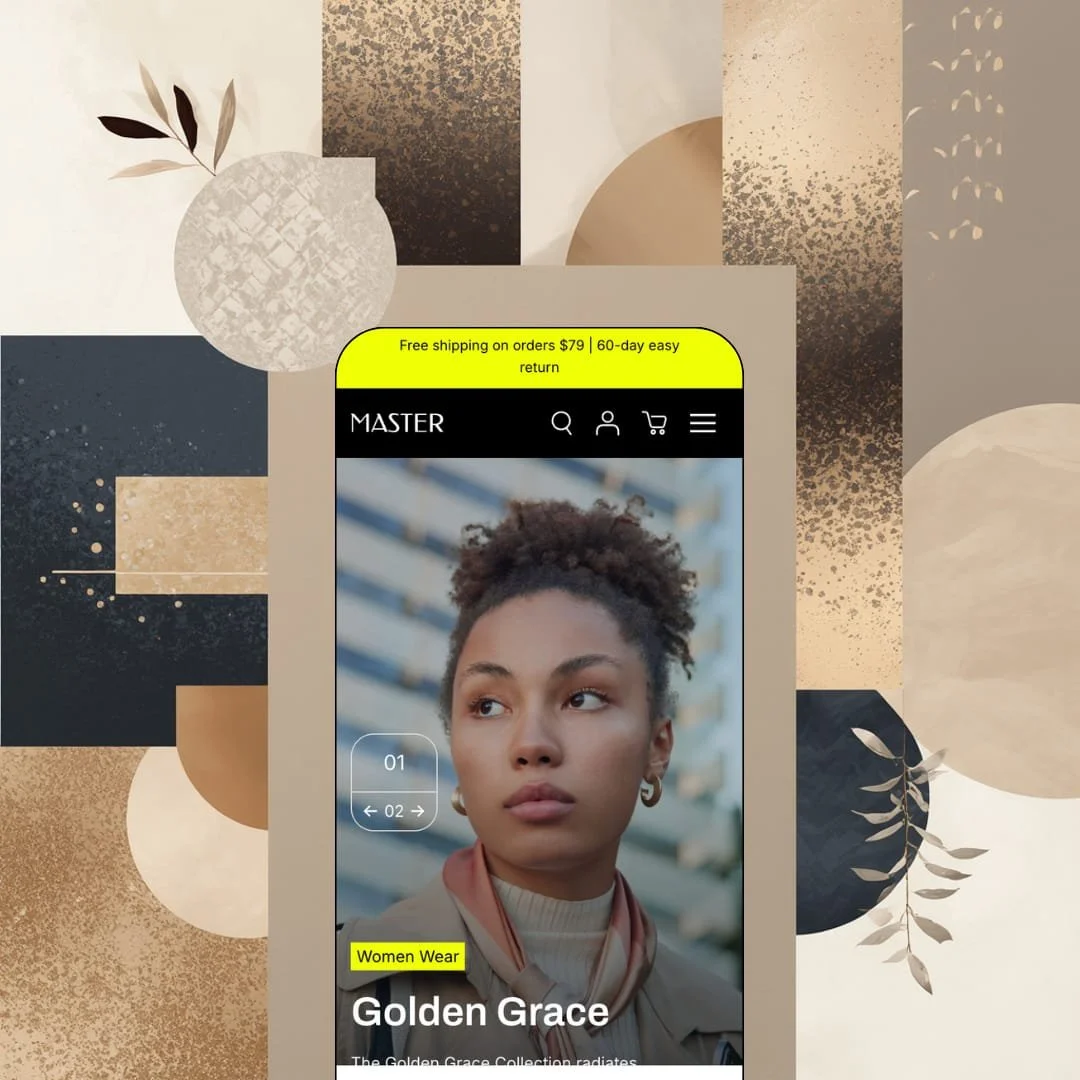
Somewhere between the scrolling discount ticker and the add-to-cart buttons sitting directly in the homepage grid, Master shows its hand: this demo wants to close sales, not pose for them. Shine Dezign Infonet's Online Store 2.0 build costs $100, ships a single fashion-staged preset, and carries a feature list that runs from mega menus and promo popups to pre-order and in-store pickup. That is an unusual amount of hardware at the entry end of the paid Theme Store. The open questions are execution quality and whether a theme with four public reviews has earned the confidence its name claims.
Buying starts in the grid
No page load required. Product cards in the homepage grids unfold into per-variant purchase rows, each pairing its own quantity stepper with a running line total, so a shopper can drop a specific color and size into the cart from the section they are already reading. Quick view and the featured-product module carry the same mechanism, one coherent buy-anywhere family rather than a bolted-on widget. For impulse-driven apparel and accessories stores in the 30 to 100 SKU range, that shortens every path to checkout.
A promo kit that outgrows its price
How much urgency tooling should a hundred dollars buy? Master answers with scrolling marquee bands, promo popups, a countdown timer, stock counters and product badges, a coordinated conversion bundle sturdy enough to carry a full sales calendar from launch week through clearance without a single app install. Flash-drop and clearance-driven fashion sellers at budget and mid-market price points will use every piece of it.
The cart does fulfillment work
Sticky cart included. The slide-out cart pairs with cart notes, gift wrapping, pre-order support and an in-store pickup block that renders under the buy box, so gifting, reservation and local-collection scenarios all route through one drawer instead of three separate installs. Local boutiques with in-store pickup routines and gift-heavy seasonal sellers get their operational basics covered natively.
A mega menu that merchandises
The menu sells, too. Each top-level entry opens into image-led collection columns with product-level deeplinks underneath, and the layout reserves slots for banner tiles, so a SALE panel and a 20%-off tile sit inside the navigation itself rather than waiting for the shopper to scroll. Dawn, Shopify's free baseline, stages its navigation as a plain dropdown; Master turns the same real estate into a campaign surface. Stores running eight or more collections across seasonal rotations will feel that difference daily.
Two listed verticals, zero staged reference
The Theme Store listing tags Jewelry & Accessories and Food & Drink alongside clothing, yet the single demo is apparel from the hero image to the footer links, so buyers from those two verticals purchase without ever seeing their product type rendered in the theme's grammar. That is a leap of faith. Jewelry merchants selling considered, high-ticket pieces and food brands with replenishment-driven catalogs inherit the most translation work.
Social proof is presentation only
The homepage prints four customer quotes with store names and job titles attached, and nothing on the product page or anywhere else collects, verifies or refreshes a single one of them. It's stagecraft. Single-brand DTC stores selling to social-proof-reliant impulse buyers will be installing a review app on day one, because the theme supplies the frame for trust but none of the evidence.
The default voice is a discount
This kept bugging me as I scrolled: section headlines lead with savings language, from Smart Style Savings to UNLOCK HUGE SAVINGS, and the demo runs that promotional register as the house style rather than as one mode among several. Quiet brands will fight it. Merchants with luxury-tier positioning or considered-purchase categories should budget real setup time for stripping urgency out before the theme matches their voice.
Limited track record
Master launched in January 2025 and has collected four Theme Store reviews since, all of them positive. Four data points is not a pattern. Version 2.0.4 shipped in June 2026, so maintenance is clearly active, but merchants planning a 500-plus SKU migration on an evergreen sales cycle are betting on a depth of support the public record cannot yet confirm.
What it takes to launch
Expect a copy pass across hero, editorial and brand-story sections, a mega menu re-staging so navigation labels line up with their targets, and a general product-data hygiene sweep before launch, roughly one to two days of focused work.
-
What works in this preset
You land on a two-slide hero (Golden Grace, Modern Muse) and within two scrolls the store has already pitched you twice, first through a rail of tappable collection tiles, then through a shoppable lookbook where product cards with prices ride alongside a portrait image. It moves fast. The rhythm alternates full-bleed imagery with dense selling blocks, which keeps a long homepage from feeling like one continuous banner even though nearly every section ends in a SHOP NOW.
The featured-product module near the bottom of the homepage is the demo's best trick. I clicked into the Casual Collared Shirt staging and got the full buy box without leaving the page: five color chips, three sizes, per-color gallery thumbnails, a quantity stepper and an add-to-cart, all rendered inside a homepage section rather than on the product template. For a store built around a handful of hero garments, that section alone changes how the homepage earns its keep.
The product page itself is thorough in quieter ways. The gallery stacks nine images, five angles of the lead colorway plus one shot per alternate color, and the description area breaks into tabbed panels for overview, care and styling questions. I also noticed the search overlay does more than search, surfacing a popular-categories list and a row of suggested products before a single character is typed, which turns a utility into a small discovery surface.
Where it stumbles
I went looking for a size guide on a shirt sold in five colors and three sizes, and the demo never stages one anywhere on the page. The feature exists in the theme's library, so this is a staging choice, but it is a strange one: an apparel-staged preset skipping the single most apparel-specific merchandising moment leaves merchants to wire that piece up themselves and weakens the demo as a reference for the theme's own vertical.
Master's defining trait is compression: a mid-tier merchandising vocabulary packed into the cheapest corner of the paid Theme Store.
The structural trade-off is that all of that breadth arrives through one preset and one editorial temperament, so the theme's real range lives in its settings panel rather than in anything a buyer can see before purchase. Where a multi-preset family lets you preview several visual grammars before committing, here the second and third look have to be built rather than browsed.
As a first paid theme for a store graduating out of the free tier, it is a genuinely strong candidate. As a ready-made playbook for a specific vertical, it is not one yet.
★ 7.4/10
Rating
-
Buy-anywhere purchasing, a native promo kit and a full cart-and-fulfillment set cover ground well beyond the price point; quantity pricing and combined listings sit behind a Shopify Plus flag.
8
-
The 30-plus section library is large and consistently structured; the sheer number of homepage modules means new merchants will spend their first day deciding what to switch off.
7
-
Sticky header, slide-out cart and a back-to-top control keep small screens navigable; the media-heavy homepage asks more of mobile connections than the layout does of thumbs.
7
-
The demo homepage stacks multiple video slots, looping marquee bands and well over a dozen sections; the lean path here is trimming, not adding.
7
-
Image-led menus, hotspot and before/after sections and effect-driven presentation give a single preset a wide styling range within its editorial register.
8
Frequently Asked Questions
-
One. The Master demo is staged as a fashion boutique, and there is no second design to preview before buying.
-
Translated theme strings ship for English, French, Italian, German and Spanish; product content itself is still localized through Shopify's own tools.
-
Yes. Quantity pricing and combined listings both carry a Shopify Plus flag on the feature list.
-
Shine Dezign Infonet maintains a GitBook manual for the theme and takes support requests through a theme contact form.
-
Version 2.0.4 arrived in June 2026 with the updated account component and a round of smaller fixes.
-
Yes. The demo stages a tabbed three-video gallery plus a standalone video section, all built from native theme sections rather than embeds.
This review is based on hands-on testing of the publicly available preset demos of the Master Shopify theme as of August 2026. Theme features, preset availability, and performance can change with subsequent updates from the theme developer.