
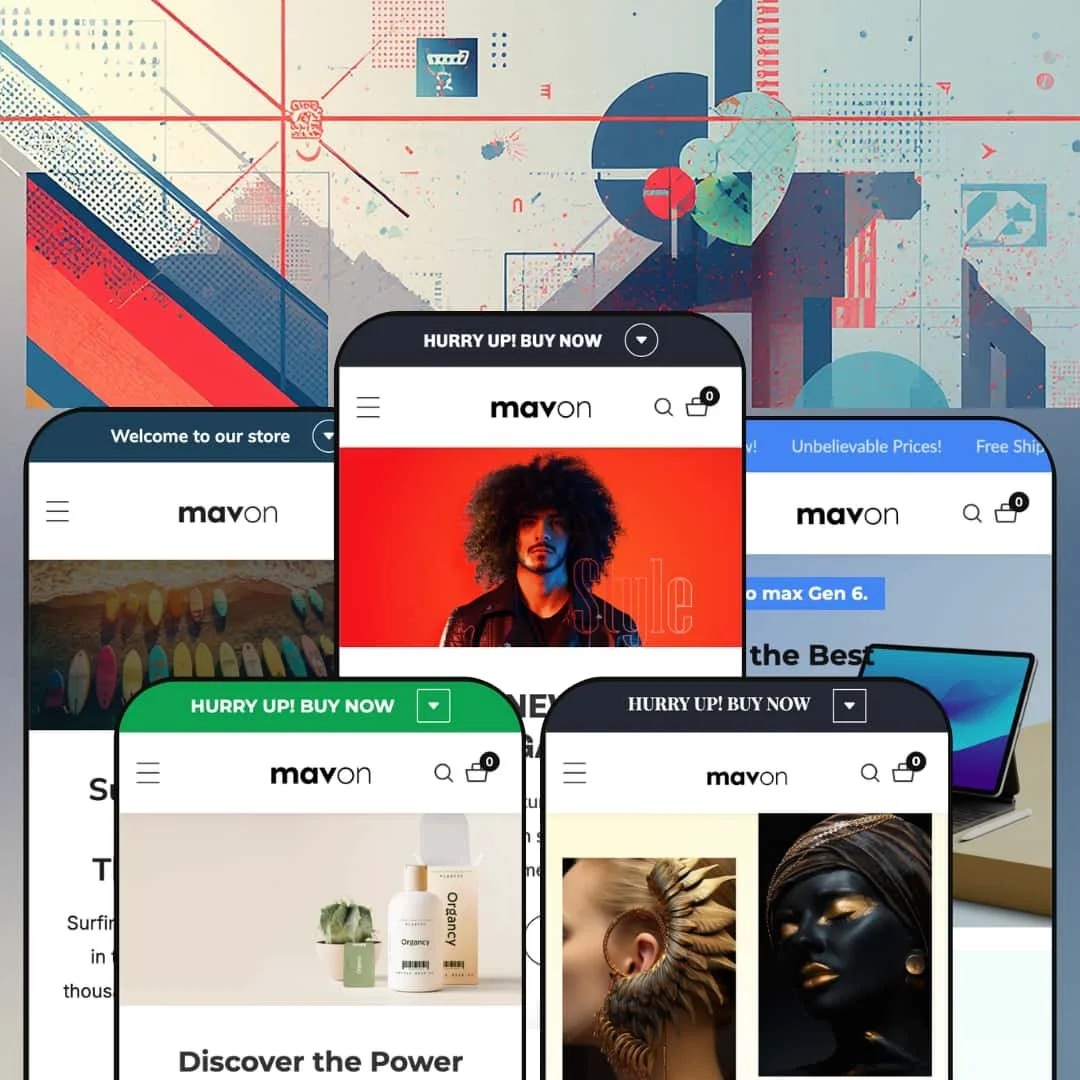
Most premium Shopify themes pick a vertical and commit. Mavon, a $280 Online Store 2.0 theme from Gloryio, spreads itself across five presets instead: fashion, beauty, electronics, jewelry, and sports gear. That breadth is the sales pitch, and it's also the thing this review keeps poking at. The theme launched in March 2023 and was still receiving version updates as of May 2026, so what follows describes a product under active development.
A conversion-feature bundle that trims the launch stack
Countdown timers, promo popups, back-in-stock alerts, stock counters, pre-order, age verification, and cross-sell strips ship inside the theme as one coordinated kit. The evidence is live on the demos: back-in-stock triggers sit under sold-out variants, and inventory counters read out exact remaining stock. Dawn, Shopify's free baseline, includes none of this conversion layer. For flash-drop apparel brands selling impulse-priced units under $100, this bundle covers most of the urgency toolkit on day one.
Quick order list turns the product page into an order desk
Every variant gets its own row. The demo dress page renders a full order table spanning eight size-and-color combinations, each with an independent quantity stepper and running line totals, so a buyer assembles a multi-variant order in one pass without repeated cart round-trips. Wholesale-enabled apparel merchants and stores with repeat buyers who reorder across sizes get a purchasing pattern here that single-variant buy boxes can't serve.
The mega menu sells before any page loads
Mavon's dropdowns carry promotional tiles as first-class menu content, with the beauty preset staging a discount banner directly inside its store navigation and the flagship running four columns of category links seven deep alongside a campaign slot. The menu stops being wayfinding and becomes shelf space. Multi-category stores carrying 100+ SKUs with cross-shop-heavy buyers can put seasonal campaigns in front of every navigation touch.
Three years of shipping, and still shipping
Version 12.1.1 landed in May 2026, three years after the theme's March 2023 launch, replacing legacy padding-based video sizing with modern CSS aspect-ratio handling and patching stylesheets across seven components in one release. That cadence predicts whether the theme keeps pace with platform changes. Single-brand merchants planning a multi-year evergreen operation are buying the maintenance trajectory as much as the current build.
The default product page is a maximalist sales machine
The buy box arrives fully armed. A sale badge, a percent-off chip, a stock counter, a cart-quantity readout, a back-in-stock trigger, an ask-a-question form, and a social share row all crowd around the add-to-cart button before a merchant has configured anything. Luxury-tier brands selling considered purchases will spend their setup phase switching components off one by one and then checking whether the stripped-down page still holds together.
Five verticals, one toolbox
The presets change clothes, not capabilities. There's no spec-comparison surface for the electronics vertical, no ring-sizing or engraving tooling for jewelry, and no fit-finder for sports equipment, so each vertical gets the identical component set beneath its styling. Electronics merchants running multi-attribute catalogs of 50 to 200 SKUs, where side-by-side attribute comparison decides purchases, won't find that capability in the feature list.
Nothing demonstrates scale
No demo catalog exceeds sixteen products, and the electronics preset's entire inventory fits on two collection pages. There is no evidence anywhere in the preset family of how the grid, mega menu, and filter counts behave under genuine inventory weight. Merchants operating 500+ SKUs across multiple brands are buying blind on the exact dimension that matters most to them, so the trial period is the place to test it.
What it takes to launch
Expect a multi-day pass across hero copy, testimonial blocks, FAQ entries, and footer link architecture, plus size-guide metafield population, market and currency configuration, and a cleanup round for demo product data that traveled between the preset stores. Budget three to five days before the storefront reads launch-ready.
-
What works in this preset
Browsing the flagship demo feels like walking a busy mid-market apparel store. The mega menu runs four top-level categories with roughly seven sub-links each, and it reserves a promotional banner slot inside the dropdown itself, which means the navigation is already merchandising before a single page loads. Nothing about it is shy.
I sat up at the quantity field. The homepage embeds a complete featured-product buy box mid-scroll, with a seven-image gallery, size and color selectors, and a quantity stepper that reports how many units of that product already sit in your cart, a small state-awareness touch that most buy boxes skip. It reads as a statement of intent: the shortest possible path from scroll to add-to-cart.
Product pages carry the deepest toolset in the demo. An eight-image gallery, a size-guide modal, an ask-a-question form with its own reference-URL field, a pairs-well-with cross-sell strip, and a full variant order table that lists every size and color combination with an individual quantity stepper all sit on one template. It's a lot of selling surface for a single dress.
Where it stumbles
Staging a full buy box on the homepage is a hard-sell move for a fashion audience that often browses by mood before committing to a product page. The preset optimizes relentlessly for transaction speed, and boutique apparel brands whose shoppers want gallery-first discovery will find the flagship staging pushier than their positioning.
-
What works in this preset
Beauty shoppers buy on proof, and Dewy stages proof. The demo runs a before-and-after image comparison, ingredient-style benefit bullets directly inside the buy box, and an inventory counter that reads out the exact remaining stock on the featured cleanser, which together build the kind of evidence trail a skincare purchase decision actually follows.
The lookbook section earns its slot. One lifestyle photo carries three shoppable product tags with prices pinned inline, so a single flat-lay image quietly merchandises a bronzer, a hair treatment, and a cleanser at once, turning editorial content into a three-product endcap.
-
What works in this preset
A generation-timeline section is the preset's signature move. Four tabbed panels walk product generations from a 2020 original through a 2023 model, each with its own image, price point, and call-to-action, and the device suits electronics retail unusually well because gadget buyers genuinely think in model years.
I went looking for the filter architecture on the collection page and found the most complete setup in the preset family. Facets cover availability, a price range slider, brand, color, storage, and weight, each with live product counts, and the storage facet alone spans seven capacity tiers. For attribute-driven catalogs, that panel does real work.
The homepage keeps a high pulse. Scrolling marquee announcements, a circle grid of nine gadget categories, and an embedded video section give the preset a launch-event energy that matches how consumer electronics get marketed.
Where it stumbles
For a spec-driven vertical, the staging tells lifestyle stories. Video, testimonials, and heritage timelines dominate the homepage while spec-first presentation, the format an electronics buyer actually researches in, never takes the lead, so the preset sells gadgets with the emotional grammar of a fashion brand.
-
What works in this preset
This is the most brand-forward staging in the family. An editorial split hero, a rotating logo strip, and an Instagram-style community grid push imagery ahead of interface, and for jewelry, where the photograph does most of the persuading, that hierarchy is the correct call.
The lookbook hotspots translate well to the vertical. Three price-tagged pieces hang off one styled flat-lay, so necklace, earrings, and bangle set get merchandised as a complete look rather than as isolated SKUs, a genuinely useful pattern for a category where customers buy coordination.
Where it stumbles
Fine jewelry is a considered, trust-heavy purchase, yet Brilliant deploys the same countdown-and-scarcity urgency toolkit as the fashion flagship. Low-stock counters next to diamond earrings read off-register for luxury positioning, and merchants at that end of the market will be working against the preset's instincts rather than with them.
-
What works in this preset
The category cards carry live item counts. Surfboard, fins, leash, and costume tiles each display their product totals directly on the card, a small transparency touch that helps shoppers judge catalog depth before clicking, and the full-screen three-slide hero gives the preset a suitably cinematic opening for an outdoor-sports brand.
A homepage FAQ accordion is the preset's most unusual inclusion. Six questions about board selection, care, and safety sit directly on the landing page, and for equipment retail, where first-time buyers arrive with genuine knowledge gaps, answering education questions before the catalog is smart sequencing.
I scrolled through the board-generation timeline and recognized Nimble's device wearing a wetsuit. The same tabbed section that sells headphone generations on the electronics preset here narrates surfboard heritage from traditional Polynesian craft forward, which demonstrates the section library's range across wildly different storytelling registers.
One section engine, five believable storefronts
Reading all five demos back to back reveals genuine styling range rather than five hardcoded designs. The same section library restyles convincingly from $39 cotton tees to $1,310 surfboards, and the tabbed timeline that narrates headphone generations on one preset resurfaces as heritage storytelling on another without feeling recycled. That elasticity is the real product.
The cart drawer does page-level work
Across every preset, the slide-out cart carries a seller note field, discount-code entry, and a complete shipping estimator with country selection, all inside the drawer. Checkout-adjacent friction gets resolved without a single page navigation, which is a cross-preset architectural decision rather than a per-demo styling choice.
Headroom into Plus
Quantity pricing and combined listings are wired for Shopify Plus, which only becomes visible when reading the capability set as a whole. A merchant who outgrows a standard plan doesn't outgrow the theme, and that upgrade continuity is rarer than it should be at this price point.
No quiet mode in the family
All five presets speak the same high-velocity promotional dialect, from rotating announcement bars to marquee strips to countdown blocks. There is no preset staged for restraint, so calm-brand merchants begin every build by subtracting rather than selecting, and the theme's personality keeps reasserting itself at the edges.
Choosing a preset is choosing a palette
The homepage skeletons repeat nearly beat for beat: hero, marquee, collection circles, featured grid, lookbook, timeline or countdown, testimonials, newsletter. Structure barely varies between verticals, so the five presets function as one layout wearing five outfits, and merchants expecting five distinct information architectures will find one architecture with five moods.
★ 7.4/10
Rating
-
The component depth is unusual at $280: quick order tables, back-in-stock, pre-order, age verification, before/after sliders. The main gap is vertical-specific tooling.
7
-
A large section library means many decisions per page, and the demo stores need substantial teardown before real content goes in.
8
-
Presets ship dedicated mobile hero artwork rather than cropped desktop images, and the slide-out cart and menu patterns are built for thumbs.
8
-
Default homepages stack video, marquee, countdown, and multi-image collage sections. Individual sections run lean, but the staged density is media-heavy until trimmed.
7
-
Five palettes and a broad section library flex across price points and verticals. The ceiling is the theme's fixed conversion-first personality.
7
Frequently Asked Questions
-
Quantity pricing and combined listings are flagged as Plus-only capabilities. Everything else in the feature set runs on standard Shopify plans.
-
The theme ships pre-translated interface strings for English, French, Italian, German, and Spanish. Your product descriptions and pages still need their own translation workflow.
-
Yes, RTL rendering is a listed capability, which matters for Arabic or Hebrew storefronts and is far from universal among themes.
-
It opens as a modal on product pages and pulls its content from a page or metafield you assign, so it stays empty until you populate it during setup.
-
The rating displays are integration surfaces that need review data behind them. Plan on pairing the theme with a review app to feed those stars.
-
Quick view and quick buy are both in the feature set, so add-to-cart can happen directly from collection grids and featured sections.
This review is based on hands-on testing of the publicly available preset demos of the Mavon Shopify theme as of July 2026. Theme features, preset availability, and performance can change with subsequent updates from the theme developer.