
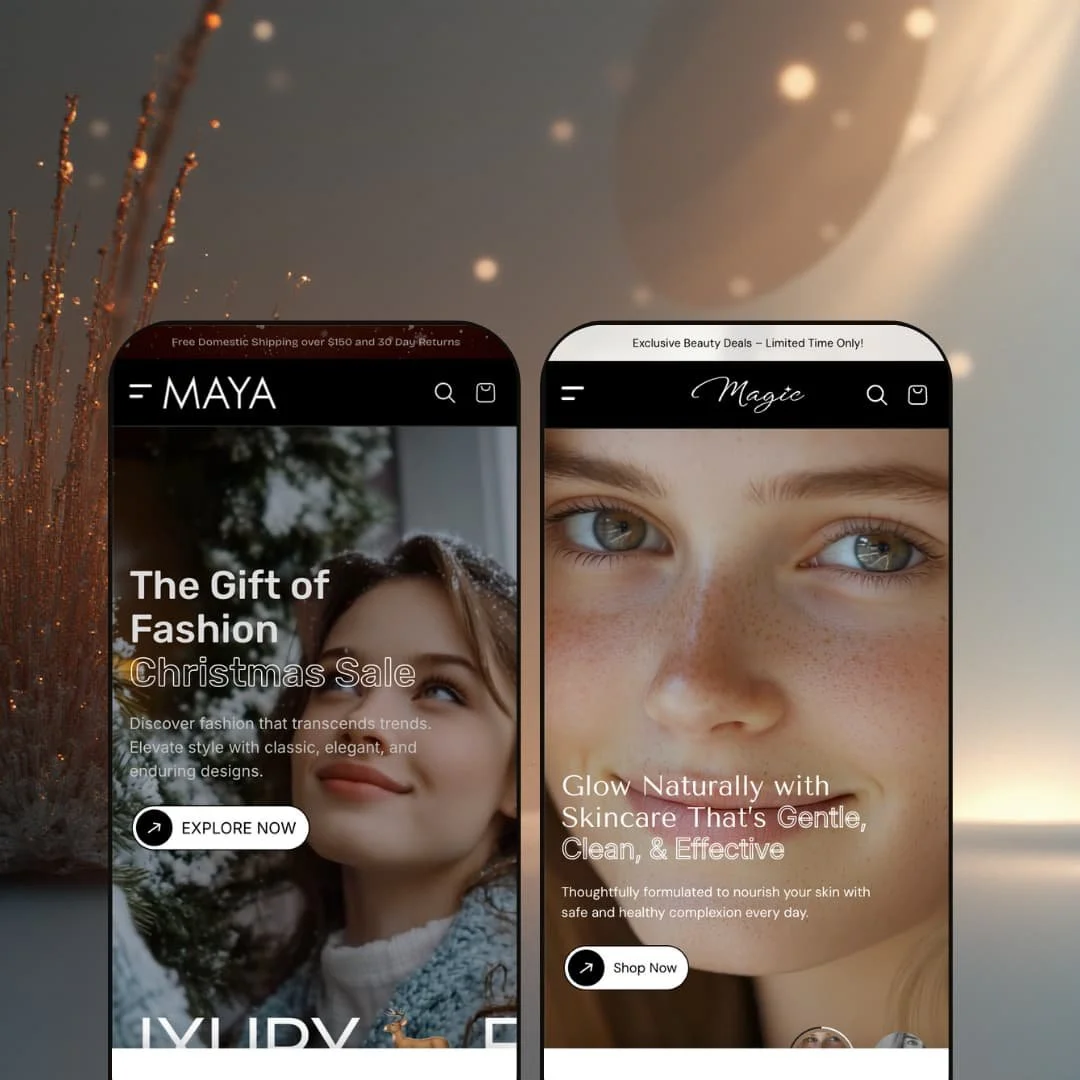
Maya is the kind of Shopify theme that puts design and merchandising front and center. Both demos lean into long, story-driven pages with lots of visual rhythm, which is great when you’ve got strong photography and a brand voice that can carry a scroll. What stood out most in testing wasn’t one “magic” section, but how consistently Maya encourages browsing without constantly forcing a hard jump from grid to product page.
Pros.
〰️
Pros. 〰️
✚ Flexible presets, consistent core.
flexible preset options that maintain core functionality while offering distinct aesthetic approaches. In practice, that means you can aim the same underlying theme at very different storefront moods without rebuilding your shopping flow from scratch. Default leans energetic and fashion-forward, while Magic reads calm and beauty-led, yet the overall structure still feels cohesive.
✚ Quick view and cart flow that keep shoppers moving
Maya’s shopping flow is built to reduce “dead ends” while browsing. Product discovery is supported by fast interaction patterns that let a shopper act without losing their place, and the cart experience keeps the customer in the storefront rather than bouncing them into a separate checkout-style page too early. The result is a more fluid browse-to-cart loop, especially for shoppers who add multiple items.
✚ Product pages that balance story, structure, and upsell
Across testing, Maya product pages are not just a title-price-button stack. They’re staged to support structured information blocks, clear variant selection, and related product moments that encourage continued browsing. Magic’s demo also shows how the theme can stage a more aggressive cross-sell moment via a bundle-style overlay, which signals real flexibility in how upsells can be presented.
Search and “no results” handling that feels intentional
Search is treated as part of the shopping experience, not a forgotten utility page. The search overlay presentation encourages discovery, and the dedicated results page handles empty queries gracefully instead of leaving the shopper stranded. That matters because “no results” moments are where many stores accidentally create a dead end.
✚ Merchandising sections built for modern home pages
Maya supports a home page that behaves like a campaign. The demos showcase story-first modules such as collage-style layouts, carousels, embedded media moments, testimonials, and FAQ-style content blocks that keep long pages readable. If you like building seasonal landing pages without constantly installing extra apps, this theme is clearly designed with that in mind.
Cons.
〰️
Cons. 〰️
🚫 Long, section-heavy layouts can feel intense
Maya’s demos are built around extended scrolling experiences with many full-width moments. That’s effective when it’s curated well, but it can overwhelm shoppers who just want a fast scan of categories and products. The theme rewards brands that can pace content thoughtfully, and it punishes stores that leave too many sections “on” without a clear story.
🚫 You’ll need strong content discipline to get the best result
Because the theme leans so visual, the quality of photography and the consistency of brand assets matter more than usual. When the imagery is strong, Maya feels premium and intentional. When the assets are inconsistent, the same design choices can read as cluttered or overly busy, especially in a preset like Default.
-
The Default preset is staged like an energetic fashion storefront with high-contrast sections and bold graphic interruptions. It feels built for brands that want the home page to act like a lookbook and a landing page at the same time.
What works in this preset
The strongest part of this demo is how loud and directional it feels from the first few scrolls. Bright color blocks, punchy typography, and frequent “moment” sections keep the browsing experience from blending together. In practice, that helps a shopper keep moving because each screen feels like a new chapter rather than another repeated product grid.
This preset’s staging leans hard into collage-style merchandising. The mosaic-style slider section with overlapping imagery and arrow navigation gives the page a styled, magazine-like cadence. Even if the underlying section is a reusable theme capability, the way it’s presented here makes the store feel curated, not catalog-heavy.
The Default demo also uses motion as a pacing tool. A “Best Sellers” media section adds a short burst of movement mid-scroll, which breaks up the otherwise image-and-text rhythm. It’s the sort of staging choice that fits streetwear or fashion drops, where a bit of energy helps the store feel current.
Product browsing in this demo is styled to look clean first, functional second. The product tiles read as design elements, and interactive purchase shortcuts are not visually dominant until you engage with the grid. That creates a more editorial first impression, especially for shoppers who are still in “scroll and browse” mode.
On the product page itself, this demo stages information in a segmented way. The tabbed pattern for content (the visible “Overview,” “Description,” and “Specifications” style navigation) makes the page feel more structured, like you’re moving through defined sections instead of one continuous wall of text. It’s a presentation choice that supports shoppers who want to skim and jump.
Where it stumbles
This demo’s biggest trade-off is intensity. The bright blocks, high contrast, and dense section rhythm can feel visually busy if your brand is minimal, luxury, or heavily ingredient-led. It’s not a theme limitation so much as a staging mismatch that would require toning down layout density and palette choices to fit a quieter catalog.
The product pages in this demo also keep the top area visually clean, without staging a breadcrumb trail above the title. That makes the experience feel modern and uncluttered, but it can add friction for shoppers who are deep in browsing and want quick “where am I?” orientation without relying on the header or browser back behavior.
-
Magic restages Maya into a calmer, beauty-forward storefront that feels more spa-like than streetwear. It leans into soft color choices, clean spacing, and curated category framing so the shop reads like a skincare edit rather than a traditional catalog.
What works in this preset
The first thing you notice is the tone shift. The pastel palette and generous white space make the store feel breathable, and the typography hierarchy reads more “premium beauty” than “fashion promo.” For skincare, fragrance, or wellness, that calmer baseline supports trust and slows the scroll in a good way.
Magic also leans on a distinctive “film-strip” style of vertical imagery in its staging. The repeated visual rhythm and scrolling banner-like segments make the experience feel editorial, almost like flipping through a product zine. It’s a simple presentation choice, but it gives the preset a recognizable identity without needing a complex hero every time.
This demo does a nice job of surfacing product moments directly on the home page. The in-page product call-out (“Floral Fresh”) is staged like an embedded purchase moment with selectable sizing and purchase buttons right there in the section. That’s a smart way to reduce friction for shoppers who already know what they want, without forcing them to hunt through collections first.
Magic’s product page presentation is also styled differently from Default in a way that changes the feel. Instead of relying only on tab-like segmentation, this demo surfaces key supporting information as expandable blocks (for example, sections titled like “International Shipping,” “Natural Beauty,” and “Pure Ingredients”). It keeps the left side tidy and makes the page feel like it’s optimized for skimming.
The most distinctive product-page staging choice in Magic is the large bundle-style overlay module that appears over a full-screen image and presents additional products with variant dropdowns and a combined add-to-cart action. Regardless of whether that module is optional or section-driven, the demo uses it very prominently. The impact is clear: it pushes cross-sell as a primary narrative, not a subtle “you may also like” afterthought.
Where it stumbles
In this demo staging, call-to-action contrast can be a little understated. Some buttons sit quietly within the pastel palette, which fits the calm vibe but can reduce urgency when a shopper is ready to take action. It’s the kind of thing that looks beautiful in brand terms, but benefits from careful contrast tuning to support conversion.
The bundle overlay module is also a double-edged sword in this presentation. It’s attention-grabbing and encourages larger carts, but it competes with the primary product experience because it sits on top of a full-screen visual moment. In the demo, it doesn’t read like an optional suggestion; it reads like the focal point, which may feel pushy for certain audiences.
This preset demo also treats the announcement-style strip at the top as a persistent part of the header experience. That can be useful for promotions, but the staging makes it feel permanent rather than occasional, which can start to compete for attention once a shopper is already navigating deeper pages.
Niche Suitability
Not Ideal For
Final Recommendation
-
Maya is a strong fit for fashion, beauty, and lifestyle merchants who want a storefront that feels curated and campaign-driven, not purely catalog-driven. If your brand benefits from storytelling sections and you want to keep shoppers browsing instead of bouncing between pages, Maya’s structure supports that.
-
If you want an ultra-minimal storefront, or you prefer short pages with very few merchandising modules, Maya may feel like too much theme. Stores with limited photography or minimal creative resources may also struggle to make the most of its section-driven pacing.
-
High — Maya gives you a lot of presentation power, but it expects you to curate sections and visuals carefully. The payoff is a store that can feel genuinely branded, but it takes real setup discipline.
★ 7.8/10
Rating
-
The theme supports fast browse-to-cart behavior, strong product-page structure, and merchandising modules that help stores feel curated rather than generic.
9
-
Navigation and shopping actions are straightforward, but the abundance of sections means merchants will spend time curating and simplifying to avoid clutter.
5
-
The demos are clearly built for long scroll sessions, and key actions remain easy to reach. Very media-heavy pages can still feel demanding on slower connections.
8
-
Interactions feel responsive during hands-on use, but the visual density means performance will depend heavily on how much media a merchant keeps enabled.
8
-
Default and Magic demonstrate a wide aesthetic range, and the theme’s section approach makes it realistic to restage the look without rebuilding the store.
9
FAQ
〰️
FAQ 〰️
-
👑 Yes. The Default demo is staged like a fashion lookbook with bold visual pacing, which suits lifestyle catalogs where discovery and browsing matter as much as the individual product page.
-
📱In testing, the demos are designed around scrolling and quick product discovery. The layouts are structured so shoppers can move from browsing to action without constantly losing their place.
-
🎨 Maya is built around presets and sections, so brand identity comes down to how you restage typography, spacing, imagery, and which modules you keep active. The two demos alone show how drastically the mood can shift without changing the overall store structure.
-
⚡ Interactions such as browsing and cart actions felt smooth during hands-on use. The main variable is page weight: Maya rewards merchants who keep media intentional and avoid turning every section on at once.
-
👕 Yes. Both demos show variant selection presented in a shopper-friendly way, and the buying flow remains clear even when there are multiple options like sizes or volumes.
-
🔎 Shopify handles core SEO fields like titles and meta descriptions, and Maya’s layouts give you plenty of content areas to support on-page storytelling. The key is using those sections deliberately so pages stay readable and structured.
-
💱 Yes, this is configured through Shopify Markets and your store’s localization settings. You control languages and currencies in Shopify, and the theme displays the storefront accordingly when those markets are enabled.
-
⚙️ In general, yes. Maya follows standard Shopify theme patterns, so apps that add theme blocks or storefront elements should be compatible, and many merchants won’t need extra apps for features like quick view or a cart drawer because those patterns are already part of the theme experience.
-
🛒 Yes. You can preview the demos publicly, and Shopify allows you to install and customize a theme before committing to publishing it on a live store.
This review is based on hands-on testing of the publicly available preset demos of the Maya Shopify theme as of 27 December 2025. Theme features, preset availability, and performance can change with subsequent updates from the theme developer.