
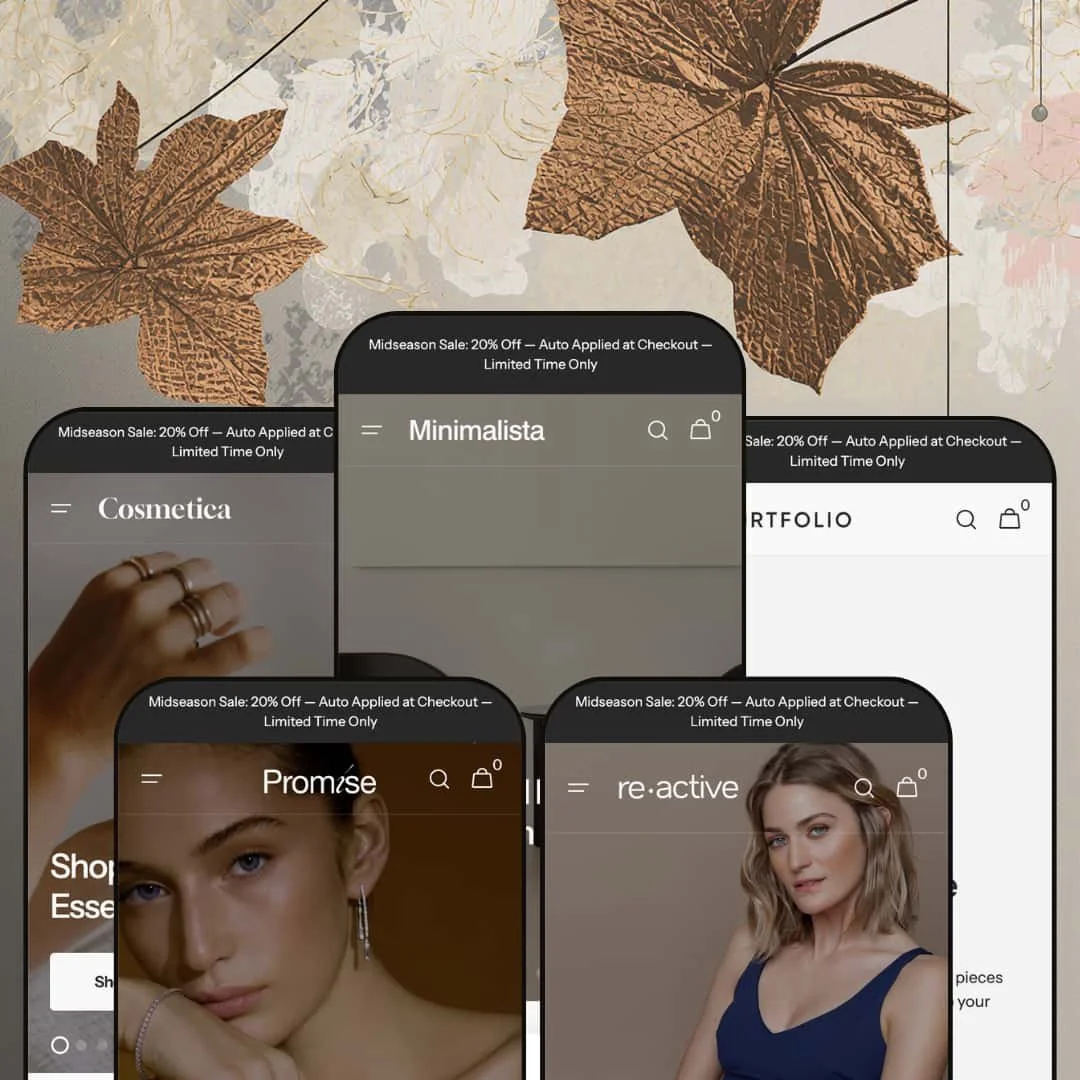
Most theme demos sell you one store. Minimalista's five presets sell you five: furniture, activewear, beauty, jewelry, and wall art, each one running on the same Online Store 2.0 codebase and the same shared section library underneath. The interesting question isn't whether a single theme can dress that many windows, but whether the merchandising holds its shape once you look past the photography in each demo. I went through all five to find out.
A section library wide enough to dress five different stores
Set Minimalista beside Dawn, Shopify's free baseline, and the gap is the section toolkit: alongside the usual blocks sit Compare, Countdown, Before/After slider, Logo List, Lookbook, Markers, Multicolumn, and Social Media Collage, all available to every preset. That range is why the same codebase convincingly becomes furniture, beauty, and art. It pays off most for operators running more than one brand, or for a single store that expects to reposition itself as its catalog and audience grow over time.
A header and mega menu built for deep, branching catalogs
The header is genuine theme-layer work, not a default. It supports a multi-level mega menu with featured-collection image tiles dropped beside the link columns, a sticky state on scroll, predictive search, and a configurable announcement bar. For furniture and art sellers carrying deep, multi-level taxonomies and well over a hundred SKUs, that depth keeps a sprawling catalog walkable instead of forcing shoppers into endless collection pages to find a single sub-type.
A product page that respects considered purchases
On the Bay Armchair page the gallery runs five images in a slider-with-bullets layout, with color swatches for the variant picker, a live in-stock count, breadcrumbs, and an accordion stack splitting Specifications, Materials, Shipping, and Returns into separate tabs. The theme ships seven distinct gallery styles plus variant-image swatches. Together they serve considered-purchase categories like furniture, jewelry, and art, where buyers study specifications and finishes closely before they commit to a price this high.
A coordinated merchandising kit for promotion-led brands
Rather than scatter promo tools, Minimalista bundles them into one working kit: promo popups, promo banners and tiles, product badges, a stock counter, and a countdown section that all push the same urgency in concert. That coordinated kit is built for discount-led DTC brands in beauty and activewear that run frequent drops, where a launch needs a popup, a badge, and a ticking timer working together to move a limited release before the window closes.
Online Store 2.0, not the newer Theme Blocks architecture
At $380 Minimalista sits in premium territory, and a merchant shopping that tier in mid-2026 may specifically want the newest Theme Blocks architecture with its deeper nesting and AI-assisted section generation. Minimalista is built on the prior Online Store 2.0 generation instead, which means roughly two levels of block nesting and no AI block tooling. That mostly matters to agencies and multi-brand operators planning heavy, ongoing in-editor customization who would lean on the newer nesting model day to day.
Built for image-rich catalogs, sparse for small ones
Every preset assumes photography, depth, and a homepage long enough to justify multiple bands of content. A single-brand startup carrying under thirty SKUs inherits a layout designed for a store several times its size, and the default sections will look thin until there is enough product and lifestyle imagery to fill them. An empty-looking store sells nothing. The structure rewards a stocked catalog.
Visual storytelling is the priority, not operational speed
Minimalista's instincts run toward editorial presentation: full-bleed imagery, multiple video heroes, and long narrative homepages across all five presets. A high-volume, evergreen retailer carrying five hundred or more SKUs, who prioritises getting a shopper to a product in as few taps as possible over lifestyle staging, will be trimming the default sections and adding density that the theme does not lead with. A pure operational catalog gets less from that than a brand-led one does.
What it takes to launch
Expect cross-preset brand-naming and copy-bleed cleanup across the social handles, collection narratives, and trust columns, plus metafield and vendor-data population for the specs accordion, the Compare block, and the Shop-by-Artist surfacing. Add multi-language string work and a multi-day copy pass over heroes, FAQs, and About-page content before any preset is launch-ready.
-
What works in this preset
The Shop menu is where this furniture preset earns its keep. It opens into a multi-level mega menu that nests Chairs down into Lounge Chairs, Armchairs, Stools, and Benches, runs parallel trees for Sofas, Tables, Lighting, and Planters, and still finds room for a featured collection image tile sitting beside the link columns. It reads like a real store. For a home catalog that branches naturally into rooms and sub-types, that header carries a lot of quiet navigational weight.
I clicked through the homepage and kept landing on narrative instead of a plain grid. Collection blocks carry written introductions, with one seating range framed around the idea that comfort and restraint are not opposites, while a lookbook section stages pieces in styled rooms and a tabbed Featured Products band sorts inventory into Minimalist Mastery, Modern Elegance, and Unique Furniture. The effect suits a buyer who reads context before a price. It feels considered.
Where it stumbles
The editorial weight that flatters a stocked catalog turns against a thin one. By the time you reach the homepage's third overlapping bestseller-and-sale band, the layout is openly assuming a library of lifestyle photography and a deep product list that a brand-new furniture seller simply will not have on launch day, which makes the first real task subtraction rather than styling. A startup inherits a structure built for a catalog it hasn't grown yet. The pruning is the work.
-
What works in this preset
Discount staging runs through the whole activewear preset. Product cards wear Sale badges with struck-through original prices, an On Sale carousel collects the markdowns, and full-width banners push lines like sixty percent off selected activewear without burying the call to action. It moves fast. For a drop-driven athleisure brand that lives on promotion and restock urgency, the default merchandising already speaks the right language before a single edit.
I noticed the Featured Products band here sorts by benefit rather than category. The three tabs read Four-Way Stretch, Breathable Fabric, and Compression Support, which is exactly how a performance shopper actually decides between two near-identical leggings. Short, specific, useful. It is a small staging choice that quietly reframes the catalog around what the customer came to solve rather than around how the store happens to file its inventory internally.
-
What works in this preset
This beauty preset leans on proof, and the before/after slider is the clearest example. The demo stages a draggable comparison between bare and treated skin, and the footer carries a row of ingredient-trust icons reading Organic, Hypoallergenic, Plant Base, Clean, and Green Supplier. Skincare buyers want evidence. For a results-led brand selling serums and creams where the claim is the product, that pairing of visual proof and credential badges does heavy persuasive work on the page.
The homepage also drops a full product block in line, so a shopper can read the Make My Day cream, pick a size from 15ml, 30ml, or 60ml, and add to cart without leaving the front page. A countdown section sits below it pushing a thirty percent window. That suits a repeat-purchase skincare catalog with a tight SKU count and slim margins, where urgency and one-tap buying nudge the basket along faster than a long browse would.
-
What works in this preset
The jewelry preset reaches for editorial credibility, and the Featured by row is the standout. Six press-style logos sit under a single banner, lending the catalog the borrowed authority that jewelry shoppers lean on when they cannot hold the piece first. It signals trust quickly. For a gifting or considered jewelry purchase, that strip of names builds confidence in a way another product grid in the same slot could not.
Metal selection is staged cleanly too, with Gold and Silver swatches on the cards and a restrained, image-led layout that lets the pieces breathe rather than crowding them. I went looking for clutter and mostly didn't find it. The page trusts white space, and that calm presentation flatters small high-margin objects whose entire appeal is detail, finish, and the sense that each one was chosen rather than stocked in bulk.
-
What works in this preset
The art preset is the most distinctive of the five, starting with how it sells. A Shop by Artist row links into vendor-filtered collections, products display price ranges such as $700 to $1,000 to cover size-variant prints, and the hero leads with text statements about art shaping a space rather than with a product shot. It treats the catalog like a gallery. For a curated, multi-artist print business, that artist-first structure mirrors how the buyer already thinks about the work.
The collection logic follows the same idea, organising the catalog by aesthetic into Abstract Allure, Color Odyssey, Figurative Narratives, and Monochromatic Mystique rather than by generic product type. The result is browsable by mood. That editorial grouping fits an art seller whose customers shop by feel and style affinity far more than they shop by dimension or by the literal category label a more conventional storefront would reach for.
Where it stumbles
The artist-first surfacing leans entirely on populated vendor data, and the demo stages it with a full roster already in place. A single-artist shop, or one whose catalog never recorded vendor as a structured field, will restructure or skip that Shop by Artist row instead of lighting it up the way the demo does, since the section is only as rich as the metadata behind it. The look depends on the data. Thin records, thin section.
One engine that genuinely carries five identities
Read across all five demos and the achievement is consistency of execution: the same shared codebase becomes a furniture showroom, an activewear shop, a skincare brand, a jeweller, and an art gallery without any of them feeling like a costume stretched over the wrong frame. For a buyer, that lowers the risk of the purchase, because the theme is not betting everything on one vertical fitting one merchant. It is demonstrating range in public, which is a genuinely reassuring thing to evaluate in a way a single polished demo never is.
A clear point of view about brand-led selling
Across every preset the theme privileges narrative over template sameness, reaching first for collection stories, lookbooks, press rows, and styled video heroes instead of dropping a grid and moving on. That through-line is an editorial stance, visible only once you have seen all five presets lean the same way, and it means a merchant who leads with brand and lifestyle inherits a coherent toolkit for doing so rather than a neutral shell.
It assumes a resourced merchant
The cross-preset pattern that emerges after touring all five is a single operating model: every demo presupposes plentiful photography, structured product data, and ongoing merchandising attention to look the way it does. That model quietly rewards brands with content and operational resources and exposes leaner ones, because the same depth that makes the demos sing is depth the merchant has to supply. It is less a flaw in any one preset than a standing expectation the whole theme sets about how much you will bring to it.
Family resemblance limits true distinctiveness
Because one engine drives all five, the presets share a recognisable rhythm once you have seen it: hero slideshow, category grid, bestsellers, tabbed featured products, lookbook, blog, social wall, trust columns. A merchant hunting for a storefront that looks like nothing else will notice the shared skeleton under the different paint. The presets vary the styling convincingly, yet the underlying homepage sequence repeats closely enough that genuine visual singularity will take real custom work on top of whichever preset you choose.
★ 7.8/10
Rating
-
The section library spans Compare, Countdown, Before/After, Lookbook, Logo List and more, and the five-preset range proves it stretches across genuinely different catalogs.
9
-
The Online Store 2.0 editor is familiar, but reaching the demos' depth means populating metafields, restaging mega menus, and translating UI strings before launch.
7
-
Menus collapse into a stacked slide-out and several sections ship dedicated mobile imagery, so small screens get a deliberately built layout rather than a squeezed desktop one.
8
-
Image lazy-loading and a restrained base keep things reasonable, though the default homepages lean on full-bleed photography and multiple video heroes worth trimming.
7
-
Five presets, a wide section set, and editable color and type tokens leave plenty of starting room, all within one shared visual language.
8
Frequently Asked Questions
-
Portfolio is built for art: it surfaces a Shop-by-Artist row driven by vendor data and shows price ranges for size-variant prints. For furniture, the Minimalista preset leads with the deepest mega menu and a room-by-room category structure. Pick by the shape of your catalog, then restyle from there.
-
Yes. The section library is theme-wide, so the before/after slider, compare block, countdown, and logo list are all available regardless of which preset you install. Presets are starting layouts, not separate feature sets.
-
No, both are native sections in the theme. The catch is data: the compare table and the product specs accordion only read well once you populate the underlying product metafields. Budget time for that rather than for an app subscription.
-
Because the presets and the section library already span verticals, a move from jewelry to accessories is mostly restyling and recolouring rather than rebuilding. You swap imagery, copy, and menu structure while the underlying bones carry over.
-
Yes. The homepages use native video sections, and there is a dedicated countdown section you can point at a sale end date. Both are theme features you configure directly in the editor.
-
The theme renders the country and currency selector in the header and footer, but the actual conversion is handled by Shopify Markets, which you set up in your admin. The theme shows the control; Markets does the math.
This review is based on hands-on testing of the publicly available preset demos of the Minimalista Shopify theme as of June 20 2026. Theme features, preset availability, and performance can change with subsequent updates from the theme developer.