
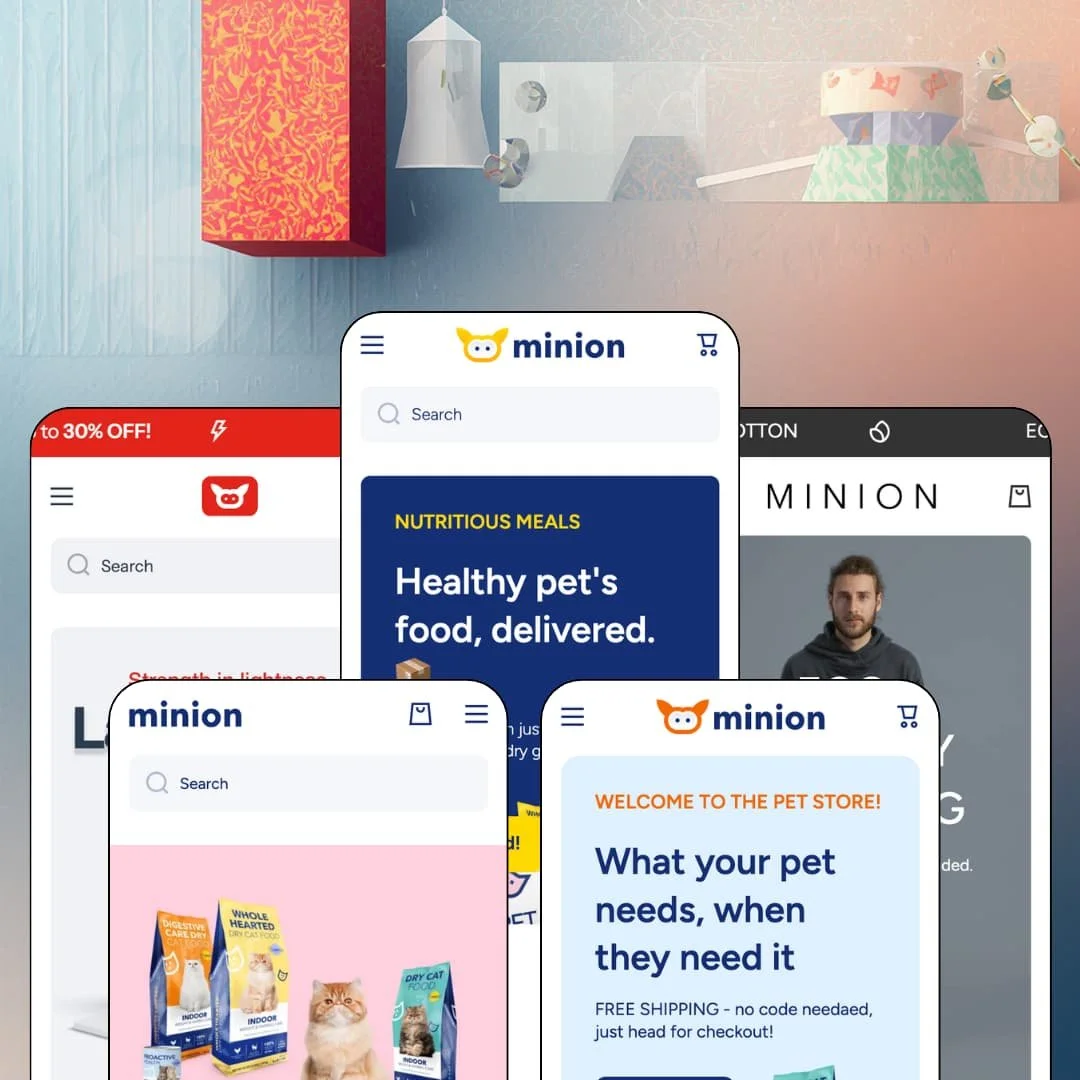
Most sub-$150 Shopify themes hand you one preset and call it a day. Minion, Softali's Online Store 2.0 theme, ships five of them for $100: three pet-retail builds, an electronics store, and a fashion boutique. That spread makes it look like a bargain multitool, which is exactly why it deserves a closer read. I spent time in all five demos to sort out where the value is real and where it's just staging.
The mega menu is a selling surface, not a sitemap
Minion's menu engine goes past nested links: panels can carry promotional tiles with their own calls-to-action, and menu columns can point straight at individual products, which the electronics demo uses to list specific phone models as entries. Navigation becomes placement real estate. For multi-category retailers with 100-plus SKUs and cross-shop-heavy buyers, whoever controls the menu controls the first product a session sees, and this menu gives merchants that control.
The cart drawer sells while it sums
The slide-out cart carries a free-shipping progress bar, a "Top products of this week" cross-sell rail, a discount-code field, an order-notes input, and an optional terms checkbox, all inside one drawer. It earns its screen space. Dawn, Shopify's free baseline, hands you line items and a note field in the same slot; Minion treats it as the last merchandising surface before checkout. For impulse-buy stores at budget-to-mid price points pushing carts toward a shipping threshold, this drawer is where average order value gets made.
What about buyers who shop in video feeds?
Minion answers with shoppable reels: sections that pair autoplaying vertical video with a product card docked beneath it, staged in the pet, electronics, and fashion demos alike. Product meets clip in one tile. For social-first brands selling impulse-friendly price points to feed-native audiences, the format buyers already trust on TikTok and Instagram carries straight onto the storefront, keeping the scroll-to-purchase distance short.
Variant choices get real decision support
On the orthopedic dog bed demo product, six color options render as image swatches, three sizes as buttons, and the theme layers on a size-guide section, informational popups that explain variant options, and an inline ask-a-question form beside add to cart. Doubts get settled on the page. For sellers of sized and multi-color goods, apparel or home gear, serving considered-purchase buyers, fewer wrong-variant orders means fewer returns eating an already thin margin.
Fashion gets the mechanics, not the stagecraft
I went looking for editorial tooling across the fashion demo and the official feature list: lookbook sections, shop-the-look, outfit builders. They aren't there. Apparel merchants get solid transactional plumbing in size charts, swatches, and video banners, while the visual storytelling layer that editorial fashion brands build product discovery around has to be improvised from generic image and video sections. For apparel brands with lookbook-driven merchandising and considered-purchase buyers, that's a structural gap the five-preset price doesn't offset.
The design voice is stuck in megaphone mode
Every preset shouts. Scrolling ticker marquees, emoji-heavy promo copy, deal strips, and countdown-ready sections recur across all five demos, including the fashion boutique, where a looping marquee tops every page of an otherwise quiet layout. This kept bugging me: sections can be deleted, but the theme's temperament is promotional retail, and building a hushed, editorial brand means working against its grain the whole way. For luxury-tier positioning and single-brand storytellers selling considered purchases, this is the dealbreaker to weigh before the price tempts you.
The merchandising model runs on hand curation
Minion's homepages are built from curated collection rows. The Vertical demo alone draws on weekly top products, featured, sale, and per-pet collections, and the sister demos stack four more labeled rows apiece, each one a collection somebody has to fill, prune, and rotate to keep the storefront from going stale. That's recurring merchandising labor, not one-time setup. For lean single-operator teams running restock-driven or seasonal catalogs, budget standing weekly hours for it.
What it takes to launch
Expect a multi-day pass before launch: full copy and imagery replacement across hero sections, services pages, FAQ entries, testimonial sets, and About content, plus mega menu re-staging for your actual catalog, currency-format configuration, and a cleanup sweep of demo copy that repeats across sections. The demos are dense, so there's simply more of them to replace.
-
What works in this preset
Landing here, the first thing you meet isn't a hero image, it's the menu. A vertical mega menu runs down the left edge with Dog, Cat, Fish, Small pet, Reptile, and Bird stacked above Brands, Pharmacy, Pet services, and Sale, and hovering Dog unfolds columns for food, supplies, health, and shop-by-brand, with a free-shipping promo tile carrying its own call-to-action inside the panel. Navigation is the storefront.
A full product buy box sits mid-homepage under a "Deal of the week" banner: a gallery that includes a product video, three size variants with per-size pricing, a countdown component, a quantity stepper, and add to cart, all without leaving the page. That's a homepage that can close a sale on its own.
Big-box pet retail needs more than shelves, and this preset gets that. A services trio for grooming, veterinary care, and a pets hotel runs on reservation-style calls-to-action, a store-locator banner pushes foot traffic, and a tabbed collection browser flips between weekly top products, sale items, and per-pet tabs in one section. It reads like a retailer with a parking lot, not just a warehouse.
-
What works in this preset
Electronics retail is a war of category depth, and this demo is staged like it knows that. Ten product categories sit in the top navigation, a tile wall repeats them visually below the hero, and linked category cards for smartphones, computer equipment, and gadgets list products directly, so a buyer can reach a specific model from three different directions on one page.
The merchandising stack is the heaviest of the five demos. An eighteen-card featured wall with quick-view triggers leads, followed by four separately labeled collection rows in sequence, and the volume works for gadget shopping, where buyers graze across price points before committing.
Scroll to the bottom and you hit a long-form "About our store" text block: assortment lists, delivery promises, service-center copy. It's unglamorous and useful. Category-heavy stores that live on search demand get a ready slot for exactly this sort of content without hacking a page template into the homepage.
-
What works in this preset
Browsing here feels like flipping through a tile board rather than walking an aisle. Menus become optional. Square tiles act as the main navigation surface, and video-backed banners for dogs and cats each pair with their own four-product row, so category, motion, and purchasable product sit together in a single block instead of being spread across separate sections.
The catalog leads everywhere in this staging. A fifteen-product "Top picks of the week" wall fronts the page before a visitor ever opens a menu, which makes this the demo to copy for merchants who want inventory, not brand story, doing the persuading.
-
What works in this preset
This one isn't a store. It's a pitch. A single-brand cat-food landing page moves through an ingredient story, a feature trio, animated results counters, a resident-vet video section, a press-logo strip, and an on-page FAQ in one straight persuasion sequence, proving the theme can run narrative-first commerce and not just multi-category retail.
The ticker sections earn their keep here as well. Instead of discounts, the looping marquee carries certification claims and sourcing language, and a money-back banner anchors the guarantee, which is the right use of loud for food and supplement brands whose buyers need reassurance before the first order.
Where it stumbles
The pitch wins and the shop shrinks. The demo trims navigation to a single Food menu with two collections, which suits the landing-page format but leaves brands wanting storytelling plus a real catalog with no worked example of how the two coexist; you'd re-stage discovery by borrowing from the other demos.
-
What works in this preset
After four promo-dense demos, this one finally exhales. A two-slide hero, video banners for the Woman, Man, and Sale collections, and a two-tile category block make up the calmest staging in the family, and it's a useful reference for how quiet the section library can be dressed when a merchant holds back.
I clicked into the Cobra Hoodie page and found the strongest apparel evidence in the review: size-run buttons from XS to XL, a size-guide table with US and UK conversions, materials and care blocks, a product video inside the gallery, and a slim sticky add-to-cart bar. Apparel product pages come out complete.
Where it stumbles
For its named vertical, the staging is a sliver. One dropdown menu and a boutique-sized catalog give no demonstration of how the theme would carry a fuller apparel assortment through seasonal turnover, so of the five demos, this is the one that teaches a prospective buyer the least.
One system, five proven deployments
Read the demos side by side and the theme's real asset comes into focus: a single section library flexed from big-box superstore to single-brand landing page to boutique. You aren't buying five designs. You're buying one system with five worked examples of how far it stretches, and copying from a staged deployment is faster and safer for a first build than assembling sections from a blank slate.
A promotional playbook comes pre-installed
Across every preset, the persuasion layer arrives already staged: trust rows, product badges, promo strips, banner rotations, and countdown-ready slots. A first-time merchant inherits a working promotional rhythm rather than an empty grid, and at this price that inherited know-how is arguably worth as much as the sections themselves.
Four years of maintenance behind a $100 license
Minion launched in mid-2022, and its latest release, version 4.2.0, landed in late June 2026 with expanded variant option limits. Ongoing releases four years in signal a developer still investing in the product, which matters most at the budget end, because a one-time payment is only cheap if the theme stays current with the platform.
The preset count overstates the design range
The five demos differ in palette, photography, and vertical, but the same building blocks recur underneath: labeled collection rows, video banners, ticker sections, testimonial grids, and service tiles. Two stores built from different Minion presets will still rhyme. Differentiation ends up being a content job, not a template choice.
The pet identity is mostly wardrobe
Softali bills Minion as pet-industry-first, yet what makes the demos feel pet is photography and copy; beyond content slots like ingredients and usage information, the mechanics underneath would serve a hardware store just as well. Merchants choosing Minion because it's "the pet theme" are largely buying staging they'll replace during setup anyway. Pick it for the system, not the label.
★ 7.4/10
Rating
-
In-menu promos, quick view and quick buy, shoppable reels, an age verifier, stock counters, and a cross-selling cart add up to a long feature sheet for a $100 license.
8
-
Five copyable demo configurations flatten the learning curve, but the sheer density of staged content means real hours spent replacing and pruning before launch.
7
-
Slide-out navigation and cart, sticky cart access, and compact card layouts follow a consistent mobile-first pattern across all five demos.
8
-
Product and collection templates run lean, while the demo homepages stack autoplaying video sections and long merchandising rows; restraint is left to the merchant.
7
-
The system stretches from superstore to landing page convincingly, but its promotional temperament follows it everywhere; layout flexes further than tone.
7
Frequently Asked Questions
-
Start from Minion if you want the vertical menu carrying discovery, or Domestic if you prefer tile-and-video browsing; both run the same catalog structure underneath, so the choice is about how customers should navigate.
-
Yes. One of the five demos is staged exactly that way, as a persuasion-first landing page rather than a catalog homepage, so you're not guessing whether the format works.
-
Both patterns are staged: dedicated service pages with reservation-style calls-to-action in the pet demos, and services listed as purchasable products, such as device setup and multi-month technical support, in the electronics demo.
-
All five presets come with the single license as a one-time payment with lifetime use, and Shopify lets you customize the theme free in your store, paying only when you publish it.
-
Yes. Cards in the demos carry quick-view triggers and clickable variant swatches directly on the card, and quick buy sits on the official feature list alongside them.
-
Yes. Right-to-left support is a listed theme feature, and the interface ships with pre-translated strings in English, French, Italian, German, and Spanish, so the theme-side text starts localized.
This review is based on hands-on testing of the publicly available preset demos of the Minion Shopify theme as of July 2026. Theme features, preset availability, and performance can change with subsequent updates from the theme developer.