
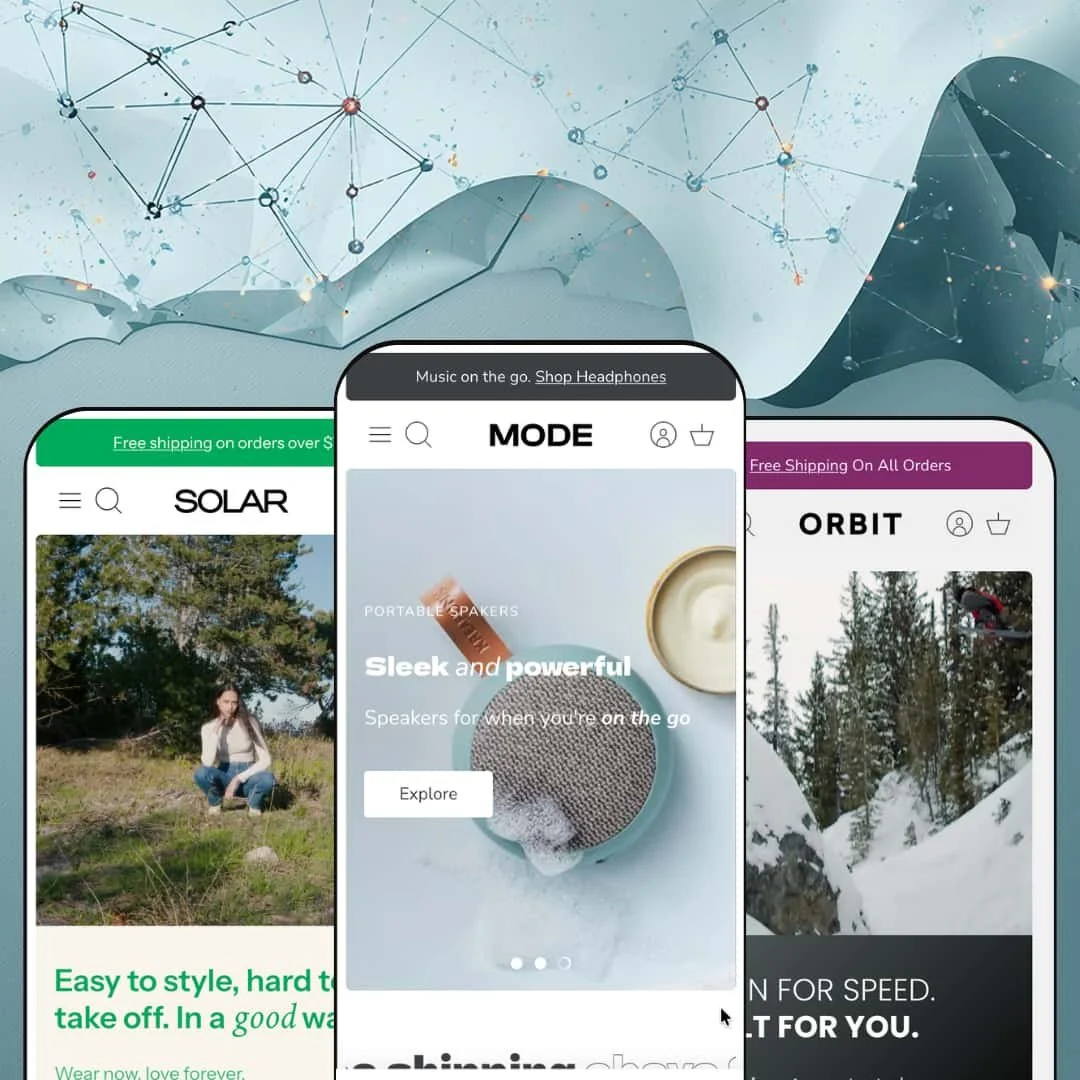
Most theme demos try to look tasteful. Mode's three demos try to sell you something at every scroll position, and they don't apologize for it. Clean Canvas built this $400 Online Store 2.0 theme on more than a decade of Shopify work, and it shows in how confidently the Kreafunk electronics, Black Diamond outdoor, and Tomorrow Denim presets each commit to their vertical. I spent an afternoon across all three to find out where that confidence is earned.
A promotion system that works as one kit
Promo tiles, in-menu promos, computed discount badges, rotating announcement messages, and popups ship as a coordinated set rather than scattered toggles. The badges do arithmetic on their own: the Helio Active Shell card reads "$70.00 off" without anyone typing that number, and a free-express-shipping tile sits inside the Jackets collection grid itself, mid-list, right where sale hunters look. That's rare discipline. For flash-drop apparel brands and mid-market electronics stores running weekly promotions across 100-500 SKUs, this kit is the core of the argument for the price.
The cart drawer sells even when it's empty
What should a cart show when there's nothing in it? Mode's answer: a product carousel. Orbit's empty drawer serves a "You may like" row of chalk, rope, and climbing shoes, while the Mode preset's drawer opens with a free-shipping progress bar reading "$100.00 away" that counts down as items go in. A newsletter block with incentive copy rounds out the panel. Merchants with impulse-friendly accessories under $50 and repeat-buyer customer bases get a recovery surface at the exact point where carts usually go quiet.
Variant galleries that regroup per color
Pick a different color and the whole gallery follows. On the aCUBE speaker, each of eight colorways carries its own set of four angles plus video thumbnails, so a shopper who lands on Spicy Red never wades through Ivory Sand photography to reach it. This matters most where color drives the purchase: jewelry and beauty brands with 30-100 SKUs and heavy color variance get a gallery that behaves like a per-variant lookbook instead of one long undifferentiated scroll.
Availability signals stacked on the product page
Stock counts, pickup availability, and backorder states all render in the buy area, not buried in tabs. The Hepburn Jeans page shows "9 in stock" beside the size picker, a pickup card naming the warehouse with a ready-in-24-hours estimate and a map link, and a plain-language backorder line when a variant runs dry. Nothing here needs decoding. For multi-location retailers and considered-purchase categories like furniture or outdoor equipment, where buyers weigh delivery against a drive-over, this transparency shortens the decision.
The design never sits still
Marquee strips crawl across the homepage, the product page, and sometimes both at once. Every preset runs them, and Solar's homepage alone loops three separate text marquees between hero and footer, layered on top of auto-advancing slideshows and a rotating announcement bar. It's a lot. Single-brand luxury stores and considered-purchase categories like fine jewelry, where restraint is the sales pitch, will spend their first configuration session switching things off rather than on.
An Online Store 2.0 engine in a Theme Blocks era
Mode runs on Online Store 2.0 architecture, which caps block nesting at roughly two levels and predates Shopify's newer Theme Blocks generation with its deep nesting and AI block generation. None of that limits the sections Mode ships. It does limit what you can compose beyond them. Agency teams building bespoke page structures for multi-brand portfolios, and 500-SKU-plus merchants planning heavily customized landing pages, should know that ceiling exists before spending $400 to live under it.
Five theme languages, and that's the list
The pre-translated interface strings cover English, French, Italian, German, and Spanish, alongside right-to-left rendering. Everything else is manual work. Cross-border sellers and multi-market holding companies targeting Dutch, Polish, or Nordic audiences will be editing locale files or commissioning translations for every button label and cart message before launch, which is routine work but unbudgeted time for anyone expanding past those five markets.
What it takes to launch
Plan a full copy and imagery pass across the homepage and product-page sections, mega menu re-staging around your own catalog structure, and metafield population if you want the attribute-based collection filters the demos run. One to two focused days.
-
What works in this preset
Landing on the homepage feels like flipping through a well-art-directed audio catalog. The slideshow headlines set words like fidelity and performance in italics mid-sentence, which gives the typography a magazine rhythm, and each slide splits its call to action between a hero product and its parent collection. It's a small routing decision. It's also exactly how an electronics brand with one flagship SKU should direct attention.
Free shipping above $49, then a green speaker, then 30-day returns, then a white radio. The marquee strip alternates text promises with cut-out product photos as it crawls the width of the page, turning what would normally be a static trust bar into a moving shop window. It earns its motion here. On a catalog this photogenic, the ticker doubles as product discovery rather than decoration.
The collection showcase sections pair a descriptive header card with a swipeable product row, so Headphones gets a paragraph of brand positioning before a shopper ever reaches a price. Cards inside the row carry their own image carousels and label states, from Best Seller to Pre-order. Browsing stays on the homepage longer this way, and the section quietly does the job a dedicated landing page would otherwise need.
Where it stumbles
For a preset named after electronics, the product pages sell like fashion. I went looking for spec-forward staging on the speaker pages and found lifestyle photography doing most of the work, with technical details like battery life, Bluetooth version, and IP rating parked in a flat bullet list far below the fold. Those are the decision criteria for this vertical, and staging them under layers of mood imagery reads against the preset's own positioning.
-
What works in this preset
Navigation is where Orbit flexes. The Equipment menu nests to a third level, with Climb opening into helmets, rock protection, ropes, and trekking poles, while the Activity menu skips lists entirely and presents four photographed category cards with one-line descriptions. Two menu registers, one header. Merchants can match menu style to how their customers actually think about a catalog, by gear type or by sport.
Halfway down the homepage you run into a complete buying surface: the Recon Stretch Ski Shell with six colorways, four sizes, and an add-to-cart button, embedded as a section without ever leaving the page. I clicked around it expecting a teaser and got the whole transaction path. For hero-product launches, this collapses the distance between story and checkout to zero.
The collection template carries the deepest filter deployment of the three demos as staged here: nine sort orders, an out-of-stock visibility toggle, manual price bounds, and attribute filters for activity, sub-category, and gender built on product data. Seventy-plus color values render without the panel collapsing into chaos. That's what a several-hundred-SKU catalog needs on day one.
-
What works in this preset
Our Story doesn't open a link list. It opens a sustainability pitch: photography, a paragraph about redesigning textile manufacturing, and two buttons, all living inside the dropdown itself. This is the in-menu promo feature used for brand storytelling rather than discounting, and for a values-led label it turns dead navigation space into the elevator pitch.
Shopping by fit gets equal billing with shopping by product type. The By Style menu and a four-tile row on the homepage both route shoppers through Straight, Skinny, Flare, and Tapered, mirroring how denim buyers actually narrow down a wall of near-identical blue. It's merchandising logic, not just taxonomy.
Press coverage runs as a system, not a screenshot. Magazine logos loop on the homepage and reappear as a condensed logo list on the jeans product page, keeping third-party credibility in view at the two moments where buyer doubt tends to creep in.
Where it stumbles
The preset bills itself for clothing and jewelry. The demo stages denim, tops, and jackets, and nothing else; there isn't a single small-object product showing how the grids, zoom, and gallery handle macro photography of rings or pendants. Jewelry merchants at luxury price points with tight 30-SKU catalogs are asked to buy on faith that a system art-directed around full-body apparel shots will flatter their category.
One machine, three convincing disguises
Read all three demos back to back and the same interaction vocabulary appears everywhere: the drawer behaves identically, the badge system is one system, the menus are one engine dressed three ways. That consistency is a buying signal. Whatever you admire in Orbit's staging you can rebuild in Solar's, because the difference between presets is configuration and content rather than divergent code.
Range proven by the preset family itself
A compact audio catalog, a multi-hundred-SKU technical gear store, and a single-vendor denim label all read native on this engine. Few claims in theme marketing are testable; this one is, because the demos are the test. The promotional register also scales down as well as up, with Solar running visibly quieter than Mode, which shows the density is a dial rather than a default you're stuck with.
Three verticals, one narrative script
For all their surface differences, the three homepages follow one storyboard: hero, ticker, collection showcase, testimonials, promo block. Merchants get enormous freedom at the section level and much less encouragement to break the sequence itself. A Mode store that wants to feel unlike other Mode stores will need to deliberately reorder the script, not just reskin it.
The family stays inside lifestyle retail
Electronics, outdoor gear, and denim are three flavors of the same consumer lifestyle posture. Nothing in the preset family previews how Mode behaves for wholesale-enabled operations, content-first publishers, or service-adjacent stores, so buyers in those categories are extrapolating rather than evaluating. The engine may handle them fine. The demos just never show it.
Rating
★ 8.0/10
-
Promotion, cart, and availability tooling ships deep and coordinated, and combined-listing support covers Plus stores. The gaps sit at the edges, like the five-language translation set.
8
-
Sections are self-explanatory and the presets double as configuration documentation, though the sheer count of promotional toggles means a longer first session in the editor.
8
-
The slide-out cart, sticky header, and swipe-driven product rows translate naturally to small screens; the dense homepage sequences ask for extra scrolling on a phone.
8
-
Pages run lean for how much merchandising is on screen, with image lazy-loading throughout; the marquee and carousel count is the thing to watch on long homepages.
8
-
Three visibly different brand registers from one settings schema is genuine range; the Online Store 2.0 block-nesting limit is the hard outer boundary.
8
Frequently Asked Questions
-
All three run the same navigation and filtering engine; Orbit's demo stages it deepest, with third-level menu columns and attribute filters, making it the most instructive starting template for catalogs past a few hundred SKUs.
-
Yes. Version 5.2.0 shipped on March 31, 2026 and introduced support for Shopify's new customer accounts alongside general optimizations.
-
Only combined listings, which Mode supports for Plus stores; the rest of the feature set works on standard plans.
-
Products can carry a Pre-order badge at card level, and the product page swaps in plain backorder messaging on affected variants, so out-of-stock items keep selling instead of going dark.
-
The feature set includes dedicated ingredients, nutritional, and usage information displays, so label-regulated products have native slots even though none of the three presets demos them.
-
The demos rotate two to three independent messages, each carrying its own link, and the bar sits above a sticky header so at least one promotion stays pinned through the scroll.
This review is based on hands-on testing of the publicly available preset demos of the Mode Shopify theme as of July 2026. Theme features, preset availability, and performance can change with subsequent updates from the theme developer.