
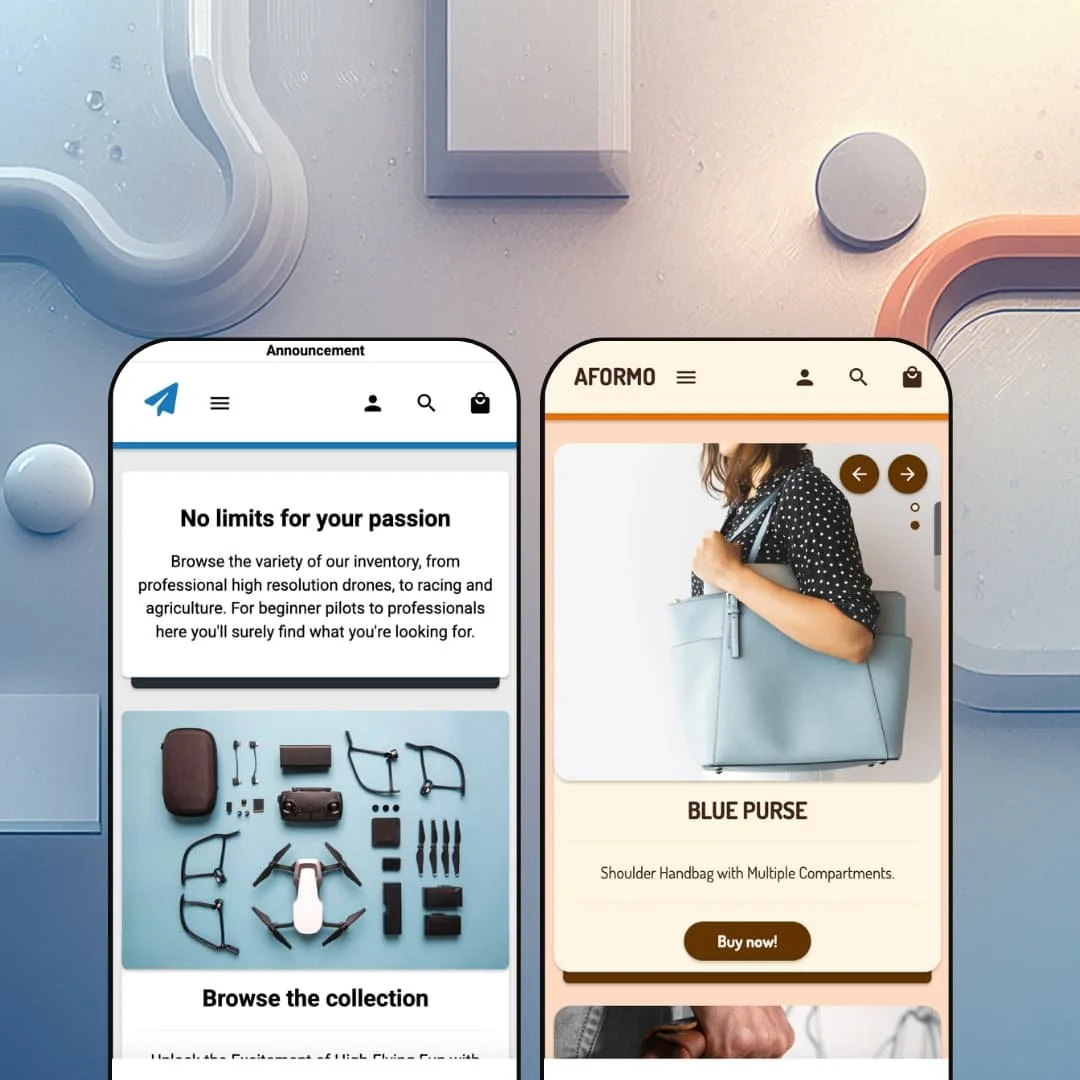
What do you make of a Shopify theme that has been sitting in the Theme Store since November 2022 without collecting a single review? Modules, a $200 Online Store 2.0 theme from Argo Themes, is exactly that: two presets, a compact feature list, and almost no public footprint. I spent time in both demos — a drone shop and a leather-accessories store — to work out whether the silence hides a quiet workhorse or a theme that never found its audience.
A full buy box, right on the homepage
The Modules demo embeds a complete purchase interface into its homepage: a gallery with an image counter, a two-axis variant picker running camera and battery options across nine combinations, a quantity stepper, and an add-to-cart button. That collapses the distance between landing and buying to a single scroll. The whole decision happens on one page. For drop-model brands with under 30 SKUs and impulse-friendly price points, this section can carry the store's entire selling job.
Filtering that understands variant attributes
How do you help someone choose between twelve drones? The demo's collection page answers with filters for availability, price, and brand, then keeps going into the attributes that actually drive the decision: camera resolution, battery capacity, color, material. Filters read straight off product options and metafields, so a merchant's data model becomes the navigation. Electronics and gadget sellers with 50-to-100-SKU catalogs and considered-purchase buyers get a browsing experience shaped like the way their customers compare.
Product cards that merchandise on their own
Product cards ship as a coherent kit: sale badges, compare-at strikethrough pricing, "From" pricing on multi-variant items, and a second image that swaps in on hover. Each card answers three buyer questions before a single click, namely whether it's discounted, what it costs across variants, and what the other angle looks like. That's real work done at grid level. Restock-driven apparel and accessories stores whose shoppers cross-shop heavily get comparison value out of every collection view.
Native product video with a job to do
The theme treats product video as a first-class homepage section: the Modules demo runs a hosted 1080p clip of a drone performing its return-home maneuver, captioned and tied to the exact product it demonstrates. Motion sells function in a way stills can't. For merchants of gadgets, toys, and other demonstration-driven products whose considered-purchase buyers need to watch the thing work before paying mid-three-figure prices, this section does persuasion the rest of the page can't.
A compact section palette with a visible ceiling
Across both demos the homepage vocabulary stays small: hero, collection grid, featured product, video, blog cards, testimonials, countdown, newsletter. It covers a focused store completely. I went looking for a lookbook, hotspot, or comparison-style section and found none staged in either demo and none on the Theme Store feature list, which means single-brand luxury merchants and content-heavy storytelling brands serving considered-purchase buyers will feel the walls within their first week of building.
Three and a half years, zero reviews
Modules launched in November 2022, and as of July 2026 the Theme Store shows no reviews at all. That's not a rating problem; it's an adoption problem. The listing names a single live store running the theme, so the public record on support quality, update reliability, and edge-case behavior is essentially blank, and merchants running restock-driven stores in the 50-to-100-SKU range who need a theme to survive years of Shopify platform changes are taking that bet largely on faith.
Support infrastructure runs thin
Support routes to a contact form on the developer's own site, the listed contact resolves to a personal Gmail address, and the documentation link points at the developer homepage rather than a searchable help center. None of that predicts bad support. It does mean there's no knowledge base, no visible changelog culture, and no community to fall back on, which weighs heaviest on first-time builders launching evergreen single-brand stores without developer resources on call.
What it takes to launch
Expect a full copy pass across product descriptions, page content, and blog entries, plus imagery replacement, menu re-staging, and light metafield population to feed the filter attributes before launch. Plan one to two working days.
-
What works in this preset
Landing on the aberne demo feels like reading a spec sheet that learned manners. The opening section pairs a plain-spoken headline with a flat-lay photo and a single collection link, and everything that follows keeps the same discipline: one job per section, generous whitespace, zero decoration. The page makes its argument in five moves. For hardware buyers who arrive with a model number half-decided, that restraint reads as confidence rather than emptiness.
"Our top picks" sits in the main navigation as a dropdown holding five direct product links. I clicked it expecting a category tree and got a shortcut shelf instead, which turns out to be the smarter staging choice for a store this size: shoppers jump from any page straight to a specific drone without ever routing through a collection. The mega menu is doing retail work here, not architecture work.
Below the buy area, the product template stacks three merchant-editable content rows covering shipping, delivery time, and a safety note the demo titles "Fly safe". It's a small pattern with real utility. Policy questions get answered on the same screen where the purchase decision happens instead of being exiled to a footer link, and since each row is just a heading plus a paragraph, populating them takes minutes per product.
Where it stumbles
For a preset fronting €800 drones, the persuasion layer is thin. High-consideration hardware shoppers look for spec tables, side-by-side evidence, and dense galleries before committing three or four figures, and this demo stages two-image galleries with a short bullet list where that depth should live. The skeleton could plainly hold more; the staging never shows it holding more, so a merchant selling serious tech inherits the job of building that case themselves.
-
What works in this preset
Two full-bleed heroes open the page, stacked back to back: a blue handbag, then a pink one, each carrying a one-line pitch and a direct buy link. It's an unapologetically product-first opening. No lifestyle preamble, no brand manifesto, just merchandise at full width, and for accessories that photograph this well, the confidence lands.
The homepage gives blogging actual real estate. Two article cards render with publish dates, topic tags, and generous excerpts about leather patina and studio craft, which nudges the demo from catalog toward small brand magazine. For makers whose story is part of the price, that section earns its slot.
The bottom of the page pairs a countdown-driven sale banner with a three-portrait testimonial row. Urgency and reassurance, side by side. The countdown section takes an image, a promo headline, and a collection link, so repurposing it for a seasonal drop is a ten-minute configuration job rather than a rebuild.
Where it stumbles
The preset argues with itself. The blog entries sell slow craft, a decade of handwork, leather that improves for years, and then the same page closes on a 30%-off blowout with a ticking clock. Both tools are useful on their own; deployed together on one homepage they pull the brand story in opposite directions, and a leather-goods merchant positioning at the premium end will want to pick a lane before launch.
One design system, two convincing verticals
Read back to back, the presets prove the theme's core claim: the same modular skeleton carries consumer tech and fashion accessories without either demo feeling like a costume. Sections keep their proportions, spacing logic, and typographic restraint across both, so a merchant can predict how any block will behave before dragging it in. That predictability is the actual product.
Quietly maintained for its whole lifespan
Whatever the review count says, the version history doesn't show abandonment: the theme launched in late 2022 and shipped version 4.0.1 on December 2, 2025. For buyers, the meaningful signal is that updates kept arriving across three-plus years even without visible market traction, and the release notes are published openly on the listing for anyone who wants to verify the cadence.
No signature move
After both demos, I couldn't name the one thing only Modules does. The system is clean, consistent, and anonymous; every section could plausibly appear in a dozen other storefronts without anyone noticing the swap. Merchants get a dependable canvas and no built-in identity, which shifts the full differentiation burden onto their photography and copy.
Built around focused catalogs by design
Everything in the theme's posture, from the short menus both demos stage to Shopify's own catalog-size tag of 11 to 100-plus products, assumes a store you can hold in your head. That's a coherent choice rather than an accident, but it means the theme's design intent and a deep multi-category catalog part ways early. Merchants planning serious taxonomy should read these demos as a boundary, not a starting point.
★ 6.4/10
Rating
-
The commerce fundamentals are present, from slide-out cart to attribute-driven filtering, but the section library stays compact and specialty merchandising tools are scarce.
5
-
A small, predictable section set on Online Store 2.0 architecture means little to learn and few ways to break a layout. Staging a complete homepage is an afternoon's work.
8
-
A dedicated slide-in mobile menu carries its own top-picks entry, and responsive image delivery keeps small screens first-class rather than an afterthought.
7
-
Pages run lean: restrained section counts, sized image requests, and no third-party script clutter in either demo. The hosted video is the heaviest asset on any page.
7
-
Two presets share one visual temperament, and the theme rewards working inside it rather than against it. Merchants wanting dramatic layout departures will hit edges quickly.
5
Frequently Asked Questions
-
It can work, but it ships with setup work. The hero CTAs say SHOP MEN/SHOP WOMEN, the FAQ block has e-commerce sizing questions left in, and the about-us footer link is broken. The services grid, opening-hours block, and clinic-address section are genuinely useful for a service business once the demo content is cleaned up. Smile is workable for dental, salon, or similar service verticals after a content pass.
-
The default Nexa (Clothing) preset. It's the only one with the yoga/athleisure product catalog (Sweltering-branded leggings, sports bras, yoga sets), the three-slide hero, the deepest mega menu, and the five-language country selector. If you're buying Nexa for the Gymwear headline, install the Nexa preset first.
-
Theme-native. The compare modal, the per-card add/remove action, and the comparison page render are all wired into the theme's own code rather than depending on an external app subscription. This is one of the few price-band advantages Nexa carries over competing themes that punt the feature to a separate paid integration.
-
Demo inventory only. The Sweltering-branded yoga products have variant inventory set to zero in the demo store, which is why the swatches render as greyed-out and struck-through. The theme renders available variants normally: merchants populating their own catalog will see their actual stock state, not the demo's.
-
Five: English, German, French, Italian, and Spanish, matching the EU Translations claim on the Theme Store. This covers theme UI strings (button labels, form text, navigation defaults, country/language switcher copy). Product descriptions, blog content, and metafield values are not translated automatically and still need either manual entry per locale or a Markets-compatible translation app.
-
Placeholder. Every preset's Before/After section ships with the instructional text "To show before/after comparison, add more blocks in the section" visible on the live demo. The section's underlying mechanic works; the merchant just needs to add their own paired before/after image blocks and remove the placeholder text before launch.
-
King ships pre-translated UI strings for English, French, Italian, German, and Spanish (button labels, form text, navigation labels). Language selection and currency switching for the storefront are handled by Shopify Markets at the platform level; the theme contributes the country/language selector UI and RTL CSS support. Product content translations remain a merchant responsibility through Shopify's translation interface or apps like Langify.
This review is based on hands-on testing of the publicly available preset demos of the Nexa Shopify theme as of May 2026. Theme features, preset availability, and performance can change with subsequent updates from the theme developer.