
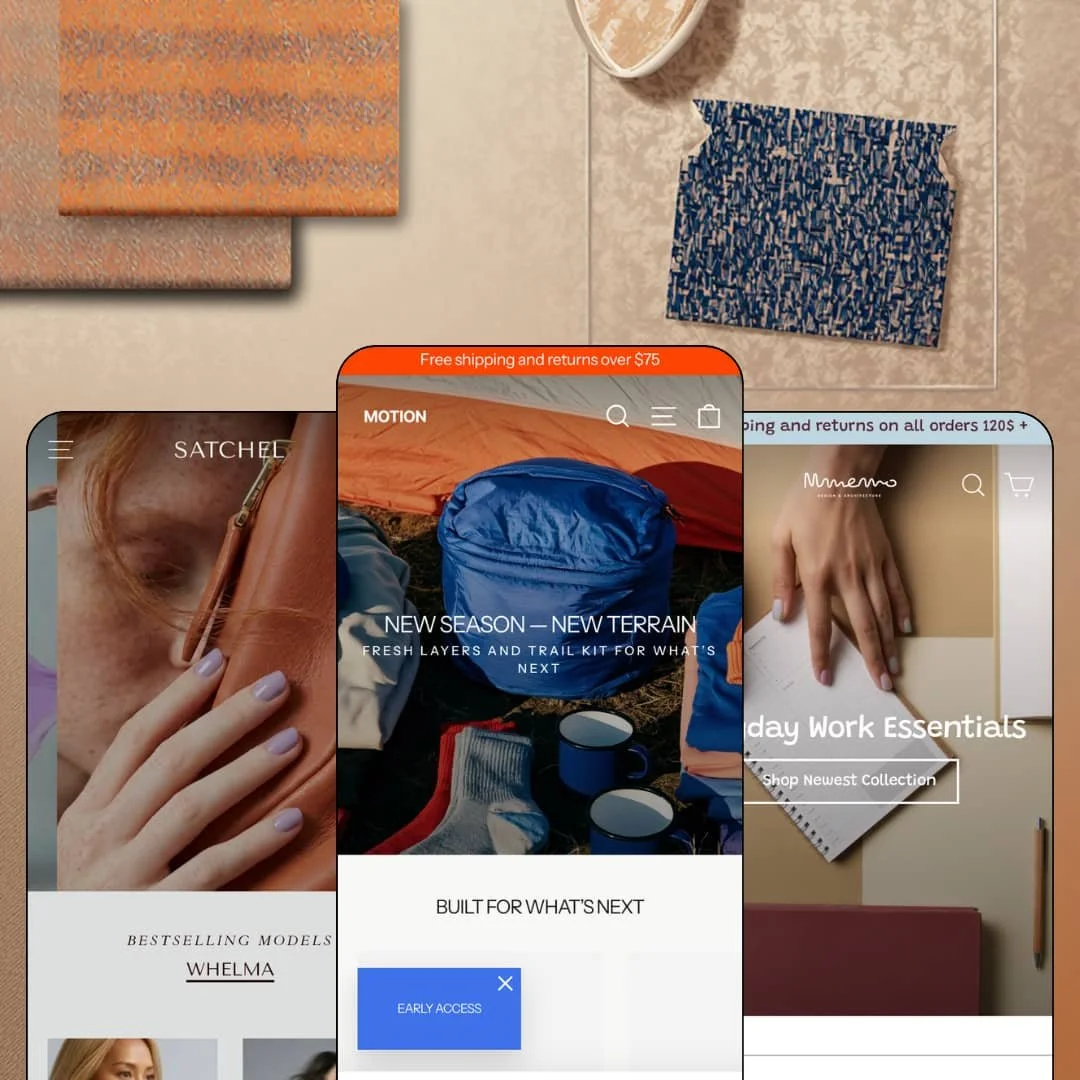
Most Shopify themes treat movement as decoration, a hover effect here and a fade-in there. Motion, true to its name, builds the entire storefront argument around video, animation, and things that don't sit still. Archetype Themes launched it in September 2017 and has kept it in active development since, with the current demos running on Online Store 2.0 architecture and a version 12.0.0 release shipped in July 2026. At $420 it now sits at the very top of the Theme Store's price ladder, and that's the bar this review holds it to.
An animation system, not an animation gimmick
Does the movement premise survive contact with three different catalogs? It does. Video sections, image rollovers on product cards, hotspot overlays, a before/after slider, and GIF-friendly image slots all belong to one coherent motion vocabulary, and each demo deploys that vocabulary differently, from the apparel demo's brand-film staging to the desk-goods demo's triple-video homepage. For lifestyle apparel and home-goods brands selling considered purchases off a strong photo and video library, this is brand storytelling without commissioning an agency build.
Quick view to slide-out cart is one continuous flow
Quick-view triggers sit on every product card across all three demos, and the slide-out cart they feed carries an order-note field and a terms checkbox before handing off to checkout. That's short. The practical effect is that a shopper can move from browsing a collection to a completed line item without a single full page load, which is the difference between an impulse converting and an impulse cooling off. Impulse-driven accessory shops and drop-model apparel brands running catalogs under 100 SKUs will feel this in their numbers.
A coordinated conversion kit ships in the box
Countdown timers, promo popups, stock counters, trust badges, product badges, and cross-sell rows function here as one merchandising bundle rather than six disconnected toggles. The Whelma page counts inventory down to two remaining items while the apparel homepage pairs a countdown with a buy-one-get-one banner, so the demos prove the pieces compose into an actual campaign. For flash-drop sellers in mid-market apparel and accessories, this bundle replaces several separate app installs plus the integration work of making them look native.
The mega menu earns its space
Motion's header supports multi-column dropdowns that mix link lists, captioned image tiles, and in-menu promotional callouts, restyled convincingly across all three demos. Navigation becomes campaign real estate: a seasonal push can live inside the menu itself instead of competing for homepage slots. Merchants running 100-plus SKU catalogs on seasonal campaign cycles get a header that can be re-staged every quarter without touching the page layouts below it.
The whole premise assumes you have footage
Motion's identity is movement, and movement needs raw material. The desk-goods demo alone leans on three separate video files, and the apparel demo's personality comes from lifestyle photography shot for exactly this purpose, none of which a merchant inherits with the license. No footage, no Motion. Dropshipping and reseller-model stores, and single-founder budget brands working from manufacturer product shots on white backgrounds, will pay top-shelf money for a theme whose signature sections they cannot honestly fill.
$420 buys last-generation architecture
Motion runs Online Store 2.0: JSON templates, sections on every page, solid block support, all of it mature and stable. What it doesn't have is the Theme Blocks generation's nested-block composition, which allows blocks inside blocks up to eight levels deep and underpins Shopify's newer AI block workflows. That gap won't matter for most stores. It will matter for agencies and multi-brand operators planning heavily customized landing systems across 500-plus SKU catalogs, who are paying the platform's highest theme price for its previous architectural ceiling.
Theme-string translations stop at five languages
I went looking for the localization scope, and the packaged theme-interface translations cover English, French, Italian, German, and Spanish. Everything the theme itself renders, from button labels to cart microcopy to form text, needs manual translation before launching in any language outside those five. Cross-border, wholesale-enabled brands selling considered-purchase goods into Nordic, Eastern European, or Asian markets should budget a translation pass as real setup work, not a checkbox.
What it takes to launch
Expect a multi-day pass across hero and section copy, brand naming, testimonial and press placeholders, promotional dates, and imagery replacement in whichever preset you deploy, plus menu re-staging to match your own catalog structure.
-
What works in this preset
Scrolling this demo feels like watching a brand film that happens to sell fleece. The hero slideshow rotates editorial captions over full-bleed trail photography, a text marquee repeating the shipping promise runs as a ticker across the fold, and a tabbed Wear/Carry switcher lets one featured-collection slot serve two catalog halves without doubling the page length. It's confident staging. The whole homepage builds toward a brand-film section with a watch link rather than a discount.
I spent time on the Merino Wool Quarter-Zip page, and the small decisions add up. Two option axes render as clean button groups, a size-guide link opens a modal with a US/UK/EU conversion table, and an ask-a-question form sits directly on the page instead of routing buyers to a contact template. Inventory messaging even distinguishes between stock that's ready to ship and stock that's on the way, which is a genuinely useful nuance for anyone selling replenishment-driven basics.
The Explore mega menu is where the header earns attention. Three link columns for Trail, Hike, and Gear sit beside captioned image promos that behave like miniature campaign banners, and further down the page a collage section mixes five product crops at deliberately different sizes to break the grid monotony. A countdown block paired with a shop button rounds out the promotional staging.
Where it stumbles
The preset positions itself as a full outdoor-apparel brand, yet the catalog staging runs thin against that ambition. One featured grid closes on a view-all link promising exactly two products, which undercuts the impression of a deep seasonal assortment the navigation works hard to suggest.
-
What works in this preset
Here, the homepage teaches the business model. The "Style in Seconds" section walks from Step 1, Pick a Bandana, through Step 3, Swap Anytime, each step carrying its own button, so the mix-and-match logic of bandana bases and iron-on patches lands before a shopper ever opens a collection page.
Motion handles the personality work: a ticker line reading "The best-dressed dogs on the internet" scrolls between sections, and the benefit icons near the footer are small animated GIFs rather than static badges. The playfulness matches the vertical instead of decorating it.
On the Check Bandana page, sizing runs Extra Small to Extra Large as a tidy button group beneath the price. Five sizes, one glance.
Where it stumbles
The navigation wears a suit two sizes too big. Three dropdown columns serve a catalog of exactly two product types, so the Bandanas and Patches columns each repeat a "Latest drop" entry and route to the same Sale collection under different labels; the demo stages more menu than this vertical has inventory to feed. Merchants copying the preset one-to-one should plan to slim that staging down to their actual range.
-
What works in this preset
This is the preset that cashes the animation check. The homepage opens on a full-width video hero, runs a second product video mid-page, and closes with a third video teasing a 2026 lookbook, with sale-priced tumbler cards and Save-$15 badges threaded between them. Nothing here is static for long, and on a desk-goods catalog the movement reads as product demonstration rather than mood.
Social proof gets two dedicated formats: a press-quote carousel with star ratings and outlet names, plus a monochrome logo strip directly beneath it. A tabbed switcher then splits the most-popular grid between Organizers and Mugs so both hero categories get front-page placement without a second section.
There's also a nice brick-and-mortar wrinkle. A store-opening announcement section promotes a physical Williamsburg location with its own imagery, which quietly demonstrates that the theme can serve retailers whose story isn't purely online.
Where it stumbles
The press carousel and logo strip presume earned media that most young desk-goods brands simply don't have. A launch-stage merchant inherits two of the homepage's most prominent slots with nothing honest to put in them, and the layout loses meaningful personality once those sections come out.
One library, three believable verticals
Read side by side, the demos make a quiet argument no single one can: the same section set convincingly builds an outdoor apparel brand, a luxury leather-goods boutique, and a design-led desk-goods shop. The range is the product. A merchant unsure where their brand will land in two years is buying room to pivot without repurchasing.
Nine years old and still shipping
A September 2017 launch date paired with a 12.0.0 release in July 2026 is its own trust signal. This kept surprising me as I moved through the demos: nothing about the staging, the section variety, or the merchandising patterns betrays the theme's age. Longevity with active maintenance is rarer than launch-week polish.
Three stagings, one design DNA
Cross-preset reading reveals that the presets differ in photography, palette, and copy far more than in bones. Spacing rhythm, card grammar, and section sequencing stay remarkably consistent from apparel to handbags to homewares. You're choosing an art direction, not one of three structurally distinct designs, and buyers expecting the latter should adjust expectations.
The character is front-loaded
Across all three demos, the sections that carry Motion's personality, video heroes, collages, marquees, press features, concentrate on the homepage while deeper templates play things straight. Brands driving paid traffic directly to product URLs will find those landing experiences competent but more conventional than the homepage promises, which shifts the theme's value toward stores where the front door still matters.
Rating
★ 8.0/10
-
Countdown timers, popups, lookbooks, a before/after slider, quick buy, and a promotional mega menu ship natively; launch-day merchandising needs little outside help.
8
-
Three complete presets give strong starting points, but the sheer volume of promotional sections forces real editorial decisions about what to keep before launch.
8
-
The build is phone-first rather than shrunk-down: slide-out navigation stacks cleanly, card grids compress to swipeable widths, and tap targets stay generous throughout.
9
-
Imagery lazy-loads and section counts stay restrained, but video heroes and GIF assets are heavy by nature; stacking three videos on one homepage, as the Memo demo does, has a load-weight cost.
7
-
Color and typography restyling is proven by three very different-feeling demos, though composition stays within the section grid Online Store 2.0 allows.
8
Frequently Asked Questions
-
Yes, and it's staged rather than theoretical: each demo links a dedicated pre-order product page, such as the Trail Pack Dusk on the apparel demo.
-
The Satchel demo stages a styled gift-card product page, so the template gets the theme's look instead of a bare default.
-
An age verifier is built in, relevant for alcohol, supplements, or other 18-plus product lines.
-
A size-chart modal opens next to the variant picker with a US, UK, and Europe conversion table, so sizing help never leaves the product page.
-
In-store pickup is supported at the cart level, and the Memo demo dedicates a full homepage section to announcing a new retail location.
-
Combined listings are supported but flagged Plus-only; standard-plan merchants can ignore that single line item, as everything else works on regular plans.
This review is based on hands-on testing of the publicly available preset demos of the Motion Shopify theme as of August 2026. Theme features, preset availability, and performance can change with subsequent updates from the theme developer.