
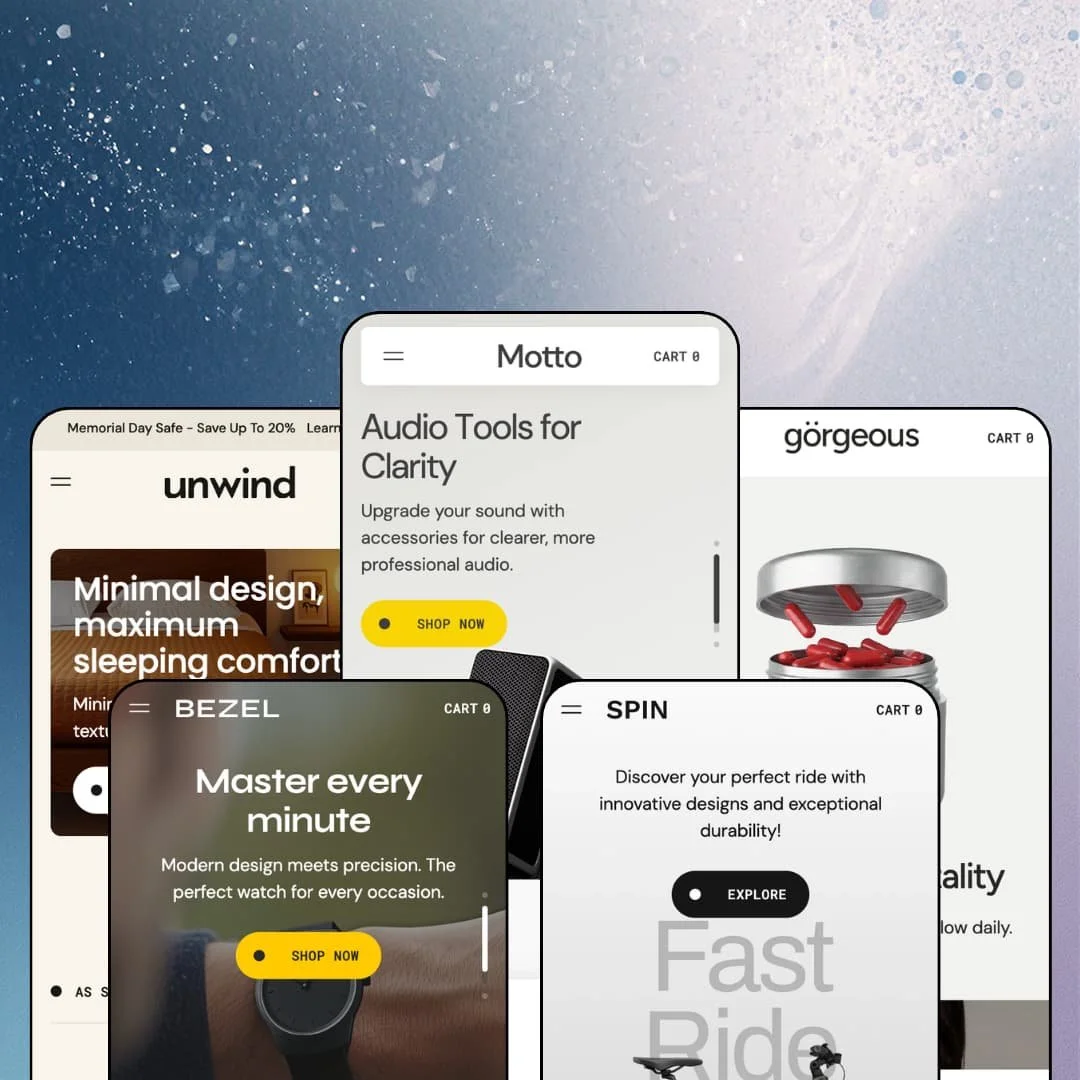
Five demo stores, five product categories, and one homepage that never changes shape. That was the first thing I noticed working through Motto's presets, where a microphone brand, a skincare line, an e-bike shop, a bed maker, and a watch label all sit on the same full-width image grammar. Noord launched the theme in November 2024 on the Online Store 2.0 architecture and has shipped eleven releases since, the most recent adding B2B volume pricing and a discount field inside the cart drawer. Whether that shared skeleton reads as consistency or as a template depends on which of those five stores you're actually planning to run.
Homepage buy box with live variant switching
The Featured Product section renders a complete purchase form on any page, not a teaser card. Gallery, variant pills, quantity stepper, and Add to Cart all live inside it, and the price recalculates when a shopper changes an option, so a two-axis product can quote four different prices without leaving the homepage. Three of the five demos stage it. For single-hero-product brands under 30 SKUs selling considered purchases such as e-bikes or watches, it collapses the homepage-to-checkout path into one scroll.
Do you sell to shops as well as shoppers?
Since the August release, Motto renders B2B volume price breaks as a table on the product page, shows a live unit price beside the quantity field, and honours minimum, maximum, and increment rules in both the cart drawer and the cart page. A Quick order list section was added at the same time. I couldn't test it against a wholesale catalogue on the demos, but the release notes are specific about the behaviour, and the sticky add-to-cart reads the same quantity as the main form so tiers don't drift. Wholesale-enabled brands with 50 to 500 SKUs in parts, supplements, or accessories get a native ordering surface here.
A buy-box urgency kit that works as one unit
Under the price on every product page, four elements stack in a fixed order: a stock status line, an urgency sentence with a per-product countdown, the Add to Cart form, and a trust row of up to three badges. Scroll past it and a sticky bar with a thumbnail strip and a second Add to Cart follows you. They're built as one block group. Flash-drop and impulse-buy merchants in mid-market electronics or beauty get the whole scarcity argument configured in one product template rather than assembled from separate sections.
For merchants who want the product page to do the selling
Every product template in the five demos continues below the buy box into a brand statement, a video or hero banner, a feature card list, testimonials, an image pair, and a recommendations slot. That's the same section library the homepage uses, deployed on the product template. Content-led single-brand stores in furniture or audio, where the buyer reads before buying, can treat each product page as its own landing page without a page-builder app.
The stars are typed in
Every testimonial on every demo is a hand-entered quote with a hand-entered score and a portrait upload, and the "5/5" is a text field. No product page in the five demos shows a review block, a rating average, or a review count, and the developer's release notes mention Judge.me only as a styling-compatibility fix. That's set dressing, not proof. Beauty and supplement brands with repeat buyers at mid-market prices, where reviews carry the purchase, will need a review app installed and styled before launch.
Refills without a refill mechanism
Gorgeous stages a Day Cream Refill and a probiotic in 30, 60, and 90-count runs, which is replenishment merchandising. Nothing in the buy box offers a subscribe-and-save toggle, a delivery interval, or a recurring price, and the Theme Store feature list doesn't claim one. The theme presents the products; the reorder logic has to come from Recharge, Appstle, or a comparable app, with the integration work that implies. Subscription-driven brands in skincare, supplements, or food should price that app into the theme cost.
Online Store 2.0 at $320 heading into 2027
Motto launched in November 2024, a few months before Shopify's Theme Blocks generation, and it stays on the two-level block nesting that Online Store 2.0 allows. Dawn, Shopify's free theme, sits on the same generation with fewer sections and no sticky add-to-cart, so the $320 buys section depth rather than a newer architecture. Agencies and multi-brand operators planning builds with a three-year lifespan should weigh that against the AI block generation and deeper nesting the newer generation brings.
What it takes to launch
Expect a multi-day copy pass across hero captions, feature cards, testimonials, FAQ entries, and product descriptions carried between verticals, plus real assets for the press-logo and Instagram sections, fresh announcement-bar and countdown dates, and a catalogue restructure wherever colourways or sizes were staged as separate products. Market and language configuration per demo adds a half day.
-
What works in this preset
Landing on the Motto demo feels like opening a product launch page rather than a shop. Three full-bleed slides push a single microphone, each with a one-line pitch and a Shop Now button, and the header above them keeps things quiet: Products, About, Journal, and a Features entry. Open Products and the mega menu drops three image tiles (Motto R1 Microphone, Accessories, Shop All) beside a tagline and its own button. The Features column is the surprise, because it links to twenty-one section demo pages and four product-page layouts, which means the demo doubles as a tour of the section library without you leaving the storefront.
Scroll down and the homepage keeps handing you reasons to buy. A five-card product grid runs colour pills under each price, a three-card feature list explains capsule and control details with icons, and a two-card spotlight row pairs the microphone with a replaceable cap. Below that sits a countdown block, then a press-logo strip, then an Instagram grid with a follower count, then a four-question FAQ accordion. It's a lot. But the order follows a sales argument rather than a section dump.
I spent time on the Amplifier Black product page because it stages four colour swatches with per-variant pricing, and the Silver option jumps from $30 to $35 the moment you click it. Under the price sits an "Available In Stock" line, an urgency sentence with its own timer, a quantity stepper, and then a trust row reading 14 Days Return Policy, VAT included, Up to 5 Years Warranty. Share links go to Facebook, X, Telegram, Reddit, and copy-link. Further down the page switches into landing-page mode: brand statement, video banner, feature cards, testimonials, an image pair, and a recommendations slot.
Where it stumbles
The section labelled Compare on the homepage promises a casing-materials comparison for the microphone, but what renders is a before/after image slider with two photos and a paragraph. For an electronics preset that's a staging choice worth flagging, because a buyer weighing aluminium against polymer wants numbers and weights, and the demo answers with a drag handle. Merchants in this vertical will want to populate the Overview and Specifications tabs with real data before leaning on that section.
-
What works in this preset
Gorgeous replaced the earlier Retouch preset in April 2026, and it reads as the most catalogue-minded of the five demos. The hero cycles three skincare slides, then three product-image banners each link straight to a single product page (day cream, serum, night cream). A six-card grid titled "Where Skincare and Wellness Intersect" mixes creams, probiotics, and a $150 Sleep Set, and a three-tile collection row (Skincare, Nutrition, Sets) sits right below it. Then a second grid runs Bestsellers. The homepage sells product first and story second.
The Pre+ Probiotic page shows the theme's pill-style variant picker with three counts (30, 60, 90) priced $55, $90, and $140, and the price updates as you tap through. Same buy-box grammar as the other presets: stock line, urgency sentence, timer, stepper, trust row. Here the trust row shows only two badges, which tells you those badges are individually configurable rather than a fixed trio. The thumbnail strip runs vertically beside the gallery.
What kept me scrolling was the skin-results section, staged as a before/after slider under a "compare" eyebrow label with a full-width lifestyle photo further down. Three portrait testimonials with job titles follow, then a six-image Instagram block. The language switcher offers English and French in this demo, with EU interface strings for five languages listed on the Theme Store page.
Where it stumbles
Sets are a real vertical in beauty, and Gorgeous stages three of them, but each is a fixed product at a fixed price. There's no pick-your-own set builder, no per-slot variant choice, and the Sleep Set and Pure Mind Set share the same hover image. A brand that sells routines rather than single jars will need to build bundles as plain products or bring an app.
-
What works in this preset
Try the Motto R1 Universal Bike module on the Spin homepage before reading anything else. It's a full buy box embedded mid-page: five-image gallery, a Color axis (Silver, Black), a Version axis (Motto R1, Motto R1 Max), and a price that moves from $3,499 to $3,999 when you switch to the Max. Add to Cart sits right there. The three feature blocks beside it (battery, display, brakes) turn the module into a spec sheet you can buy from.
I clicked through to the catalogue because bikes are a filter-heavy category, and Spin gives the collection page a sidebar with Size, Color, Price (from/to inputs), Availability, and a Version facet built from the variant option. Nine sort orders are available, from Featured to Date, new to old. Eighteen products paginate at twelve per page, every card swaps to a second image on hover, and cards carry colour pills plus Sale and Sold Out badges. On mobile the same filters collapse into a Filter and sort drawer.
The rest of the homepage leans on lifestyle framing. Two spotlight cards show Urban and Max Endurance with a Vendor line above the title and an Explore button, a full-width "New accessories" image links into the parts collection, and a mobile-app image-with-text section pitches an add-on. A four-question FAQ and a three-column benefits row close it out before the newsletter.
Where it stumbles
Bikes ship in frame sizes, and Spin's bikes don't. Every bike in the catalogue carries a colour axis, some carry a version axis, and none carry a frame or rider-height option; the Size filter (Small, Medium, Large) appears to draw from accessories rather than the bikes themselves. The demo also stages two sold-out items in an eighteen-product catalogue, including the Max Cruiser. For a considered purchase at $1,000 to $4,000, the variant staging reads more like electronics than cycling.
-
What works in this preset
Warm, quiet, and photo-led. Unwind opens with three bed slides, drops into a press-logo strip, then an About image-with-text block titled "Sturdy wood bed frames" with a single button. A "Pick your finish" spotlight row pairs a $29.99 leg enhancer against a $1,700 Artisan frame showing its struck-through $1,850 price. Then a four-column "eco purity" band covers FSC certification, tool-free assembly, tree planting, and waste reduction. It reads like a furniture catalogue rather than a promo page.
The twelve-card product grid is where I noticed the finish swatches doing real work: Light Oak, Medium Walnut, Dark Mahogany appear as pills under a bedside shelf, and Beige/Brown under the frames, so the wood story carries into the cards. The Premium Platform Bed page adds a Sale badge next to the H1, a Brown/Beige swatch pair, and a "Shipping Information" collapsible block that expands into a full return policy paragraph, a block type the other presets keep hidden. Testimonials on this demo show a 4/5 rating alongside two 5/5s, so the star display isn't locked to perfect scores.
Where it stumbles
A bed without a size is a photo, not a product. Every frame in the Unwind catalogue sells on a colour axis alone, with no Twin/Queen/King option and no dimension table anywhere on the product page, and the Overview and Specifications tabs sit under the gallery without a single measurement staged. The Luxury Wooden Bed Frame is sold out in both homepage grids. Furniture merchants will need to rebuild the variant structure and populate specifications before this preset can take a real order.
-
What works in this preset
Watches are the vertical Motto's photography grammar was built for, and Bezel proves it. Three full-bleed slides with two-line taglines, a short About strip, then a three-card row where every watch shows Black, White, and Grey pills and one carries a Sale badge with the $900 struck through to $700. An image-with-text block links to the journal instead of a collection, which is an editorial choice more than a merchandising one. Three feature cards and three blog cards follow.
The homepage buy module here is the deepest of the five demos: an eleven-image gallery for the Motto Watch Black, colour pills, quantity stepper, trust row, and a "View full Details" link out to the product page. Underneath it, a "Next Issue" countdown block runs full width with a Start shopping button. The header swaps between a light and a dark logo file depending on colour scheme, and the language switcher pairs English with Italian.
Where it stumbles
I went looking for the Motto Watch as a single product and found three: Black, White, and Grey each exist as separate listings, and each one carries the full three-colour picker inside its own buy box. That doubles the catalogue, splits any future filter results, and sends a shopper who picks Grey on the Black listing to a variant that already has its own page. The Expedition line repeats the pattern. This is catalogue architecture, not a theme limitation, but it's the structure a buyer inherits when installing the preset.
One visual grammar carries five verticals without breaking
The full-bleed slide, the About strip, the icon feature cards, and the two-card spotlight row appear in the same positions on all five homepages, and none of them look wrong for their category. That means preset choice is a photography decision, not a feature decision. A merchant who picks Unwind for a watch brand loses nothing but the sample images.
The demos document the theme
Every preset carries a Features menu linking to more than twenty section demo pages and up to five product-page layouts, so the section library is browsable from the storefront itself. I've rarely seen a theme demo that doubles as its own documentation this thoroughly. It shortens the evaluation, and it shortens onboarding for whoever builds the store.
Dark-scheme awareness runs through the assets
Each demo ships a light and a dark logo file, the multicolumn section has a dark-mode image setting, and a per-section colour-scheme picker arrived in May. Combined with the transparent-header fix in August, that adds up to a theme where a dark storefront is a settings change rather than a CSS project.
Five stores, one skeleton
Read all five demos back to back and the homepage order barely changes: slides, About, grid, feature cards, testimonials, logos, FAQ, newsletter. The presets show one layout dressed five ways rather than five layouts, and a merchant who wants a homepage that behaves differently from that sequence is rearranging sections from the start, not choosing from alternatives.
Listed for food and drink, staged for nothing edible
The Theme Store files Motto under Food and Drink alongside Jewelry and Accessories. Bezel covers the second category convincingly. No preset touches the first, and the section library has no menu, nutrition, or ingredient staging in any demo, so a food merchant is buying a promise rather than a preset.
The photography bill
Hero slides render at 3840 pixels wide, every card wants a hover image, the Bezel buy module uses eleven gallery shots, and the product-page landing sections expect a video or banner per product. The theme's whole argument rests on full-width imagery, and a brand without a studio budget will feel that on day one.
Rating
★ 7.4/10
-
B2B pricing tiers, per-product countdowns, homepage buy modules, and a five-facet collection filter cover more ground than the "full-width presentation" pitch suggests; reviews and subscriptions still route to apps.
8
-
Section demo pages inside every preset and a consistent block order across templates make the editor predictable; the trust row, urgency line, and shipping block are all per-block toggles.
8
-
The mobile menu folds into a slide-out with collection image tiles, filters collapse into a drawer, and the sticky add-to-cart follows the scroll; full-bleed slides at this resolution will need separate mobile crops.
7
-
Homepages run long with logo strips, Instagram grids, and countdowns stacked, and the demos load a lot of high-resolution imagery; lazy-loading and the CLS work noted in earlier releases keep it usable.
7
-
Colour-scheme per section, dark-mode assets, and 21 section types give room to work; the fixed homepage rhythm across presets shows where the layout wants to stay.
7
Frequently Asked Questions
-
A free-shipping progress line at the top, line items with quantity steppers, and since August both a discount-code field and a cart-note field before the checkout button. The empty state links back to the catalogue.
-
English, French, Italian, German, and Spanish interface strings are included, and the five demos each stage a different second language in the switcher so you can see the translated buttons live.
-
Support for high-variant products and Shopify Plus combined listings arrived in April 2026, along with a swatch type that pulls colours from variant images rather than a manual picker.
-
In-store pickup is on the feature list, and the buy-box block library includes the pickup availability block; none of the five demos stage a pickup location, so you'll see it only after connecting a location.
-
Two layouts appear in the demos: an image-tile panel with three collection cards, a tagline, and a button, and a text-column panel with headed link groups. Both hang off a single top-level item and fold into the slide-out menu on mobile.
-
Yes, an age verifier is on the feature list. None of the demos enable it, so expect to configure the modal text and threshold yourself.
This review is based on hands-on testing of the publicly available preset demos of the Motto Shopify theme as of August 2026. Theme features, preset availability, and performance can change with subsequent updates from the theme developer.