
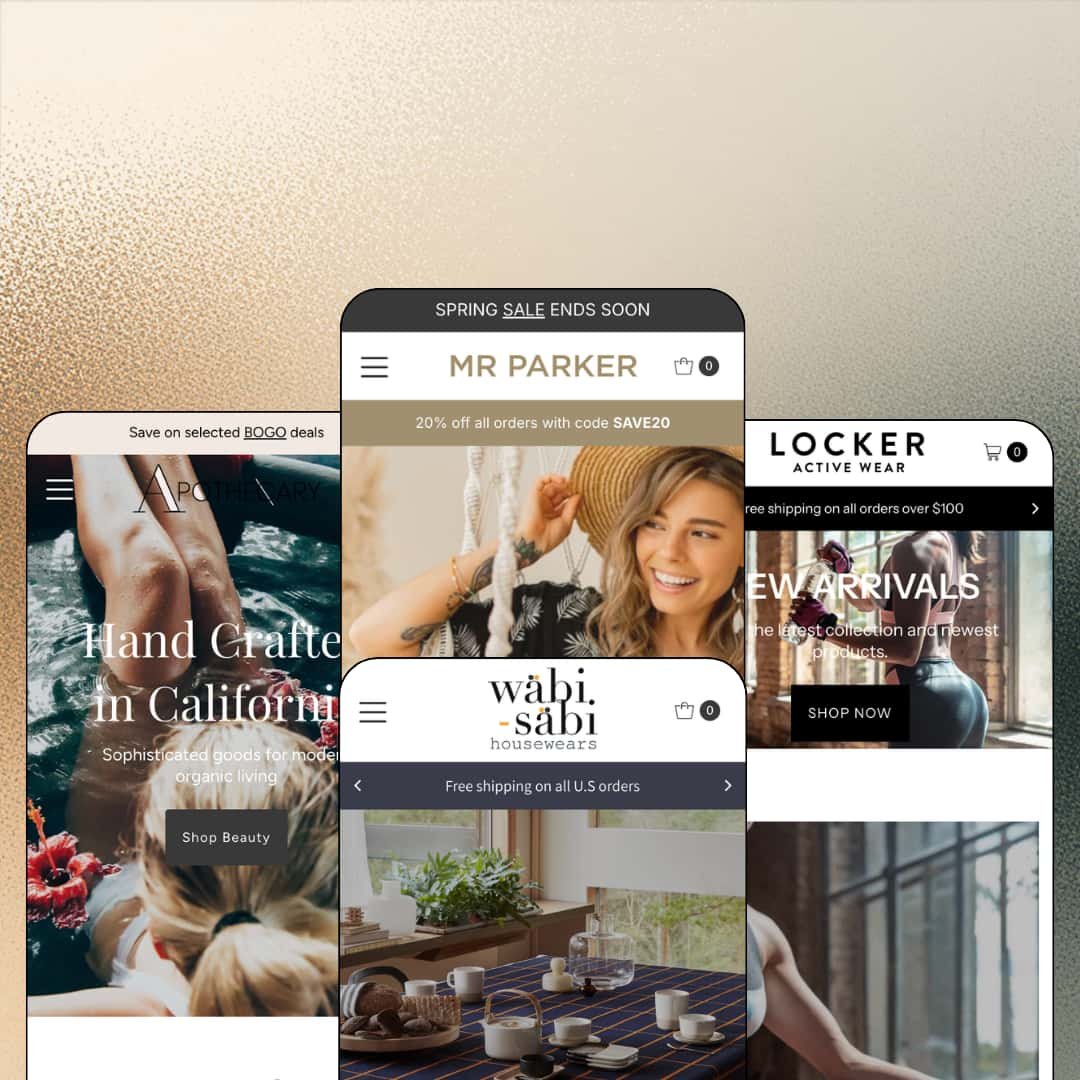
A theme that first shipped in 2017 has no business landing a major release in 2026, yet Mr Parker's version 12.0.0 arrived this June with color schemes rolled out across every global section. We Are Underground sells it for $160 with four presets spanning womenswear, activewear, bath and body, and home goods. Under the surface it runs Online Store 2.0 architecture, JSON templates and all. For founders shopping the lower end of the paid tier, the real question is how much of that nine-year head start survives in daily use.
Four storefront directions for one license
How many positioning experiments does $160 buy here? Four. Womenswear, activewear, bath and body, and home goods each ship as a distinct preset under a single purchase, so a founder can trial-fit an entire visual direction, decide it's wrong, and pivot to another without spending again. For single-brand shops in the 11–100 SKU range still testing which presentation converts, that's an unusually cheap way to be wrong twice.
Selling starts before the product page
Interest converts on the spot. A featured-product homepage section sells in place with live variant selection, a low-stock line, and an add-to-cart button that never asks the shopper to leave the page they arrived on. Pair that with quick buy and quick view across catalog grids and the theme consistently shortens the distance between noticing and owning. Impulse-friendly gift and consumables merchants with compact, giftable catalogs get the most from this wiring.
Filtering that doesn't bill monthly
Product filtering, swatch filters, and collection page navigation are native. One merchant review on the listing, posted in April 2025, specifically credits the pre-built filtering and taxonomy with sparing them a third-party app install, which is about as direct as buyer validation gets. For home-and-lifestyle sellers spreading 50–100 SKUs across many sub-categories, discovery tooling arriving in the box keeps the monthly app bill where it belongs. Nowhere.
A promo kit with real reach
Campaign messaging travels here. The announcement bar rotates multiple messages, marquee ticker sections can sit mid-homepage or directly on the product template, and promo popups, promo tiles, and in-menu promos round out one coordinated promotion surface that follows the shopper from landing page to buy box. Sale-driven apparel and beauty brands running frequent code-based campaigns will find most of their toolkit pre-installed.
The default voice sells discounts, not brands
Every demo leads with promotion. The womenswear demo alone stacks a rotating discount code, a free-shipping threshold, and a save-up-to-60% banner above its hero, and the pattern repeats across the family with coupon codes staged into headers and footers alike. Luxury-leaning brands selling considered purchases will spend their first setup days stripping urgency out of a theme that assumes urgency everywhere.
Stars without a system
The five-star carousels are typed, not earned. Review sections render star rows and glowing quotes attributed to first names and home states, yet no review engine exists anywhere in the theme, so every one of those stars is a display setting a merchant fills in by hand. Repeat-purchase beauty and consumables brands that live on accumulated customer reviews should budget for a review app from day one.
The buy box travels light
Nothing pins the purchase button. The feature set includes quick buy and stock counters but no sticky add-to-cart, and product templates encourage long pages, with tabs, promotional banners, and recommendation content stacked beneath the buy box until the button sits several screens behind the shopper. Mobile-first apparel and activewear merchants courting impulse purchases will feel that gap in their conversion numbers.
What it takes to launch
Expect two to three days before launch: a full copy pass across hero captions, testimonial sections, and announcement messaging; brand-asset and naming alignment in every preset; a review of the five bundled interface locales; and re-staging of demo navigation and product content that currently serves the developer's showcase rather than a real catalog.
-
What works in this preset
You get three complete campaigns before you ever scroll. The hero slideshow cycles a resort launch, an autumn edit, and a mid-season sale, and each slide carries its own headline, subline, and destination, which makes the demo behave like a store with a marketing calendar rather than a single frozen splash image. That's rare at this price.
Discovery gets a proper three-column dropdown. The Shop menu splits into Shop by type, Shop by collection, and Store info, each column with its own heading and link stack, so a boutique with a dozen categories can stage department-store navigation without touching code. Further down the page, the Spotlight On section gives three products an image, a one-line caption, and a Buy Now link apiece, letting editorial moments do quiet merchandising work.
The product page earns trust in layers. On a $140 dress I found a breadcrumb trail up top, size buttons with an "Only 1 left!" line beneath them, a payment-icon strip under the add-to-cart button, and a tab trio for details, delivery, and returns, followed by a collection browser showing live item counts. Nothing flashy. Each element answers a pre-purchase question in the order a shopper would ask it.
-
What works in this preset
The fastest route to cart in the whole family lives here. Legging cards expose the full size run, 0 through 8, as tappable chips, and each chip links straight to that exact variant, so a returning customer who knows her size skips the browsing step entirely. I clicked a chip and landed with the picker already set. No detours.
Cross-border staging is live, not theoretical. The announcement row carries a working language menu offering English, German, Spanish, French, and Brazilian Portuguese, which turns the theme's bundled interface translations from a features-list bullet into something you can actually toggle and read.
The Inspired Looks section pairs one campaign photo with four buyable products listed right beside it, so lifestyle photography gets a direct sell path instead of sitting there as decoration. Campaign image in, purchases out.
Where it stumbles
Activewear lives and dies on fit, and this demo sells a five-size legging with no measurements anywhere in reach. The size chart exists in the theme's merchandising set; merchants picking Arena will need to configure and stage it themselves before the preset's fit story holds up.
-
What works in this preset
Sixteen-dollar candles don't need a deliberation phase, and this demo knows it. Single-variant products carry a one-tap Add to Cart directly on the grid card, collapsing the entire purchase into one gesture, which is exactly the right calibration for low-cost consumables where a product page visit is friction rather than reassurance. It just works.
The header does double duty. Utility links for Contact, Blog, and Features sit inside the announcement bar itself, and an As-seen-in row further down lines up six press logos, handing a small apothecary brand two credibility layers that cost nothing to maintain once configured.
Where it stumbles
I went looking for a subscribe option and never found one. A homepage section titled Subscriptions sits over products that check out as strictly one-time purchases; the replenishment story this preset gestures at needs a subscription app installed before any of it becomes real.
-
What works in this preset
Navigation goes deepest in this demo. Three mega menu columns for Home Decor, Kitchen & Dining, and Bed & Bath deeplink into pre-scoped sub-collections like Vases or Towels, so one click lands a shopper on a filtered shelf instead of a generic catalog page — the difference between browsing and hunting.
Shop the Look here shows genuinely smart card logic. Single-variant items get an instant Add to Cart while multi-variant plates switch to a Select Option control, an automatic per-item calibration that keeps casual homepage browsers from hitting a dead end mid-purchase.
The collection grid reports its own inventory. Tiles display live item counts, from Kitchen & Dining at 44 items down to Blankets at 2, which sets honest expectations before a click and quietly signals where the catalog's real depth sits.
Nine years of maintenance, still compounding
Version 12.0.0 landed in June 2026 and brought color schemes to every global section, on a codebase that first shipped in 2017. A theme this old could easily have been left to coast. Instead it keeps absorbing platform changes, and the four demos behave with a consistency that only comes from years of the same team sanding the same edges.
One grammar, four skins
Read all four demos back to back and the same section vocabulary appears in different arrangements: hero, editorial tile, product row, ticker, newsletter. That sameness is an asset. A merchant who learns one preset has learned them all, and a later pivot from candles to apparel becomes a restyle rather than a rebuild.
The listing points where the presets don't go
Shopify files Mr Parker under Jewelry & Accessories and Food & Drink, yet none of the four presets stages either vertical. A jeweler or food merchant buys on faith and adapts an adjacent demo, with no reference implementation showing how the theme handles their category's specific staging problems.
Prose is the only data layer
Across every preset, product information lives in rich-text tabs and typed descriptions. There is no metafield-driven spec, ingredient, or dimension table pattern anywhere in the demos, which matters precisely for the data-heavy categories the listing names, where shoppers compare on attributes rather than adjectives.
Rating
★ 7.0/10
-
Quick buy on cards, a homepage selling module, native filtering, and a five-locale translation set is a dense package at $160.
6
-
Merchant reviews on the listing describe the settings as approachable for non-developers, and the shared section grammar means skills carry across all four presets.
8
-
Slide-out cart, tap-sized quick-buy targets, and compact card layouts suit small screens; the missing sticky add-to-cart leaves the mobile buy path one tool short.
7
-
Pages run lean on stills rather than heavy media, with restrained section counts and lazy-loaded imagery keeping homepage weight sensible.
8
-
The v12 color-scheme system now reaches every global section and the four presets prove real visual range; deeper layout invention stays bounded by the Online Store 2.0 generation.
6
Frequently Asked Questions
-
Version 12.0.0 extended color schemes to all global sections, added new sections, and shipped a bug-fix pass, according to the release notes on the listing.
-
English, French, Italian, German, and Spanish ship as translated interface strings; product content itself still needs translating on the store side.
-
Yes. In-store pickups are part of the cart and checkout feature set, and one demo advertises selected-item pickup in its header messaging.
-
Shopify's filing says Some (11–100+), and the demo catalogs run at boutique scale with discovery leaning on curated menus and collection depth.
-
No. Mr Parker is Online Store 2.0 with JSON templates; it doesn't use the newer Theme Blocks nesting introduced with the Horizon era.
-
Neither is native. Both require apps, so plan your stack accordingly if replenishment purchasing or saved-items features matter to your model.
This review is based on hands-on testing of the publicly available preset demos of the Mr Parker Shopify theme as of August 2026. Theme features, preset availability, and performance can change with subsequent updates from the theme developer.