
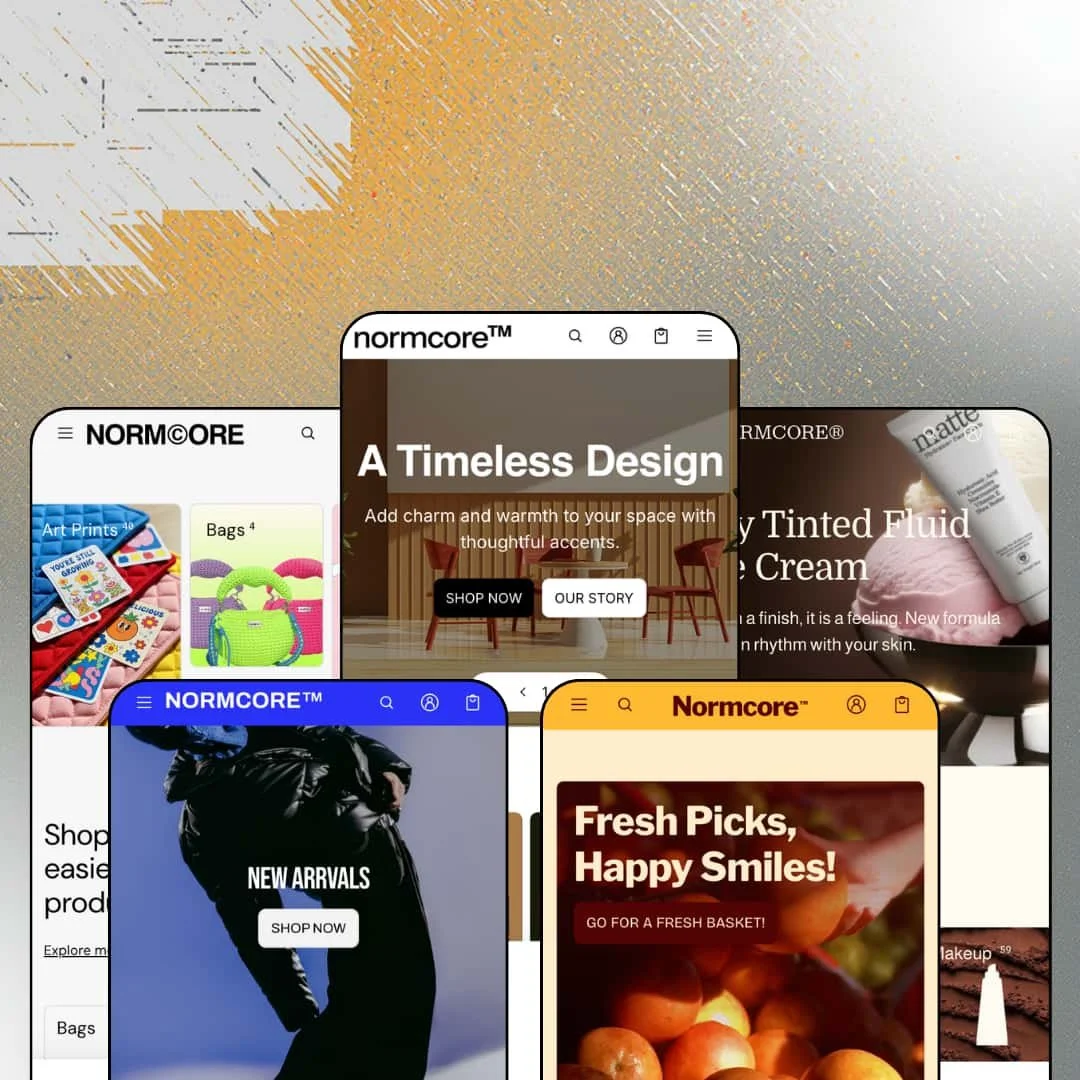
Most furniture themes sell a mood. Normcore sells order mechanics: bulk-order tables, threshold bundles, and a compare tray wired into every product card. eComX built it on Online Store 2.0 and stretched one department-store grammar across five demos that run from sofas to skincare to a full grocery aisle. At $320, the question is whether all that machinery earns premium money.
A wholesale order matrix built into a product template
The wholesale template turns a product into an order sheet. Rows total themselves. Every variant renders as its own line with SKU, barcode, and a quantity stepper, while a running subtotal follows the buyer toward a single add-to-cart, so a boutique reordering twelve size-and-color combinations places the entire restock in one pass. For brands running retail and wholesale from the same storefront, that template replaces a separate trade portal with a product page. Wholesale-enabled apparel, furniture, and CPG sellers with repeat trade buyers get the clearest payoff.
Compare is native, and it lives on every card
Three slots, one tray. Each collection card carries an add-to-compare checkbox feeding a side-by-side of price, vendor, product type, description, and product attributes, so a buyer weighing two armchairs and a stool never juggles browser tabs. Spec-by-spec reading is how deliberate purchases actually get decided. Furniture and electronics-style catalogs in the 100-to-500-SKU range serving considered-purchase, attribute-reading buyers close a gap that otherwise ends in a notepad.
How many ways can one theme say "buy more"?
I counted at least three bundle dialects across the demos. Merchants can set a pick-any threshold with their own item count and discount, stage a fixed curated set behind a single add-bundle button, or run a multi-product set block where every slot keeps a live variant picker, and each mode computes its total inline. That range covers impulse baskets and planned sets alike. Grocery, beauty, and CPG stores with replenishment buying patterns and sub-$50 price points get their basket-size levers without leaving the theme editor.
Gallery layout is a template pick, not a rebuild
Six product-page media layouts ship ready to assign: left, right, or bottom thumbnails, one-column and two-column galleries, and a collage. A hero product with campaign photography can run the collage while workhorse SKUs keep tidy thumbnails, decided per product from the template dropdown rather than through a developer ticket. Presentation stops being a project. Multi-line operators and agencies juggling mixed photography, flat-lays for accessories and editorial shoots for hero items, will feel that flexibility weekly.
No review layer, anywhere
I went looking for a single star and never found one. Across five demos the social proof is handwritten quote sections with names and job titles, product pages surface SKU, barcode, and performance scores but no rating, no count, and no review module, and the published feature list offers no reviews entry to fill the hole. For a $2,141 sofa, that's thin ice. Furniture and beauty merchants selling considered purchases at three- and four-figure price points will be installing and integrating a review app before the store can argue its own quality.
The B2B headline sits partly behind the Plus fence
Two load-bearing features wear badges. Quantity pricing and combined listings are both flagged Shopify Plus on the feature list, meaning the tiered wholesale pricing implied by the "Bulk Buy & B2B/B2C Hybrid" positioning stays out of reach on standard plans even though the order matrix and wholesale templates work everywhere. Read the badges before you budget. Mid-market wholesale-enabled brands on non-Plus plans should price the distance between the demo's promise and their plan's reality.
Discounting is the factory voice
Every demo shouts percentages. Countdown rails, flash-sale sections, threshold nags, ticker urgency, and per-card discount badges saturate all five homepages, so the default rhetoric assumes a promotion is always running somewhere in the store. Luxury-positioned single-brand shops with evergreen, full-price sales patterns will spend their first setup days removing sales pressure rather than adding it, and the surviving sections still carry a deal-hungry accent.
What it takes to launch
Expect a multi-day pass across product-page tab copy, shipping and FAQ text, and testimonial sections, plus metafield population for the spec tables and performance scores, menu-taxonomy and collection re-staging behind the deep navigation, catalog price hygiene, and bundle and promo configuration before any preset reads launch-ready.
-
What works in this preset
Six room departments, one menu bar. The flagship furniture demo organizes its catalog into "Explore the rooms" navigation, so a shopper hunting a home-office chair enters through the space they're furnishing instead of guessing at a category tree, and the Offers flyout goes further by printing actual deal terms as menu items. "Table Lamps: Deal 50% off" is a navigation link here. That's merchandising inside the chrome.
The Complete Living Room module made me sit up. Four products share one purchase block, each with its own live variant picker, so a buyer can set the sofa to Ivory and the coffee table to Dark Walnut before committing to the 25% set discount, and the block totals everything in place. Set-selling for considered purchases rarely gets staged this cleanly.
There's also quiet inventory theater. A "Last stocks" rail surfaces thin quantities, and a before/after slider makes the styling argument without a word of copy. Both are small. Both do work a hero image can't.
Where it stumbles
The pitch says large catalogs; the stage says boutique. Normcore's listing leads with navigation built for 500-plus-SKU furniture stores, yet the flagship demo counts roughly 174 items, which means the family's deepest discovery machinery is demonstrated at a scale where a patient shopper could nearly browse the whole store by hand. Merchants with genuinely large catalogs are asked to extrapolate.
-
What works in this preset
The product page is the show here. I clicked into a hoodie and found a twenty-image gallery with video, an augmented-reality "View in your space" launcher, color swatches, and a stock line stating the exact unit count instead of a vague low-stock nudge. "In stock: 92 products" reads like a warehouse talking. Below the buy box, metafield-driven performance bars score the garment on durability and ease of care, while a per-product FAQ and an ask-a-question form close the loop without leaving the page.
Browsing a collection feels equally deliberate. The outerwear grid pairs facet filters carrying live counts for brand, color, size, product type, and stock with nine sort orders, and every card shows variant swatches plus a hover-swap second image, so narrowing 24 jackets to the two worth opening takes seconds.
Menus sell as hard as pages. Image tiles preview each category, a brand column splits the catalog by label, and a promo banner rides inside the flyout itself.
-
What works in this preset
Seven maker brands share one storefront without elbowing each other. A vendor spotlight section gives each label a logo, a one-line identity, and a collection link, the mega menu repeats that brand rail with thumbnails, and shop-the-look blocks pair lifestyle photos with the exact items in them, which turns a catalog of $3 keychains and postcards into something that browses like a small gallery.
Urgency gets a typographic voice too. A scrolling ticker repeats the no-restock warning across the page while emoji-labeled collection tabs separate best sellers from doomed stock. Loud, but coherent for drop-culture goods.
-
What works in this preset
You shop this demo by problem, not product. The skincare menu splits into By Skin Concern, By Ingredients, and By Routine, the hair flyout adds concern and ingredient rails of its own, and that taxonomy quietly does the guiding work a beauty clerk normally would. It's the sharpest navigation thinking in the family.
Bundles here respect variants. Inside the buy-three block, single-variant items add directly while a perfume offered in 100ml and 500ml opens a picker first, so threshold discounts survive contact with real product data instead of breaking on the first multi-option SKU. The demo also runs VND pricing behind its country selector, staging the storefront for a non-US home market rather than defaulting to dollars.
-
What works in this preset
Groceries are chaos, and this demo leans into it. Six department panels open with photography, sub-collection lists, and promo tiles inside the menu itself, so moving through meat, produce, dairy, bakery, pantry, and kitchenware feels closer to walking aisles than clicking links.
Content earns its keep. A dedicated recipes blog publishes full ingredient lists with step-by-step methods, and a hover-hotspot section maps a plated dish to the purchasable ingredients behind it, converting recipe curiosity into cart intent in a single gesture. One hover, one basket.
Then there's the Sauce Shelf. Three sauces, one STOCK THE SHELF button, a running set total. Curated sets don't need a builder when the merchant already knows the answer.
Where it stumbles
Beer flows with no gate. The demo stages an ABV-labeled range of stout, ale, pilsner, and multipacks, yet nothing in the shopping path asks for a birth date, and age verification appears nowhere on the theme's published feature list either. Grocers carrying alcohol will be shopping for compliance tooling before launch day.
One retail grammar, five economies
The same skeleton sells a $4,282 sofa set and a $2 postcard without changing posture. Read all five demos in a row and the department-store DNA shows: departments up top, transactional modules in the middle, editorial at the bottom. That vertical-agnosticism is the real product, and the furniture positioning is simply its loudest costume.
Merchandising by arithmetic
Persuasion here runs on numbers before words. Counts, thresholds, set totals, and unit inventory carry the argument across every demo, while copy mostly decorates the math. Stores whose economics reward basket size will recognize a kindred spirit; stores built on narrative will be working against the current.
The demos document themselves
Every preset ships a Theme Features menu linking live examples of each template and module. It's an unusual bit of transparency. A buyer can audit the pre-order flow or a specific gallery layout on a real page before spending a dollar, which shortens evaluation in a way screenshots never do.
The listing argues with the presets
The sales pitch centers large furniture catalogs, yet the store listing's own tags name jewelry, food and drink, and an 11-to-100-plus catalog band, and four of the five demos aren't furniture at all. None of that is disqualifying. It does mean buyers translate the marketing themselves before knowing whether their vertical is a first-class citizen or a costume change.
Depth is populated, not shipped
The pieces that make Normcore feel premium, the concern taxonomies, spec tables, performance scores, and department menus, are containers. Their value arrives only after a merchant feeds them structured data, and a store that skips that work wears a department store's chrome over an empty stockroom. Budget the data entry like a feature, because here it is one.
★ 8.0/10
Rating
-
Order matrices, native compare, three bundle modes, and pre-order and wholesale templates ship in the box; beyond reviews, little of the commerce layer waits on apps.
9
-
The section variety is generous but data-hungry; menus, metafields, and bundle rules all want deliberate configuration before they earn their keep.
7
-
The collection toolbar sets mobile column counts separately from desktop, and product pages keep a sticky add-to-cart within thumb reach.
8
-
Homepages stack tickers, countdowns, and carousels generously, so restraint during setup matters; product pages run leaner than the landing experiences.
7
-
Five convincingly different verticals come out of one section library, and gallery presentation swaps at the template level per product.
9
Frequently Asked Questions
-
A dedicated pre-order product template is staged in every demo's feature menu, assignable per product from the template picker.
-
Yes. The collection toolbar exposes two to six columns on desktop and one or two on mobile as a shopper-facing control.
-
The theme's interface strings ship in English, French, Italian, German, and Spanish, with right-to-left text support; translating product content remains the merchant's own work.
-
The apparel demo's hoodie gallery includes a "View in your space" launcher alongside video slots, so spatial previews sit inside the standard gallery rather than a separate widget.
-
The grocery demo runs six department panels holding roughly thirty linked sub-collections, with photography and promo tiles living inside the flyout.
-
A category dropdown sits beside the query field and scopes results before you type, and each demo fills it with its own vocabulary: furniture types in one, skincare categories in another.
This review is based on hands-on testing of the publicly available preset demos of the Normcore Shopify theme as of August 2026. Theme features, preset availability, and performance can change with subsequent updates from the theme developer.