
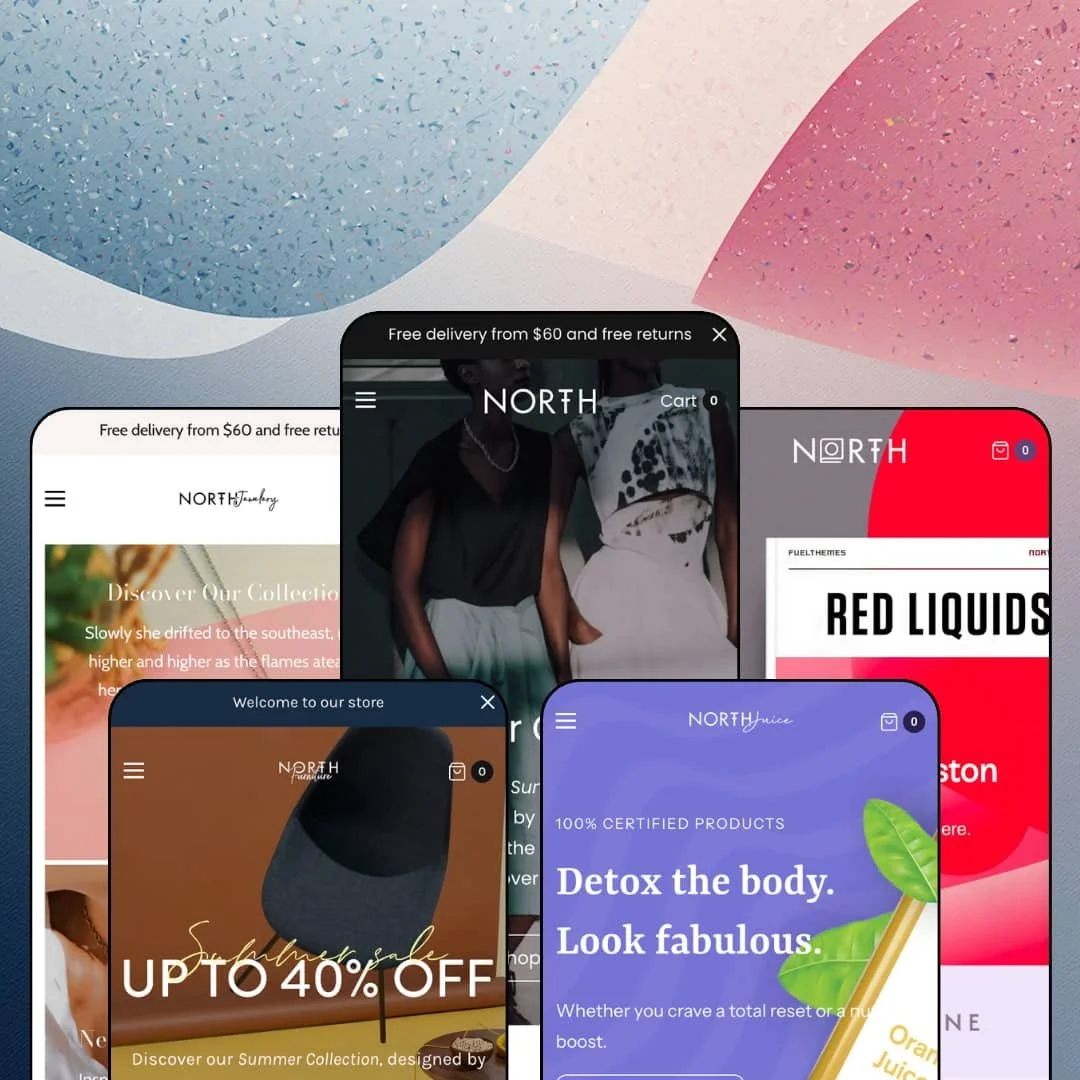
Most five-preset themes stay inside one industry and repaint it four times. North runs a womenswear boutique, a furniture showroom, a jewelry line, a cold-pressed juice brand, and a bookshop off the same Online Store 2.0 section library, and the demos read like five separate design briefs rather than one template in costume. That range is the pitch, and it's also the question I kept coming back to: when a $280 theme stretches this wide, does the buy box underneath still do the specific work each vertical needs? Five homepages, five product pages, and one collection page later, the answer is mostly yes, with two gaps that matter depending on what you sell.
The homepage sells a product without leaving the homepage
Juice stages a full buy box mid-page: the Vitality Shot with Turmeric at $48, a five-image gallery, the ingredient list, a Color picker, and an Add to cart button, all inside a homepage section rather than on a product page. One section, one sale. That's a featured-product section with live variant selection, not a card linking out, and for a launch, a hero SKU, or a bundle push it removes a click and a page load from the path to cart. Single-hero-product DTC brands and small-catalog food or beauty stores with a signature item are the audience; a 500-SKU catalog gains little from it.
Five product page layouts, and the buy box is only the start
The Theme Store lists five product page layouts, and the demos show the pattern running under all of them: a gallery, a buy box, then a stack of tabs or accordions (Shipping & Returns, Materials, and Product Care on the fashion demo; Product Details and About Author on the bookshop), then optional editorial rows below, so the product page can run as a landing page when a merchant wants it to. The order is the merchant's call. It matters for considered purchases: furniture, fragrance, hardcover gift editions, anything a shopper reads before adding. Mid-market brands with under 100 SKUs and long-form product copy will use the extra rows; a fast-fashion drop model with 40-word descriptions won't need them.
A mega menu that carries promotion, not just links
Pagefold's Books menu opens into two labeled columns, Age and Type, with four links each, plus an image block with a promotion heading beside them. That's the in-menu promo the Theme Store lists, rendered as a third column inside the dropdown. The menu becomes a merchandising surface. A seasonal edit, a bestseller, or a gift-guide tile lives where the shopper is already looking, which means the highest-traffic element on the page is doing sales work instead of only wayfinding. Multi-category catalogs with 100+ SKUs and a seasonal sales pattern get the most out of it; a five-product store won't open the menu often enough to notice.
What happens between "add to cart" and the doorstep?
North's product page answers that with a "Pickup availability" block under the size picker, and the feature list rounds it out with pre-order, a stock counter, gift wrapping, and cart notes, all native to the theme rather than app hooks. That's a fulfilment state set. It lets a merchant tell a shopper whether an item is in stock, on backorder, collectable in store, or giftable before checkout, which is the difference between a storefront and a catalog page. Single-location retailers with a physical shop, and gift-heavy categories like jewelry or books, are the ones who'll wire up every piece of it.
The social proof is display, not evidence
Three demos run a testimonial section with quotes and a logo strip, and two of them still show "Review author" as the byline. There is no rating engine anywhere in the theme. No stars on cards, no review count on any of the five product pages, no review widgets at all, so any brand that converts on reviews (beauty, supplements, food) is buying a review app on day one and styling it to match. It's a mood board, not a track record. For a replenishment-driven DTC brand with 20 to 60 SKUs, that app is the first line item after the theme.
Product data lives in prose, not in tables
Materials and Product Care are rich-text tabs. The juice nutrition strip is a single formatted line, and none of the five product pages I opened carries a spec table, a comparison section, or a metafield-driven attribute block that would let a furniture store list dimensions and finishes, or an audio seller list drivers and battery life, in a structured way. Greige stages headphones and a side table in the same grid, and both product pages fall back to paragraph descriptions. Considered-purchase categories with 100+ SKUs (furniture, audio, appliances) will feel this; a boutique with 30 dresses won't.
Online Store 2.0 at a 2026 price
Compare it to Dawn, Shopify's free baseline: Dawn is also Online Store 2.0, and it ships the same JSON templates, section groups, and two-level block nesting that North runs on. Same generation, different wardrobe. What $280 buys is the section library, five preset configurations, and the merchandising features above, not a newer architecture, and a merchant who wants Theme Blocks depth or AI block generation is looking at a different generation entirely. Agencies building for clients on a three-year horizon should weigh that; a single-brand owner launching this quarter probably shouldn't care.
The product page never follows you down
Juice and Pagefold both run long product pages: editorial band, taste scale, nutrition strip, quotes, logo strip, all below the buy box. On neither did a sticky add-to-cart bar appear, and the feature list doesn't claim one. For a page built to be scrolled, that means the button is a full swipe back up on mobile once the shopper is three sections deep, and the theme offers nothing that keeps it in reach. Food and beauty brands with story-led product pages and impulse-priced items under $70 are exactly the audience that loses a sale that way.
What it takes to launch
Expect a multi-day copy pass across hero slides, benefit rows, testimonial bylines, product tabs, sizing tables, and About-page narrative before launch, plus a variant re-staging job and menu re-wiring for whichever vertical you pick.
-
What works in this preset
The first thing you meet is a promise, not a product. A slim announcement bar pins "Free delivery from $60 and free returns" above the nav, and three icon columns under the hero repeat the offer in longer form: free delivery, 30-day returns, a five-year international warranty. It's a reassurance-first homepage. For a dress boutique selling on trust rather than hype, that ordering makes sense, and the copy slots are plain text blocks a merchant can rewrite in ten minutes without touching a template file.
Navigation goes three levels deep from a left-aligned menu. Shop opens to named collections, Clothing nests Men and Women beneath it, and the same tree collapses into the mobile drawer without losing a tier. I clicked through to the collection list expecting a dead end and found the full hierarchy intact. Alongside it sits a language switcher for English, German, and French, which is the theme rendering the selector, not inventing the translation.
"Flash Sale: 50-70% Accessories" sits as a promo tile between the collection cards and the product grid, and it's the one loud note on an otherwise quiet page. The cards carry vendor names above the title, so Stelen and Herschel read as brands rather than anonymous SKUs. Multi-variant items get a "Select options" trigger, and a single "Out of stock" label shows the badge vocabulary is live. Quiet, but complete.
Where it stumbles
The lead position in Recent Arrivals belongs to a sold-out dress. It's the first product a visitor sees below the fold, and it can't be bought. For a preset that positions itself as a new-season boutique, opening the arrivals row with an unbuyable item works against the whole pitch, and since a featured grid follows collection order, keeping that row shoppable is a curation job the merchant owns.
-
What works in this preset
A side table, a Taschen photo book, and a pair of B&O headphones share one Featured Products row. That mix is deliberate. Greige is staged as a lifestyle concept store rather than a furniture-only showroom, with a collection band that runs Accessories, Bath, Beauty, and Classic Luxury Furniture side by side, and the neutral card grammar (vendor line, title, price, one trigger) holds that range together without the page tipping into marketplace territory.
Numbered hotspots sit over the "Premium Life Products" lifestyle image. Points 1, 2, and 3 are anchored to objects in the photo, and each maps to a shoppable product beneath, which is the image-hotspot section doing what it's built for: turning a styled room into a product entry point. I noticed this is the only demo in the family that stages it, so treat Greige as the reference for how the section behaves rather than as the only preset that has it.
Sale pricing here reads at a glance. Falcon Enamelware shows the original price struck through beside the reduced one, an "On Sale" badge on the card, and, because it's a single-variant product, a direct "Add to cart" instead of an options trigger. The card knows the difference between a one-click buy and a decision, which is the distinction that keeps a home-goods grid from routing every visitor through a modal. Small detail, real friction saved.
Where it stumbles
The product page stages a side table with XS, M, and XL as its variant axis. Furniture sells on finish, dimensions, and material, and none of those appear as options anywhere in the demo, so a home-goods merchant gets no preview of how the picker handles the choices that matter for the category. The buy box is fine. The staging beneath it belongs to a different vertical.
-
What works in this preset
Primrose centers the logo, splits the nav around it, and the whole page slows down to match. Hero, a short "Discover Our Collection" intro, two collection cards with a line of copy each, then Recent Arrivals. Nothing shouts. The four-icon trust row moves to the bottom of the page and adds a "Gift Package" column that none of the other demos carry, which is the right instinct for a category built on gifting.
"Designed in San Francisco. Handcrafted responsibly in Paris." That one-line provenance banner sits between Best Sellers and a pair of split promo tiles, and it's the section I'd borrow for any maker brand: image on one side, a single statement on the other, one button. Below it a full-width text band with a Learn More link into the About page carries the brand story without a photo at all. Primrose proves the section library can do quiet editorial as well as it does grid.
Two product rows, two jobs. Recent Arrivals and Best Sellers use the same card component with different collection feeds, and the vendor line (Trisha, Loren, Stewart, Rachel Comey) turns a four-item row into a multi-designer edit. Price points from $48 to $290 share one grid without the layout favoring either end, which is what a curated jewelry store with a dozen makers needs from a homepage.
Where it stumbles
Jewelry sells on ring size, chain length, and metal, and none of those axes are staged. The one necklace I opened offered a size picker running XS to XL, which is apparel sizing dropped onto a pendant, so a jeweler evaluating this preset never sees how the swatch or dropdown picker handles the options a real catalog carries. It's a vertical-fit gap, not a theme limit.
-
What works in this preset
Six benefit icons do the selling before any product appears. Sugar Friendly, Probiotics, 100% Vegan, Gluten-free, 18 Cals, Zero Waste, each a small icon with a label in a single row under the hero. It's the fastest brand brief in the family. For a cleanse brand whose buyers scan for dietary flags before they read a description, putting that row above "Meet Our Products" is the correct order, and every juice card below it goes straight to "Add to cart" because each flavor is a single-variant product.
The product page carries a taste scale. Sweet, Spicy, and Veggies each get a row of filled bars (six, two, and ten), sitting under a "Recapture your energy" editorial band, and a Nutrition Facts strip lists calories, fat, sodium, carbs, fiber, sugars, and protein in one line above the Ingredients accordion. That's food-and-drink staging that reads like a label. I went looking for the same treatment on the other four demos and didn't find it, which tells you these are general-purpose sections dressed for juice, not juice-only components.
Testimonials are framed as "In the Press" with three quotes and a logo strip beneath, and the footer drops to three links, a social row, and nine payment icons. Juice is the leanest demo of the five. A small-catalog DTC brand with a handful of flavors doesn't need a mega menu, and the demo doesn't pretend it does: the header runs Home, Shop, News, About, Contact and stops.
Where it stumbles
Every juice is a single-variant product with a Color option set to "Blue" or "Black". For a cleanse brand the natural axes are pack size and cleanse length, and neither is staged, so the variant picker never gets exercised in the vertical it's meant to demonstrate. The homepage also pitches a 30-day program and a free trial kit, which is a replenishment story a merchant will need to back with a subscription app; the demo never previews what that looks like.
-
What works in this preset
Three hero slides, three books, three "Add to cart" buttons with the price baked into the label: $28.50, $12.20, $18.00. Pagefold opens as a shop window. The slide button copy is editable text, so the price-in-button trick is a merchant choice rather than a live price feed, and the pattern itself (hero slide as buy prompt) is sound for a bookshop moving front-list titles where the cover is the whole argument.
The collection page opens with a looping video banner. A "FOR READERS" text block sits beside it, then the grid, then a filter drawer with Availability counts (12 in stock, 0 out), a price range with min and max fields, and a Brand facet, plus nine sort orders from Featured to Date, new to old. Ten products per page with numbered pagination. For a 12-title demo that's more machinery than needed, which is the point: the discovery layer is built for a catalog this store hasn't grown into yet.
Below the grid the homepage keeps going. Four feature icons (Recycled Papers, Ship Worldwide, Add Gift Wrap, Personalized Books), a "Night Light" featured title with a long excerpt and its own buy button, three literary quotes styled as testimonials, and a Journal block. It's the most editorial homepage of the five. A bookshop lives on recommendations, and this preset gives the recommendation copy room to breathe rather than cramming it into a card.
Where it stumbles
No product in the demo has a variant. Hardcover versus paperback, signed versus standard, print versus e-book: those are the axes a bookshop sells on, and the twelve titles all ship as single "Add to cart" products with one image each, so the format picker that would matter most here is never shown.
One library, five distinct voices
Read all five demos back to back and the section list barely changes: hero or slideshow, benefit icons, collection cards, product rows, an editorial band, testimonials, blog, newsletter. What changes is the header, the ordering, and the copy density, and that's enough to make the fashion demo feel like a boutique and the bookshop feel like a bookshop. A merchant who pivots categories later keeps the same tooling.
The blog isn't an afterthought
Every one of the five homepages carries a three-post blog block with date, excerpt, and image, and Pagefold promotes it to "Journal" in the main nav. Content-led brands get an editorial surface that's already part of the homepage rhythm rather than a page tucked behind a footer link.
Header patterns that differ for real
Left-aligned nav with a promo bar, centered logo with split nav, and a column mega menu are three separate header configurations, and each demo commits to one. That's a choice a merchant makes once; here all three are visible before you buy.
Curated discovery for catalogs that stay small
Menus top out at three levels, the filter drawer renders whatever facets the store configures and the demos never stage more than three, and every homepage shows between 10 and 20 products. The theme is comfortable when a human has arranged the shelves. The Theme Store tags it "Some (11-100+)" for catalog size, and the upper edge of that range is where hand-curation starts to cost real hours each week.
A promotional default voice
Four of five demos open with a free-shipping threshold, and the fashion, furniture, and juice pages each stage a percentage-off panel somewhere on the homepage. Change the copy and the tone changes, but the default rhythm assumes discounting is part of the story. Luxury and heritage positioning will need to remove sections, not just rewrite them.
Full-bleed photography does the heavy lifting
Split promo tiles, hotspot lifestyle shots, hero slides, and a video collection banner: the demos are built on campaign-grade imagery. A brand launching with product-on-white photography will find several sections looking empty rather than restrained.
★ 7.0/10
Rating
-
Homepage buy module, image hotspots, in-menu promos, and a native pickup, pre-order, stock-counter set cover a lot of ground. No review engine and no sticky add-to-cart hold it back.
7
-
Sections are copy-slot driven and the five demos show the same handful of blocks reordered, so setup is mostly text and images. Five presets plus five product layouts add decisions before the first edit.
7
-
The three-tier menu survives the mobile drawer intact and cards stay readable at one column. Long product pages without a sticky bar make the buy button a scroll away.
7
-
Homepages run lean with restrained section counts and lazy-loaded imagery. The animation library and a video collection banner are the weight to watch.
7
-
Three header patterns, five product page layouts, alternating collection grids, and five verticals staged from one library. Color and typography stay within a neutral, editorial register.
7
Frequently Asked Questions
-
The theme's own strings come in English, French, Italian, German, and Spanish, and the fashion demo shows a live switcher for English, German, and French. Your product titles and descriptions are translated through Shopify Markets, not the theme.
-
Version 11.0.0 from August 2026 wires in Shopify Standard Events for analytics and pixel apps, upgrades the GSAP animation library, fixes the price filter for comma-decimal currencies, and improves keyboard access in drawers and side panels.
-
As a slide-out drawer with a "Return To Shop" empty state, and the feature list adds cart notes and gift wrapping inside it. A full cart page remains the fallback.
-
It's on the feature list, but none of the five demos stages it. Beauty and home-improvement merchants will want to test it in the editor before committing.
-
Yes, RTL is listed as a theme capability, which matters for Arabic and Hebrew storefronts.
-
Between one and five per product. The juice homepage buy module runs five, the bookshop product page runs one, so the gallery scales down without leaving empty thumbnail slots.
This review is based on hands-on testing of the publicly available preset demos of the North Shopify theme as of August 2026. Theme features, preset availability, and performance can change with subsequent updates from the theme developer.