
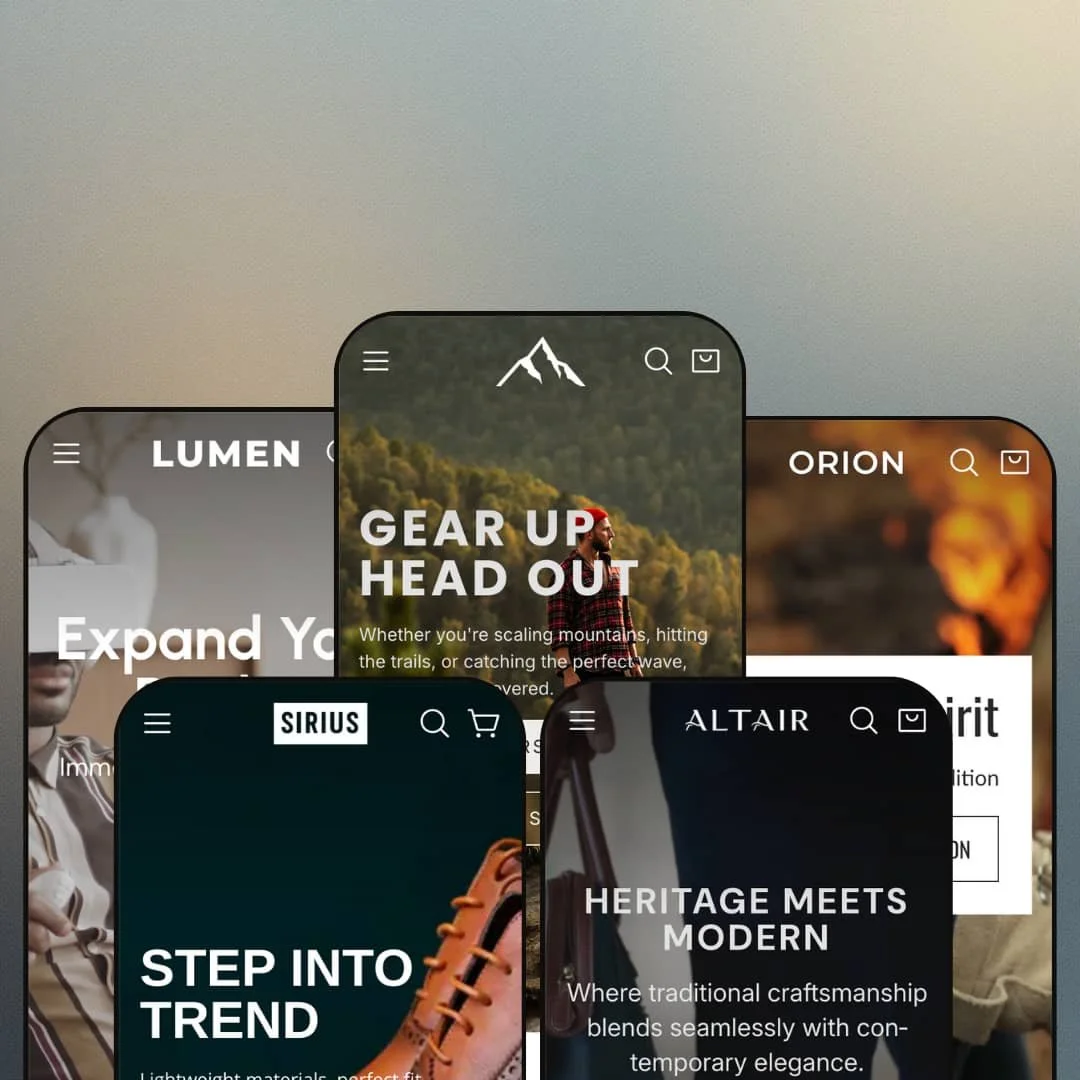
Most Shopify themes treat animation as garnish. Nova builds the whole meal around it: scroll-driven image scrollers, marquees, clip reveals and hover states are the point, and the five presets (outdoor gear, electronics, watches, leather bags, dress shoes) exist mainly to show how far that motion vocabulary stretches. At $350 from Mile High Themes, the question isn't whether it looks expensive, because it does, but whether a store built on motion still sells when the novelty wears off. Under the hood it's an Online Store 2.0 theme, launched May 2025 and now on version 1.4.0.
A scroll-driven section family built as one system
Nova's real product is five motion sections: a Vertical image scroller that slides media upward at staggered speeds while a fixed message holds center, Scrolling hero images that fade and zoom between full-screen scenes, Scrolling image reveal that enters cards one at a time over a blurred background, a Horizontal image scroller that pulls panels in from the right, and marquees that run on autoplay or on scroll. Hero, Slideshow and Scrolling hero images each accept a separate mobile image. Five sections, one grammar. For DTC brands in furniture, beauty or premium apparel shipping a campaign-grade photo and video library, this replaces the custom-section work an agency would otherwise bill for.
Homepage buy modules that sell without a click-through
Lumen stages a "Don't Miss the Deal" block with the Wireless Bluetooth Controller at $150, White and Black swatches, a quantity stepper and a live Add to cart, all on the homepage. Pick, add, done. The same Featured product section accepts autoplaying embedded video and a carousel of complementary products, so the module works as a landing page inside the landing page. For hero-product brands under 30 SKUs, impulse-buy price points and drop-driven launches, it shortens the path from ad click to cart to a single screen.
Mega menu with promo tiles
Merchants running catalogs of 100–500 SKUs across three or more departments get a header that carries the load. On the Nova demo the Catalog trigger opens Climbing, Camping and Hiking columns with seven, seven and six sub-collection links, flanked by two image tiles ("Fresh gear, Just in" and "The Best of Clearance") that push a promotion into the navigation itself. In-menu promos are a listed theme feature, not a demo trick. Sporting-goods and multi-category home stores get department-store wayfinding. No app required.
Does the cart drawer do more than list items?
Yes, and by more than I expected. Version 1.1.0 added a free-shipping progress bar to both drawer and cart page plus a recommended-products fallback when the cart is empty, 1.3.0 added upsell products inside the drawer, 1.2.0 made the desktop cart sidebar sticky, and every demo already exposes an "Order special instructions" field. The parts are there. For replenishment brands and gift-driven stores with average orders hovering just under a shipping threshold, that progress bar and upsell slot are the two levers that actually move basket size.
Social proof is typed in, not earned
Every Lumen card shows a count like "(5)" and the RTX3080 page says "5 reviews"; the Nova backpack says "67 reviews" under its gallery; both sit as static text with no review engine behind them, and the "Trusted by Thousands" strip is seven hand-entered quotes with stock portraits. The counts are painted on. Electronics and footwear merchants selling above $50 who lean on ratings to convert will need a review app before those numbers mean anything.
Limited track record
Nova launched May 2025 and has collected two Theme Store reviews in sixteen months, both positive, the most recent from November 2025. That's not a warning sign. It's an absence of signal. Merchants choosing between this and a theme with hundreds of reviews are buying on the strength of Mile High Themes' other products rather than evidence about this one.
The motion needs fuel
Four of the five demos open on a hero video, collection strips run video tiles, product pages embed clips, and the Features page's scroll sections are built to hold multiple images or videos each. Static product-on-white photography looks thin in these layouts. Single-founder brands and marketplace-style resellers without a content budget will find the theme's best sections sitting empty or filled with stock footage, and the whole premise sags.
Online Store 2.0 at a 2026 price
Nova is a sectioned OS 2.0 theme, not a Theme Blocks build, so nesting stops at the block level and the AI-assisted block generation arriving with Shopify's newer architecture isn't available. Dawn, Shopify's free default, shares the same generation. At $350 you're paying entirely for the section library and the animation layer, and merchants planning a three-to-five-year run should weigh that against where the platform is heading.
What it takes to launch
Expect a multi-day pass replacing generated placeholder imagery, rewriting hero and banner copy across five presets, re-pointing footer and social links, populating FAQ, testimonial and countdown content with real data, and reconciling product naming, pricing and variant labels before launch.
-
What works in this preset
Open a backpack listing and you don't land on a buy box. You land on a full-width banner reading "Your Ultimate Hiking Backpack Awaits" with a View Details anchor that scrolls you down to the gallery, and only then do price, Color and Size pickers appear. Below the fold the page keeps going: a "Built to Last" video block, a seven-quote testimonial strip, three image-and-copy rows and an icon bar, so a single product page reads like a campaign microsite rather than a spec sheet.
The collection page is where I spent the most time. A banner with editorial copy sits on top, followed by a sub-collection strip where Climbing Harnesses runs as a video tile beside static tiles for Boots, Ice Axes and Sleeping Bags. Filtering covers In stock, Price, Color and Product type, sorting offers nine orders, and the Backpacks collection paginates 42 items across three pages. Nothing exotic. Solid.
Structure-wise the homepage stacks a photo hero with paired Best Sellers and Collections buttons, a nine-image gallery interleaved with two videos, and a scrolling hero that rotates "Sky is the limit", "Travel Light Explore Far" and "Scale the Summit" over full-bleed backgrounds. Category tiles are labelled Camping, Trekking, Climbing and Hiking with a single product photo each, which keeps the outdoor vertical legible even at a glance.
Where it stumbles
For a preset pitching "premium outdoor gear", the demo leans hard on markdown. A "70% Off" banner sits mid-homepage, a countdown promises "Up to 50% Sale" under the collection grid, and five of the ten Best Sellers carry a Sale badge. That's a clearance-store voice wearing an expedition jacket, and merchants selling full-price technical gear will need to strip most of it out.
-
What works in this preset
Tabs do the heavy lifting here. "Smart Choice Here" splits into Laptops, Headphones, TVs, Cameras and Gaming with ten products per tab, each card carrying a review count in parentheses, and the Journal below it lists ten dated articles from June to August 2025 on cameras, gamepads, microphones and keyboards. For an electronics store that's a lot of catalog surfaced without a single click.
Would you buy a soundbar from a lifestyle photo? Lumen's "The Perfect Setup" section bets you might, tagging a desk scene with six product cards from a $35 Android TV Stick to a $400 32-inch Smart TV, each linking straight to its listing. A second hotspot section, "Focus Points", annotates a camera with seven callouts (Control Ring, Accessory Slot, Pro Optics, Power Battery and so on), which is the right format for feature-dense hardware.
I noticed the product page handles three option axes without breaking. The RTX3080 gaming laptop offers CPU (Intel i7 / i5), RAM (16GB / 32GB) and Storage (1TB / 2TB) as button groups, shows "Low stock: 10 left" beneath them, and follows with "Fresh Picks" category tiles and a four-question shipping FAQ. Quiet, but complete.
Where it stumbles
The specs live in a paragraph. That RTX3080 laptop describes its graphics card, processor and memory in three prose sentences, and nowhere on the page or across the demo does Lumen stage a row-by-row specification table or a side-by-side comparison, which is the one thing electronics shoppers scan before anything else. Merchants with 50–200 SKUs of comparable hardware will be building that data layer themselves.
-
What works in this preset
"Precision in any condition." That's the first line under the hero, and the watch imagery (licensed from Vaer) is the strongest photography in the whole family. The homepage runs a "Customer Favorites" grid tabbed into New, Women, Urban, Sports and Classic, a "Street Watchline" shoppable scene with four tagged watches, and an "Insights & Time" blog carrying twelve dated posts on sapphire crystal, straps and watch care.
The product page earns its length. The R1 Racing Chronograph carries a fourteen-image gallery covering caseback, lume and wrist shots, strap options render as image swatches rather than color dots, a "One design, two energies" before-and-after slider compares Spectral Aqua against Spectral Olive, and "The Finest Form" lists four benefit blocks (Premium Materials, Swiss-Inspired Precision, Designed to Impress, Water Durability). This is the closest any preset gets to a considered-purchase layout.
Navigation goes deep. The Men's Watches column breaks into ten sub-collections spanning style (Business, Classic, Minimalism, Urban, Fashion), movement (Quartz, Mechanical) and material (Titanium, Gold), Women's Watches mirrors the same ten, and Accessories splits Straps from Cases. For a watch catalog that's exactly the faceting a buyer expects.
Where it stumbles
Colorways sprawl into separate products. The R1 Racing Chronograph exists as Black 38mm, Black 42mm, Blue 38mm and Panda 42mm listings, the G5 Meridian as Navy/Red, Navy/Black and Green, and the Customer Favorites grid repeats several of them across tabs. Nova lists combined listings as a Shopify Plus feature, so non-Plus watch brands with four or five dial variants per model will either accept the duplication or restructure into variants.
-
What works in this preset
Altair sells men's leather bags and keeps the homepage lean: a hero video titled "Heritage Meets Modern", a "Special Collections" row of six category tiles (Duffels and Totes, Tech Bags, Briefcases, Messenger Bags, Accessories, Backpacks), and a three-panel "Built to last / Your daily companion / your everyday choice" block. It's the calmest of the five demos. That calm suits leather.
Scroll further and the "From Image to Life" section tags three bags (Bolt Briefcase, Outback Duo, Hitch) onto a single styled photograph, while "Notes & News" lists seven blog posts covering briefcase care, rain protection and choosing a bag for your body type. The GIF-backed "New arrivals" tile adds movement without a video file.
The Corvian bag is staged with its full buy box directly on the homepage, Brown selected by default with two alternate colorway thumbnails, an In stock line, a quantity stepper and a "Pairs well with" trio underneath. I clicked through to the product page and found the same layout plus a description accordion, so the homepage module isn't a teaser, it's the real thing.
Where it stumbles
For a preset named around heritage and craftsmanship, Altair never talks about leather. There's no materials row, no care guide section, no construction hotspot on the Corvian page, just a description paragraph and a video that says "Make Every Day Stylish". Bag brands whose margin depends on explaining full-grain versus bonded will be adding that storytelling layer from scratch.
-
What works in this preset
The busiest preset is also the most footwear-literate. The header opens into three columns (By Type with eleven shoe styles from Oxford to Brogues, By Occasion with six entries from Business to Travel, Exclusive with Italian Craft, Limited, Heritage Revival and Collector's Line) plus two promo tiles, so a dress-shoe catalog gets faceted before the shopper reaches a collection page.
The homepage pairs a countdown ("Upgrade Your Walk") with a 13-product grid, then a "Prestige Line" carousel of seven collections where Derbys runs as video, a two-GIF text marquee, five image-and-copy rows and a "Define Your Look" compared-images slider. I sat up at how much of that is motion. Nearly every block moves.
On the Jacob boot page the sticky buy bar reads "Add to cart | $49.99" and follows you down, Size runs from 6.5 to 13 in twelve steps, and the page continues with a "Gentlemen's Q&A" accordion, a "Details that Matter" hotspot row, a "Choose Your Style" tabbed grid and an inline contact form. It's the fullest product-page build in the family.
Where it stumbles
The description tells you to "refer to the size chart for details". There isn't one. No size-guide modal, no conversion table, no fit note beyond a line recommending one size down, on a preset whose entire catalog is sized footwear. Shoe merchants will need to build that reference before the first return request lands.
Product pages built like landing pages, in every preset
Read all five demos and one pattern holds: the product page is never just a buy box. Nova adds a banner above the fold, Lumen a hotspot section and FAQ, Orion a compare slider and benefit rows, Sirius a Q&A accordion and contact form. The theme treats the PDP as the primary storytelling surface, which is unusual and, for brands that drive paid traffic straight to product URLs, exactly right.
Tabbed collection grids as the family's workhorse
Featured collection tabs appear on every homepage and most product pages, from "Smart Choice Here" to "Customer Favorites" to "Choose Your Style". It's a simple mechanic, but it lets each preset surface 40–50 products above the footer without a wall of cards, and it's the reason the demos feel stocked rather than sparse.
A release cadence that keeps moving
Six versions in sixteen months, two presets added in December 2025, new customer accounts wired in September 2026 with legacy templates removed. Whatever the review count says, the codebase isn't parked.
Five verticals, one skeleton
Hero video, collection tiles, tabbed grid, shoppable image, blog row, newsletter: every homepage follows that order with different photography. The presets are color-and-content variations on one page grammar, and merchants who want structural difference between, say, a watch store and a shoe store will be rearranging sections rather than choosing a preset.
Storytelling rows instead of data rows
Across all five demos, product detail is delivered as prose, benefit blocks and hotspot captions. Nowhere does a preset stage a specification table, a comparison grid or a metafield-driven attribute list, even in the electronics and watch verticals where buyers compare on numbers. The theme's instinct is to narrate, not tabulate.
Listed industries the presets don't cover
The Theme Store files Nova under Jewelry & Accessories and Food & Drink. Orion's watches sit adjacent to the first; nothing in the family touches the second. Food, beverage and supplement merchants will be staging their vertical from an outdoor-gear or electronics starting point.
★ 7.6/10
Rating
-
Motion sections, homepage buy modules, mega menu promos, cart upsells, sticky buy bar and stock counters all ship natively; the gaps are a size guide and structured product data.
8
-
Five presets give a real head start, but every demo carries generated imagery and placeholder links, and the motion sections demand media the merchant must produce.
7
-
Hero, Slideshow and Scrolling hero sections accept separate mobile images, the sticky buy bar follows on small screens, and the menu collapses to a drawer with nested accordions.
8
-
Two releases explicitly optimized JavaScript and images lazy-load, but four of five demos open on hero video and stack multiple animated sections per page.
7
-
Centralized color schemes, 65+ icons, marquee/stack/grid layout switches and per-block image-or-video choice; the homepage grammar itself is less flexible than the parts inside it.
8
Frequently Asked Questions
-
No. Nova launched with three; Sirius and Altair were added in version 1.3.0 in December 2025, which is why their demos use more generated imagery than the original trio.
-
Yes, since version 1.4.0 (September 2026). The legacy customer account templates were removed in the same release, so stores still on classic accounts should plan the switch.
-
Yes. The sticky buy bar arrived in version 1.2.0 and is live on the Sirius demo, showing the selected variant and price as you scroll.
-
Only on Shopify Plus. Combined listings are flagged as a Plus feature on the Theme Store page, and the Orion demo shows the alternative: separate products per dial color.
-
Yes, that toggle was added in 1.3.0, alongside the option to hide article excerpts in the Featured blog section.
-
English, French, Italian, German and Spanish for theme strings such as buttons and form labels. Product content translation is handled at the platform level, not by the theme.
-
Yes. Version 1.2.0 added selectable pagination types for collection and search pages, including infinite scroll, and the Nova demo currently runs numbered pages.
This review is based on hands-on testing of the publicly available preset demos of the Nova Shopify theme as of September 2026. Theme features, preset availability, and performance can change with subsequent updates from the theme developer.