
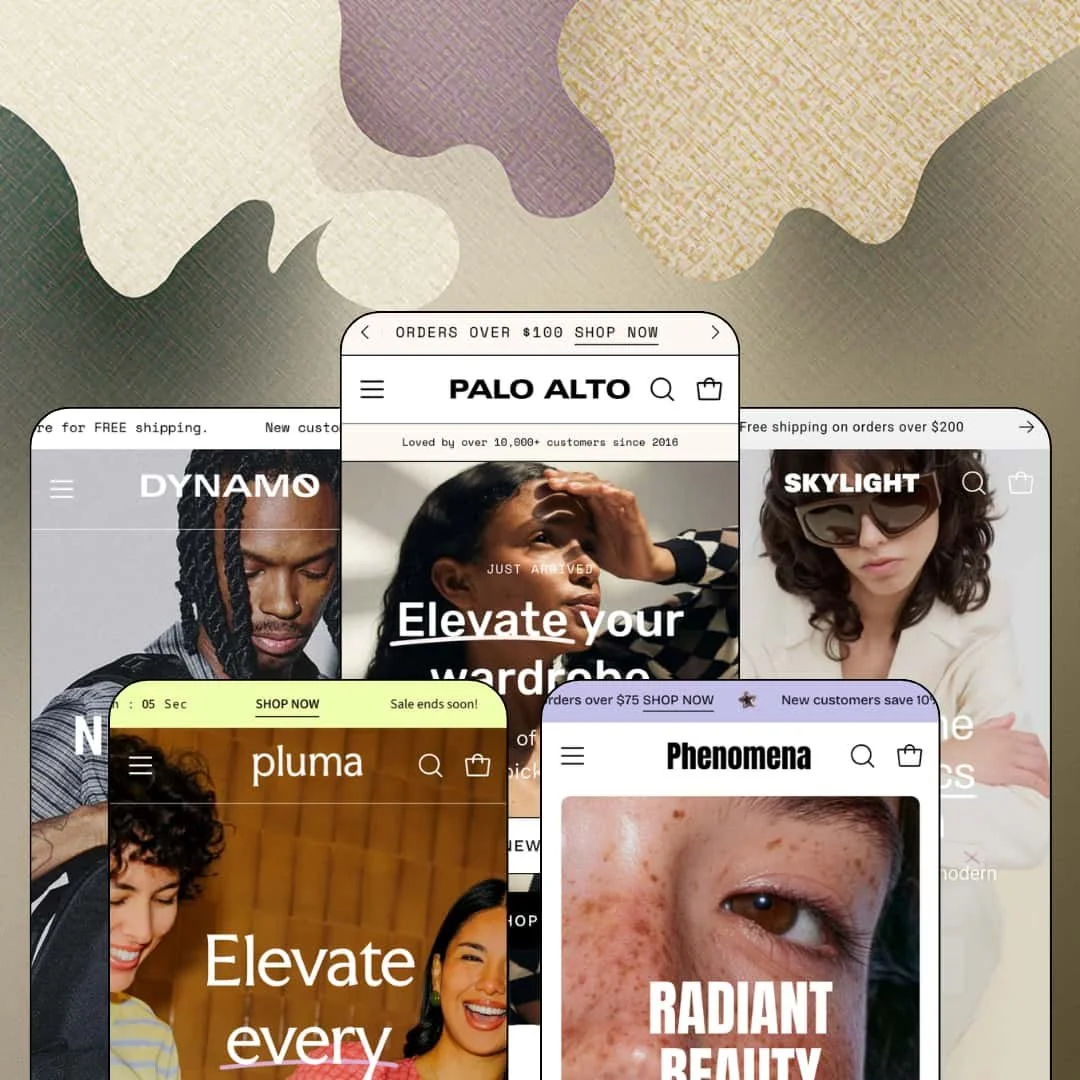
Most five-preset themes are one storefront wearing five outfits. Palo Alto's demos run five genuinely different store grammars: a discount-driven womenswear shop, a spec-happy gear brand, an Italian footwear atelier, a beauty storefront, and a playful tableware label. Presidio has kept this Online Store 2.0 flagship on a steady release rhythm since its 2017 launch, with version 9.2.0 landing on August 6, 2026 and the Pluma preset a recent addition. At $420 it sits near the top of the Theme Store's pricing ladder, so every feature below gets judged against flagship money.
The homepage can close the sale by itself
How much selling should a homepage do? Palo Alto's answer is: all of it, if you want. The featured-product section renders a full gallery, live variant selection, and Add to Cart inline, and Pluma's demo uses it to sell a candle in five colorways with zero click-throughs while Dynamo runs the same section on a duffel. For hero-SKU brands with under 30 products and impulse-friendly price points, this collapses the funnel by an entire page.
A fit-confidence kit that actually reduces guesswork
The apparel demos ship a coordinated sizing apparatus rather than a lone chart link. A one-to-five fit scale with configurable poles marks each product as true to size or not, the size-guide modal opens a full measurement table spanning XXS to XXL across six body dimensions, and a dedicated size chart page backs it up. Returns are the tax on fashion ecommerce. For apparel and footwear merchants selling considered purchases at mid-market prices, this bundle is the theme doing pre-emptive customer service.
Navigation that merchandises instead of listing
The mega menu treats every column as sellable space. Dynamo attaches one-line straplines to individual product links and pins an "On Sale Now 30% off" entry at the top level, and the structure runs three levels deep with image tiles available alongside text columns. That converts the most-visited element on the site into a promotional surface. Merchants running 100 to 500 SKUs across several categories, whose customers cross-shop between them, get discovery and pitch in one component.
An urgency engine wired into every surface
Countdowns here are not one homepage section. Product pages in the Moda and Dynamo demos each run their own "Limited time offer" block with independent end dates, stock strings switch between exact unit counts and configured phrases like "Hurry! Low inventory," and the badge vocabulary spans Back in stock!, Selling fast!, and Final sale. It's one coordinated scarcity mechanism deployed from announcement bar to buy box. Drop-model and clearance-driven merchants selling to impulse-buy audiences get their entire playbook natively.
The social proof is presentation, not machinery
This kept bugging me across all the demos I could open. Moda's homepage claims "10,000+ 5-star reviews" directly above six hand-typed quote cards, and the product page's "Customer Reviews" section is eight written blurbs with names attached. There is no collection form, no moderation queue, no rating data behind any of it; every word is content a merchant types into the editor. That's prop work, not proof. Beauty and supplement brands whose repeat-buyer audiences decide on review volume will need a review app on day one, with the theme's sections serving only as the display shell.
Product information lives in prose, not data
Every attribute in the demos is hand-typed where it appears. Dynamo's gear specs are a bullet list inside an accordion, the size conversions are manually built tables, and the accent lines on product cards are per-product text fields. Nothing draws from a structured metafield layer. At eight products that's charming; at scale it means every dimension, material, and claim is maintained by hand in multiple places, and there is no spec-table or side-by-side surface for buyers who compare. Electronics and gear merchants running 100-plus SKUs for spec-reading customers should weigh this before choosing the Dynamo lane.
Flagship pricing on the previous architecture generation
Palo Alto is an Online Store 2.0 theme, and Shopify's free Dawn ships the same architectural generation at $0. What the $420 buys is the section library, the preset family, and the conversion tooling, not a generational step: the deeper block nesting and mobile-first construction of the Theme Blocks era are not part of this codebase. Agencies standardizing a platform for multiple client builds, and evergreen brands making a five-year bet, should price in that the architecture underneath is the 2021 standard carried forward very well.
What it takes to launch
Expect a multi-day pass across hero copy, testimonial and press content, FAQ entries, countdown end dates, and the cross-links between pages, plus metafield-free product content that must be written per item. The demos also set a photography bar (editorial lookbooks, split heroes, UGC grids) that assumes a comparable asset library on the merchant side.
-
What works in this preset
I clicked through the Moda demo's navigation before anything else, and it earns the time. The Apparel entry opens a three-column layout with a Clothing column, a Featured column, and a Shop All column, flanked by image tiles for Knitwear and Fall Looks. The New entry does something better: four shoppable product cards, each with its own "Shop now" line, sit directly inside the dropdown. The Sale entry carries a "15% off" label inline, so the menu itself announces the promotion before any page loads.
The product cards carry more information than most grids attempt. Under each title sits an accent line pulled from the product: "100% silk" on the Blake Shorts, "Ethically sourced" on the Harlow Coat. Badges rotate through Staff pick, Best Seller, and Selling fast! Color swatches on the cards jump between sibling listings, so the navy Blake Shorts and the beige version live as separate products stitched together at the card level, which keeps each colorway's imagery and inventory clean while the shopper experiences them as one item.
Below the fold, the homepage assembles a full trust band without leaving the section editor. A testimonial section mixes quote cards with customer photos, a press block pairs pull-quotes with magazine logos, and an FAQ accordion answers shipping and warranty questions on the homepage itself. It's a lot of surface. For a merchant who wants the pre-purchase objection handling done before the product page, the sections are already wired.
Where it stumbles
The demo's copy and its staging argue with each other. The brand text pitches slow fashion, body positivity, and pieces you keep forever, while the surrounding sections run a 30% off banner, a free tote offer, and a welcome discount in the announcement bar. Both registers are configurable, but the preset ships them stacked, and a merchant courting the quiet end of womenswear inherits the job of stripping the louder half out.
-
What works in this preset
Halfway down the homepage, a complete product page appears inside a section. The Workout Duffel module renders the full image gallery, a color choice between Black and Grey, and a working Add to Cart, so the hero product sells without a click-through. It's the single most aggressive homepage pattern in the family. Dynamo also opens with a countdown hero announcing a styles drop, which tells you what kind of merchant this preset imagines.
The collection presentation runs on tabs rather than stacked grids. A Bestsellers tab and a Tech Accessories tab share one section, each with its own collection image, a product count, and a "Shop all" link, so two catalog slices occupy the space one would normally take. The mega menu extends the same economy: product links carry one-line straplines like "Where sleek design meets smart functionality," turning a nav column into a pitch sheet.
On the Metro Backpack page, the theme's fit scale reappears wearing a different label. The same one-to-five widget that grades apparel sizing here reads "Volume size" with Small, Medium, and Large poles, and the accordion below lists liters, length, width, and depth. The stock string renders as "Hurry! Low inventory" instead of a unit count. Watching one component serve two verticals with different vocabulary is the clearest evidence in the demos that the toolkit was built configurable rather than hard-coded.
-
What works in this preset
"Runs big, size down." That line sits in the Lacey Boot's Fit Notes accordion, next to the heel height and a wide-feet note, and it captures how this preset handles footwear anxiety. The size picker links a chart modal that converts EU, US, UK, and centimeter sizing across ten rows, the stock line reports "Only 6 left in stock" as a real unit count, and a Buy It With slot cross-sells two handbags under the add-to-cart. The whole buy area is built to answer the questions that generate returns.
I went looking for how the catalog is organized and found the siblings system before finding it advertised anywhere. The search overlay's category suggestions list collections named for product families, Abe Braided Shoes and Abie Handbag among them, and the Abie Bag card offers six colorways from a single tile. Colorway families live as their own browsable groupings, which is a quiet piece of catalog architecture most shoppers will feel without noticing.
The editorial layer is the preset's actual personality. A paginated lookbook section steps through "Cityscape chic" and "Urban elegance" like magazine spreads, split heroes alternate imagery with made-in-Italy copy, and a press band runs four pull-quotes over fashion-magazine logos. Skylight demonstrates that the same theme shouting discounts in Moda can lower its voice to boutique register when the sections are staged for it.
-
What works in this preset
If you sell skincare or cosmetics, Phenomena is the preset aimed at you. It's the family's beauty entry, and Shopify's own related-themes carousel surrounds its listing with beauty templates, which is a reasonable signal of where merchants actually deploy it. The feature set underneath is identical to the other four demos: the same quick view, promo popup, shop-the-look, and countdown tooling documented above applies here without asterisks.
Judge this preset in the live demo rather than by family resemblance. Beauty storefronts live or die on texture photography and shade presentation, and those are staging qualities each merchant should evaluate against their own product line before committing $420.
-
What works in this preset
Pluma is the newest voice in the family and the most playful. Its signature move is a New Arrival spotlight that rotates three products in sequence, each with price, a long-form description, and a View Product link, framed by a scrolling "New Arrival ~" ticker line. It reads closer to a design journal than a grid. For a small-batch tableware label with eight bestsellers, one rotating stage beats forty cards.
The product page stacks brand storytelling in layers the other demos don't use. Value-prop chips like "Small Batches, Big Impact" sit under the buy box, detail content splits into Product details, Care, and Shipping tabs, an "About the designer" block profiles the maker, and a shop-the-look grid ties @-handle photos to product links. A three-column "Why choose" section closes the page with bulleted brand values. Short catalog, long story: that's the trade this preset is built for.
Practical touches keep it from being pure aesthetics. The homepage runs the same Bestsellers/Sale tab section as Dynamo, an icon row advertises the 1% conservation donation alongside shipping terms, and a country selector staged with 27 markets shows the header handling the selector Shopify Markets feeds it without layout strain.
Where it stumbles
Tableware is a gifting category, and the preset's own FAQ concedes the gap: "we don't currently offer gift wrapping." The theme's cart toolkit runs to cart notes, with no gift-wrap or gift-message line item anywhere in the feature set, so a Pluma-style merchant whose December traffic is buying presents for other households has nothing between the product page and checkout that acknowledges it.
Five store grammars from one purchase
Read across the whole family and the presets turn out to be structurally different machines, not recolors. One homepage runs collection tabs with an embedded buy module, another paginates a lookbook like a magazine, a third rotates a product spotlight with long-form copy. The purchase price buys a range of store architectures, and switching lanes later means restaging sections rather than replatforming.
A flagship that's still being built
Nine years after launch, the release notes read like an active product: version 9.2.0 arrived in August 2026, and the Pluma preset joined the lineup recently enough that its asset library is months old. Long-lived premium themes often coast on their back catalog. This one is visibly still receiving investment, which matters more at $420 than any single feature.
The demos double as a configuration manual
Because each preset stages the shared library for a different job, reading all five is a tutorial in what the sections can become. The same fit widget grades sizing in one demo and bag volume in another; the same tab section carries gear in one store and serveware in the next. A merchant who studies the family before building learns the theme's range faster than documentation would teach it.
The default register is a discount
Every reachable demo opens with a welcome code in the announcement bar, pins a Sale entry in the main menu, and leads hero copy with an offer. The machinery is optional; the voice it ships in is not. Brands whose positioning depends on never looking like they're on sale start their build by lowering the theme's volume everywhere at once.
Food & drink is listed, not staged
Shopify files Palo Alto under Food & drink, yet no preset sells anything consumable; the nearest neighbor is Pluma's tableware. A coffee or pantry brand evaluating the theme has to extrapolate from adjacent verticals with no demo evidence of how product grids, subscriptions to replenishment rhythms, or ingredient-heavy pages would look.
Campaign photography is a prerequisite
The layouts that make these demos persuasive are the ones that consume imagery: paginated lookbooks, full-bleed split heroes, UGC grids, spotlight rotators. All five stores run on professional campaign libraries. A merchant with twenty product-on-white shots will fill the sections and watch them go flat, because the design's ceiling is set by the photo budget.
Rating
★ 8.0/10
-
Homepage buy modules, per-product countdowns, sibling colorway collections, and a configurable fit scale form a genuinely deep native kit; the missing structured-data and review layers keep it off a 9.
8
-
Everything observed is section-and-toggle work in the OS 2.0 editor, but the hand-typed content model means launch effort scales linearly with catalog size.
8
-
The slide-out navigation stacks expandable levels cleanly, sticky cart and sticky add-to-cart are shipped behaviors, and card layouts collapse without losing badges or swatches.
8
-
Homepages are long and image-dense by design, though product cards themselves stay lean and media loads deferred; the countdown and rotator sections add script weight merchants can trim.
7
-
Five structurally distinct preset architectures from one section library, with components that re-label per vertical, is close to the ceiling of what OS 2.0 theming demonstrates.
9
Frequently Asked Questions
-
The theme includes EU translations for its interface strings in English, French, Italian, German, and Spanish. Product and page content still gets translated through Shopify's own localization workflow.
-
Both appear on the official feature list, and the Dynamo demo shows a "Back in stock!" badge live on a product card. No third-party app is required for the alert form itself.
-
A slide-out cart with cart notes support, plus a sticky cart behavior, are the shipped patterns. In-store pickup display is also on the feature list for merchants with Shopify locations configured.
-
Version 9.2.0 was released on August 6, 2026, and the Pluma preset's demo assets date from late 2025, so both the theme and its newest preset are under active maintenance.
-
Pluma. Its bestseller tab stages eight products, and the rotating New Arrival spotlight is built to give a handful of items individual attention rather than filling a grid.
-
Infinite scroll, collection page navigation, swatch filters, and product filtering and sorting are all included, so category pages can keep loading product without pagination clicks.
This review is based on hands-on testing of the publicly available preset demos of the Palo Alto Shopify theme as of August 2026. Theme features, preset availability, and performance can change with subsequent updates from the theme developer.