
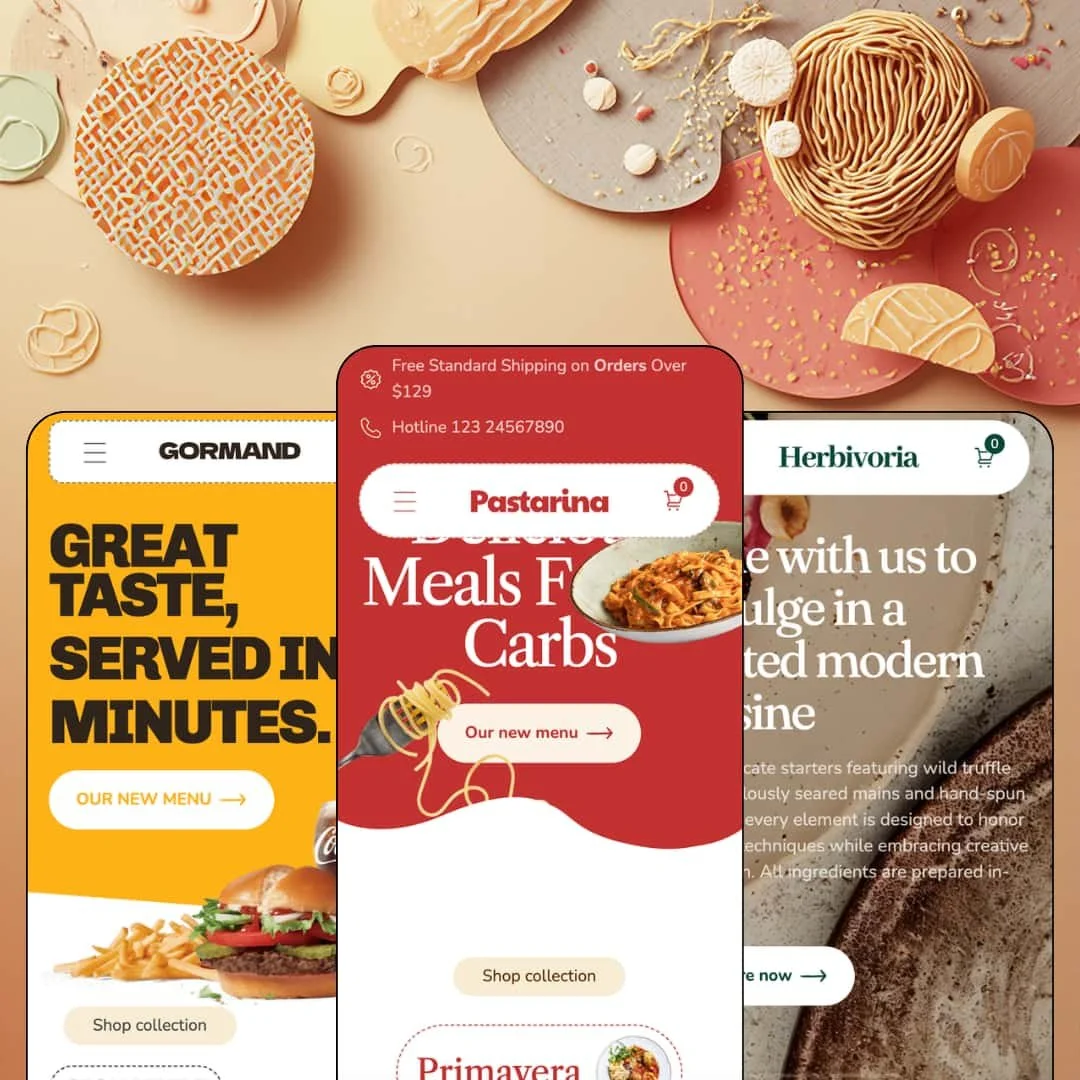
Most food themes sell groceries. Pastarina sells a table: Xotiny's $320 Online Store 2.0 theme ships three presets, a pasta trattoria, a burger counter and a fine-dining room, and each one opens with dishes, opening hours and a menu page rather than a product grid. That is a bet on restaurants and meal-delivery brands, made with a single Theme Store review behind it fifteen months after launch. Whether the restaurant vocabulary is backed by restaurant mechanics is the question the rest of this review keeps circling.
A menu page that behaves like a menu
Every preset links to a menu page built from the same section: a category strip (Fresh Pasta, Specialty Pizzas, Salads, Sandwiches, Baked Pastas, Desserts) at the top, then numbered entries, "01. Classic Margherita", "02. Wild Pepperoni", each with a one-line description, a price and two dietary icons. A countdown banner reading "Plus up to 50%" can be dropped between courses. For a single-location restaurant or a meal-prep brand with 20 to 60 dishes and dietary-conscious diners, this section replaces the menu-as-PDF workaround with something orderable, and the dietary icons are merchant-set fields, not an app.
Nutrition and ingredient tables built into the product page
Where does the calorie count go on a Shopify food product? Pastarina answers with a two-column Ingredient Details section under the buy box: a Nutritional values table per 100g (262 kcal, 4.8g fats, 38.5g carbohydrates, 3.8g fibers) beside an Ingredients table with quantities (500 grams Mafaldine, 2 tbsp olive oil). Both are theme sections, filled from the editor. That matters for packaged-food brands shipping into the EU or UK, where per-100g labeling is expected on the page, and for meal-kit sellers with 30 to 100 SKUs where a spec table beats a paragraph.
A promo kit with a cart-side Offer tab
The cart drawer has two tabs: Cart and Offer. The Offer tab pulls entries from a dedicated offers blog, so promotions live next to the basket rather than in a banner shoppers scrolled past, and the same kit supplies four lightboxes, Signup, Age verification, Countdown timer and Promo, each with its own disclaimer line. One switch each. For a delivery brand running weekly deals or a bar-restaurant selling wine online that needs an age gate at the door, the pieces are already wired without a popup app.
Multi-axis option pickers that survive a sauce list
If you run a made-to-order kitchen with modifier-heavy dishes and fewer than 50 base products, this theme won't flatten your options. The Cavatapi product carries three option rows, Portion (S, M, L), Firmness (Normal, Slight) and Sauce with eight choices from Creamy Garlic to Forty Creek, and all three render as pills inside the quick-add modal opened from a collection card, which is where the 1.3.0 update's high-variant support earns its keep. The collection filter picks the same axes up as facets, Firmness and Portion, each with counts. One dish, 48 variants, one listing.
One review in fifteen months
Launch was June 2025. As of this review the Theme Store shows a single review, positive, dated November 2025, which means a $320 purchase rests on one merchant's word and no volume of feedback to cross-check it against. For restaurant groups standardizing three or more locations on one theme, or agencies putting it in front of hospitality clients, that's thin evidence for a premium-tier commitment.
Restaurant words, retail mechanics
The Membership page lays out Bronze, Silver and Golden tiers, one point per dollar, 25 points for signing up, and its Sign up now button opens the all-products collection. No points ledger, no tier logic, no account hook; the section is a brochure. This kept bugging me on every preset. It sells the dining room, not the reservation. For loyalty-driven casual chains or subscription meal-prep brands, everything the page promises has to be bought as an app and then reconciled with copy the theme already wrote.
Social proof is typed in, not collected
Every preset runs a Customers love us section with a quote, a name, a VERIFIED USER tag and a product card underneath. The tag is a text field. Nothing in the theme collects, moderates or counts a review, so the badge asserts a verification the theme can't perform, and a star rating on the product page still needs Judge.me or a similar app. For considered-purchase categories like gift hampers or premium dried pasta at $40 a box, where a stranger's rating does real work, budget the app before launch.
An Online Store 2.0 build at a 2026 price
Pastarina launched in June 2025 on the Online Store 2.0 architecture, the same generation as Dawn, and it shows in the shared vocabulary: "Unit price / per", "Filter and sort" and "Select options" are the free baseline's strings. What $320 buys over that baseline is the food-specific section set, not a newer block model. Nested theme blocks and AI section generation aren't on the table. For multi-brand operators with 100-plus SKUs who rebuild pages often, and for merchants who want editor-side flexibility to outlast the next two years, that's a ceiling worth knowing about before purchase.
What it takes to launch
Expect a multi-day pass across placeholder hotline numbers, licensed third-party menu copy and dish photography, compare-at pricing, pickup-location data, opening-hours blocks maintained in three places, and product-page story sections that currently reuse one pasta narrative on every dish in all three presets.
-
What works in this preset
The first thing you meet is a utility bar, not a hero. Free shipping over $129 sits on the left, a hotline number on the right, and only then does the logo row arrive with a three-level menu that runs All products, Alla carbonara, Insalara without ever opening a picture panel. It's a phone-order layout. For a trattoria that still takes half its orders by voice, having the number above the fold on every page matters more than a banner in the dropdown, and the theme lets that row carry its own icons and links.
The homepage stacks a flash-sale grid, a Featured Product buy module and a combo tile. The flash-sale cards show S, M and L pills directly on the card, the Featured Product block for Alfredo Deluxe carries its own description and price, and the Classic Pasta Combo tile pairs a mac 'n' cheese with a second pasta at a struck-through $57 against $52 and a Get deal now button. Three buying prompts on one page. I noticed the combo tile links to a product rather than a bundle builder, so the discount is whatever you set on that product.
"Home 1" to "Home 4", "Column layout", "Classic layout": the Theme features menu is a live index. Each entry opens a working page, so you can compare four homepage arrangements and two product-page layouts on the demo itself instead of guessing from screenshots. The Classic layout on the Cheese meat page adds a pickup block under Add to cart that lists three locations with "usually ready in 24 hours" copy and a link to check the others. That's the dine-in-plus-takeaway pattern this preset is built around.
Where it stumbles
The preset can't decide whether it's a restaurant or a pasta brand. The homepage sells plated dishes with opening hours and a locations page, yet the product pages below the buy box run retail packaging copy, "cooks to perfection in just 4 minutes", nutritional values per 100g and a sage-butter serving suggestion. A restaurant guest doesn't need cooking times. A dried-pasta brand doesn't need a reservations tone. Merchants will need to pick one register and strip the other before the page reads as a single business.
-
What works in this preset
Everything here shouts, and that's the point. Headings run in uppercase, a marquee band rolls CRUNCHY, KRISPY, DELICIOUS, MUSTARD, BURGER across the page, and two "Today's best deal" tiles stamp 40% OFF beside a photo of fried chicken. I sat up at how far the same section library can be pushed from the trattoria's lowercase, letter-spaced calm to this. The type system does the work; the sections underneath are the ones the other presets use.
The Classic Beef Burger block on the homepage is a full buy module with two option rows. Portion offers Small, Medium and Large; Extra offers Fries, Sauce and Box; the Add to cart button sits under both, and the same product opens from a card in a quick-add modal with those rows intact. For a burger counter where most tickets read "a medium with fries", that's the whole transaction on the homepage. No product page needed.
Scroll far enough and you reach five addresses in a row. Each Address card carries a street line, a phone number and "Opening time: 7h - 23h", laid out as a list rather than a map, which is the right call for a chain that wants every branch on one screen. Testimonials follow with a name and an occupation, Linda the worker, Paul the teacher, Sarah the skater. It reads like a neighborhood chain's window poster.
Where it stumbles
Fast food is combo business, and this preset has no combo builder. The Happy Combo tile promises a burger, fries and a drink at 40% off, but its ORDER NOW button lands on the all-products collection, and the only way to assemble the meal is to add three products one at a time. The Extra option row on the burger gets you halfway there. It doesn't get you a priced meal deal.
-
What works in this preset
"Dine with us to indulge in a rooted modern cuisine." That line, over a full-width image, opens the page, and two more image-and-text rows follow before a single price appears. Line-caught fish, candlelight, an open kitchen. The preset argues for a reservation before it argues for an order, and the Book a table button sits in the second row rather than the header, which tells you exactly how the developer thinks a fine-dining site should be read.
The collection tiles list their own menu items. Ambrosial Acres, Delightful Dining and Flavorsome Forte each show two dish names under the collection title, so the tile works as a mini menu card before you click through. Six tiles, twelve dish names, one row. For a tasting-menu restaurant with a short, rotating card, that's a better index than a filtered grid.
I went looking for the product page and found allergen data in the option picker. The Pesto Cannellonis page runs an Allergen information row (Milk, Fish) and a Dietary preferences row (Vegan, Vegetarian) as selectable pills above Add to cart, while lower on the homepage a four-post journal of recipe write-ups sits next to a wine section with eight producer tiles. Content-heavy, catalog-light. That's the fine-dining register, and the preset holds it all the way down to the footer's "Book a table tonight" line.
Where it stumbles
Allergen and dietary labels are modelled as variants, not attributes. Because Milk, Fish, Vegan and Vegetarian are option values, the theme treats "Fish plus Vegan" as a purchasable combination and each pairing becomes its own SKU, which is the opposite of what an allergen disclosure should do. Labels should describe the dish, not change it. Reservation handling has the same shape problem: Book a table routes to the contact form, so a table request arrives as a message rather than a booking.
One page grammar, three dining registers
Trattoria, burger counter, tasting room: the same sequence of hero, menu link, featured dishes, restaurants block with opening hours, testimonials and gallery appears in all three demos, and what changes is type, casing and color. The letter-spaced lowercase headings of Pastarina become uppercase slabs in Buncheeze and quiet serif lines in Gourmet without a different section being swapped in. That's a real skin system. A casual spot going upmarket mid-life keeps its page structure and changes its voice.
Where and when as page furniture
Opening hours appear in the restaurants section, in the footer and in the address list; pickup availability names a location and a ready time under the buy box; the footer's closing line invites you to book tonight. Across three presets the theme treats time and place as content the way an apparel theme treats size and color. That is the difference between a shop and a place, and it's the reason the theme reads as hospitality rather than grocery even before a single dish photo loads.
The changelog stops in December 2025
Four releases between June and December 2025 added a mega menu with product images, high-variant support and infinite loading, and then nothing for nine months. For a theme whose whole pitch is the current season's menu, a nine-month gap is long enough that a buyer should check the release notes on purchase day rather than trust this review's date.
Restaurant-only food
The Theme Store lists Jewelry and accessories alongside Food and drink, and neither the jewelry side nor the packaged-grocery side of food gets a preset. All three demos are places you eat at. A sauce brand or a coffee roaster can use the sections, but it will be undoing restaurant assumptions, opening hours, table booking, dine-in testimonials, on every page.
Built for a short card
Collection tiles that list two dish names, a menu page that numbers its entries, two pages of pagination at nineteen products: the structure assumes a menu you can read in one sitting. The 1.4.0 infinite-loading option softens the grid, but the discovery layer is still a menu card rather than a search-first catalog, and a 300-SKU deli would feel it within a week.
★ 7.2/10
Rating
-
Menu page, nutrition tables, pickup block and a four-lightbox promo kit cover the food-service checklist; loyalty and booking remain copy only.
7
-
Familiar Online Store 2.0 editor conventions and a live Theme features index keep the learning curve short; three copies of opening hours need keeping in sync.
7
-
The header collapses into a stacked drawer with a header row per level; quick-add modals and pill pickers keep thumb targets large, and the sticky cart was reworked in 1.2.0.
7
-
Homepages carry marquees, animated letter-spaced headings and four lightboxes on every page; restrained image sizing helps, the popup count doesn't.
7
-
Three registers from one section set, four homepage layouts and two product layouts on the demo, with letter-spacing and casing as the main dial.
Frequently Asked Questions
-
There's no booking calendar. The Book a table buttons are plain links, so a reservation app or an embedded widget in a custom Liquid block is the route, and the buttons can be pointed at it.
-
Product images and a banner column inside the dropdown, according to the August 2025 release notes. The Pastarina demo header nests three levels of text links; deploying the image panel is a merchant-side choice.
-
Yes. The Ingredient Details section and the menu page's dietary icons are text and icon fields, so allergen notes can live there while product options stay reserved for size and sauce.
-
The 1.1.0 release added a Map section alongside Membership, FAQ, Hero and Featured Offer sections. None of the three demos deploys it, so expect to configure it yourself against your Shopify locations.
-
Since 1.4.0, yes. The demo runs classic pagination, two pages at nineteen products, so both modes exist and the choice is a theme setting.
-
Xotiny runs a support portal at support.xotiny.com and documentation at docs.xotiny.com; the designer is based in Hanoi, so expect replies on Vietnam business hours.
This review is based on hands-on testing of the publicly available preset demos of the Pastarina Shopify theme as of September 2026. Theme features, preset availability, and performance can change with subsequent updates from the theme developer.