
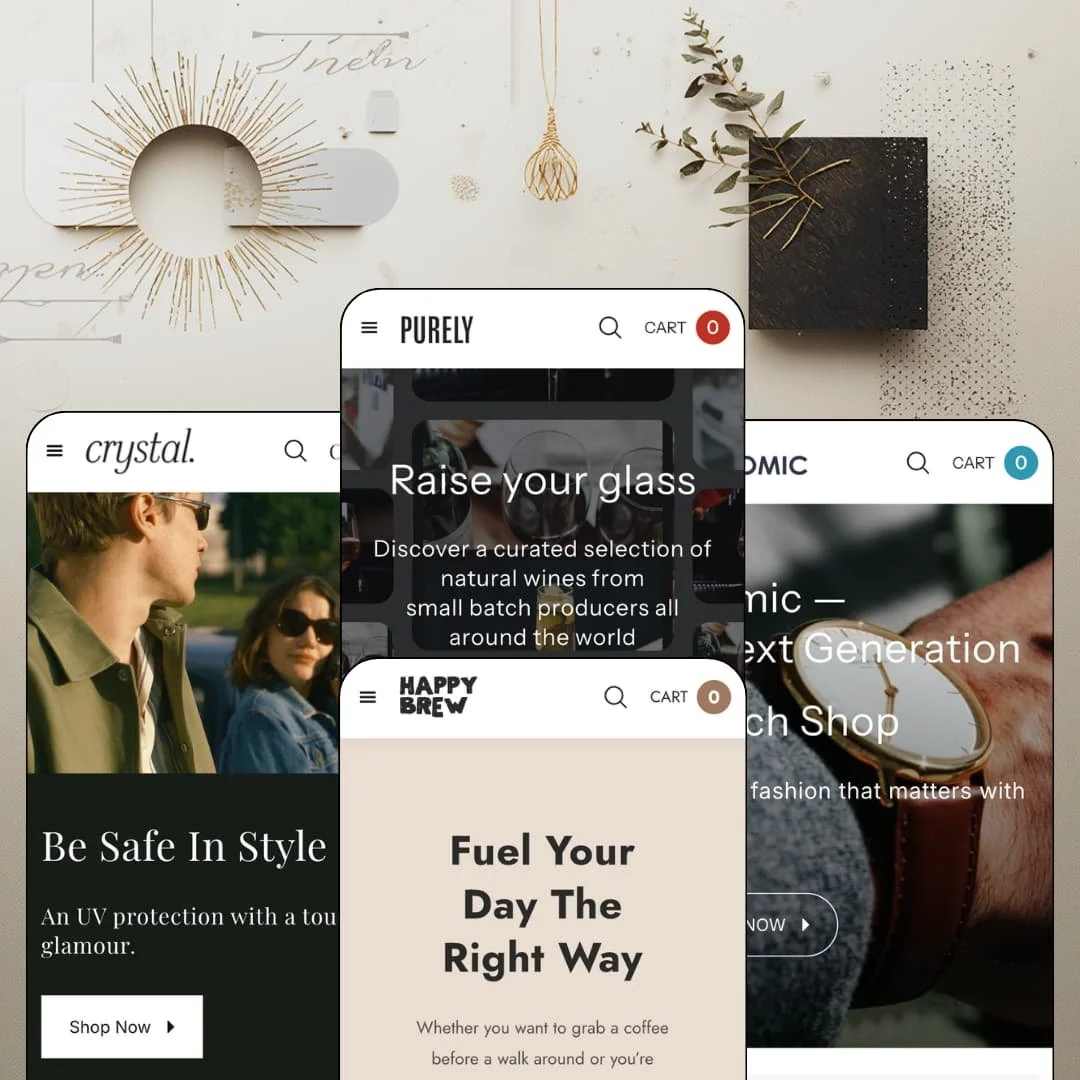
Most Shopify themes at a starter budget hand you one storefront and stop there. Purely hands you four: a wine cellar, a coffee roaster, an eyewear boutique, and a watch shop, all under a single $150 license from BoostifyThemes. It's an Online Store 2.0 build, launched in spring 2025 and updated as recently as May 2026. I spent time in all four preset demos to see whether the breadth is real or just four coats of paint.
Quick add on cards carries full option rows
Catalog cards here don't just link to products, they sell them. A coffee card exposes both option rows in place, six grind types and three pack sizes, and a watch card offers its band colors the same way, so a returning customer can rebuild a precise previous order without ever leaving the grid. The reorder path collapses to two taps. For consumables merchants running 11 to 100 SKUs with repeat-buyer patterns, wine, beans, refills, this is the single most commercially relevant mechanism in the theme.
A disclosure layer alcohol merchants actually need
What does selling wine online demand of a product page beyond a pretty bottle shot? Purely's answer is a dedicated Alcohol Units tab fed by metafields: ABV, units per bottle and per 125ml glass, an allergen line, and net contents, sitting alongside a site-wide age verifier that includes a confirm state and a re-entry prompt for anyone who clicks no. Populate the fields and the compliance furniture is built. For wine and spirits sellers with considered-purchase buyers in regulated markets, that's groundwork the theme has already framed instead of leaving to a page builder.
One header system, two navigation grammars
The mega menu flexes between taxonomy and merchandising. The eyewear demo runs it as four filter columns covering frame shape, use type, gender, and brand, while the coffee and watch demos fill the same slot with linked product photo tiles, and every variant carries a promotional image panel on its right edge. Same header, opposite jobs. Merchants choose whether navigation explains the catalog or sells from it directly, a real decision for cross-shop-heavy stores in the 50 to 100 SKU range weighing guided browsing against impulse routing.
A promo layer that's staged, not just listed
Urgency tooling shows up actually working in the demos. Atomic's announcement bar rotates three messages, a $75 free-shipping threshold, a free-strap offer, and the FREESTRAP code that claims it, while the coffee demo stages a countdown banner carrying its own mobile-specific artwork rather than a cropped desktop image. Promo popups and in-menu promos round out the declared set. Flash-sale and drop-driven merchants at budget and mid-market price points get working campaign tooling on day one, with the demos as a live reference for how each piece should be configured.
Social proof is decoration
Every testimonial in these demos is hand-typed. The eyewear preset's review carousel runs portrait avatars over verified-buyer tags with no rating mechanism behind any of it, and nothing in the theme collects, stores, or displays actual customer reviews. The praise is painted on. Watch and eyewear merchants selling considered purchases in the $100 to $300 band should budget for a review app from the first week, because at those prices buyers look for receipts before they look for adjectives.
No structured data layer for attribute-led catalogs
This kept bugging me across the watch and eyewear demos. The section library offers a size chart and the metafield disclosure tab, but no spec table and no product-comparison view, so every technical attribute a buyer might weigh, case diameter, lens category, movement type, has to live in description prose. Prose doesn't sort and it doesn't compare. Merchants with 50 to 100 SKU catalogs of spec-driven goods, watches, eyewear, small electronics, will hit that ceiling the first time a customer asks which of two models is actually bigger.
The default voice is discount-led
Sale tabs sit inside every demo's product grid, the watch demo's badges run as deep as 52% off, and the coffee homepage leads an entire section with a save-up-to-70% claim. None of that is wrong for a promotional brand. But the staged personality is markdown-first from the header down, and a luxury-positioned or evergreen-catalog merchant will spend real staging time stripping the urgency furniture back out before the storefront matches their price integrity.
What it takes to launch
Expect a multi-day pass covering hero and section copy across all four demos, FAQ and footer content, menu and footer link routing, locale-string and market-currency configuration, and metafield population for the disclosure tab before any preset is launch-ready.
-
What works in this preset
Shopping this demo feels like being walked through a cellar by someone who already knows why you came. Collections split by occasion (Weddings, Christmas, New Year's Eve, Birthdays, Valentine's Day) and again by varietal, from Pinot Noir to Chardonnay, so a gifting customer and a Cabernet loyalist reach the same bottles through completely different doors. Different buyers, different doors. That taxonomy fits a category where purchase intent swings from panic gift to precise craving.
One quote, one card, one button. The testimonial band pairs each customer quote with a live product card: Scott O. praises a sparkling red, and The Golden Orb 2022 sits beside his words at $35 with an add-to-cart button ready to go. I sat up at this, because the quote does the persuading and the card closes the sale inside the same viewport instead of leaving the reader to hunt for the bottle being praised.
The lower half of the page turns editorial without losing its commercial spine. A ticker loops EVERY BOTTLE / A TALE TO TELL between icon rows, and a Shop the Look block hangs a three-item product list off a single lifestyle photo: a $57 bottle, $9 stemless glasses, an $8 opener, one basket-building gesture. The blog is genuinely populated, with dated posts on decanting and aging that carry real comment counts.
-
What works in this preset
How should a coffee page price 250 grams against a full kilo? Here, cleanly. I clicked into Colombia Coffee Beans and found an eighteen-variant matrix built from just two option rows, six grind types from whole bean to Turkish and three pack sizes, with prices stepping $22, $32, $52 as the bag grows. The pickers render as button groups, so the entire decision happens without opening a single dropdown.
Vendor names do quiet work across this demo. Cards credit Coffee Beans, Steeped Coffee, and Cacao Shroom Fusion, each linked to its own vendor collection, which gives the storefront the posture of a small roaster marketplace rather than a single-label shop. Guest roasters slot in without new plumbing. For a merchant stocking multiple suppliers, that structure is already wired into the catalog grammar.
Scroll far enough and the homepage starts answering questions before anyone asks them. A numbered FAQ band covers shipping, returns, and delivery windows, then hands off to support with a contact link for anything it missed. It sits above the blog row. Sequencing service answers ahead of editorial content is a small choice that flatters a first-time buyer's caution.
-
What works in this preset
The first thing moving on this page is the merchandise. A full-width video hero pushes UV-protection messaging before a single product card loads, and beneath it, frame-shape cards for Square, Aviators, Round, Navigator, and Rectangular each carry a live item count of twelve to fifteen pieces. You see the depth of every rack before opening one.
Halfway down, the demo stages a complete buy box on the homepage for a pair of signature sunglasses: long-form description, price, quantity stepper, add-to-cart, and a View Full Details exit for anyone who wants the whole page. That's a landing-page move. A hero product gets sold where it's introduced instead of two clicks away.
Numbered story panels give the brand narrative a magazine rhythm, 01 Quality Material into 02 Fit Machine, and the navigation carries a Shop By Top Brands column while cards wear vendor tags that link straight to brand collections. The whole preset leans multi-brand retail. A boutique carrying several eyewear houses inherits that structure instead of improvising it.
Where it stumbles
The optical side of this optical store stops at the frames. Reading glasses ship as separate products with the strength baked into the title, M192 at +1.00 and M212 at +1.50 as distinct listings, and I went looking for any lens-selection step and found nothing between choosing a frame and checking out. Prescription workflows will be an app project, and merchants planning a true optical operation rather than a sunglasses boutique should price that gap before committing to this preset.
-
What works in this preset
Hudson, Cortland Alley, Haven Plaza, Park Ave. Atomic closes its homepage with a store-locations band, four named locations with photo tiles and one call to action, which quietly repositions the demo from webshop to retail brand with an online arm. Watch buyers still walk into stores. This preset is one of the few budget storefront designs I've seen admit that out loud through layout rather than a buried contact page.
I noticed the bundle logic here is merchandising, not machinery. The Philosopher Bundle sells at $269 as its own product beside the $219 Philosopher 36mm and a $49 leather strap, so the saving is staged through catalog curation rather than any configurator. It's honest and low-maintenance. Merchants comfortable managing kit inventory by hand get bundle economics without extra tooling.
The page opens with a featured trio rather than a grid: Bundle, 36mm, 3-Link, each with price and quick view, before the tabbed catalog takes over. Three products, one glance. For a narrow watch line where each model carries the brand, leading with individual pieces instead of categories reads exactly right.
Where it stumbles
Specs ride in the product titles. Philosopher 36mm, Native 40mm, and Pioneer carry case sizes as name suffixes, band color is the only structured choice a buyer actually selects, and anyone weighing movement type, water resistance, or lug width is reading paragraphs. A watch store can launch this way. A serious one, selling to people who compare three models across two tabs before spending $250, will outgrow it.
Four believable verticals from one license
The vertical detailing runs more than palette-deep: wine thinks in occasions and compliance, coffee thinks in brew methods and suppliers, eyewear thinks in face shapes and brands, watches think in storefronts. Each demo makes decisions its category would actually make. At $150 for the whole family, that per-vertical judgment is the theme's core argument, and it survives close reading.
A homepage that expects content marketing
Every preset ships with a genuinely populated blog and gives it homepage real estate, and most close with social-gallery bands built for community imagery. This is a family designed by someone who assumes the store will publish, not just list. Merchants planning an SEO or content channel inherit the layout for it instead of bolting one on later.
European posture out of the box
The demos stage an English–German interface toggle, and the theme ships its own interface strings pre-translated in five European languages on top of gift wrapping and in-store pickup in the feature set. It expects cross-border trade. For EU-based small merchants, the localization groundwork on the theme's side of the line is already laid.
One skeleton wears four outfits
Beneath the vertical styling, all four homepages run nearly the same sequence: hero, tabbed product grid, benefit icon row, story band, FAQ or blog, social gallery. Learn one and you've learned them all, which cuts both ways. A merchant wanting a structurally different storefront from the demo next door will be rearranging sections, not choosing between architectures.
The pitch names jewelry; the presets don't
Shopify files Purely under Jewelry & Accessories, and the theme's own tagline promises wine, coffee, watch, and jewellery stores. The preset family delivers wine, coffee, eyewear, and watches. Jewelry merchants are buying on translation, trusting that a watch demo's grammar stretches to rings and chains without a staged example to copy from.
The imagery does the heavy lifting
Full-bleed heroes, a video opener, multi-image social grids, and lifestyle look photography carry the personality of every preset. Swap in thin product renders on white and the charm drops fast. Merchants without a photo library, or the budget to build one, should count that into the true cost of looking like these demos.
Rating
★ 7.0/10
-
Card-level variant quick add, a metafield disclosure tab, and working promo tooling are strong for a $150 license; the ceiling is the missing spec and comparison layer plus app-dependent reviews.
6
-
The four presets share one section grammar, so configuration skills transfer instantly between them; the disclosure tab and vendor structure demand metafield and catalog discipline up front.
8
-
The mobile menu stacks levels behind a back-button pattern instead of endless accordions, promo banners carry dedicated mobile artwork, and a sticky cart targets small-screen checkout starts.
7
-
Media loads lazily with lightweight placeholders throughout, but the demo homepages stack heroes, galleries, video, and long tabbed grids, so section restraint at launch will matter.
7
-
One layout system stretches convincingly from wine cellar to watch shop, though differentiation comes from palette, type, and photography more than from alternative page structures.
7
Frequently Asked Questions
-
It's an Online Store 2.0 build rather than a Horizon-era theme, so block nesting stops at the OS 2.0 ceiling while sections and templates behave the way that generation always has.
-
Purely launched in March 2025, and the current 1.0.4 release landed in May 2026 with improvements and fixes; documentation lives on BoostifyThemes' own site.
-
The feature set covers a slide-out cart with cart notes, gift wrapping, and a sticky cart, plus in-store pickup display for merchants running physical locations.
-
Its interface strings ship pre-translated in English, French, Italian, German, and Spanish, and the demos stage a live English–German toggle; translating your product content remains your own project.
-
Shopify classifies Purely for catalogs of 11 to 100-plus products, and the demos run compact, curated ranges that sit comfortably inside that band.
-
BoostifyThemes, a Hanoi-based studio, which also maintains the documentation portal and the support contact linked from the Theme Store listing.
This review is based on hands-on testing of the publicly available preset demos of the Purely Shopify theme as of August 2026. Theme features, preset availability, and performance can change with subsequent updates from the theme developer.