
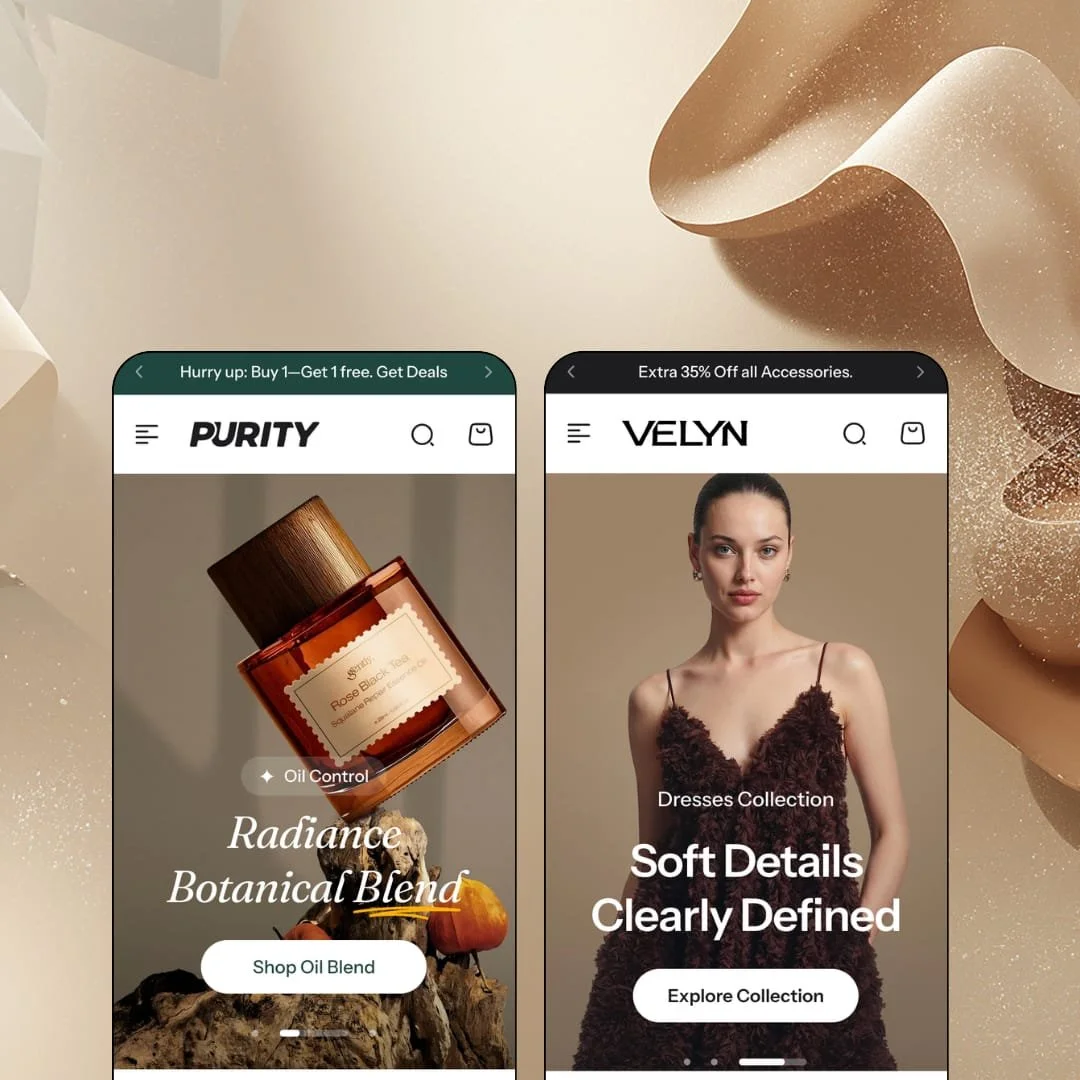
Most beauty themes sell the bottle. Purity sells the routine, and it does that with a product finder, a skin-tone slider and a product page that reads like a landing page, then adds a second preset, Velyn, that points the same machinery at apparel with an outfit builder and a fit assistant. At $300 it sits in premium territory, so the real question is whether two vertical-specific presets beat a wider generalist library at the same price. Under the hood it's an Online Store 2.0 build with JSON templates and section groups, not a Horizon-era theme, which sets a ceiling on how deep block nesting goes.
The product page is built as an education sequence
Below the buy box, the Purity product template stacks a Top Benefits list, a See in Action video strip, ingredient cards with a photo per ingredient (Candelilla Wax, Vitamin E, Botanical Oils), a before/after slider, a What You'll See results block and a numbered three-step usage row. That's one template, not six apps. Each piece is a theme section merchants can reorder or remove, and because they sit on the product template rather than the homepage, every SKU gets the same argument without a hand-built landing page per product. For skincare and cosmetics brands selling considered purchases in the $40 to $150 range with 30 to 100 SKUs, this is where the theme's price is earned.
For apparel brands, the look is the unit of sale
If you sell mix-and-match pieces, Purity's shop-the-look sections do the bundling without an app. Velyn's Styled for You block stages six outfits of three or four pieces, each with its own colour and size selectors and an Add all to Cart button showing the combined total, $610, $590, $630, $695, $740, $640. The same section runs on the beauty preset as The Editor's Edit, three products at $370. Theme-wide, staged twice. It fits boutiques and DTC apparel labels with 100 to 600 SKUs and cross-shop-heavy buyers who arrive for one piece and can be talked into three.
What does a collection page do beyond the grid?
Purity answers with three things. A sub-collection tile row above the products with live counts (Facial Cleansers 8, Serums 8, Toners 5), a promotion banner tile that sits inside the product grid around the fourth slot, and an Others Also Bought row below the Load more button. The filter sidebar renders the merchant's own groupings, Concerns, Formulation, Brands, Size, as expandable lists rather than one flat column, which starts to matter once a catalog carries a dozen or more attributes. For beauty and wellness merchants with 200 to 500 SKUs and repeat buyers who shop by concern rather than by product name, that's a collection page doing discovery work instead of just listing.
Size guidance that's more than a chart link
Velyn's product page opens a Size guide modal with a seven-row table (XS to 3XL with US size, bust, waist, hips), a four-step How to Measure guide beside it, and a Runs large / True to size / Runs small scale under the size buttons. A Model Size accordion lists height, shoulder width, weight and bust/waist/hips for the photographed sample. All of it is theme, filled from the merchant's data. For online-only apparel brands at mid-market prices, where returns eat the margin, this cuts the will-it-fit hesitation at the exact moment it happens.
The product finders route to collections, so someone has to build the collections
Purity's Find Your Match section lets a shopper pick a skin type from five options and a concern from sixteen, then hit See My Routine. That button opens a collection page. In the demo it lands on /collections/large-pores, which means every answer combination a merchant wants to honour needs a pre-built collection behind it, or the quiz sends dry-skin and oily-skin shoppers to the same shelf. Velyn's Find Your Perfect Fit works the same way with fit and category. For a single-brand store with under 30 SKUs and three or four real concerns, the finder has doors with nothing behind them; for a 500-SKU catalog with a merchandiser on staff, it's a week of collection building before the quiz is honest.
The fit assistant makes a promise the theme can't keep
Velyn's Find your fit assistant walks a shopper through height, weight, tummy shape, hip shape and bra size, then recommends a size with a line saying the recommendation is based on what people like you bought and whether they returned it. The theme has no order data. It has no returns data. What it has is a form and a size table the merchant fills in, so that sentence is either a claim you can back with your own analysis or copy you delete on day one. Ship it as-is and you've put a fake data claim on every product page. For mid-market apparel brands under 100 SKUs still building trust, that's a reputational risk the theme hands you by default.
Two verticals, and the specialised sections don't travel
Purity's distinctive work is vertical-locked: ingredient cards, before/after, results blocks and the skin-tone slider on one side; fit assistant, fabric comparison, outfit builder and model measurements on the other. Outside beauty and apparel, none of it applies. A home-goods or electronics merchant with 100 to 500 SKUs and considered-purchase buyers would be paying $300 for the generalist layer, the slideshow, promo tiles, FAQ and testimonials, and leaving the parts that justify the tier switched off.
What it takes to launch
Expect a multi-day pass covering copy across hero slides, product-page storytelling sections and FAQ entries, metafield population for ingredient cards, fabric comparisons, size tables and fit rules, collection building behind the product finders, and market and currency configuration. Add a cross-preset cleanup of placeholder contact details, demo social links and search placeholder text.
-
What works in this preset
Scroll the homepage and you get a rhythm, not a pile. A three-slide hero, a scrolling claims marquee, then a Popular Picks row where each card carries a vendor line, two tag chips like Lash and Mascara, and a Buy 1 Get 1 badge next to the sale percentage. It's dense without feeling busy. The section that sat me up was the brand-story block, Pure Beauty Chosen With Care, which pins a headline and scrolls five belief cards past it, Our Belief, Our Approach, Our Ingredients, Our Rituals, Our Promise, a format that lets a skincare founder tell an origin story without sending anyone to a blog post.
Fair Skin, Light Skin, Medium Skin, Dark Skin. That's the Choose Your Shade section: four portrait tiles above a range slider, with a product row underneath that shifts as the slider moves. I clicked through it expecting a filter and got a merchandising rail instead. For a foundation or concealer line it's a stronger pitch than a swatch grid, because the shopper sees a face before a hex value.
Above the fold on the Lift Lash Mascara page, the buy box packs a lot into little space: a Low stock: 20 left counter under the colour picker, two policy lines for free shipping over $175 and 30-day returns, and a gift line promising a free Calm Boost Mask when both products land in the cart. None of that needs an install. A sticky add-to-cart strip follows the shopper down the page with the variant selector intact, so someone who scrolls deep into the ingredient story can still buy without scrolling back up.
Where it stumbles
The star ratings on every product card and the photo-review blocks on the product page come from Judge.me, not from the theme. For a beauty preset whose whole pitch is trust and education, that means the demo's most persuasive layer, a 5.0 with customer photos on the mascara page, is a separate install with its own setup and its own monthly bill. Purity gives it a slot. It doesn't give you the reviews.
-
What works in this preset
About half a year after Purity launched, Nextsky bolted a fashion preset onto a beauty theme, and the surprising part is how little it looks bolted on. The mega menu runs Tops, Bottom and Dresses as full columns with sub-lists like Crop Tops and Slip Dresses, adds Occasional and Seasonal collection columns with a Spring/Summer promo tile, and puts Outfit Builder in the top-level nav as its own destination. It reads like a boutique built it. The three-message announcement bar rotates returns, free shipping over $150 and a 35% accessories promo, the same bar Purity uses with apparel copy swapped in.
Product cards on the homepage carry colour swatches and S/M/L/XL size buttons inline, with a Quick Add button underneath, so a shopper can choose Pink in Medium from the grid without opening the product. I tested it across the New Arrivals row. Every card had sizes rendered in plain view. On the Asymmetric Strap Dress the colour swatches also carry their own sale percentages, Warm Walnut at -10%, Midnight Indigo at -15%, Burgundy at -17%, a per-variant discount display that tells the shopper which colourway is the deal before they pick one.
Trust arrives here in two forms. A press row quotes The Gentlewoman, Harper's Bazaar and Vanity Fair, and a Store Locations section lists three boutiques with a phone number and a View Store link each. The Customer Feedback section pairs every quote with the product the customer bought and its price, which turns a testimonial into a product card and gives the social proof somewhere to send people.
Where it stumbles
On the Bow Wrap Dress page I went looking for the outfit builder and found Shop Similar Color and See Similar Styles rows instead; the builder itself lives on its own page reached from the nav. For a preset whose pitch is buying complete looks, assembling the outfit means leaving the product. On a phone that's a detour, and the preset's own copy promises the opposite.
Guided discovery is the house style
Both presets route shoppers by question before they route them by category: skin type and concern on one side, fit and category on the other, a shade slider and an Explore by Color row in between. The pattern repeats on the homepage, in the mega menu promo tiles and in the product page's similar-colour rows. It's a consistent point of view about how people shop when they don't know a product's name, and it survives the jump between verticals.
Vertical switching is content work, not layout work
Read both presets end to end and the page skeleton doesn't move: rotating announcement bar, hero, marquee, product rows with inline swatches, story section, testimonials, gram feed, trust trio, footer with a contact block and a category column. What changes is the fill. An agency running one beauty client and one apparel client could hold both on one theme and one set of editor habits, and a merchant who pivots categories keeps their muscle memory.
The release cadence is real
Purity launched in August 2025 and stood at version 1.4.0 by September 2026, with that release adding a tiered discount progress bar for the cart and drawer, a parallax storytelling section, related products on blog articles and a header and search rework. A 1.4.0 inside thirteen months is a working roadmap, not launch-and-wait. Documentation sits on a public GitBook rather than behind a support login.
Discount tone is baked into both presets
A three-message announcement rotation with an Ends tonight: Up to 75% Off slot, a welcome popup offering 15%, a Before You Go exit popup with a second code, a Today Offers panel and a gift-with-purchase line are staged on both presets in nearly the same positions. Each is a toggle. Together they set the theme's default voice as promotional, and a luxury-tier brand that wants quiet will spend its first day turning things off and its second day wondering what the theme looks like without them.
The listing sells half the theme
The Theme Store page describes a minimalist beauty theme, and the fashion preset arrived months after launch without that description changing. An apparel merchant scanning the listing sees skincare screenshots and a beauty tagline; the outfit builder, fit assistant and fabric comparison only appear after clicking into the Velyn demo. The theme outperforms its own pitch, which is a strange problem to have at $300.
★ 8.0/10
Rating
-
Product-page storytelling sections, shop-the-look bundles, size guidance and the collection-page rows are all theme-native; the specialised set stops at two verticals.
9
-
Section library available theme-wide and the skeleton is consistent, but finders, fit rules and ingredient cards all wait on merchant data and collection building before they behave like the demo.
7
-
Inline size buttons on cards, a sticky add-to-cart strip and a bottom tab bar with Home, Shop, Cart and Account keep the buy path short; the outfit builder living on a separate page is the one detour.
8
-
Homepages lean on lazy-loaded imagery and SVG icon assets, and the 1.4.0 release notes call out image-loading work; the demos still stack a lot of sections.
8
-
Two distinct personalities from one skeleton show the range; the promotional default voice and vertical-specific sections narrow it for brands outside beauty and apparel.
8
Frequently Asked Questions
-
It's part of the theme. Velyn's demo links a dedicated Outfit Builder page from the main nav, and Nextsky lists it as the preset's headline feature alongside the theme's own shop-the-look sections.
-
The Theme Store lists EN, FR, IT, DE and ES translations for theme strings, and both demos stage an English/Arabic language switcher with right-to-left support listed as a feature.
-
Both demos use a slide-out drawer; its empty state shows three trending collections with images and a Show All Collections link rather than a blank panel. Version 1.4.0 added a tiered discount progress bar to the drawer and the cart page.
-
It pre-fills four suggested terms (Exfoliators, Serum, Lipstick, Body Sunscreen on Purity) and a short Collections shortlist, so a shopper gets somewhere to click from an empty box.
-
Quantity pricing and combined listings are tagged as Plus features on the Theme Store list; the demos don't stage either, so expect to configure them yourself.
-
Both appear on the Theme Store feature list. I scrolled through several product pages on each preset and didn't find either staged, so verify the button and form styling on a trial before you plan around them.
This review is based on hands-on testing of the publicly available preset demos of the Purity Shopify theme as of September 24 2026. Theme features, preset availability, and performance can change with subsequent updates from the theme developer.