
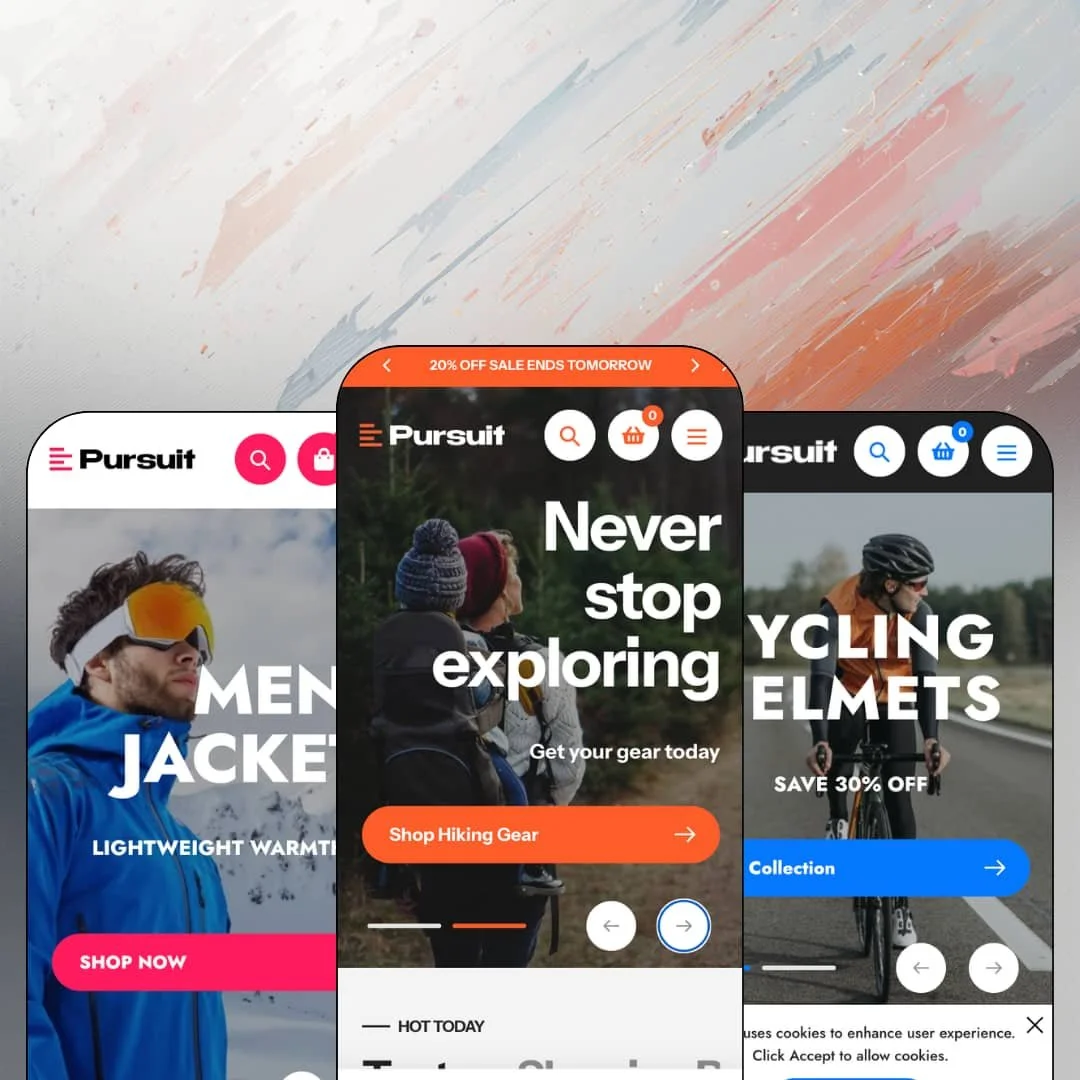
You're selling tents, skis, and technical jackets out of one storefront, and every one of those departments wants the homepage. Pursuit, a $350 Online Store 2.0 theme from Mile High Themes, is built for exactly that merchant: the multi-department active-lifestyle retailer with hundreds of SKUs and a promotion running somewhere at all times. Its three presets, Pursuit, Vail, and Telluride, stay close to home in outdoor gear, adventure sports, and outerwear. I spent time in all three demos to see whether the big-box ambition holds together.
Two navigation systems in one header
Pursuit lets a standard mega menu and a separate collection-navigation menu run in parallel, each supporting promo tiles and multi-level link columns. Seasonal campaigns get their own menu without wrecking the permanent category tree. Both stay fully editable. For sporting-goods or hardware retailers carrying 500+ SKUs across several departments, this is the difference between navigation that scales with the catalog and navigation that gets rebuilt from scratch every quarter.
Search that behaves like a store directory
Dawn hands you a search icon and a results page. Pursuit's live search opens with a category-scoped dropdown, popular-search chips, and product suggestions, and the theme even ships a homepage section that plants that same search box mid-scroll as its own merchandising block. For large-catalog stores serving considered-purchase buyers who arrive knowing the exact rod or boot they need, this shortens the path from intent to product page in a way no hero image can.
Stock states handled as a family
The product template covers the inventory lifecycle in one place: a live unit counter, a back-in-stock notification form, and pre-order messaging for items sold ahead of arrival. Restocks stop being dead ends. For seasonal, restock-driven operations in gear or apparel, where winter jackets sell out in November and come back in February, that trio keeps demand captured on the page instead of bounced to a competitor.
A cart drawer built for the empty state
The slide-out cart doesn't just list items; its empty state serves collection quick-links, a cross-sell row of suggested products, and a newsletter signup, turning an abandoned moment into three exits that keep the visit alive. Dead ends become shelf space. Cross-shop-heavy stores at mid-market price points, with plenty of under-$50 accessories to suggest, will get the most out of precisely these nudges.
One volume setting: loud
Every preset ships with a contact bar, rotating announcements, countdown blocks, sale badges, and discount percentages competing across the fold. If your brand whispers, Pursuit will shout over it. Luxury and minimalist single-brand labels with curated catalogs under 30 SKUs will spend their setup deleting sections rather than adding them, and even after the purge the bones of the layout stay promotional.
Product cards print your copy back at you
Collection and carousel cards render a truncated slice of each product description directly on the card. Write tight opening sentences and it looks intentional; sync a thousand unedited supplier descriptions and every grid page displays the mess. There is no hiding it. Multi-brand resellers importing 500+ SKUs from vendor feeds should budget a copy-editing pass that an image-only card layout would never have demanded.
Three presets, one neighborhood
Pursuit, Vail, and Telluride are three Colorado-flavored takes on the same active-lifestyle world: gear, adventure sports, outerwear. The demos won't show you your store. Beauty, jewelry, or food-and-drink merchants running editorial, story-led storefronts should expect to design their staging from a blank canvas rather than adapting a preset, which erodes part of what a three-preset purchase is supposed to buy.
What it takes to launch
Expect a multi-day pass across hero slides, testimonial sets, FAQ and timeline copy, mega menu re-staging around your own category tree, compare-at price population, contact-detail replacement, and a review of the five bundled translation sets before launch.
-
What works in this preset
The demo runs two menu systems side by side: a Catalog mega menu split into Hiking, Camping, Climbing, and Fishing columns, and a dedicated Collections menu that nests three levels deep, from Great Gifts down through For the Angler into individual fishing categories. Promo tiles sit inside both menus, pushing featured gear and tent sales right where shoppers are already choosing a path. Nothing feels cramped. It's the closest a demo comes to showing what a 25-category storefront actually navigates like.
Open the search bar and you get a category dropdown scoped to the store's own 25 product types, plus popular-search chips and three suggested products before you've typed a letter. A shopper who needs a four-person tent, not a browsing session, skips several steps here. I noticed myself reaching for it instead of the menus.
The homepage reads like a department-store circular. Tabbed carousels switch between Tents, Sleeping Bags, and Footwear; a countdown block pushes a flash deal; testimonials, an FAQ accordion, blog teasers, and a brand-logo row fill out the scroll, so a promotion-led retailer sees their entire toolkit already staged. Nothing needs inventing.
Where it stumbles
The same collections appear along three separate menu paths; Backpacks, for instance, is reachable through Catalog, through Collections under For the Hiker, and again in the Hiking Gear column. That's a staging choice, and the theme lets you flatten it, but a store copying this layout one-to-one would hand shoppers a maze.
-
What works in this preset
A native video slide leads the hero rotation, and further down the page sits a tabbed company-history timeline running from 2012 to 2022, a section neither of the other two demos even attempts. It reads like a brand site. For a shop selling identity along with bikes and skis, that timeline does real narrative work without a page builder or a custom page template.
Mid-homepage, a complete buy box appears for a cycling helmet: size and color pickers with sold-out states, a quantity stepper, and add-to-cart, all working without leaving the page. Impulse categories benefit directly. Anyone weighing whether to feature a hero product on the homepage instead of burying it two clicks deep gets their answer staged in front of them.
Vail also drops a standalone Find It Fast section into the middle of the page, a search box with its own category selector treated as a merchandising block rather than a header utility. It's an odd placement that works.
Where it stumbles
The demo stages a single Shop Now mega menu over a catalog spanning cycling and snowsports. The theme's menu system goes far deeper, as the other two demos make clear, so treat this as a starting sketch; a store running two full sport lines will want department-level top navigation built out from day one.
-
What works in this preset
Telluride flips the header to a centered-logo layout with the contact bar riding above it, a small structural change that shifts the whole preset toward apparel-boutique territory while keeping the same commerce engine underneath. The pink-on-black palette does the rest. Between the three demos, this is the one that shows the theme can dial its intensity down.
Vendor names print on the product cards here and link straight to per-brand collection pages, which matters in multi-brand outerwear, where Fjällräven or Craft is half the purchase argument. Brand names sell jackets. The staging turns every card into a doorway to that brand's full rack, and the demo commits to it consistently across carousels and grids.
Near the footer sits a retail-location section with street address, opening hours, and a Get Directions link wired to Google Maps. I went looking for an equivalent in the other demos and only Telluride stages one, which makes this preset the natural template for click-and-mortar setups.
One retail engine at three intensities
All three demos run a recognizable rhythm of hero, collection tiles, tabbed sellers, deal block, testimonials, brands, and newsletter, tuned up or down per vertical: Pursuit maximal, Vail brand-forward, Telluride boutique-adjacent. Reading them side by side tells you how the system will behave with your own catalog before you spend a dollar, which is exactly what a preset family should do.
Demo data with real weight
The presets are staged with genuine brand catalogs, deep variant matrices (a hiking boot in three colorways across fourteen sizes), and live inventory counts. What you evaluate is close to what a working store looks like, not an art-directed shell, and that honesty makes the pre-purchase evaluation genuinely trustworthy.
A 2022 architecture in a 2026 market
Pursuit runs on Online Store 2.0: JSON templates, sections everywhere, block nesting capped at shallow depth. That's a proven foundation, but Shopify's newest theme generation allows far deeper block composition, and merchants who expect to restructure layouts beyond the section level will hit the editor's ceiling and land in code.
Variation by palette, not by blueprint
Read consecutively, the three presets differ in color, typography, and vertical far beyond how much they differ in page architecture; the homepage skeleton repeats nearly section for section. A buyer hoping for three genuinely different store concepts is getting one concept, styled three ways.
Rating
★ 7.6/10
-
Dual menus, scoped live search, the stock-state trio, and countdown, popup, and promo sections cover conversion work that would otherwise mean stacking several app installs on top of the theme.
8
-
Sections map cleanly to the Online Store 2.0 editor and the demos show every major block already in use; trimming, not building, is the main onboarding task.
8
-
Slides ship with dedicated mobile image assets, and the mobile menu collapses the full multi-level tree into an accordion without losing depth.
8
-
Product imagery loads in tightly sized responsive variants, but the default homepages are long and media-heavy, with video heroes and stacked carousels; lean staging is on the merchant.
7
-
Two header layouts, deep menu options, and a wide section library, all inside one promotional register; stepping outside the big-box look takes real effort.
7
Frequently Asked Questions
-
Yes. Both the Pursuit and Telluride homepages stage a flash-deal block with a live countdown; the end date is a section setting, no app involved.
-
The theme interface ships in English, French, Italian, German, and Spanish. Product content still runs through Shopify's own localization workflow.
-
The star display renders from the theme's own templates, but collecting the reviews behind those stars requires a connected review app; the theme provides the placement, not the review engine.
-
Yes. In-store pickup is part of the cart feature set, and the theme includes a store-location section with hours and a directions link.
-
Both are in the merchandising set. The demo product pages run tabbed content blocks below the buy box, and a size-chart modal is available for apparel and footwear catalogs.
-
Version 2.1 shipped in December 2025, roughly three and a half years after the July 2022 launch, with documentation hosted on the developer's own support site.
This review is based on hands-on testing of the publicly available preset demos of the Pursuit Shopify theme as of July 2026. Theme features, preset availability, and performance can change with subsequent updates from the theme developer.