
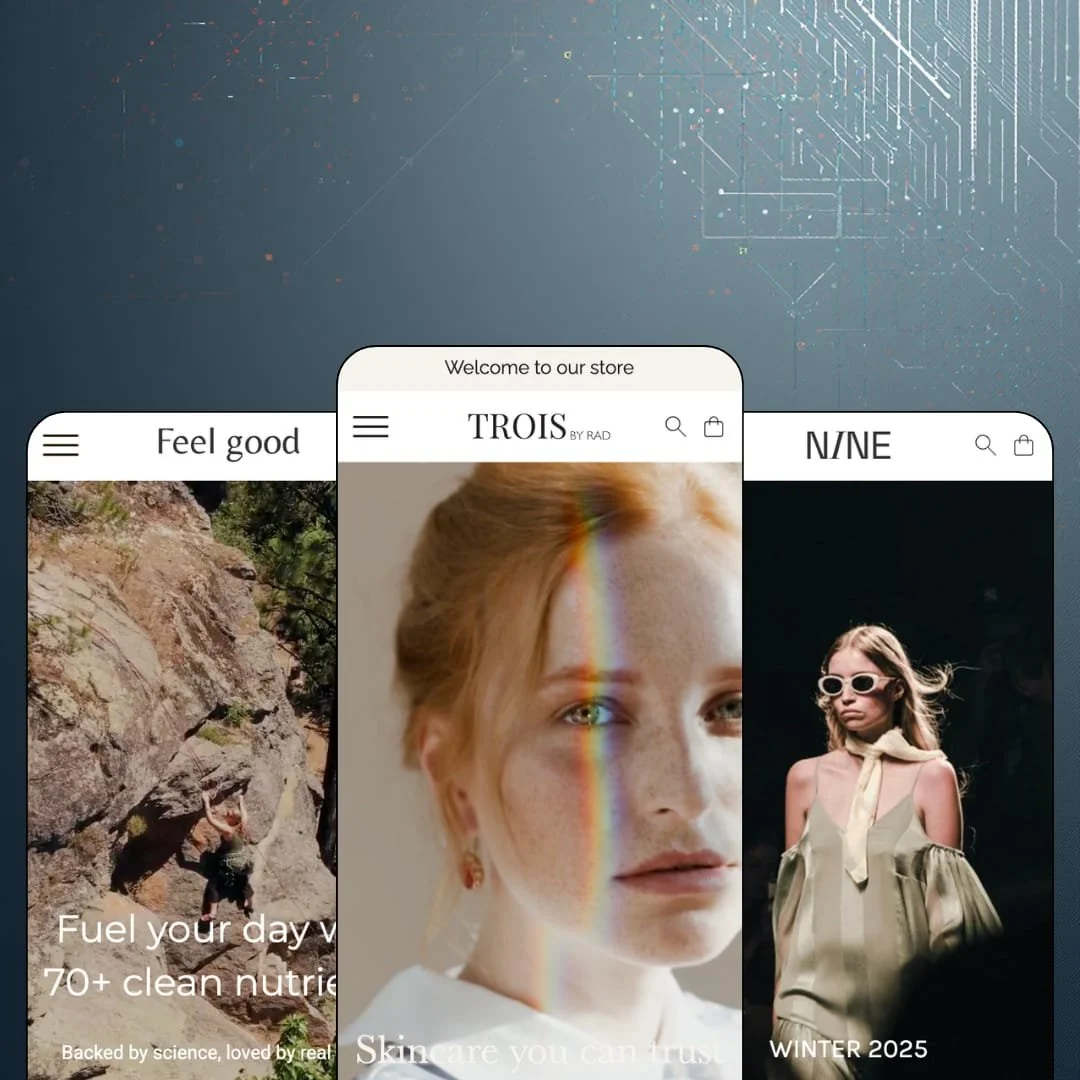
Most Shopify themes treat the grid as a shelf for products. Rad treats it as the whole page: a three-column layout where a campaign video, a buyable product card and a collection tile can sit side by side, so the skincare demo reads closer to a magazine spread than a catalog. At $320 it asks premium money for an Online Store 2.0 build with three presets and a very short public record behind it. So the real question is whether one strong layout idea, plus a few well-chosen selling tools, carries that price.
A grid that mixes media, products and promos in one layout
Rad's layout system is the reason to buy it. Since version 2.0.0 merchants can switch between a default grid and an "inspirational grid", set gap spacing with sliders on eight grid-based sections, and drop multiple promo or call-to-action cards straight into a collection page's product grid. Dawn, Shopify's free baseline, keeps products in a uniform grid and media in separate full-width sections; Rad lets them share a row. For single-brand beauty or fashion stores with under 50 SKUs, that turns a short catalog into a page that feels full.
Built-in pre-order
Selling before stock lands? This one's for you. Version 3.0.0 added pre-order handling to the theme itself, and the demos show it in use: the button label changes from "Add to cart" to "Pre-order" on product cards and on the product page's main button, with no app block involved. Drop-model brands with small seasonal runs, whether apparel or skincare, get a way to test demand before paying for inventory.
Shop-the-look hotspots that work beyond the homepage
An image hotspot section tags products onto a photo and lets shoppers buy from it. Rad treats this as a headline feature, and it shows: the section turns up on two of the three demo homepages, and the fashion demo's product template reuses it under a "STYLE WITH" heading so a turtleneck page can sell the trousers and coat in the same shot. Version 2.0.0 also added background images to it. For apparel and accessories labels with cross-shop-heavy buyers, it's outfit-level selling without an app.
An active release log
Does a theme this young get looked after? The release log says yes: nine versions between August 2025 and June 2026, including two that each added a full preset (Nine in December, Feel Good in April) and one that rebuilt section and block spacing around range sliders. Fixes land fast too. For single-brand merchants in beauty or wellness who plan to run one theme for years, that cadence counts as much as any section.
Limited track record
Three reviews. That's the entire public record on the Theme Store after more than a year on sale, and while all three are positive and each praises the developer's support, a sample that small can't tell you how the theme behaves across hundreds of live stores, odd app stacks and major platform updates. Agencies and multi-brand operators running 500+ SKU client stores should weigh that before paying $320.
No size chart for a fashion-pitched theme
Rad names fashion first in its pitch, yet a size chart isn't among its listed features. Apparel in the demo sells on XS to XL pills with no fit reference beside them. For mid-market and luxury clothing labels, where a coat at several hundred euros is a considered purchase and returns eat margin, that means building a size guide from a page, a popup app or custom code. I looked for one. It isn't there.
A thin urgency toolkit at this price
Promotions in Rad come down to banners, promo tiles and product badges. Countdown timers, stock counters, promo popups and back-in-stock alerts don't appear in the feature list, which is a real gap at $320 for beauty and supplement merchants who run flash drops or restock-driven sales, because every one of those devices becomes an app install with its own styling work. Full-price brands won't care. Promo-led ones will.
No social proof layer
None of the three demos stages a single review, rating or customer testimonial, and neither product reviews nor trust badges appear among the listed features. The skincare demo's ticker claims it's "Trusted by 5000+ women", and the supplement hero says "loved by real people", but no real person speaks anywhere on either store. That's a slogan, not evidence. Beauty and wellness brands selling to first-time, considered-purchase buyers will need a review app and should budget time to style its widgets to match.
What it takes to launch
Expect one to two days of work: a copy pass across heroes, collapsible product rows and FAQ entries, product tagging for hotspot images, menu and footer rebuilds, and metafield population if you want ingredient-level filters.
-
What works in this preset
You land on a looping campaign video with one line over it, "Skincare you can trust", and the first products arrive before you've scrolled far. Four cards follow the hero, and each one carries its own option pills: 30ml or 50ml on the serums and creams, Pink, Green or White on the facial roller. That's the point. A shopper can pick a size and add to cart from the homepage without ever opening a product page, which suits a range where people already know what a day cream is and only need to choose the jar.
"Shop our day cream." That single promo link sits inside the Shop menu, next to five collection links and a nested Accessories panel that goes down to individual products like the Konjac Sponge and the Makeup Pads. I clicked through it expecting a plain dropdown and found a menu that merchandises. The header also keeps a dark and a white version of the logo, so it can sit transparent over the hero video without losing the wordmark.
Further down, the page shifts from selling to reassuring. A row of four store tiles lists Lisbon, Antwerp, Amsterdam and Brussels with street addresses, a ticker strip loops short brand claims, and the footer holds an English/Dutch language switcher beside the newsletter field. On the product page, the Day Cream splits its copy into Details, a numbered "How to use it" routine and an Ingredients row, with a slim add-to-cart bar that carries the product thumbnail.
Where it stumbles
Skincare sells in routines, and this demo only gestures at one. The "Find your perfect routine" button opens the full catalog, and I went looking for a staged regimen set, a bundle row or a step-by-step kit and didn't find one. Each product stands alone.
-
What works in this preset
Nine is the quietest of the three demos, and that's deliberate. The hero splits into two tall fashion images under a single "WINTER 2025" headline, with a separate crop prepared for phones so the composition isn't just squeezed. Below it, six pieces from the new season line up as clean cards: name, price, nothing else. No badges shout. In this preset demo the cards are staged without quick-buy triggers, which fits coats at €450 and a leather bag at €350, where nobody decides from a thumbnail.
The lookbook page is where the preset earns its fashion label. It opens on a full-bleed runway image, moves through paired portraits and a six-image grid with short editorial passages between them, then closes with a "Shop the looks" rail of eight products and a link into the collection. I scrolled through it twice. The rhythm of image, text, image, product rail is something a small label can refill each season with nothing but new photography.
Browsing the catalog is a practical affair. Sixteen products narrow by Category, Size, Color, Availability and Price, each value with a live count, so a shopper can get to size S in beige in two clicks. Cards hold several photos per product, five on the double-breasted blazer, which gives the image rollover something to show.
Where it stumbles
Colorways are staged as separate products. The oversized blazer appears three times, in black, grey and check, and the pleated wide-leg pants twice, so a sixteen-item catalog is really about a dozen designs with no swatch link between siblings. For a label that sells one cut in several fabrics, that means either merging them into variants or accepting a grid that repeats itself.
-
What works in this preset
"Fuel your day with 70+ clean nutrients." The hero video makes a supplement-brand promise, and three powders follow straight away with 30g and 700g pills on each card, so a first-time buyer can take the €3,49 sachet for a trial while the regular picks the tub. Five category tiles split the range into Bestsellers, Performance, Recovery, Everyday wellness and Limited editions. It's tidy. Nothing here needs explaining.
Open a product and the page keeps going after the buy box. PeakFuel+ stacks four collapsible rows (Details, How to use it, Ingredients, Shipping & returns), two icon lines for payment and the free-shipping threshold, then a long-form run: an image-and-text block, four benefit columns and a founder quote with a portrait. This is the template work the developer shipped alongside the preset, and it gives a wellness brand room to argue its case under the fold.
The collection page shows how far structured product data can go. Beside Category and Availability, the demo wires a "Detailed ingredients" filter with 25 values, from Magnesium and Zinc at five products each down to single entries for Vitamin K1 and whey protein. A shopper hunting for B12 gets there in one click. The FAQ page follows the same logic, with jump links at the top and eight questions grouped under product use and ingredients.
Where it stumbles
Supplements are a reorder business. Every product in this demo is staged as a one-time purchase, with no subscribe-and-save option beside the size selector, and that mechanic would come from a subscription app, not from the theme. I'd want to see how such a widget sits in this buy box before committing.
Label readers come away short. Ingredients live in a collapsible text row, and the demo stages no per-serving facts panel or dosage table, even though the catalog filter proves the ingredient data exists.
A full-price voice
Read the three demos together and a pattern shows: nobody is shouting. Across 54 staged products there's one sale badge, no popups and no timers, only video, photography and short copy. Rad is built for brands that sell at list price and let the product carry the argument.
One product-page grammar, three vocabularies
Every demo product page follows the same order: gallery, option picker, collapsible rows, sticky add-to-cart bar. What changes is the wording inside the rows: usage steps and ingredients for skincare, Materials & Care for fashion, shipping and returns for supplements. A merchant learns the template once and can stretch it across very different products.
A 2025 launch on the older architecture
Rad arrived in mid-2025, after Shopify introduced its Theme Blocks generation with deep block nesting, yet it's built as an Online Store 2.0 theme: sections holding a single layer of blocks. Nothing breaks because of that. It does mean buyers paying 2026 prices get a layout tuned through section settings instead of freely nested blocks, and that's worth knowing if you plan to keep the theme for years.
It's sized for short catalogs
All three demos hold between 15 and 23 products, navigate through one or two menu levels, and lean on category tiles for discovery. Mega menu, infinite scroll and recently viewed products aren't in the feature list. Stores past a few hundred SKUs will feel the ceiling in navigation before they feel it anywhere else.
The look depends on the footage
Two demos open on 1080p video, the third on a split photographic hero, and the lookbook alone runs through about a dozen large images. Take that media away and the three-column grid is a tidy arrangement of boxes. Brands without campaign-grade video and photography should price a shoot into the project.
Rating
★ 7.6/10
-
Pre-order, quick buy with option pills, hotspots, lookbooks and a quick order list are on board; size chart, countdown, stock counter and any review layer are not.
7
-
Spacing and grid gaps run on range sliders, the product template repeats one clear order, and the help center is organised by settings, pages, header group and footer group.
8
-
Heroes carry a dedicated phone crop, the menu slides out in nested panels, and a sticky add-to-cart bar with thumbnail follows the product page.
8
-
Homepages stay short at eight to ten sections, but two demos autoplay 1080p video above the fold, which is weight a merchant has to manage.
7
-
Two grid modes, adjustable gaps on eight sections, background images on five section types and separate logo widths for desktop, mobile and footer.
8
Frequently Asked Questions
-
Three: Rad for skincare, Nine for womenswear and Feel Good for supplements. Nine arrived in December 2025 and Feel Good in April 2026, so the family has tripled since launch.
-
No. The tagline names fashion, skincare and design stores, but no demo stages furniture or design objects, so a home brand would start from the Rad or Nine preset and restyle it.
-
Mega menu isn't a listed feature, though in-menu promos are. The skincare demo shows what that looks like in practice: a Shop panel with collection links, product-level links under Accessories and one promo link.
-
English, French, Italian, German and Spanish. The skincare demo also runs an English/Dutch switcher in the footer, which shows where the selector is placed.
-
A quick order list is included for bulk ordering from a single table. Quantity pricing is listed too, but it's tied to Shopify Plus.
-
All three Theme Store reviews mention fast, personal support, and one describes receiving written instructions, a video tutorial and a follow-up. The developer, Radikal, is based in Kontich, Belgium, and runs a help center with a contact form.
This review is based on hands-on testing of the publicly available preset demos of the Rad Shopify theme as of September 18 2026. Theme features, preset availability, and performance can change with subsequent updates from the theme developer.