
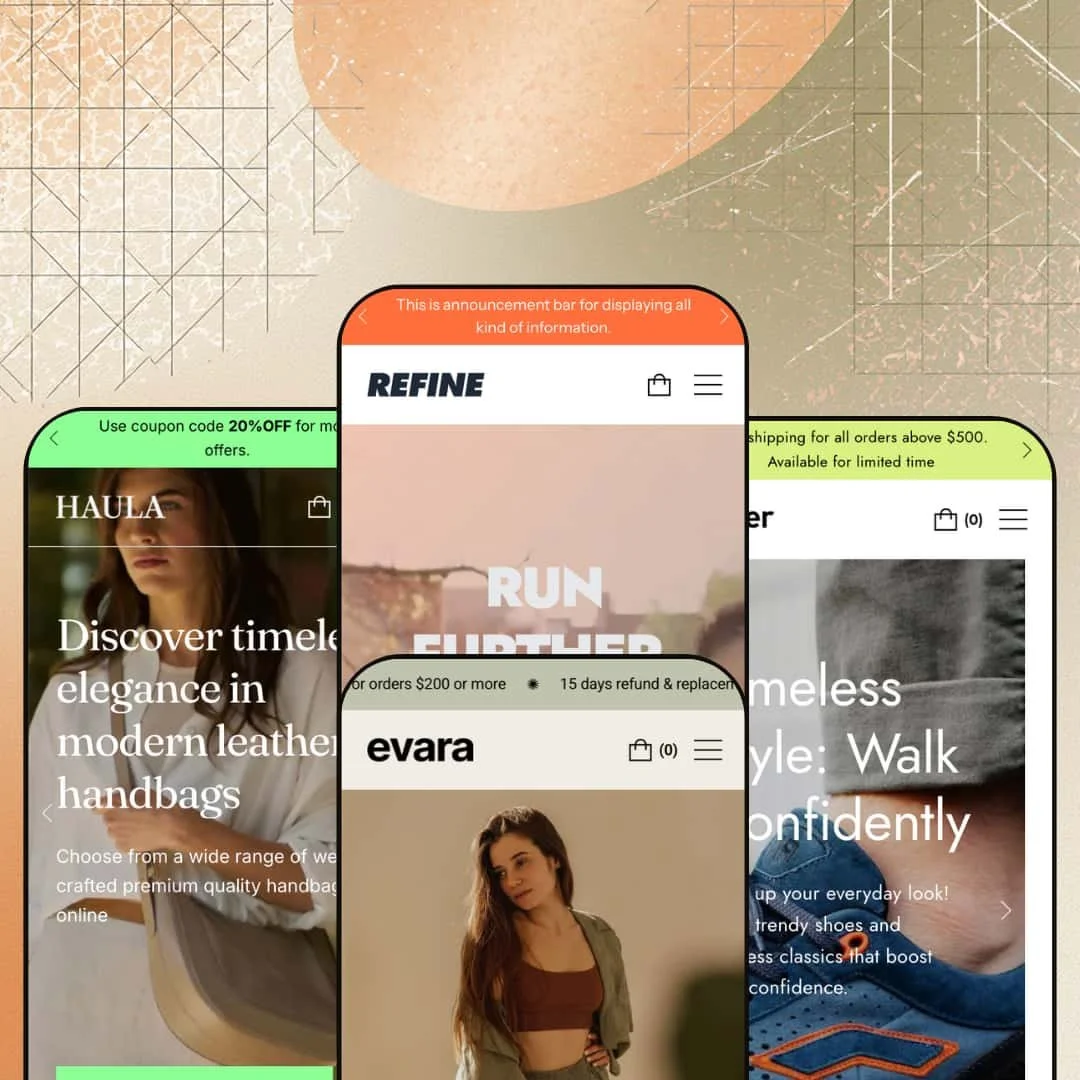
Plenty of Shopify themes commit to a single demo and call it a day. Refine ships four polished preset builds, and every one leans unmistakably fashion: activewear, sneakers, minimalist apparel, and leather accessories. That range is the draw at $100, but it also tells you who the theme is really for. Built on Shopify's Online Store 2.0 architecture, it hands clothing and accessory merchants a section-rich starting point rather than a blank page.
A genuinely broad section library for homepage storytelling
Refine ships past 30 sections, and the spread covers storytelling layouts most $100 themes never attempt: outfit and shop-the-look groupings, a before/after image slider, image hotspots, scrolling claim dividers, tabbed product carousels, and a featured-product block with embedded video. That breadth lets a merchant build a long, editorial homepage entirely from native sections instead of stitching in page-builder apps. For apparel and accessory brands with 50 to 200 SKUs that sell on lifestyle and visual identity, it removes a real chunk of launch tooling.
A conversion toolkit that comes assembled
Think of the marketing features here as one coordinated kit rather than a checklist. Countdown timers, stock counters, trust badges, quick view, recently viewed, cross-sell blocks, promo popups and tiles, an age verifier, gift wrapping, and in-store pickup all ship together and wire into the same demo. I saw the countdown running an actual "20%OFF" code on the activewear build. For flash-drop and impulse-led sellers in the mid-market band, that's a conversion layer that would otherwise mean several separate app installs.
Catalog and product merchandising that respects variants
Capability first: collection grids carry live product counts, category cards take short descriptions, and the variant picker renders color-and-size combinations as swatches with swatch filtering on collection pages. That structure turns a deep, multi-attribute catalog into something a shopper can actually navigate, with size charts, product tabs, image zoom, and product videos waiting on the product page. For apparel merchants juggling color-and-size matrices across 100 to 500 SKUs, it's the difference between a browsable store and a flat one.
More pre-built structure than the free starting point
Set Refine against Dawn, Shopify's free baseline, and the gap is in pre-built editorial structure rather than raw capability. Dawn gives you a clean, minimal foundation; Refine gives you four fully merchandised fashion builds to reverse-engineer, each one already populated with the section patterns a clothing store tends to need. For a first-time or bootstrapped single-brand merchant who'd rather edit a finished store than assemble one, that head start is most of what the $100 buys.
The whole system is shaped like a clothing store
Every preset, every demo section, every stock layout assumes fashion. The outfit groupings, the lookbook page, the garment-focused before/after slider, and the lifestyle claim dividers all speak apparel and accessories fluently, which leaves merchants outside that world doing translation work. A food and drink, electronics, or furniture seller with a considered-purchase catalog inherits sections framed for clothing and has to repurpose each one before it reads right.
One design voice across all four presets
The four presets are less four design systems than four content treatments of a single restrained one. They share the same calm typography, the same generous spacing, the same quiet palette logic. A merchant chasing a bold, maximalist, or sharply idiosyncratic brand look, especially a budget-disruptor or a luxury house wanting a signature feel, will find the aesthetic ceiling lower than the section count suggests.
It runs on photography you may not have yet
The layouts are built around big hero video, image collages, and overlay cards. Feed them thin photography and the homepage looks half-finished. A bootstrapped single-founder shop or a dropship catalog without a deep, polished media library will watch the design fall flat until those assets exist, because the structure leans on imagery to carry the premium feel.
What it takes to launch
Budget two to three days for a copy pass across hero captions, announcement and footer text, and About and FAQ narrative, plus sourcing the hero video and lifestyle imagery the visual sections expect, collection population, and mega-menu and featured-tile staging.
-
What works in this preset
The first thing I clicked was the search icon, and the overlay opened with a tidy row of suggested collections before I'd typed anything. That predictive presentation, paired with a mega menu that mixes multi-column links and three featured image tiles, gives the activewear demo a navigation system that feels considered rather than bolted on. It reads like a store that expects browsers, not just buyers.
Scroll down and the preset keeps handing you merchandising moments. There's a video slideshow hero, a scrolling claims divider, a collection grid with live product counts, activity cards with short descriptions, a tabbed bestsellers block, a countdown promo carrying a real coupon code, an outfit grouping, and a before/after image slider comparing two colorways. The density is the point: this is the demo that shows off how far the section library stretches when a merchant uses most of it.
A featured-product spotlight runs an embedded video next to a full description and a single call to action. It's a clean way to anchor a hero product. For a movement-led brand with a story to tell, the section does real work.
Where it stumbles
The activewear build is the busiest of the four, and that cuts both ways. A homepage this long, stacking video, collage, countdown, testimonials, blog, and an Instagram row, can push actual products far below the fold unless a merchant trims sections back during setup.
-
What works in this preset
Hipster swings the same engine toward footwear and streetwear. Product cards carry size-and-color variants, with sneaker runs like a 6.0 sizing scale and four-color swatch options surfacing right on the grid, plus a "Popular" badge that flags hero styles without an app. The collection vocabulary leans young, with entries like Daily workout, For girls, and Going to school framing the catalog around lifestyle moments rather than product categories alone.
The announcement bar pairs a free-shipping threshold with a coupon prompt. It's a small thing. For an impulse-driven footwear shopper, that two-line nudge at the top of every page is exactly the kind of low-effort conversion cue the preset gets right.
-
What works in this preset
Evara is where the theme proves it can whisper. The same section system that shouts in the activewear build is dialed back here into a restrained, editorial layout for silk-and-cashmere womenswear, with generous whitespace and a calm palette that lets the garments carry the page. A dedicated Lookbook page sits in the navigation, and the variant picker handles combined size-and-color options cleanly across a catalog priced uniformly at $180.
I went looking for the rotating announcement bar and found three messages cycling through it: a shipping threshold, a returns promise, and a first-order discount. That single component quietly covers most of the reassurance an apparel buyer wants before checkout. It's a strong fit for a considered-purchase shopper browsing premium basics.
Where it stumbles
The uniform $180 pricing keeps the demo clean but teaches a merchant nothing about how the theme handles tiered ranges or markdowns. A shop with entry pieces and high-end items will need to stage its own price hierarchy and sale display, since this preset never demonstrates either.
-
What works in this preset
I noticed the sale pricing rendered cleanly on the leather-goods cards, with a struck-through compare-at figure sitting beside the discounted price and a tidy "Sale" badge above it. For a handbag catalog spanning roughly $280 to $450, that pricing treatment does a lot to signal value at a glance. Named-color swatches sit on each card too, so a shopper sees a bag's Camel, Khaki, and Beige options before clicking in.
The preset opens with a two-slide image hero and a pull quote, then leans into image-overlay cards and a tabbed bestsellers block. It's the quietest, most gallery-led of the four builds.
Where it stumbles
Haula stages a calmer, image-first layout than its siblings, which suits a small accessories range but gives a large catalog less browsing momentum. Merchants with deeper inventory will want to pull in the denser grid and category sections the other presets put on display, then populate them before launch.
Sections that travel between presets
Because the same section library underpins all four demos, a merchant isn't locked into the preset they pick. You can lift the activewear outfit block into the accessories build, or borrow Evara's lookbook treatment for a footwear store, and the pieces behave consistently wherever they land. That cross-preset coherence makes the library feel larger in practice than any single demo lets on.
An actively maintained, documented base
The theme sits at version 4.3.0 with updates landing into 2026 and a public documentation site behind it. For a small merchant betting a storefront on a $100 purchase, an upkeep signal like that matters as much as the feature list, because it suggests the sections will keep working against Shopify's own changes.
Committing to a preset has a switching cost
The four presets diverge sharply in content, so the choice of starting build isn't cosmetic. Decide late, or change your mind after populating one, and you're re-staging sections and re-sourcing imagery rather than flipping a setting, since each demo fills the shared sections in its own way.
Wide rather than deep
Refine spreads itself across a lot of features without making any single one a standout mechanic. It's a broad, competent toolkit, not a specialist with one defining capability, and merchants hunting for a singular hook the theme does better than anyone else won't find it here.
Rating
★ 7.8/10
-
Section, conversion, and merchandising coverage runs well past what the $100 price band usually delivers, from countdowns to before/after sliders to swatch filtering.
8
-
Familiar Online Store 2.0 sectioned editing, though the sheer section count and demo placeholder text mean a longer-than-average configuration pass.
7
-
Slide-out mobile menu with stacked navigation and responsive product grids; the image-heavy sections collapse sensibly on small screens.
8
-
Lean image lazy-loading and low-res placeholders help, but the visual-heavy demos reward a merchant who keeps section count and asset weight in check.
8
-
Four presets and 30+ sections with full color and type control, tempered by a single underlying design language across all four builds.
8
Frequently Asked Questions
-
Match it to your catalog: Refine/Active for movement and activewear, Hipster for footwear and streetwear, Evara for minimal apparel, and Haula for leather goods and accessories.
-
Yes. The countdown section ran a live coupon code ("20%OFF") on the activewear demo, paired with stock counters and promo popups elsewhere.
-
It does, rendering combinations as swatches on both product cards and product pages, with swatch-based filtering available on collection pages.
-
Yes. The Evara preset carries a dedicated Lookbook page, and image-hotspot plus outfit/shop-the-look sections support editorial merchandising across presets.
-
The Haula demo renders a struck-through compare-at price beside the reduced figure with a "Sale" badge, so markdowns read clearly at the card level.
-
No. Refine is an Online Store 2.0 theme using sectioned JSON templates, not a Horizon-era Theme Blocks build.
This review is based on hands-on testing of the publicly available preset demos of the Refine Shopify theme as of May 30, 2026. Theme features, preset availability, and performance can change with subsequent updates from the theme developer.