
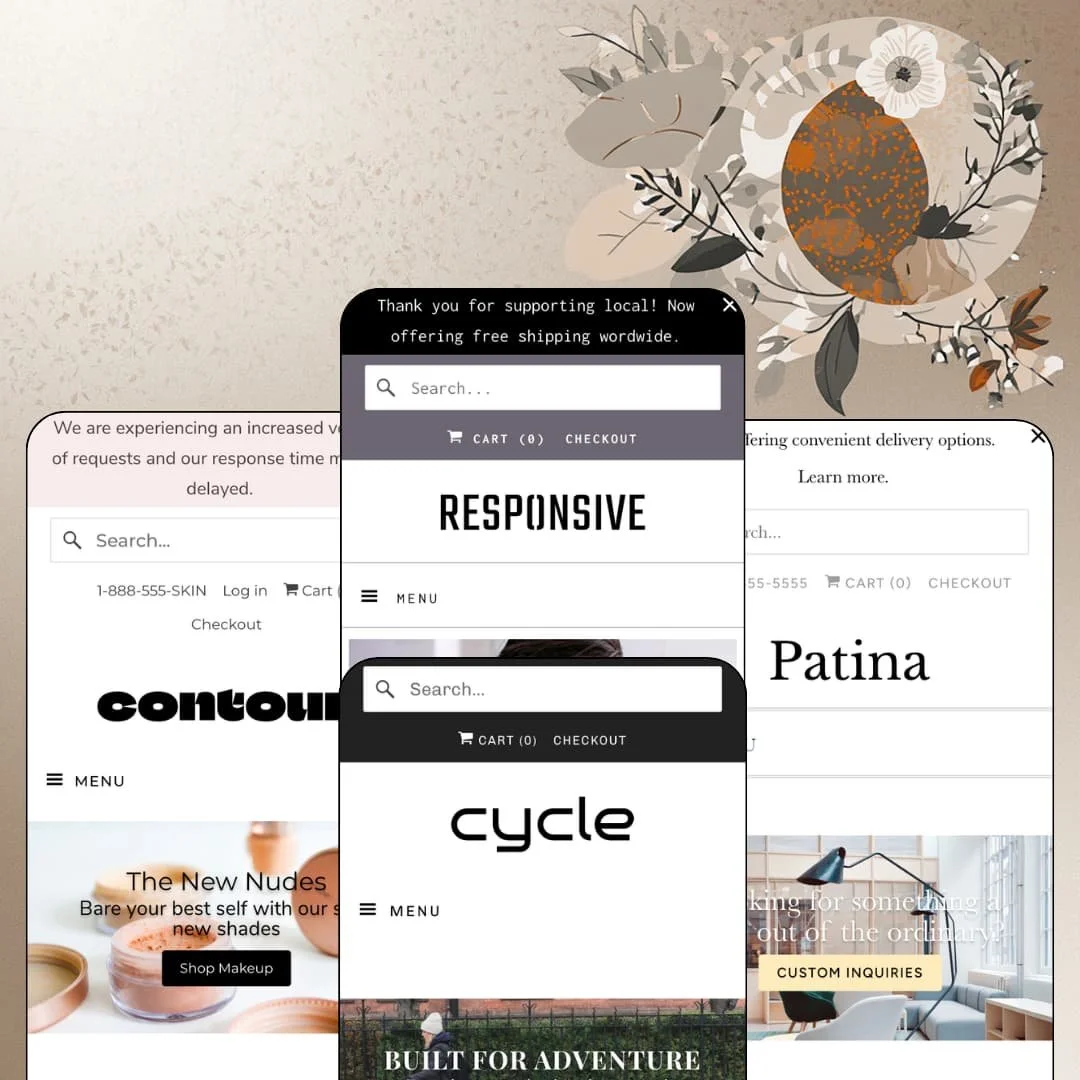
Most Shopify themes get retired or rebuilt long before their tenth birthday. Responsive is closing in on a decade and still runs the same four demo stores it launched with, now renamed Responsive, Patina, Cycle, and Contour but sitting on the original London, Paris, New York, and San Francisco URLs. That longevity is the whole question for a merchant paying $220 in 2026: is this an Online Store 2.0 theme that has quietly kept pace, or a familiar layout coasting on reputation? I spent time in all four demos, from a twelve-tee apparel shop to a two-hundred-product beauty retailer, to find out which answer holds.
A homepage buy module with a live variant picker
The featured-product section on the homepage isn't a teaser card. In the London demo it renders the Chiltern Grey top with a four-image gallery, a size-button row, a quantity stepper, and an Add to cart button, and in the Paris demo the Dome Table Lamp appears with its full sixteen-option variant list and a working add-to-cart, all without leaving the homepage. One product, fully purchasable, above the fold. For a single-hero apparel brand with under thirty SKUs, or a lighting maker selling one configurable design in several finishes, that section removes a page load between the landing and the cart.
Built for restock-driven catalogs
Merchants who sell in small batches and sell out regularly get a native back-in-stock form. On the Contour demo's Elixir Lip Gloss page and on the London demo's Chiltern Grey, a "Notify me when this product is available" email field appears directly in the buy box the moment a variant is unavailable, without any app install. It's one line of UI. What it replaces is the choice between losing the lead or paying for a restock-alert app, and for a beauty brand running limited shade drops or an apparel label restocking a core tee every six weeks, that capture form is worth more than most homepage sections.
Mega menus that scale from five columns to nine
The same mega-menu section stretches from the Paris demo's five titled columns with an image tile to the Contour demo's nine columns including two alphabetical brand lists and a promotional link line. Each column takes a heading, a list of child links, and optional image and text blocks. That's enough structure to map a lighting catalog by fixture type and an accessories long tail, or a multi-brand beauty stockist by concern, category, and brand from a single dropdown, and it means a merchant with 200 to 500 SKUs across several vendors can give shoppers a full catalog map before they touch a filter.
Does the size guide actually convert sizes?
It does, and it's the detail that told me this theme was designed by people who have shipped clothing. The London demo's Size Guide modal, opened from a link beside the price, contains three real tables: sleeveless measurements in cm and inches, T-shirt measurements with bust, waist, hips, and length, and an equivalent-sizing chart across UK, USA, Australia, France, Italy, Denmark, and Japan. Seven countries. For an apparel brand shipping internationally with considered-purchase customers who return items over fit, a conversion table that lives in the buy box is a returns-reduction tool, not a nicety.
Social proof you type in yourself
Every demo carries a customer-testimonial section, and on the Cycle demo's Calyer product page a "Customer Reviews / Based on 1 review / Write a review" block sits beneath the description. The testimonials are text blocks the merchant types in. The review widget comes from an app. Neither is a rating engine the theme owns, so a merchant buying Responsive for a beauty or apparel store where star ratings drive conversion should budget for a review app on top of the $220. The quotes are typed, and the stars are rented.
A two-column product page with no room underneath
The product page runs a gallery on the left and everything else, price, picker, description, share row, in a single column on the right, and I couldn't find a staged tab, accordion, or metafield block breaking up the description on any of the four demos. A merchant review from April 2025 on the Theme Store makes the same complaint, asking for access to the area beneath the image for long descriptions and bundle add-ons. For a skincare brand with ingredient lists and usage directions, or a furniture maker with dimensions and care instructions, everything lands in one prose column.
An Online Store 2.0 theme at a 2026 price
Responsive sits on the Online Store 2.0 generation: JSON templates, sections on every page, blocks nested to roughly two levels. Dawn, Shopify's free baseline, sits on the same generation and now ships a product-disclosures section and storefront-event hooks that Responsive's demos don't stage. Ten years in, that's a fair comparison to make. A merchant paying $220 is buying a decade of settled section design and a developer with a long support record, not the nested-block, mobile-first architecture of the current Horizon-era themes, and for a holding company standardising several storefronts on one theme in 2026, that generation gap will matter.
What it takes to launch
Expect a two-to-three-day pass covering product-description cleanup across all four catalogs, out-of-stock re-staging in featured sections, header utility details, blog and About-page narrative, and mega-menu reconstruction for your own category tree before launch.
-
What works in this preset
You land on a hero slide that doesn't just sell a mood, it sells a product. Each slide in the London demo carries a caption and a link that goes straight to a single product page, so "all that glitters" drops you onto the Seymour Black top rather than onto a collection. It's a small routing decision. For a brand with twelve tees, it means the homepage slideshow behaves like a merchandised rail instead of a billboard, and that's the right instinct for a catalog this tight.
The testimonial section below the best-sellers row does something I rarely see done well. One of the two customer quotes links its product mention, "Seymour Grey sleeveless", directly to that product page, which turns social proof into a navigational element instead of a decorative one. Two quotes, one deep link, no stars. The section is clearly built for merchants who have a handful of real customer emails and want them to do double duty as merchandising, and it reads more like a shop wall than a review widget.
I clicked through the header and found a language switcher offering English and German alongside the country selector, which matches the theme's bundled EU interface strings. The product cards carry a "New" badge on Brook Grey and a Quick Shop trigger on every tile, and the sold-out Golborne White card still renders a Quick Shop button rather than greying out. Colorways ship as separate products here, Seymour Grey and Seymour Black side by side, which is a staging choice that fits a small apparel catalog but wouldn't scale past a few dozen SKUs.
Where it stumbles
The homepage's featured-product module, the single most conversion-relevant section on the page, is staged with a product that has every size sold out. All four size buttons carry a sold-out overlay. For an apparel demo whose whole pitch is "look like a badass while you save the world", leading with a product a visitor can't buy undercuts the section it's meant to show off.
-
What works in this preset
A phone number sits in the top utility bar before the cart link. The Paris demo, staged as a lighting and hardware maker, puts 1-800-555-5555 in the header and opens with a hero that reads "Looking for something a little out of the ordinary?" linked to a custom-inquiries contact page. That's a retail-workshop posture, not a DTC funnel, and it fits a catalog of chandeliers priced from $900 upward where a buyer wants to talk to someone before ordering a nine-light fixture.
The mega menu under "Catalog" runs five titled columns, Wall Sconces through Accessories, each with three or four child collections, plus a full-height image tile on the left. Hardware gets its own column with Brancusi cabinet pulls and brass pipe fittings. Accessories lists bulb cages, canopy kits, extra cord, and swag hooks, which is exactly the long tail a lighting buyer needs after choosing a pendant, and the menu makes that add-on path visible without a second click.
Pricing on the Featured Fixtures cards shows "from $900.00" with a struck $1,040.00 compare-at price and a Sale badge on the nine-light chandelier, and "from $1,580.00" on the linear chandelier. The "from" prefix matters for a catalog where a single product spans sixteen finish-and-height combinations. Below that, a three-post blog block with dates and "Continue Reading" links and a newsletter block round out a homepage that treats content as part of the sale rather than an afterthought.
Where it stumbles
The Dome Table Lamp module on the homepage exposes its sixteen variants as one flat dropdown: "Vintage Brass / Black Marble (Honed) / 24"" through "Vintage Nickel / Black Marble (Honed) / 30"". Finish, marble, and height are three separate decisions for a furniture buyer. Collapsing them into a single list is a variant-picker staging choice that works against the considered-purchase vertical this preset is dressed for.
-
What works in this preset
"Free delivery to Manhattan + Queens!" is the first thing you read. The New York demo, staged as a bike shop stocking Brooklyn Bicycle Co. frames alongside Brooks bags and Thousand helmets, uses the announcement bar for a local-delivery promise rather than a discount code, and the navigation splits into a Bike Shop branch (bottle racks, cargo racks and baskets, helmets, saddles, handlebars and grips, tires and kickstands) and a bike branch (City, Commuter, Cruiser, Hybrid, On Sale). That's the category map of a real shop floor.
I went looking for the collection page and found the filter sidebar running on Shopify's native Storefront Filters: an availability facet showing "In stock (14) / Out of stock (5)" and a product-type facet, with Sale badges and struck compare-at prices on the Brighton 7 in the grid. Responsive 11.0.0 dropped its older tag-based filtering in favour of this in May 2026, and the demo reflects the change. Two facets isn't a lot. For a nineteen-bike catalog it's enough, and it means filters follow Shopify's product data instead of a tag taxonomy the merchant has to maintain by hand.
The Calyer product page stages a two-colorway bike, Army Green and Matte Black, as one product with a colour picker rather than as two listings, and the page's story is told through long-form copy about internally geared three-speeds and English-style racing bars. The About and Our Story pages carry a founding narrative about launch parties and local cycling advocacy, and the customer-testimonial section on the homepage names a specific model and colour ("Willow 7 in Columbia Blue"). This is the pre
-
What works in this preset
Nine columns. The San Francisco demo, staged as a clean-beauty retailer, opens its "Shop" mega menu into Bath + Body, Eyes + Brows, Hair + Nails, Lips, Skincare, Makeup, Wellness, and two alphabetical brand columns (100% Pure through Lily Lolo, Moon Juice through Vapour Beauty), with a promotional image tile and a "Check out our New Arrivals too!" link line at the end. It's the biggest menu across the four demos, and it's how a multi-brand stockist with a couple of hundred SKUs makes a flat catalog navigable without a filter page.
The header stacks a 1-888-555-SKIN phone line, an account login, and the cart, and a newsletter popup with a brush photograph offers 10% off a first order. Both of those are theme sections, not apps. The Wellness column lists Candles, Edible Beauty, and Green Cleaning, which tells you the menu tolerates categories that don't fit a tidy skincare taxonomy.
On the Elixir Lip Gloss page I noticed the product page wraps its buy box with breadcrumbs above, a four-image thumbnail gallery beside, a Tweet / Share / Pin It / Email row beneath, and then a full-width image banner ("Feel good about your skin") before the "You may also like" recommendations. Four shades, Honor through Suite, render as text buttons. The page reads as a considered, slightly editorial layout rather than a conversion sprint, and for a $25 gloss that's a defensible choice.
Where it stumbles
A beauty preset that stages lip-gloss shades as text buttons rather than colour swatches is leaving its own vertical's most basic merchandising cue on the table. "Honor", "Beguile", "Metro", and "Suite" tell a shopper nothing about the colour. The theme's product-badge and image-rollover options are staged elsewhere; the swatch treatment isn't staged here, and a cosmetics merchant will want to change that before launch.
Four catalog shapes on one skeleton
Reading the four demos together, the striking thing isn't any single section but the range one header, one card grid, and one product template cover: a twelve-tee apparel brand, a lighting maker with sixteen-way variants, a bike shop with a parts long tail, and a two-hundred-product multi-brand beauty stockist. None of the four looks like it's fighting the layout. That's the practical meaning of "flexible" in the Theme Store copy, and it's earned.
A theme that assumes you have a shop door
Phone numbers in two headers, a local-delivery promise in a third, in-store pickup and age verification in the feature list, custom-inquiry contact pages, founding-story About pages. Across the presets, Responsive keeps treating the storefront as an extension of a physical retail business rather than a pure DTC funnel. Merchants with a counter and a Shopify POS will recognise themselves in it more readily than a dropship brand will.
Prose where data should be
Across all four demos, product information lives in typed description copy: bike gearing in a paragraph, lamp finishes in a variant string, cosmetic ingredients in a sentence. No preset stages a spec table, a metafield block, or a comparison view. The theme presents products well and structures them barely, and that gap widens with every SKU you add.
Listed verticals without a preset
The Theme Store files Responsive under Jewelry and Accessories and Food and Drink, and neither vertical has a demo. Apparel, lighting, bikes, and beauty are what you can actually preview. A jeweller or a grocer is buying on inference from the closest neighbour, which is a weaker basis than the other four verticals get.
One homepage grammar, four times
Slideshow, featured product, collection grid, testimonials, newsletter. Every demo runs the same sequence with different photography. The sections are good, but a merchant who wants the homepage to feel structurally different from the demos will be rearranging rather than discovering, because the four presets don't show alternative page architectures.
Rating
★ 7.0/10
-
Buy module, back-in-stock form, size guide, and mega menu are all theme-owned; social proof and product-data structure depend on apps or manual copy.
6
-
Sections are conventional and predictable across all four demos, and the developer's help centre and update app lower the maintenance load.
8
-
The mega menu collapses into a stacked accordion and cards keep Quick Shop reachable; long single-column product pages ask for a lot of thumb travel.
7
-
Homepages run lean with a restrained section count and lazy-loaded imagery; the sixteen-variant lamp module is the heaviest thing on any page.
8
-
Wide layouts and open typography settings cover four very different verticals convincingly; alternative homepage structures and swatch-style pickers aren't demonstrated.
6
Frequently Asked Questions
-
Yes. The Paris demo runs a lamp with finish, marble, and height options, sixteen combinations in total, inside the homepage module with a working Add to cart.
-
Yes. The Size Guide modal is a theme feature and accepts full HTML tables; the London demo uses it for three tables including a seven-country conversion chart.
-
Responsive 11.0.0 (May 2026) removed tag-based filtering. Collection pages now use Shopify's native Storefront Filters, which is what the Cycle demo's in-stock and product-type facets run on.
-
The Theme Store lists a slide-out cart alongside pre-order, in-store pickup, and quick buy. The demos link the header cart icon to the cart page, so test the drawer in your own preview before assuming a layout.
-
Interface strings ship in English, French, Italian, German, and Spanish; the London demo exposes an English/German switcher in the header. Product content still needs Shopify Markets or a translation app.
-
The Cycle demo stages a two-colour bike as one product with a picker; the London demo stages colourways as separate products. Both approaches work, but the theme doesn't stage colour swatches on cards or product pages in any demo.
-
Yes. Both the Patina and Contour demos put a click-to-call phone number in the utility bar above the logo without an app.
This review is based on hands-on testing of the publicly available preset demos of the Responsive Shopify theme as of August 2026. Theme features, preset availability, and performance can change with subsequent updates from the theme developer.