
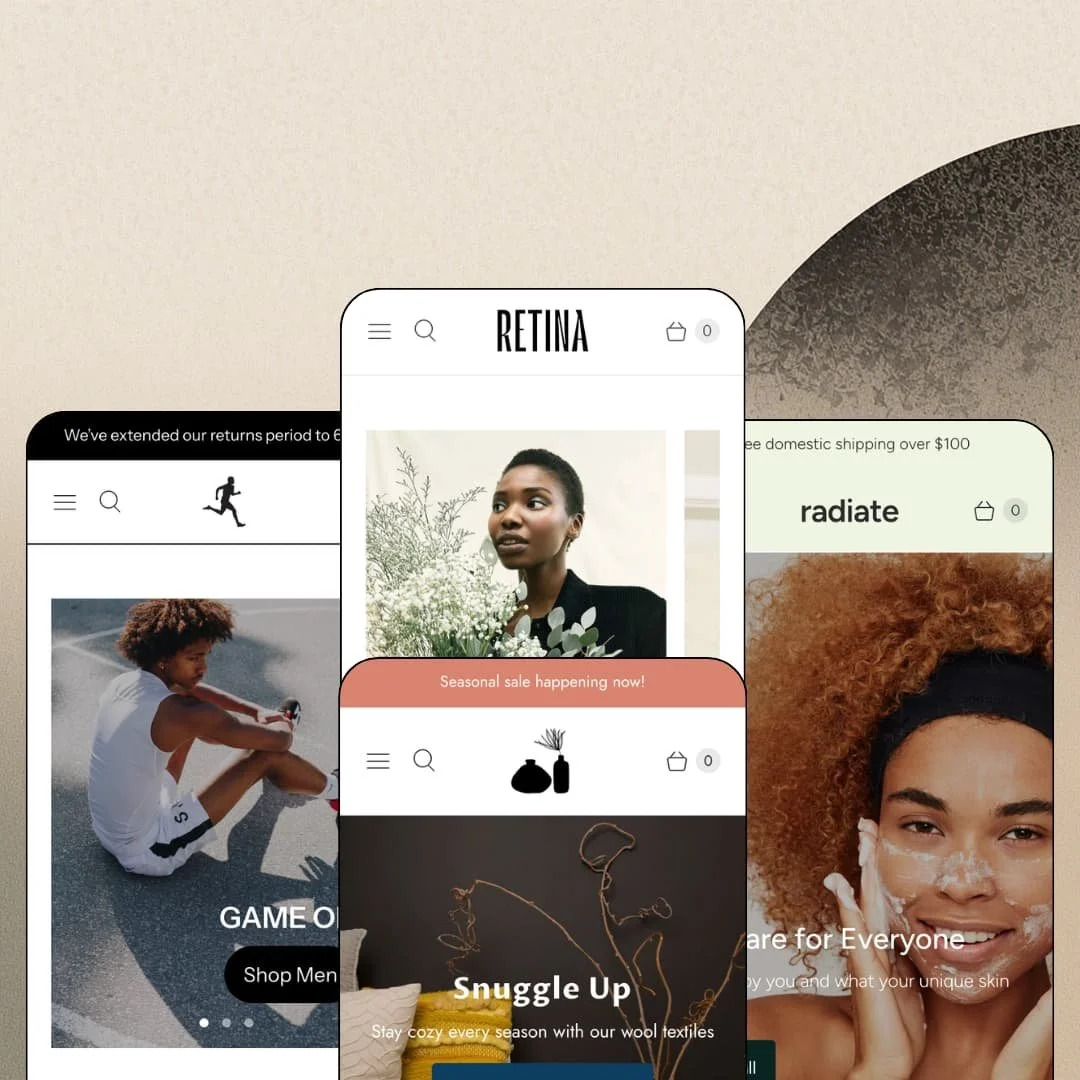
Most multi-preset themes chase range by adding machinery. Retina chases it by staying out of the way: four demos across womenswear, athletic footwear, handcrafted home goods, and skincare, all running the same quiet Online Store 2.0 skeleton. Out of the Sandbox has been refining this theme since 2017, and at $220 it sits in the standard tier, where the question isn't whether it works but whether restraint is what your catalog needs. I spent time in all four demos to find out.
Restock capture comes standard
Back-in-stock alerts ship as part of the theme, and the demos stage the notify-me field directly inside product buy boxes rather than hiding it behind a badge. Sold-out becomes a lead. Every out-of-stock variant turns into an email address with purchase intent attached, which is the cheapest remarketing list a store ever builds. For restock-driven brands running small-batch catalogs under 100 SKUs, that single field converts inventory gaps from lost revenue into queued demand.
What if the homepage could close the sale itself?
Retina's featured-product section is a working buy box, not a preview card: full variant selection, quantity control, and add-to-cart, deployed in both the fashion and home-goods demos on completely different product types. No detour, no product page. A shopper never has to leave the front page to purchase the hero item. For single-hero-product DTC brands selling to impulse-leaning buyers, this collapses the funnel by an entire page, and the section carries enough styling range to feel native in a boutique or an artisan shop alike.
Size guidance lives where the decision happens
The Size Guide opens right beside the variant picker instead of on a buried policy page. Amsterdam stages a bust, waist, and hip measurement table covering XS through XL in the modal, and Sprint fills the same slot with running-shoe and apparel conversion charts, so the mechanism adapts to whatever sizing logic the catalog needs. Fewer guesses, fewer returns. For apparel and footwear merchants selling considered purchases at mid-market price points, resolving the sizing question inside the buy box is where return-rate math actually gets won.
A promo kit that speaks one language
Retina bundles its campaign tooling into a coherent set: countdown sections, promo popups, announcement bars, a badge vocabulary spanning Sale, New, and Pre-Order, plus an age verifier in the feature list. The pieces share one visual voice. A merchant can stage a seasonal event across popup, bar, badge, and countdown from theme settings alone, without the styling drift that creeps in when each layer comes from a different source. For seasonal-sale merchants in fashion or beauty running a promotional calendar, that coordination is the difference between a campaign and a collage.
Navigation tops out at a dropdown
All four demos run the same flat pattern: a menu label opens a plain list of collection links, and that's the ceiling. No mega menu layer appears in any demo or anywhere on the theme's feature list, which means no in-menu imagery, no product-level links, and no promotional real estate inside the navigation itself. The header stays shallow. For multi-category stores pushing past 100 SKUs with cross-shop-heavy buyers who browse between departments, the header simply runs out of room to guide them.
Social proof is display, not machinery
The quote sections across the demos are typed text blocks with photo avatars, and the 5.0-star line with two reviews on Sculpt's homepage module reads as app-fed, because Retina ships no review engine of its own. The quotes are scenery. This kept bugging me across all four stores: everything that looks like verification is actually decoration, and a merchant who wants collectable, displayable customer reviews is signing up for a separate review app plus its integration on day one. For repeat-purchase beauty and home brands whose conversion leans on rating volume, that gap lands directly in the budget.
An Online Store 2.0 build carrying a 2026 price tag
Retina predates JSON templates and was ported forward well, but the architecture stops at the OS 2.0 line: no nested theme blocks, no next-generation editor depth. Dawn covers that same OS 2.0 baseline for free, so the $220 is buying four presets, the promo kit, and nine years of design polish rather than a structural advantage. An October 2025 update shows the upkeep is real. For first-store founders on tight budgets weighing this against free options, the generation question deserves an honest look before checkout.
What it takes to launch
Expect one to two days of launch work: a full copy and imagery pass across heroes, quote sections, and press walls, size-chart assets rebuilt on your own files, promo popups and countdowns re-pointed at live campaigns, and homepage grids re-staged around actual inventory.
-
What works in this preset
Scrolling the Amsterdam-styled Retina demo feels like paging through a lookbook that happens to take orders. A philosophy statement, paired gallery images, a campaign video, and then, mid-scroll, a complete buy box for the Chore Style Shirt Dress with color and size selection, a quantity stepper, and per-colorway pricing that holds Black at $290 while Ice Grey and Sage sit at $342.50. That's unusual staging. Most of this homepage asks you to look; this one section quietly asks you to buy.
Urgency gets treated as an event, not a banner. The Clearance Sale section pairs its pitch copy with a live countdown broken into days, hours, minutes, and seconds, laid over a full-width campaign image, so the sale reads like a moment on the calendar rather than a sticker slapped on a grid. One section, one message. It gives a soft-spoken boutique demo a single loud room without changing the house's voice.
The product template keeps working after the add-to-cart button. Below the buy box, the Chore Style Shirt Dress page rolls into a full-bleed quote image, a Details & Care half-panel linking to the garment-care page, and a pull for the ethical-buying journal article, while collection chips under the description route shoppers onward to Dresses, New, and Clearance. The page behaves like a landing page. Brand storytelling continues exactly where most purchase decisions stall.
Where it stumbles
For a boutique preset, the buy box makes a curiously plain choice. Color and size render as dropdown selects even though color swatches are part of Retina's toolkit, and the demo's own gallery cycles through three colorways of the same dress that would sell the swatch row on sight. The staging undersells the theme's own picker options.
-
What works in this preset
Energy is a staging decision, and Sprint commits to it completely. The Austin-styled demo stacks split heroes ("game on"), a three-slide slideshow, a play-button campaign video, and a photo wall of runners, boxers, and dancers into a homepage that moves even while standing still. Nothing here whispers. It's the same skeleton as the boutique demo wearing a completely different pulse, which is exactly what a preset family should prove.
On the Knit Runners page I clicked into a picker built for shoe walls. Sizes 8 through 13 render as tappable buttons with the color option labeled alongside, and the variant pricing quietly marks white pairs in sizes 11 through 13 down to $99 while every red variant and smaller size holds $110. Clearance by size, rendered cleanly. That per-variant granularity matters for footwear, where broken size runs are the daily reality of inventory.
The announcement bar earns its pixel height by carrying policy instead of promo. "We've extended our returns period to 60 days" links straight into the blog, turning the thinnest strip of the header into a trust channel with a destination behind it. Small choice, real signal. It suggests the bar can do more than shout discount codes at arriving traffic.
Where it stumbles
The "Just in" grid seats a sold-out sneaker in the middle of the new-arrivals row. A footwear demo trading on freshness and momentum shouldn't greet shoppers with unavailable stock in its newest lineup, and the miss is a staging choice, not a theme limit, since the grid could simply lead with the seven live products.
-
What works in this preset
Sculpt is the only demo in the family that behaves like a shop full of other people's work. Product cards carry maker lines: Klippan under the lambswool blankets, Maison Bengal under the jute bags, P.F Candle Co under the incense, Eunmi Kim under the ceramics. The vendor byline turns a grid into a curation statement. For a stockist selling on provenance, that one card detail does the positioning work an About page usually has to carry alone.
The homepage buy module returns here in artisan clothing. The Ritual Ceramic Vase sells directly from the homepage in a choice of Dawn or Dusk at $45, marked down from $64, with the section framing a single handmade object the way the fashion demo framed a dress. Same mechanism, different temperature. It shows the featured-product section flexing across price points and product cultures without redesign.
Press coverage gets a wall of its own. The Shoutouts from the Press section runs four quotes with names and mastheads attached, from an Apartamento editor to a Strategist designer, styled as an earned-media strip rather than anonymous praise. Attribution does the persuading here. It reads noticeably stronger than a generic testimonial carousel because someone put their byline on the compliment.
Where it stumbles
The shelves read half-empty against their own pitch. The New Arrivals row stages two of four items sold out, Staff Picks adds a sold-out linen blanket, and all of it sits under a promo popup announcing new items arriving daily, so the demo's scarcity accidentally contradicts its abundance story. Restocking the grids, or staging live products, would fix the dissonance in an afternoon.
-
What works in this preset
Radiate opens by asking about your skin before showing you a single bottle. The Shop by Skin Type row puts Dry, Oily, and Sensitive tiles ahead of any product grid, routing shoppers by concern rather than category, which is how beauty customers actually think when they arrive undecided. Concern-first beats catalog-first here. The rest of the homepage then layers best sellers and cleansers with short section descriptions that read like routine-building advice.
I went looking for the catalog toolkit and found the Shop page staging it in full. A sidebar filter rail carries availability, a price band with open from and to fields, and product types with live counts (Cleansers 6, Serums 6, Soaps 5), backed by nine sort orders and numbered pagination across the 26-product catalog. The rail is doing real work at this scale. It also signals room to grow well past what the demo stocks.
Upcoming stock gets treated as a destination instead of an apology. Bergamot Soap and the Clay Face Mask wear Pre-Order badges on their cards, and the footer keeps a dedicated Pre-order collection one click from anywhere, so a replenishment brand can merchandise its production calendar. Waiting becomes shoppable. That is a sharper inventory posture than most of this demo's gentle aesthetic lets on.
One skeleton, four temperatures
Read all four demos in a row and the same section grammar surfaces every time: hero, shoppable grid, editorial half-panel, quotes, newsletter. What changes is purely tonal. Type, color, and photography turn that fixed sequence into a boutique, a sneaker shop, a maker's stockist, and a skincare clinic without touching the structure underneath, and that tonal elasticity, rather than any single feature, is the theme's actual identity.
Low ceremony between brief and launch
Nothing in any demo depends on metafield architecture, data pipelines, or developer time. The stores are built from short copy blocks, strong photographs, and modest section counts, which means a two-person brand can realistically stage the entire storefront from the editor in a working week. The theme asks very little of its merchant beyond taste.
Prose where data should live
Care instructions, materials, measurements, and ingredients across all four demos exist as hand-typed rich text and static tables. Nothing draws from a structured data layer, so every catalog-wide consistency decision, from formatting to units, becomes manual editorial labor that compounds as the product count grows.
The design bills you in photography
All four demos ride professional brand shoots on loan from real labels, and the layout's generous whitespace is calibrated to that quality of image. Bring phone photography to these templates and the same whitespace that flatters editorial shots will expose weak ones instead. The theme's minimalism is a photography invoice in disguise.
The listing promises verticals the presets don't cover
The Theme Store files Retina under Jewelry & Accessories and Food & Drink, yet neither industry gets a preset: food surfaces only as a single collection inside the home-goods demo, and jewelry appears nowhere at all. Merchants in those categories are buying a translation job, not a template.
Rating
★ 7.2/10
-
Native back-in-stock capture, homepage buy modules, and a coordinated promo kit cover real conversion ground; navigation depth and the missing review engine set the ceiling.
6
-
The whole system runs on copy, photos, and simple sections; no data modeling or developer dependency anywhere in the demos.
8
-
Slide-out cart and menu patterns, tappable size buttons on product pages, and image-led sections that stack naturally on small screens.
8
-
Homepages run lean with restrained section counts and lazy-loaded imagery; the video-heavy Sprint demo is the one that asks more of a connection.
8
-
Four convincingly different store personalities from one purchase; the range is tonal and typographic, while the underlying page structure stays fixed.
6
Frequently Asked Questions
-
Match the vertical: Retina stages womenswear, Sprint athletic footwear, Sculpt multi-maker home goods, and Radiate skincare. If none matches your category, Sculpt's general-store grammar with vendor bylines adapts most easily.
-
Version 8.1.0 from October 2025 added support for high-variant products through a new section and template, and hides quick shop on those products to keep option-heavy catalogs usable.
-
Yes, an age verifier is part of the theme's marketing toolkit, relevant for anyone selling age-restricted goods without reaching for an extra app.
-
A slide-out cart drawer with cart-notes support, paired with quick buy on product cards so shoppers can add items without opening the full product page.
-
The Theme Store listing showcases live storefronts including Odd Future, Birdhouse Skateboards, and Minimad Things, which is useful for seeing the theme under production catalogs rather than demo data.
-
The demos stage Pre-Order badges on product cards in two presets, and Radiate maintains a dedicated Pre-order collection, so upcoming stock can be merchandised as its own destination.
This review is based on hands-on testing of the publicly available preset demos of the Retina Shopify theme as of August 2026. Theme features, preset availability, and performance can change with subsequent updates from the theme developer.