
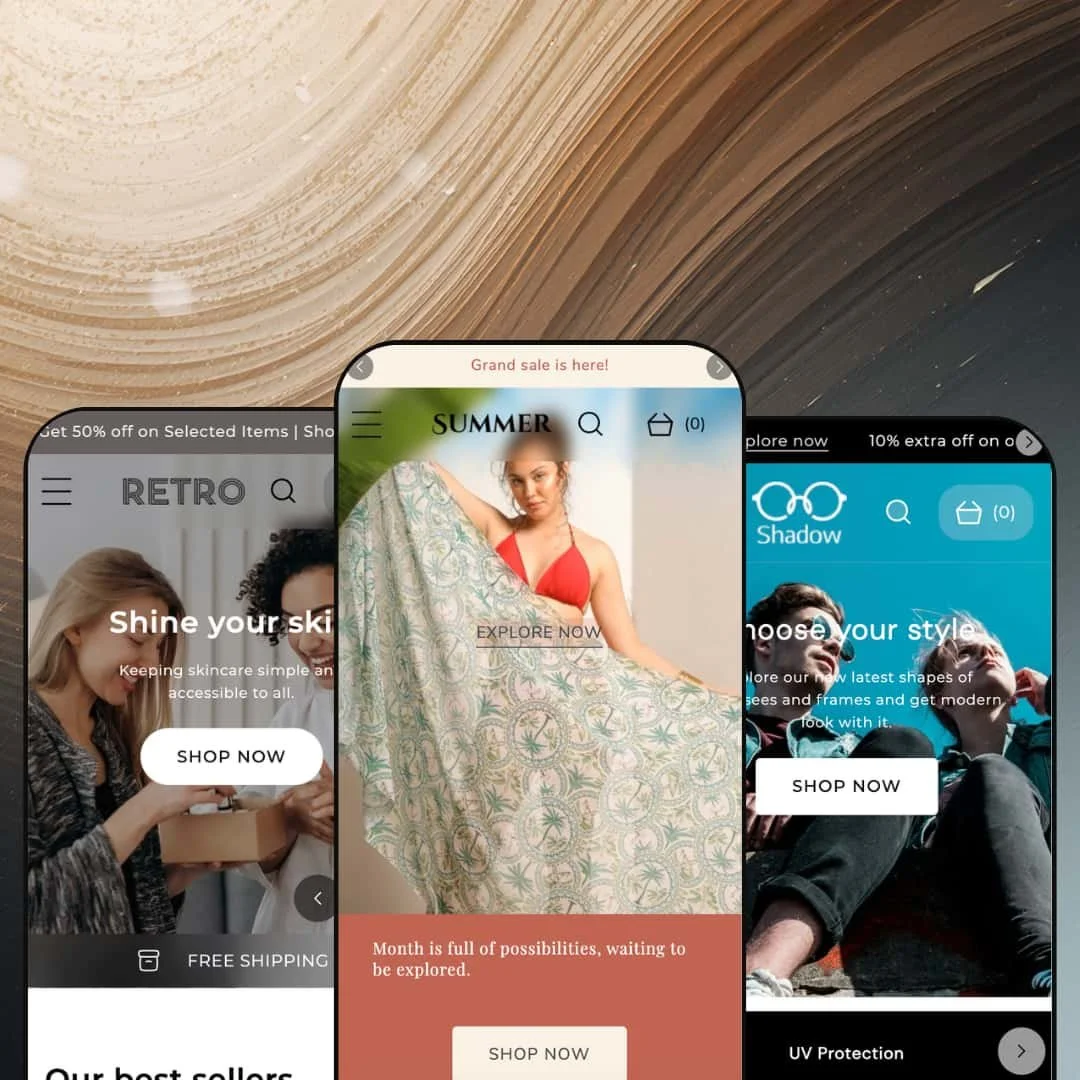
Most fashion themes hand you a single storefront mood and ask you to build your whole brand inside it. Retro splits the difference across three presets that all speak fluent apparel, from sun-bleached beachwear to a stripped-back minimal look. Built on Shopify's Online Store 2.0 architecture, it leans hard into visual merchandising rather than raw feature count. The real question for a $250 theme is whether that lookbook-first instinct earns its keep beyond the apparel rack.
Shoppable editorial that does real selling
The lookbook and image-hotspot sections combine into one shoppable editorial surface, where a single styled image becomes a direct path to every product pinned inside it. It sells the look, not the item. For visual brands that's where momentum usually lives, in the gap between inspiration and cart. A clothing, accessories, or home-goods merchant with strong lifestyle photography and a 50-to-300-SKU catalog gets a tool built for precisely that selling motion.
A before/after slider with an obvious job
Apparel brands restyling one silhouette, skincare lines showing visible results, and home merchants staging a room change all want the same move: two states, one frame, a draggable reveal. Retro ships that as a native before/after slider, not a paid add-on. The reveal does the talking. The demo stages it as "Compare your outfits," but the section is content-agnostic, so a results-driven beauty or styling-led apparel catalog can repurpose it without dev work.
A conversion kit that ships assembled
Trust badges, a stock counter, a countdown timer, press coverage, cross-selling, and recently-viewed arrive as a coordinated conversion-feature bundle rather than parts you source separately. Wired together, they cover urgency, social proof, and basket-building in one pass. For a mid-market merchant launching seasonal drops or restock-driven sales, that's a working conversion layer on day one. Less assembly, more selling.
European storefronts get a real head start
Selling into French, German, Italian, or Spanish markets from day one? The groundwork's already laid. Retro ships its interface copy pre-translated across five European languages (EN, FR, IT, DE, ES), plus right-to-left CSS support for RTL markets. That covers the theme's own UI strings, button labels, form text, and system messages, not the merchant content you still translate yourself, so for an EU-facing merchant trading across several European markets it trims a tedious slice of launch work.
Three presets, one neighborhood
The preset count suggests range, but Retro, Shadow, and Skinny all live in the same soft-goods world of apparel, accessories, and beauty. The range is narrower than it looks. I went looking for a preset outside fashion and came up empty, which means a merchant in electronics, hardware, food, or B2B supply won't find a layout that speaks their language and will be rebuilding section intent rather than restyling it. For anyone outside fashion and lifestyle, treat this as a one-vertical theme with three moods.
Built to show, not to spec
Retro's whole personality is visual: lookbooks, hotspots, before/after reveals, lifestyle blogs. That's a gift for image-led brands and a wall for spec-driven ones. A merchant selling components, electronics, or anything bought on a comparison table will find the merchandising pulling toward mood when their buyers want numbers, dimensions, and side-by-side attributes. Product tabs and a size chart help, but they don't turn a lookbook theme into a datasheet theme. Don't fight the theme's instinct; it will win.
Volume pricing is a Plus-only door
Retro lists quantity pricing among its features, but that tier-pricing hook only activates for stores on Shopify Plus. The hook is real, the gate is too. A non-Plus merchant testing wholesale-style volume discounts or B2B tiers can't switch it on from this theme alone, which matters most for the exact growth-stage stores on a standard plan that are most likely to want it.
What it takes to launch
Expect a copy-and-imagery pass across hero captions, blog and press sections, and testimonial rows, plus metafield population for product tabs, size charts, and the before/after slides before launch. Brands adopting the Retro preset specifically should budget extra time to replace its strongly themed seasonal imagery and copy tone.
-
What works in this preset
The homepage opens on a scrolling marquee nudging you toward the summer collection, then drops you straight into a shoppable lookbook. I clicked into the "shoplook" module and found image hotspots pinned to individual pieces of clothing, so a single styled flat-lay quietly doubles as a buy path for every garment in the frame. For a beachwear or co-ord brand selling the whole outfit rather than the single item, that section is doing real merchandising work. It's the strongest argument the preset makes.
Further down sits a "Compare your outfits" block built on the before/after image slider. I dragged the handle; one look wiped into another. For apparel, styling content, or seasonal restyles of the same silhouette, it's a genuinely useful way to show range without doubling your product shots, and it reads as native rather than bolted on. Short, punchy, on brand.
Keep scrolling and the preset shifts into storytelling mode, stacking a fashion blog teaser, a press "As seen in" strip, and a customer-story testimonial row before it lands on the trust badges. I scrolled through expecting filler. The intent shows. Each block has a merchandising job, and the rhythm suits an editorial apparel brand that sells through story and lifestyle imagery as much as through the bare SKU.
Where it stumbles
The Retro preset commits hard to a sun-and-sand mood: hibiscus co-ords, swim sets, beach-blog copy. The mood is loud. That's a strength if you sell beachwear and a re-theming chore if you don't, because a formalwear or streetwear brand adopting this preset specifically will be replacing imagery and copy tone wholesale, not just swapping a logo and a hero headline.
-
What works in this preset
Where Retro shouts, Shadow keeps its voice down. Slash Themes positions this preset as the mobile-first option, and the demo's vertical, image-forward composition backs that up. The full theme-wide section set is present (lookbook, hotspots, before/after slider, the conversion row), staged in a calmer register that suits a smaller screen and a shorter attention span. For a phone-heavy catalog, that restraint is the point.
On Shadow, the shared section library does the heavy lifting: quick view, slide-out cart, sticky cart, swatch filters, and recently viewed. On a phone, that adds up. Because the same merchandising tools carry across every preset, a mobile-led brand with a mid-size catalog gets the conversion plumbing without rebuilding any of it from scratch.
-
What works in this preset
What if the answer to a noisy catalog is less, not more? Skinny is the minimal preset, trading the Retro preset's density for whitespace and a slower visual cadence. The case is restraint. The same section library sits underneath, so nothing is sacrificed in capability; the difference is purely restraint in how those sections get deployed across the page, which for a beauty or considered-purchase brand selling a tight range reads as quiet confidence.
On a minimal layout, the theme's product-page tools earn their place: image zoom, color swatches, product tabs, a size chart, and a recently-viewed row, all without crowding the buy box. A skincare or fragrance brand with a small, repeat-purchase catalog can lean on tabs for ingredients and routine. The restraint flatters the product. It also asks more of your photography.
Where it stumbles
Clean design is unforgiving. Strip away the busy sections and every product photo carries more weight, so a brand without consistent, high-resolution imagery will see the gaps that the Retro preset would have papered over. Skinny rewards merchants who already shoot well, and quietly exposes those who don't.
A coherent visual identity across all three presets
Read all three presets back to back and the same design intelligence shows through: confident typography, generous imagery, and a consistent rhythm in how sections stack and breathe. Switching presets changes the mood without fracturing the logic, so a merchant can restyle seasonally without relearning the theme, and that consistency ends up being the real asset.
Depth that doesn't depend on which preset you pick
Because the section library is theme-wide, choosing a preset is an aesthetic decision, not a capability one. The lookbook, hotspots, conversion tools, and product-page features are all available no matter which preset you start from, so the decision never costs you a capability down the line.
A specialist wearing a generalist's badge
The feature list reads universal, but the design DNA is specialist. Every preset, every signature section, every demo choice points at visual, image-led commerce. Merchants drawn in by the long capability list can mistake breadth of features for breadth of fit, and the theme is far more opinionated about who it's for than the spec sheet admits.
An Online Store 2.0 base, not the newest editing model
Retro is built on Online Store 2.0, which means a mature, dependable section editor with block nesting around two levels deep. Merchants who've used the latest Horizon-era themes, with their deeper nested blocks and AI-assisted block generation, will notice where the editing ceiling sits when they reach for deeper layout customization.
★ 7.8/10
Rating
-
A deep, genuinely useful section library (lookbooks, hotspots, before/after slider, a full conversion kit) covers most fashion-commerce needs without apps. The main asterisk is quantity pricing's Shopify Plus gate.
8
-
The Online Store 2.0 editor plus three ready presets means fast assembly; the sheer depth of options adds some onboarding time for first-timers.
8
-
The Shadow preset is tuned for phone-first shopping, and the shared mobile patterns (slide-out cart, sticky cart, back-to-top) carry across every preset.
8
-
The homepage runs reasonably lean with lazy-loaded imagery, though image-heavy presets like Retro ask more of the browser as sections stack.
7
-
Strong within its lane, with rich visual sections and three distinct moods; the Online Store 2.0 nesting ceiling caps the most ambitious custom layouts.
8
Frequently Asked Questions
-
No. It's content-agnostic, so it works just as well for skincare results, furniture-in-a-room staging, or any two-state comparison. The demo simply labels it "Compare your outfits."
-
Shadow. It's the preset Slash Themes tunes for mobile shopping, with a leaner vertical composition while keeping the full section library intact.
-
Yes, they work from a handful of SKUs upward. The real constraint isn't catalog size, it's whether you have lifestyle photography strong enough to anchor the pins.
-
No. Retro ships its own interface text pre-translated and adds RTL CSS, but currency conversion and market routing are handled by Shopify Markets at the platform level, separate from the theme.
-
Replacing the demo's strongly themed imagery and copy, especially on the Retro preset, plus populating metafields behind product tabs and size charts.
-
No. The section library is theme-wide, so Skinny has the same capabilities; it just deploys them with more restraint for a minimal look.
This review is based on hands-on testing of the publicly available preset demos of the Retro Shopify theme as of June 1 2026. Theme features, preset availability, and performance can change with subsequent updates from the theme developer.