
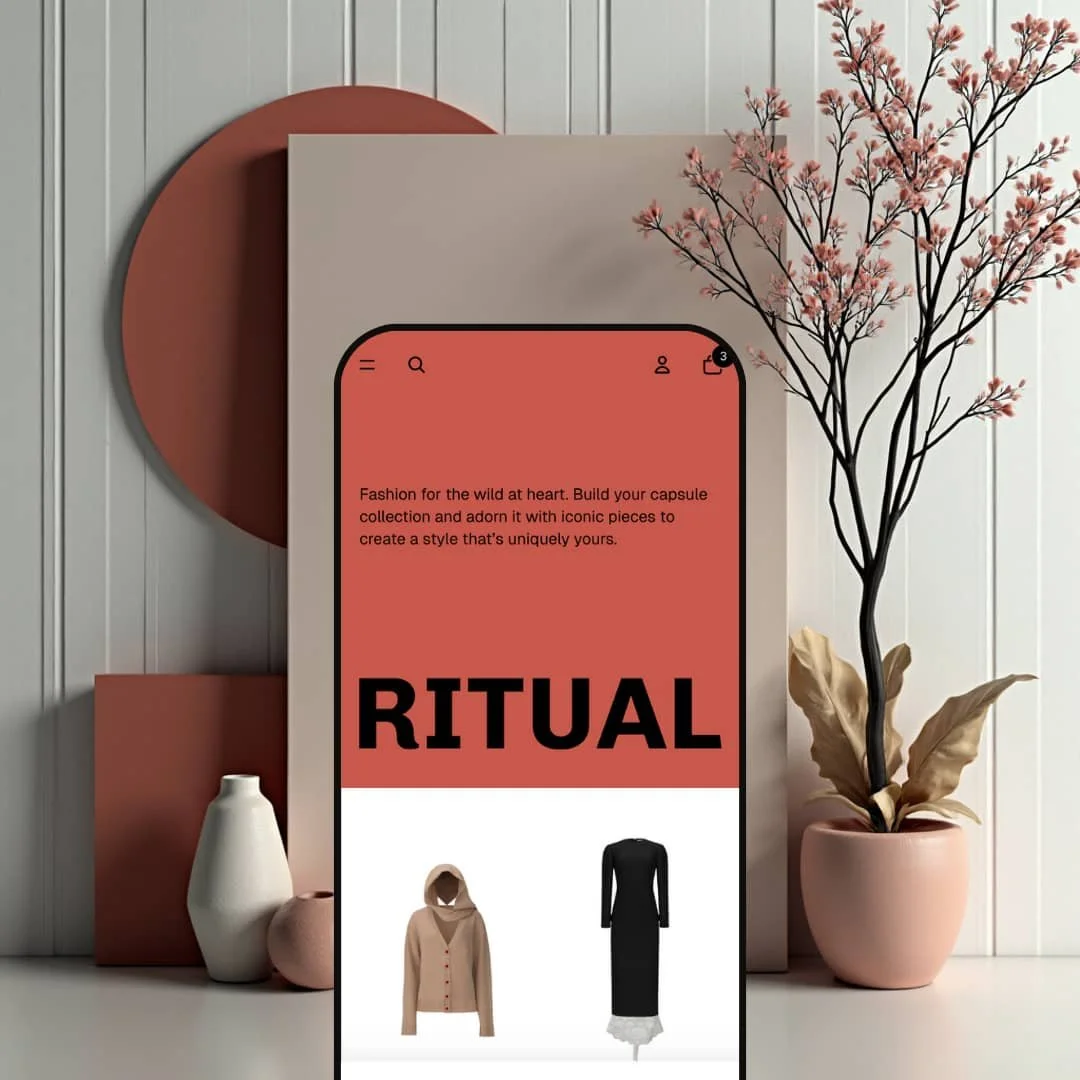
Most free Shopify themes are built to stay out of the way. Ritual wants to be looked at: the opening hero is a brand statement over a wordmark stretched across the full viewport, the demo is priced like a runway show, and the whole page reads as a fashion magazine before it reads as a shop. It's Shopify's own designer-label storefront from the Horizon family, which puts it in the Theme Blocks generation, so nested blocks and the newer editor grammar come standard in a free download. The question is whether that visual ambition survives sixteen months of merchant feedback.
Theme Blocks architecture in a free download
Ritual belongs to the Horizon family, which means nested theme blocks up to eight levels deep, group blocks for layout, and a custom section that accepts nearly any block combination. Product cards take their own blocks, including a custom Liquid block and app blocks, and the hero section accepts a separate mobile image and layout of its own. Nothing here costs extra. For a single-brand label under 100 SKUs building the store in-house, that changes what's possible without a developer: the section library behaves like a kit rather than a set of fixed layouts.
What does a fashion-magazine layout actually need from a theme?
Big type, and room for imagery. Ritual ships a jumbo text block, a marquee, a layered slideshow with drop-shadow control, a split showcase section and an editorial layout for featured collections, plus a comparison slider block and product hotspots that arrived in the December 2025 release. That library is the difference between a store that looks like a grid and one that reads like a lookbook, which matters most for luxury or designer-tier apparel brands selling considered purchases to buyers who browse for a while before they commit.
Collection tooling that scales past the demo
Vertical filters for availability, price range and color sit beside a nine-option sort, a column-density toggle and optional infinite scroll. Quick add reads "Add" on single-variant products and "Choose" on multi-variant ones, which opens a picker instead of silently adding the first variant, and the August 2026 release fixed the sold-out state so the button stays honest. It's plumbing, but good plumbing. For apparel or accessories catalogs in the 50 to 100 SKU range where shoppers cross-shop by color and price, this is the part of the theme that does the daily work.
A sticky add-to-cart bar that carries the variant
Scroll past the buy box on any product page and a slim bar pins to the top with the product thumbnail, the title, the currently selected size and price, and an add button that reflects the chosen quantity. It arrived in version 3.2.0 and picked up a sync fix in 4.0.0, so the bar tracks variant changes made further down the page instead of freezing on the default. The bar is quiet, not pushy. Add from it and the item drops into the slide-out cart with cart notes, a discount-code field and accelerated checkout buttons, which for mid-market apparel brands with long, image-heavy product pages and impulse-leaning mobile shoppers keeps the purchase one tap away at any scroll depth.
A 32 percent approval rating after sixteen months
Twenty-eight merchants have reviewed Ritual on the Theme Store, and nine rate it positively, with eleven neutral and eight negative. That's 32 percent. The complaints cluster around configuration difficulty, media that merchants say renders too large to shrink, and a gap between the product gallery and the details column that one July 2026 review describes as non-adjustable. For a first-time seller or a small fashion boutique without a developer on call, this is the track record you're signing up for, and the free price doesn't change it.
In-app browsers and older iPhones are a known weak spot
A June 2026 review reports lag and poor rendering inside Instagram's browser, and Shopify's reply confirms an issue the team is investigating. A March 2026 review reports crashes across every browser on iOS 16, with the designer acknowledging that some design elements still need updates for older iOS versions. I spent time in the release notes and counted fixes for iOS 16 layouts, iOS 17 popovers, Android web views and in-app navigation across at least six versions. That's the wrong place to wobble. For a social-first fashion brand driving Instagram and TikTok traffic toward an impulse-buy audience, the browser where the click happens is exactly where this theme has struggled.
Updates have cost merchants their settings
One March 2026 review describes updating to version 3.5.0 and losing every setting, with a color-scheme error in the editor, and Shopify's reply says the team is aware. Version 4.0.0 in June 2026 then removed color schemes entirely in favor of a new palette system, and an April 2026 review reports banner video breaking on desktop after updates. An update that deletes your work isn't an update. It's a reset. For a single-operator boutique or a seasonal drop-model brand that can't absorb a rebuild in the middle of a campaign, Ritual's fast release cadence cuts both ways.
Colorways are separate products unless you're on Plus
The Tops collection lists the Pearls Disruption T-Shirt four times, once each in grey, washed black, white and black, inside a seventeen-item grid. The cardigan repeats too. Ritual has no colorway-grouping mechanism of its own, and the one route it does support, Combined Listings, is flagged Shopify Plus in the feature list and isn't used in the demo, so a non-Plus merchant inherits this staging as the default state. For a knitwear or denim label with six colorways per style and a 50 to 100 SKU catalog, the grid inflates and shoppers see repetition where they should see range.
What it takes to launch
Expect a copy and imagery pass across the hero statement, editorial tiles and collection headers, plus product-page block staging (size guide, accordions, disclosures) and a catalog-structure decision on colorways before launch. Plan for one to two days.
-
What works in this preset
The homepage opens with a sentence, not a product. "Fashion for the wild at heart" sits above a wordmark scaled to the full width of the screen, and only after that do six collection tiles (Knitwear, Dresses, Denim, Bottoms, Tops, Jackets) appear as the real navigation surface. It's a confident sequence. Brand first, catalog second, and the tiles use full-bleed campaign photography rather than product cutouts, which is exactly what makes the page read as a lookbook instead of a storefront grid.
A single $6,500 handbag gets its own section. The Rose 11. Bag sits in a featured-product block with a variant chooser and an add button wired straight into the slide-out cart, so a visitor can buy without ever opening the product page. Below it, the Latest arrivals row stages four cards with the same quick-add treatment, each card carrying a small gallery of three or four images rather than a single shot. I noticed the price ladder runs from $980 tees to a $2,800 blazer, and the layout never flinches at those numbers.
Three editorial tiles carry the rest of the page. Tops, bestsellers and new arrivals each get a full-height image with a two-line caption and a single uppercase link, and the captions are written in a voice ("architectural blazers, sleek camis", "equal parts refined and provocative") that a fashion merchant could keep as-is. The footer closes with a three-column menu, a one-field "Get on the list" signup and the wordmark repeated at display size, which bookends the page with the same brand-first move it opened on.
Where it stumbles
The Theme Store files Ritual under Jewelry & Accessories and Food & Drink. The demo stages neither. Everything on the site is womenswear, with one handbag standing in for the accessories vertical, and the ingredients-or-nutrition block from the feature list never appears, so a food or jewelry merchant gets no preview of how this editorial grammar would carry their catalog.
The price tags promise a considered purchase, and the buy box stages a fast one. The Bonding Rose Blazer page runs title, price, a five-button size row from XS/34 to XL/42, a quantity stepper, add-to-cart and a single paragraph of description, then stops. I went looking for a size guide beside the picker and found the Fit guide only in the footer, where it's four paragraphs of prose with no measurement table. That's a staging choice rather than a capability gap, but it means the demo undersells what the theme's size-chart and accordion blocks could do at a $2,800 decision point.
Ritual is the free theme for merchants who want the storefront to feel like the brand rather than the platform: type-led, image-generous and unbothered by whitespace.
The trade-off is that every one of those choices assumes campaign-grade photography and a merchant willing to live inside the Horizon editor, because the default staging leaves very little to fall back on when the imagery is ordinary.
I'd position it as a designer-label starting point that punishes half-measures: commit to the editorial grammar and it looks expensive, cut corners and it looks unfinished. It's a bold bet for a free download.
Rating
★ 6.8/10
-
Pre-order, pickup, stock counter, product hotspots, comparison slider and disclosures block all present; the buy box and social-proof layer stay light unless a merchant stages them.
7
-
Theme Blocks editing is flexible, but merchant reviews repeatedly cite configuration friction and settings lost across updates.
6
-
Hamburger menu on all touch devices, mobile-specific hero media and thumbnail pagination for mobile galleries; in-app browser and older-iOS reports pull the score down.
7
-
Nearly every release since 2.0 lists performance work, yet lag inside Instagram's browser is an acknowledged open issue as of June 2026.
6
-
Nested blocks, a custom section, jumbo text, marquee, layered slideshow and split showcase give a free theme an unusually wide editorial range.
8
Frequently Asked Questions
-
Dawn is an Online Store 2.0 theme and Ritual is Theme Blocks generation, so Ritual nests blocks deeper and ships editorial sections Dawn doesn't have, such as the marquee, layered slideshow and product hotspots. Dawn has four more years of releases behind it, which shows in stability.
-
Yes. Since version 3.1.0 the hero accepts custom mobile media and separate mobile layout settings, so the desktop wordmark treatment doesn't have to crop awkwardly on a phone.
-
Yes. Version 3.4.0 added a text style for the Search, Account and Cart links, and on touch devices the menu always collapses to a hamburger since version 3.3.0.
-
It does. Version 3.2.0 added volume pricing display, quantity rules beside the picker and a Quick order list section, though B2B catalogs themselves require Shopify Plus.
-
Yes. Version 4.1.0 added a disclosures block for product pages and an inline disclosures tooltip on cart items.
-
Roughly thirty versions between the May 2025 launch and version 4.1.5 on August 31, 2026. The 4.1.x line has focused on bug fixes and performance rather than new sections.
-
Yes. I clicked the search icon and the overlay opened with four featured products and a View all link already staged, before any query.
This review is based on hands-on testing of the publicly available preset demos of the Ritual Shopify theme as of September 2026. Theme features, preset availability, and performance can change with subsequent updates from the theme developer.