
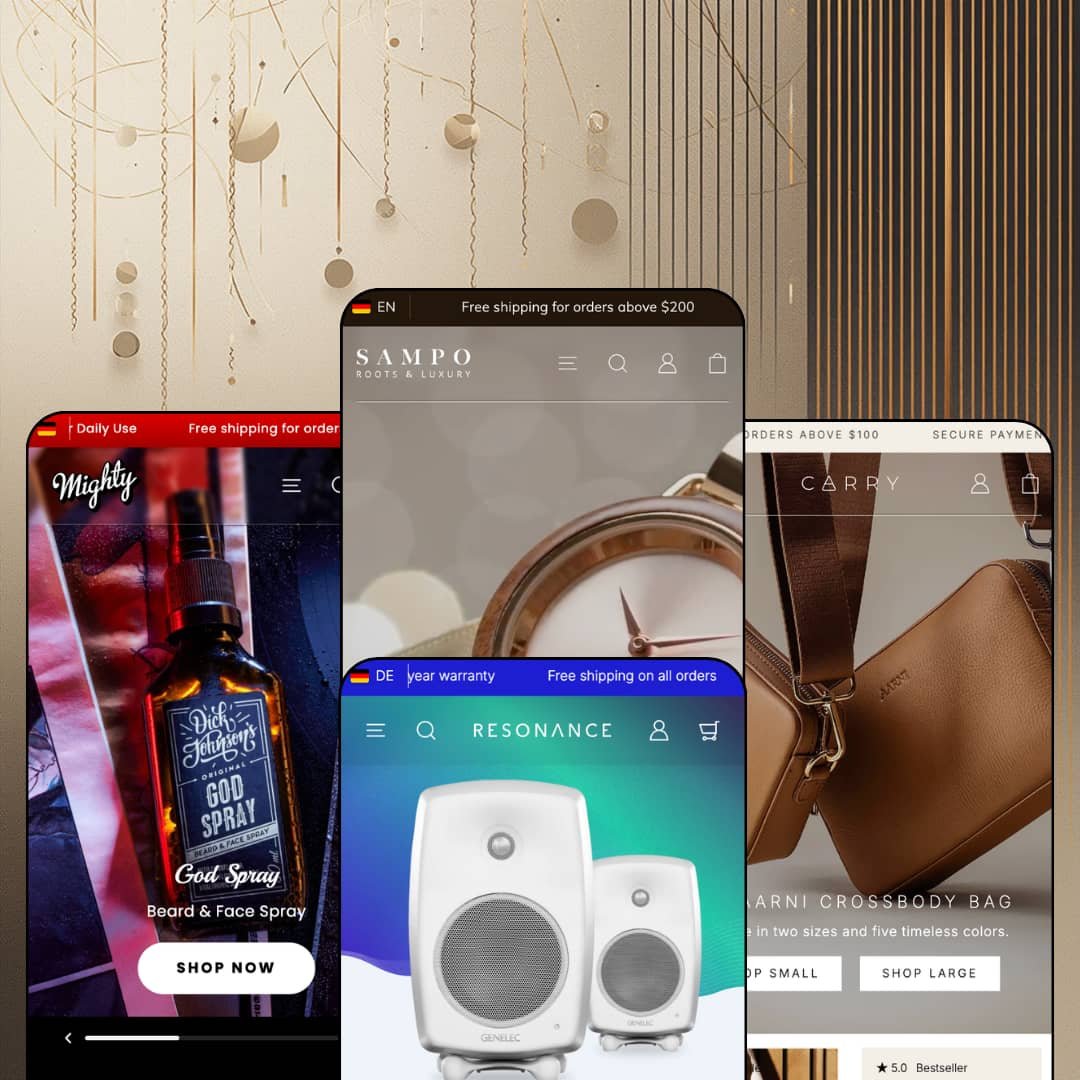
Two of Sampo's four demo stores sell the same Finnish brand's products, and you'd never guess they were related. Woolman uses that trick to make a point: the Sampo preset dresses Aarni's wooden watches in soft editorial layouts, while Carry strips the same company's leather bags down to small type and hard-edged cards, with Mighty (men's grooming) and Resonance (studio speakers) filling the space in between. Under all four sits an Online Store 2.0 build that was given a dedicated AI section for generated blocks in mid-2025 and a rebuilt mega menu system in August 2026. Whether that combination justifies a $390 price for a theme with three Theme Store reviews is the question I kept coming back to.
Native colorway grouping without Shopify Plus
Sampo's Siblings block turns separate colorway products into a single picker row on the product page. On the Resonance G Five page it renders "Color: Black" with image tiles for the White and Black listings, and on Carry's crossbody it shows five leather tiles above a separate Gold/Silver metal-color variant group, so one product can carry a real variant axis and a sibling axis at once. Combined listings only work on Plus. This block gives non-Plus merchants the same shopper-facing result. For leather-goods, eyewear and audio brands with 20 to 200 SKUs where every design ships in three to five finishes, that's the difference between a tidy product page and a "see also" row.
Is a product photo allowed to explain itself?
Sampo thinks so. Every product page carries a Highlights/Gallery toggle: in Highlights mode the main image is overlaid with short annotation labels (Rosewood and Carbon Core on the Bally sunglasses, Timeless Design and Finest Leather on the crossbody), and in Gallery mode the same space becomes a conventional image carousel. Merchants set the hotspot positions per product and control the marker style globally. It's a small mechanism. For considered-purchase categories like watches, electronics and premium accessories, where the buyer needs to know what a material is before they care what it costs, it does the explaining a second paragraph never would.
A mega menu that sells, not just sorts
Woolman rebuilt the header in version 6.0.0 around three mega menu block types (Banners, Products, Columns), and the demos show why. Mighty's "Bundles" dropdown is a shelf of six bundle cards, each with a strikethrough price, a "Save $19.80" label and three bullet rows listing what's inside, all before the shopper reaches a collection page. The Sampo demo uses the same system for two tagged product tiles beside three text columns. Column breaks can be forced with a triple-pipe marker in the menu title. For multi-category stores in grooming, accessories or home goods with 50 to 300 SKUs and heavy cross-shopping, the header becomes a merchandising surface rather than a table of contents.
Inventory states that speak in sentences
Stock messaging is handled natively and reads like a person wrote it. The Bally sunglasses show "A few left in stock!", the crossbody shows "10 in stock", and both add "Inventory on the way" as a second line when incoming stock exists; a Preorder badge appears on cards for items like the Sirius Curly Birch watch. No app involved. For drop-model and restock-driven brands selling limited runs of jewelry, watches or bags, the theme handles the scarcity message and the pre-sale button without a third-party install.
The social proof is scenery
Every product page shows a rating strip: "5.0 / 5.0, 15 reviews" on the sunglasses, "3.8 / 5.0, 120 reviews" on the Scalp Bundle, "4.6 / 5.0, 65 reviews" on the G Five. Below it sit five or six quoted reviews, each signed with a first name and the words "Verified buyer". The badge says verified. Nothing verified it. These are metafield numbers and typed testimonials; Sampo's feature list includes no review collection, and there's no submission form anywhere on the demos. Considered-purchase merchants in electronics or jewelry, where a $1,895 speaker or a $395 watch lives or dies on trust, will need Judge.me, Yotpo or a comparable app on day one, plus the integration work to place it where the theme's own strip currently sits.
Three reviews in sixteen months
Sampo launched in May 2025 and has collected three Theme Store reviews since, all positive, the most recent from December 2025. That's not a red flag about quality. It is a thin evidence base for a $390 decision. Merchants running a single-brand relaunch on a multi-year horizon, or agencies standardizing on one theme across several client stores, are betting on a track record that doesn't exist yet in public form.
An Online Store 2.0 build at a Theme Blocks price
Sampo arrived in the same month Shopify shipped its nested-block Theme Blocks generation, and chose the older architecture. Sections and blocks stop at the OS 2.0 nesting limit, the AI section added in version 3.0.0 is a container for generated blocks rather than a change in the theme's grammar, and the new mega menu blocks exist partly to work around one-block-per-item constraints. Dawn, Shopify's free theme, runs on the same generation. The $390 buys Sampo's section library and its product-page tooling, not a newer foundation. Agencies building custom nested layouts, and merchants planning for the 2027 feature cycle, should price that in.
Colorways cost catalog hygiene
The Siblings block only works if every finish is its own product, and the demos show the bill. Carry lists ten crossbody products for two bag designs; the Sampo demo's sunglasses collection reaches 40 items from around a dozen frames. Each of those products needs its own images, description, SEO fields and sibling assignment, and the collection filters see them as unrelated items. Merchants with 100-plus finish-heavy SKUs in eyewear or accessories, and lean teams who maintain the catalog by hand, will feel that cost at every product launch.
What it takes to launch
Expect a two-to-three-day pass covering copy across the multi-section product templates, metafield population for card bullets, spec rows, highlight labels and sibling links, a header rebuild on the version 6.0.0 mega menu blocks, and replacement of the typed testimonial content in every preset.
-
What works in this preset
Watches and sunglasses get the full editorial treatment here, and the homepage earns its length. A muted video hero gives way to a "Gift Ideas" split panel, then three category tiles with one-line straplines, then an animated stats trio that counts up to 156 products, 1,500 reviews and an "est. 1984" badge. Further down, the Von Wright limited-edition watch is sold directly from the homepage: five gallery images, a thumbnail strip, the full description and a working add-to-cart button, all inside a single featured-product section. It reads like a landing page. That's the point.
I spent time on the Sunglasses collection because it's where the demo shows its catalog tooling. A "Filter & Sort" drawer offers nine sort orders, a color facet, a price range and an availability toggle, and the grid loads 24 of 40 items with a "Load more" trigger rather than pagination. Two promo tiles (an elk-leather wallet, a cork card holder) sit inside the product grid itself, and below the grid the collection template continues with an editorial block, three collection links and a four-question FAQ. Collection pages here are content pages with products in them.
The header carries more than most storefronts ask of it. A rotating announcement bar cycles three messages (free shipping over $200, secure payments, three-year warranty), a utility row above the logo links Blog, Contact and Stores, and the country selector groups 37 markets by continent while the language toggle flips between English and Finnish. The mega menu under "Shop" runs three collection columns plus two featured product tiles labeled "Limited Edition" and "Best seller", and a second "Collections" dropdown uses four image tiles instead of text.
Where it stumbles
The sunglasses grid shows 40 items for roughly a dozen frame designs, because every wood finish (Ebony, Walnut, Alder, Zebrawood, Rosewood) is staged as its own product and the demo leaves the colorway grouping unconfigured on these pages. A shopper looking at Bally – Rosewood has no on-page route to Bally – Alder except the recommendations row. Merchants adopting this preset for a finish-heavy catalog will need to wire the sibling relationships themselves, and the filter drawer would also benefit from a frame-model facet the demo doesn't stage.
-
What works in this preset
Loud, dark and unapologetically male, this preset is built around Dick Johnson beard oils and pomades, and the product cards do more work than in any other Sampo demo. Each card in the Bestsellers grid carries three metafield bullet rows (Size: 50ml, Softens the beard, Ideal for stubble) and a direct Add to cart button, so a returning customer can restock without opening a product page. The hero is a three-slide slideshow where each slide is a product tile with its own strapline and shop link, and one slide runs a looping video behind the copy.
Something I hadn't seen before: a scent-intensity scale on the product page. The Scalp Bundle shows a labeled slider from "No Scent" to "Strong Scent" with the marker set at 60 percent, rendered as a product property rather than a paragraph. Below the buy box, a "Works well with" strip lists three complementary products with their own add-to-cart buttons, and the whole page stays compact enough to scroll on a phone in a few thumb-flicks. The empty cart drawer even greets you with a haiku.
Navigation leans on imagery. Each top-level dropdown (Hair, Beard, Skin Care, Fragrances) opens with a kit photo linked to a bundle product, followed by a column of sub-collections and an "All ... products" link. A separate Shopping Guide page is promoted in the header utility row, on the homepage and in a dedicated "Need more advice?" block, which is smart staging for a category where first-time buyers don't know a pomade from a fibre wax.
Where it stumbles
The Bundles are ordinary single-SKU products wearing a "Bundle" badge and a computed "Save $7.80" label; there's no slot-based builder where a customer swaps the shampoo for a conditioner. For a grooming brand whose economics depend on repeat purchase, the demo also stages no subscription mechanism of any kind, so a "subscribe and save" model would need a separate app before launch.
-
What works in this preset
Resonance ships with a header that the other three presets don't use: a drawer-style menu on the left, centered logo, account and cart on the right, with no visible top-level links at all. Open the drawer and "Shop" splits into Home audio and Professional audio groups with a rule between them, while "Series" lists G Series, F Series and The Ones. It's a quieter pattern that suits a catalog of nine speaker models and a handful of subwoofers.
The product page is where this preset justifies its electronics positioning. The G Five page renders a "Technical details" block as eight labeled rows (SPL 110 dB, Amplifier Power 150 W + 120 W, Frequency Response, Driver Dimensions, Weight 14.4 kg, Connections), each pulled from a metafield rather than pasted into the description. Two icon rows under the buy box state easy returns and a two-year warranty, and the breadcrumb runs four levels deep (Home > Home Audio > G-series > G Five). Ten gallery images. No filler.
I noticed the homepage FAQ. Three collapsible questions about delivery, returns and warranty sit between the blog grid and the newsletter block, which puts the objection-handling on the page where a $1,895 speaker is first shown, not three clicks away on a policy page. A "Where to buy" link in the utility row also stages a dealer-locator page, useful for a brand that sells through retailers as well as direct.
Where it stumbles
The stats trio promises "five different sizes" of G Series speaker, but nothing on the demo lets a shopper line those five up side by side. Sampo's feature list includes no product-comparison section, so an audio merchant who wants a spec-versus-spec table across models is looking at either a metaobject-driven custom page or an app. For a preset that markets itself to electronics stores, that's the one vertical tool I went looking for and didn't find.
-
What works in this preset
Small type, big images, sharp corners: Carry is Sampo with the softness dialed out. The homepage opens on a full-width crossbody photo, then a ten-card grid that shows the same bag in five leathers and two sizes, and the effect is closer to a lookbook than a shop. A weekender product image further down carries three floating labels (Premium materials, Laptop pocket, Cabin sized) that expand into a three-panel feature slider with dimensions and a carry-on note.
The mega menu is organized the way a bag buyer thinks. Under "Women", a Models column lists Crossbody bags, Clutch wallets, Weekend Bag and Bag accessories, a Colors column lists Black, Cognac, Espresso, Olive and Taupe as direct collection links, and three product tiles on the right carry Bestseller, New and Popular model tags. "Men" repeats the pattern with three colors. You can shop by shape or by leather without leaving the header.
On the Crossbody Bag page I sat up at how much sits below the buy box. Three short videos with captions, a "Compact yet spacious" spec list, an elk-leather story, an eight-image gallery that includes a video slide, a customer quote with a photo, an "Also available in large" band, a four-question FAQ and a strap-accessories band, all before the footer. The buy box itself pairs a Metal color button group (Gold, Silver) with a "10 in stock" counter. This is a product page that expects to close the sale on its own.
Where it stumbles
A countdown-driven Sale block with day, hour, minute and second slots sits a few scrolls below copy about bags "you carry for years, not just for moments". The urgency device is part of Sampo's section library and merchants can leave it out, but staging it inside a preset whose whole argument is permanence works against the positioning the demo is otherwise careful to build.
The product page is the landing page
Read all four demos and the pattern is unmistakable: the product template is where Sampo spends its section budget. Editorial rows, videos, FAQ blocks, customer quotes with photos, complementary-product strips and "also available" bands appear below the buy box on wooden sunglasses, a beard bundle, a studio monitor and a leather bag alike. Homepages are comparatively short. The theme is built for brands whose conversion happens after the click, not before it.
Structured data instead of pasted prose
Across presets, the details a shopper actually compares are rendered from fields rather than paragraphs: three-line card bullets on Mighty, eight-row spec tables on Resonance, a scent-intensity scale, hotspot labels, sibling tiles. That's a design decision, not a demo trick, and it means the same catalog can be re-skinned across presets without rewriting content.
A header with two storeys
Every demo runs the same header architecture: a rotating announcement bar, a utility row for Blog, Stores, Shopping Guide or Where-to-buy links and social icons, then the logo and primary navigation. It's not flashy. It gives merchants a place for service links without stuffing them into the footer or the main menu.
Four voices, one skeleton
Hero, stats trio, category tiles, featured grid, editorial band, trust marquee, newsletter, footer with store hours: the homepage sequence is the same in all four presets, and the animated counters even repeat the "est. 1984" device across two brands. The presets differ in typography, corner radius and image treatment far more than in structure. Merchants who buy Sampo for one preset and later switch will find the swap easy for exactly that reason, and merchants hoping for four truly different storefronts will find one.
A content diet lean brands can't feed
The demos lean on hero video, product-page video, lifestyle photography and a blog grid of nine posts in each preset. Strip that media out and the long product templates turn into empty scaffolds. Sampo rewards brands that already produce campaign assets at volume; it does little for a two-person label launching with a phone camera and a white backdrop.
★ 7.6/10
Rating
-
Sibling colorway block, product highlights, native pre-order and stock messaging, metafield spec rows and a rebuilt mega menu system cover the core needs of accessory, grooming and electronics stores; no review engine or comparison section.
8
-
Product page settings were reorganized twice in 2025 and the 6.0.0 header rebuild replaces older menu blocks, so upgraders face re-staging work; the hotspot and metafield features need setup before they show anything.
7
-
Drawer navigation with back-button stacking, a sticky add-to-cart card that follows the buy box, compact product cards with inline add buttons and a mobile-specific aspect ratio setting for menu banners.
8
-
Section counts on homepages stay moderate and images are served lazily, but the demos stack multiple autoplaying videos per page and the product templates run long.
7
-
Four presets span soft editorial to hard minimal from one settings model, with per-section parallax, hotspot styling and color-scheme controls; the underlying page structure varies less than the surface does.
8
Frequently Asked Questions
-
Yes, through a Siblings block that links separate colorway products into a tile row on the product page. It works on any plan, unlike Shopify's combined listings, but each color must exist as its own product.
-
Pre-order is a native feature: cards show a Preorder badge and the product page swaps the button state when stock is zero and incoming inventory exists. The demos also display "Inventory on the way" as a second stock line.
-
Three block types (Banners, Products, Columns) per dropdown, with a per-menu column count and a manual column break triggered by prefixing a sub-menu title with three pipe characters. Menu content in the mobile drawer always collapses to one column.
-
The customer-facing strings come pre-translated for English, French, Italian, German and Spanish, and the theme editor itself is translated into Swedish and Finnish as well. Product content translation still runs through Shopify's own localization tools.
-
The layout is category-neutral; what makes it feel like a grooming store is the dark palette, the product-card bullet rows and the kit imagery in the menu. Any consumables brand with sub-$50 items and repeat buyers could use the same staging.
-
Version 6.0.0 replaced the old per-item mega menu blocks with whole-menu blocks, added an Apps section for placing app blocks anywhere, added a cart-recommendations mode selector, and made sliders draggable with the mouse. Existing header menus need rebuilding after the upgrade.
-
No. Resonance stages spec rows per product, but there's no section that puts two or more products side by side, so electronics or furniture merchants who need that view will have to build it with metaobjects or an app.
This review is based on hands-on testing of the publicly available preset demos of the Sampo Shopify theme as of September 2026. Theme features, preset availability, and performance can change with subsequent updates from the theme developer.