
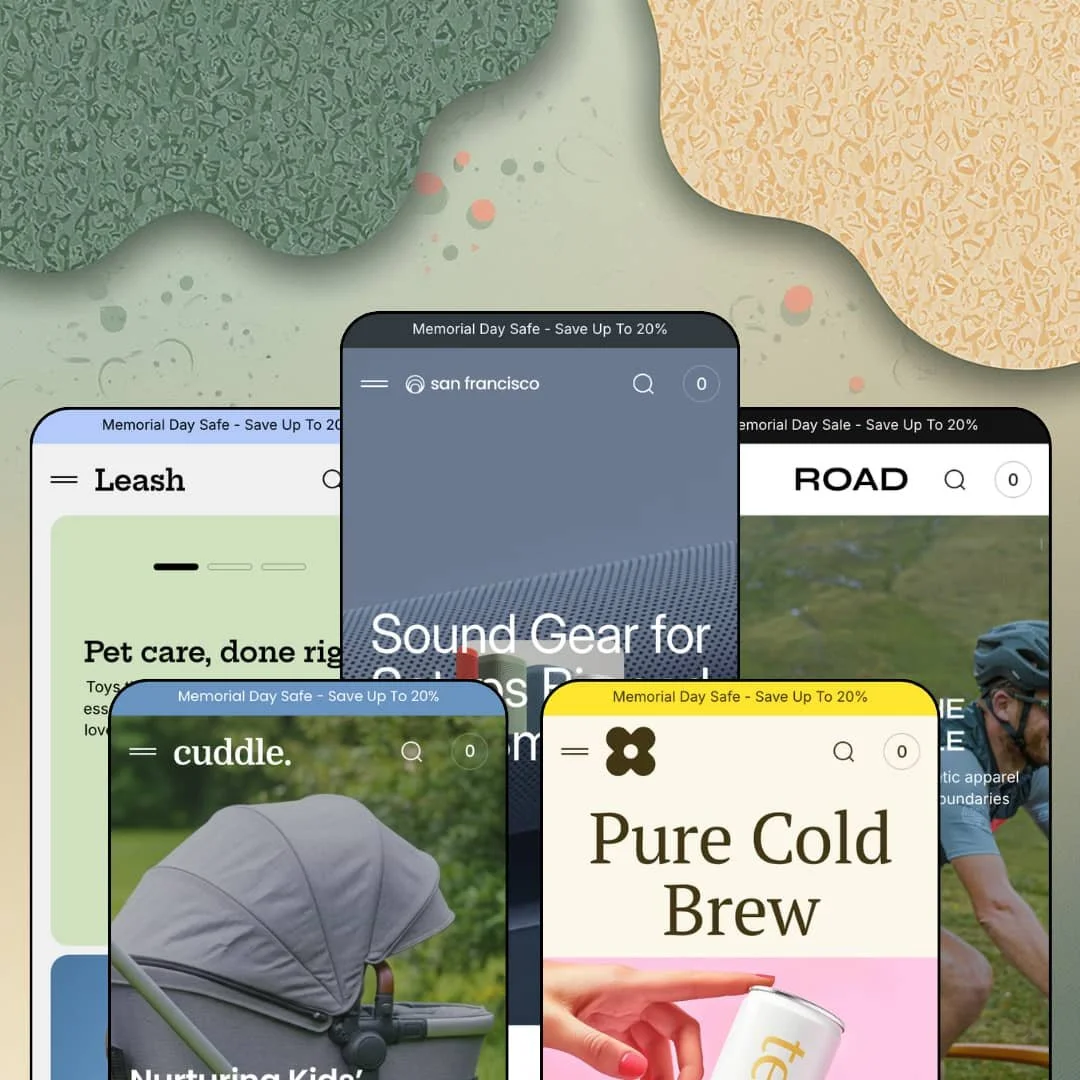
A speaker store, a cycling outfitter, a pet shop, a bubble-tea brand, and a stroller boutique, all running on one engine: that's the bet Apparent Collective places with San Francisco. It's an Online Store 2.0 theme at $380, launched in January 2025 and updated as recently as August 2026, aimed at medium-sized catalogs. I spent time in all five preset demos to see whether one section library can convincingly wear five different verticals. Short answer: mostly yes, with strings attached.
A mega menu that sells instead of pointing
Open a category flyout and you get live product cards, image, price, color swatches, Quick add, and Quick view, sitting under an editable shelf label like "Widely recognized" or "Top-rated". Navigation becomes a shelf. A browsing customer can put an item in the cart without ever reaching a collection page, which shortens the highest-frequency journey in the store. For pet, beverage, and accessories merchants with 20–100 SKUs and impulse-leaning buyers, that shortcut runs on every single session.
How do you know what a theme can build before you own it?
San Francisco answers by linking its own parts. I clicked through a Features menu, present in four of the five demos, that opens thirty section demo pages, six product-page layout variants, both blog article layouts, and every utility page from cart to 404, all as live pages rather than screenshots. You browse the parts, then buy. For first-time theme buyers and one-person brands without an agency on call, that compresses evaluation from guesswork into an afternoon.
A cart drawer that keeps selling
The slide-out cart ships with a free-shipping progress line, an order-note field, and a cross-sell rail whose items add to the cart in a single tap, and even the empty state pitches best-sellers instead of a blank panel. Every visit ends here. Wiring recommendations into the store's highest-intent surface is where average order value gets won, and the theme does it natively instead of leaving the drawer as a receipt. Sub-$100 accessory catalogs and gift-driven shops with add-on-friendly assortments will feel this feature in the numbers.
A product page that argues its own case
The extended layout stacks breadcrumbs, a live stock counter, a sticky buy bar carrying a per-product countdown, benefit-icon rows, a five-tab insight block, testimonials, and an FAQ accordion into one continuous pitch. It reads like a landing page. Long pages convert considered purchases when objections get answered in scroll order, and this layout hands merchants a slot for each one. Single-hero-product DTC brands and small catalogs selling $200-plus considered goods get the most from it.
Social proof you have to bring yourself
The testimonials section headlines "4.5 Out of 5 Stars from Over 325 Reviews" as typed text above hand-written quote cards, and the press band works the same way. None of it is generated by anything. Those stars are copy, not customers. Baby-gear and electronics merchants selling trust-heavy purchases above $200 will need a review app installed and populated before this section stops being decoration.
Prose where electronics buyers expect data
The flagship demo pitches an electronics store, yet product information lives in typed tab copy and benefit-icon rows, and the theme ships no comparison section and no spec-table block anywhere on its feature list. A shopper weighing two subwoofers gets adjectives. For electronics and appliance merchants running multi-attribute catalogs of 50–200 SKUs with comparison-shopping buyers, that gap lands on the exact workflow the vertical runs on.
A 2021 architecture at a 2026 price
San Francisco launched in January 2025 on Online Store 2.0, the same architecture generation Shopify's free Dawn has run since 2021, while the platform's newest themes build on deeper block nesting. The $380 buys sections and conversion tooling Dawn lacks, not a newer foundation. Budget-sensitive first-time sellers and merchants planning multi-year builds should price that in. The feature gap over the free baseline is real; the architectural gap is zero.
What it takes to launch
Expect a multi-day pass across announcement bars, testimonial and press blocks, product-page tab copy, and FAQ entries, plus product-handle cleanup where demo data was renamed over older records and variant staging for size- and pack-driven catalogs.
-
What works in this preset
You land on an audio storefront that behaves like it has something to prove. Hover any speaker and the image swaps to a lifestyle shot, badges flag Sale, New, and Sold Out states, and Quick add plus Quick view sit on every card, so browsing never stalls at a static grid. Nineteen products carry the demo. It never looks thin.
Halfway down the page, a full buy box takes over. The Flex Sound Mini renders with a ten-image gallery, five color swatches, a live "23 In Stock" line, and a quantity stepper, all without leaving the homepage, which collapses the path from scroll to cart into a single section. That's a purchase surface, not a teaser.
Momentum is the theme here. A marquee ticker repeats "Carry Entertainment Anywhere", stacked promo banners hand off to a countdown block, and the cart drawer answers with a free-shipping progress line plus a cross-sell rail whose items land in the cart with one tap. Even an empty cart pitches best-sellers.
Where it stumbles
The flyout menu doubles as a shelf, and shelves need stocking discipline. One of the six Components tiles sits at Sold Out inside the navigation itself, which is the first surface a browsing customer opens. A demo pitching conversion tooling should keep its most premium real estate sellable.
-
What works in this preset
There's a discipline to how this demo prices urgency. Sale badges render the actual discount, "Sale 33%" on a training jersey, "Sale 17%" on socks, "Sale 11%" on a cap, so markdowns read as math instead of noise. Shoppers see the size of the deal at card level. No copy pass required.
Riders get a hero that rotates three full pitches, each with paired calls to action for Shop now and Explore sale, and the trust columns below are rewritten for the vertical: Crash Replacement, Classic Guarantee, Free Returns. It's the same generic multicolumn every preset carries, staged so specifically that it reads native to a bike shop.
Where it stumbles
Cycling kit lives and dies by fit. Yet every jersey and bib here is staged as a single-variant product with no size picker anywhere, while the product-page copy promises availability in various sizes and colors. A size chart sits on the theme's feature list; the one demo vertical that needs it most never shows it working.
-
What works in this preset
Everything about this demo moves at a gentler pace. The header trades the product-tile flyout for a full-screen menu built around a single large lifestyle image, and the hero cycles three pitches under a "Scroll to explore" cue instead of an autoplaying carousel. Same theme, different temperament. I noticed the custom bone-and-paw SVG icons in the benefits row before I noticed any layout at all, which is exactly what token-level theming should achieve.
A press band titled "As seen in..." stages four outlet logos with pull quotes beneath them, giving the store borrowed authority right below the fold. Cards handle price ranges cleanly too, showing "$48.00 – $56.00" on a multi-variant toy rather than a misleading single figure.
Where it stumbles
The hero promises leashes and collars across all sizes. The catalog answers with color swatches only: every leash, collar, and harness is staged without a size axis, so the copy and the products tell different stories. For a vertical where a Great Dane and a terrier don't share hardware, that's a staging gap a merchant inherits.
-
What works in this preset
"Favored." "Highly acclaimed." "In-demand." Each menu column carries its own editable shelf label instead of a repeated default, a small setting that makes the navigation read curated rather than templated. Details like this compound. Cards in this demo also surface an "In stock" badge, quietly reassuring buyers on a product type people order for the week ahead.
The generic feature sections get re-voiced into an eco story, with editorial rows for Pure Ingredients, Green Packaging, and Vitamin Boost, each pairing a claim with photography and a collection link, so the sustainability pitch does double duty as navigation.
Where it stumbles
This kept bugging me: coffee and tea sell here as single units at $24 to $55 with no pack sizes, no bundles, and nothing on the page pulling a second order. Consumables are repeat-purchase businesses. The demo stages one-off gifting instead, and a merchant building a replenishment brand will restructure the catalog before the theme's conversion tooling has anything to work with.
-
What works in this preset
Parents shop strollers slowly, and the staging respects that. The scroll-driven hero eases through three reassurance-first messages, and the mid-page story banners alternate award claims with feature explanations rather than discounts, pacing the page like a considered-purchase pitch should be paced.
A hotspot section called "Magic for Little Moments" places markers on a lifestyle photo that open buyable popovers, the $455 Comfort Glide and the $220 Guard Infant Seat, with price and link inside the overlay. Shoppable imagery, no app required. It's the strongest single argument in this demo for the theme's image-hotspot feature.
Where it stumbles
Every stroller here is one SKU, one configuration. At $220 to $455, buyers expect chassis colors, seat fabrics, or at minimum an option set that acknowledges the decision they're making, and the demo offers none of it. The catalog reads like a gallery of finished choices rather than a store built for configuring one.
One grammar, five believable temperaments
Read back to back, the five demos restage the same section set from audio-gear cool to nursery softness without a single vertical-specific page type doing the work; the differences come from typography, pacing, and menu treatment. That's genuine range for a generalist kit, and it means a merchant who outgrows one aesthetic isn't buying a new theme to change tone.
Motion is the signature
Scroll-driven heroes in two demos, marquee tickers in all five, hover image choreography on every card: the family shares a kinetic identity that photography alone doesn't have to carry. Stores with modest asset libraries benefit most, because movement fills the atmosphere gap that a thin photo budget usually leaves.
Sized honestly for its bracket
Each demo runs roughly fifteen to twenty products and no layout looks starved. The listing's own catalog badge reads "Some (11–100+)", and the staging backs that claim instead of dressing up for enterprise, which is rarer than it should be in this price band's marketing.
A promotional default voice
All five demos open under a discount announcement, keep a Sale link in primary navigation, and reach for countdown pacing as a default rhythm. A quiet premium brand will spend its first week turning things off rather than on, and the theme's visual energy makes restraint the harder configuration to reach.
The demos sell sections, not verticals
Merchandising tools the verticals depend on, size charts and ingredient or nutrition tables among them, appear on the feature list but go unstaged across all five demos, so merchants configure them without a working reference. Jewelry and accessories is a listed industry with no preset at all, leaving one of the two named target verticals entirely unillustrated.
A short public record
Nineteen months on the Theme Store have produced nine reviews, all of them positive, alongside a steady release cadence through version 2.4.0 in August 2026. That's an encouraging pattern, just not yet a deep sample for a $380 commitment.
★ 7.8/10
Rating
-
Quick add, quick view, countdowns, stock counters, promo popups, and a thirty-section library cover conversion basics natively; product data itself has no structured layer to build on.
8
-
Six ready product-page layouts and live demo pages for every section make most staging copy-what-you-see; the menu shelves need ongoing collection curation to stay full.
8
-
The slide-out cart, sticky buy bar, and scroll-paced heroes are built around thumb navigation; large image galleries ask for disciplined media sizing on cellular connections.
8
-
Road and Shot run lean homepages with restrained section counts; the flagship demo stacks several product sliders and a ten-image buy module, so media weight needs watching on image-heavy builds.
7
-
Five distinct temperaments come out of one section set, down to per-column menu labels; the identity leans on motion, which quieter brands will dial back rather than up.
8
Frequently Asked Questions
-
Each preset runs roughly 15–20 products across three collections, which matches the "Some (11–100+)" catalog badge on the Theme Store listing.
-
Interface translations for EN, FR, IT, DE, and ES plus right-to-left support are on the feature list, and the demos run live language switchers; one store offers English, German, and Spanish while another swaps Spanish for French.
-
Yes, it's on the feature list, though none of the five demos stages it, so plan a verification test before launching an alcohol or CBD storefront.
-
Countdown blocks carry an editable post-expiry message, so the section degrades into copy you control instead of a dead timer.
-
Apparent Collective, based in Valletta, shipped version 2.4.0 on August 4, 2026, and the listing advertises replies within about 15 minutes during business-day support hours.
This review is based on hands-on testing of the publicly available preset demos of the San Francisco Shopify theme as of August 2026. Theme features, preset availability, and performance can change with subsequent updates from the theme developer.