
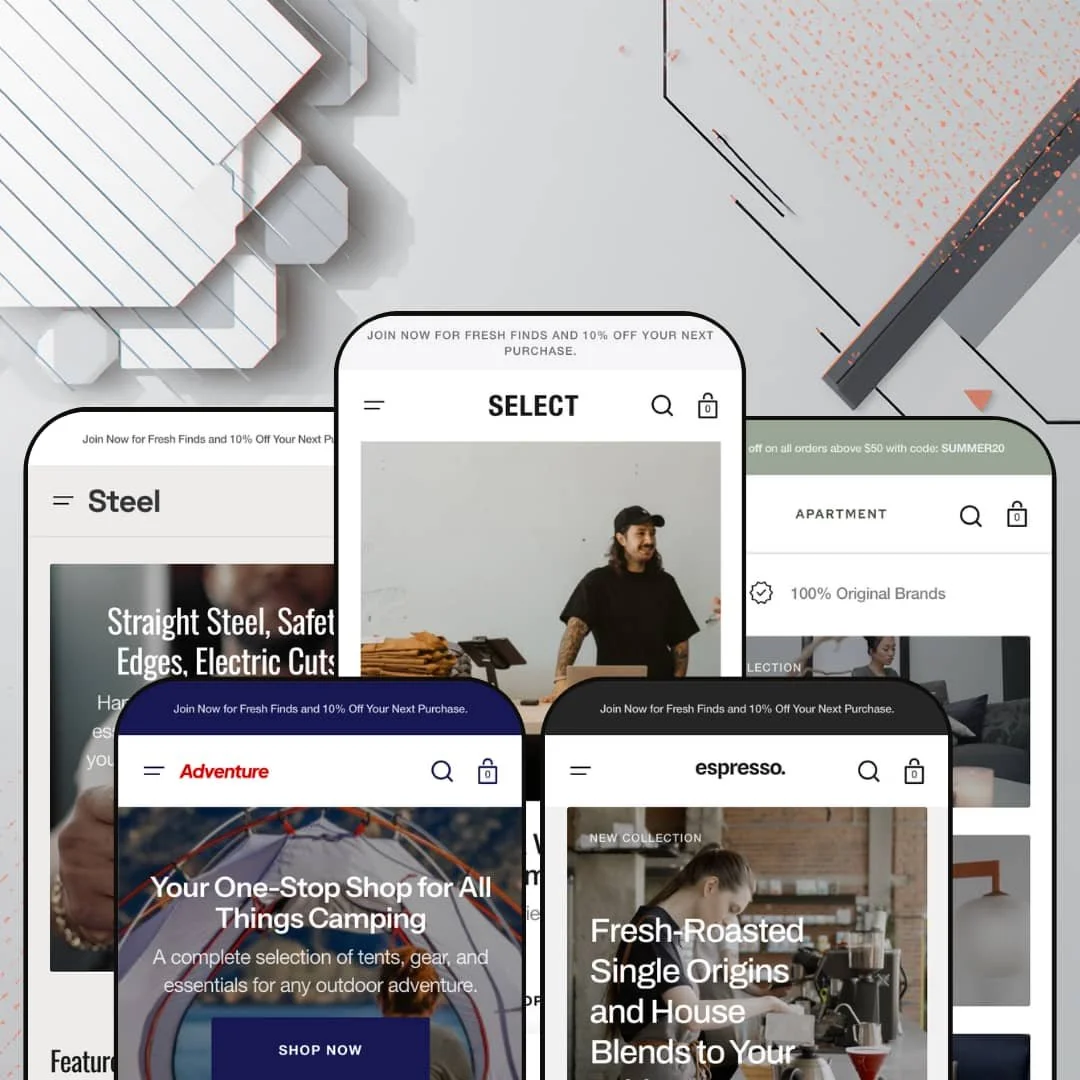
Most premium Shopify themes pick a vertical and commit. Select goes the other way, shipping five finished presets that aim at clothing, the outdoors, home decor, men's grooming, and specialty coffee from one Online Store 2.0 codebase. The interesting question isn't whether a single theme can dress up as five stores, but whether the merchandising underneath holds up once you strip the photography away. I spent time in all five demos to find out.
Five sellable storefronts from one purchase
A multi-brand operator or an agency building several niche stores gets unusual mileage here, and DTC founders spinning up more than one brand do too. Select ships five presets that aren't recolors of a single layout: the clothing, outdoor, furniture, grooming, and coffee builds each arrive with their own navigation logic, product mix, and homepage rhythm. The range is the product. For a holding-company setup or a studio launching across two or three verticals, that's several near-finished starting points under one license rather than five separate theme buys.
A genuine conversion and merchandising kit, not a token one
Out of the box the theme carries a coordinated merchandising kit: a countdown timer, promo popups and banners, image hotspots, a before/after comparison slider, a stock counter, quick view, sticky add-to-cart, and a slide-out cart with a free-shipping progress bar. These are levers, not ornaments. They're the controls that move urgency-driven and impulse purchases, and the demos stage them together so you can see how they behave side by side. For flash-drop and restock-driven sellers with impulse buyers in beauty, apparel, or food, that's a working promotional toolkit on day one.
Variant-heavy product pages render cleanly
When I opened a multi-variant product, the page handled it without strain: a stacked image gallery with zoomable media, named color swatches that swap the gallery as you change shades, a size-pill selector with a size-guide modal, collapsible care and shipping tabs, and an inventory line counting remaining stock. Busy pages stay legible. For catalogs built on color-and-size matrices, that combination keeps a crowded product page readable instead of cluttered. Apparel and footwear sellers carrying 50 to 200 SKUs across multiple colorways are the clearest fit.
Light and dark presentation is baked in
A light/dark toggle sits in every preset's header, and it isn't a gimmick layered on top, since the palettes, product cards, and section backgrounds all respond when you flip it. That hands a brand two coherent moods from one install, which matters when the same catalog wants a bright daytime feel and a darker editorial look without a rebuild. Considered-purchase verticals like furniture and grooming, where atmosphere does some of the selling, get the most out of it.
The photo-forward DNA isn't optional
Every preset is built around large photography and generous whitespace, and at $380 the theme expects you to bring the visual goods. The look falls flat without strong photography. A store with a thin photo library, or one that needs dense, data-heavy grids with specs and numbers up front, will spend its time fighting that instinct rather than riding it. For large catalogs in the 500-plus-SKU range, or budget operators shooting on a phone, the editorial bias is a poor match.
"Compare" means before-and-after, not spec-by-spec
It's worth setting expectations on the comparison feature, because the name oversells it for some catalogs. The name promises more. The Compare section is a before/after image slider built for visual transformations, hair or skin or a styled room, not a side-by-side spec table for shoppers weighing two products on numbers. If you sell electronics, appliances, or anything where buyers cross-shop on attributes, you'll still need a dedicated comparison tool for true spec-by-spec work.
Built for DTC retail, not wholesale or B2B
Select assumes a direct-to-consumer shopper clicking add-to-cart. It assumes retail. There's no wholesale pricing display, quantity-break pricing, or B2B catalog surfacing anywhere in the presets or the section library, and the entire purchase flow is tuned for retail browsing. Wholesale-enabled brands and B2B sellers working with trade pricing or login-gated catalogs will find this is the wrong starting point.
What it takes to launch
Expect a multi-day pass before any preset is launch-ready. Plan for a full copy rewrite across hero captions, FAQ entries, and section headers that ship in a pre-launch state, replacement of placeholder pricing on a handful of demo products, cross-vertical copy that needs rewording for your real catalog, and market and currency defaults to set for your region. Budget more if you adopt several presets, since each one needs its own content and imagery pass.
-
What works in this preset
Click into the clothing demo and the homepage just keeps unfurling. A rotating set of "Now Trending" cards sits above a featured-brands logo wall, a countdown promo, a "Look of the Day" editorial block, and a before/after slider pitching a wardrobe glow-up, with sale badges, "New" flags, and a sold-out state all rendering cleanly on the same product row. The result is dense, in a good way. It reads like a real menswear shop merchandised by someone who cares.
Search is where the demo quietly shows off. Start typing and the overlay surfaces popular products with prices alongside popular journal posts, which is a smart way to push catalog and content from one panel. Pair that with a mega menu that drops image tiles for Shirts and Tops next to a plain link list, and you get navigation built for browsing rather than only for finding.
-
What works in this preset
The outdoor build leans harder on motion than the clothing one. A short product video anchors the page, a stacked pair of split heroes routes you to Sale and New, and a full featured-product block lets a shopper choose a kayak size and add it to the cart without ever opening the product page. For gear buyers who research before they commit, that inline buy box is a real shortcut.
Category tiles do honest work here too. The "Shop by Categories" grid splits Tents, Climbing, Canoes & Kayaks, Backpacks, and Furniture into swappable hover images, so a broad catalog stays navigable. I clicked through to a kayak and found size pills, a quantity stepper, and a gallery ready for multiple angles. It feels built for scrollers.
-
What works in this preset
Apartment is where the theme dresses up for a higher price point. The catalog runs to four-figure lighting and sofas, and the layout gives them air: generous hero space, large product imagery, and a "Deal of the Week" featured block with white and brown color swatches wired to a single lamp. A promo bar up top carries a working-looking SUMMER20 code that sets the discount tone before you scroll. The mood is calm and expensive.
Video does a lot of the talking. Two short clips frame the Japandi and Scandinavian positioning, and the product carousels keep the high-ticket pieces moving without turning into a catalog dump. The effect suits considered purchases, where a shopper lingers over a several-thousand-dollar chair and wants the page to feel as composed as the object it's selling.
Where it stumbles
The preset sells like a boutique but checks out like a fast-fashion shop. Everything funnels to add-to-cart, even on four-figure pieces, and there's no native lead-time, made-to-order, or consultation-request surface for furniture that often sells through a conversation. The gap shows on bespoke catalogs. A studio working in long-lead or made-to-order inventory will need to bolt that flow on.
-
What works in this preset
Steel is the preset that best shows the theme's hover behavior. Product cards swap to a second image as you move across them, which suits grooming tins and bottles that look near-identical until you catch the back label, and the before/after slider returns as a hair-care proof point. It's tuned for repeat buyers. At these low price points the page is built for volume and frequency rather than a single big-ticket decision.
Flash-sale messaging is everywhere without feeling shouty. A "Save Up to 50%" banner, a video interlude, and a tidy three-question FAQ keep things moving, and the men's-grooming voice stays consistent from hero to footer. Nothing here fights the brand. It's the most focused of the five demos, and the section choices all pull toward the same low-price, high-frequency buyer instead of hedging across moods.
-
What works in this preset
Espresso takes the opposite tack from the clothing demo: less is the point. The homepage runs leaner, with a video hero, an origin-based category grid for Brazil, Colombia, Guatemala, and Rwanda, and a sourcing story in place of a wall of promos. For a small, tightly curated catalog, that restraint reads as confidence rather than emptiness.
Organizing the menu by country is a smart fit. Coffee shoppers think in origins, and the navigation mirrors that instead of forcing generic "Shop All" buckets. The featured-item block still hands one bean a full buy box with size options, so the page earns at least one strong conversion moment even at its quietest.
Where it stumbles
If you judge the theme by this preset alone, you will undersell it. Espresso deploys a smaller slice of the section library than the clothing or grooming builds, so the image hotspots, logo walls, and before/after blocks that ship with Select never appear in the coffee demo. They're available theme-wide. The coffee build simply chooses restraint, which is worth knowing before you assume this is all Select can do.
One codebase that genuinely speaks five retail languages
Read across all five demos and the achievement isn't any single preset, it's that the same underlying section system reshapes into a clothing shop, a gear outfitter, a decor studio, a grooming brand, and a coffee roaster without ever feeling forced. The navigation grammar shifts with each, origin-based for coffee, activity-based for the outdoors, room-based for furniture, which is harder to pull off than swapping colors. That range is the theme's real signature.
A consistent house style under the variety
For all the vertical-hopping, a single design spine holds the presets together: the same light and dark treatment, the recurring marquee and trust rows, the shared footer architecture, and a typographic restraint that never tips into noise. It means a merchant can trust the theme to look composed no matter which preset they start from. The coherence is the quiet win.
The presets are closer cousins than they look
Spend time in all five and the differences start to feel mostly cosmetic. Beneath the photography and palette, the same section toolkit and page grammar repeat, so a buyer hoping each preset is a fundamentally different layout engine will find one well-built system wearing five outfits. That's fine if you want a house style. It's a letdown if you expected five distinct architectures.
It's content-hungry by design
The demos impress partly because they're packed, with deep catalogs, layered promos, and photography on every block, and a fresh install won't carry that charge until you supply the same depth. It rewards stores with a lot to show. The merchandising toolkit sits half-dormant on sparse catalogs, which means a smaller shop gets a handsome theme whose best features it may never switch on.
★ 8.2/10
Rating
-
The section library is deep and the conversion tooling is real: countdown, image hotspots, before/after, stock counter, quick view, sticky cart, and a free-shipping cart drawer all ship and all work across presets.
9
-
The Online Store 2.0 editor makes section work approachable, but the sheer number of sections and the heavy demo content add a real learning-and-setup curve before launch.
8
-
The mobile menu uses a stacked, back-button drill-down, the cart opens as a slide-out drawer, and product imagery scales sensibly, though the busier homepages still ask a lot of a small screen.
8
-
Image-led heroes, multiple product carousels, and homepage video add genuine weight, tempered by lazy-loaded media and a restrained base layout, with the leaner Espresso build feeling quickest.
7
-
Color and type tokens, a built-in light/dark mode, and a large section library give wide latitude, as long as you stay inside the theme's photo-forward lane.
9
Frequently Asked Questions
-
Match it to your catalog: Select for apparel, Adventure for gear and the outdoors, Apartment for furniture and decor, Steel for grooming and personal care, and Espresso for coffee or any small, curated range. You install one and ignore the rest.
-
Yes. Several presets place a full featured-product block on the homepage with variant selectors and an add-to-cart button, so a shopper can buy a highlighted item without opening its product page.
-
The demos default to Canadian dollars and include a country and language selector in the header. The actual currency conversion and translation are handled by your Shopify Markets settings, not baked into the theme.
-
Enough to fill the carousels and category grids. The layouts assume a working catalog with real photography, so a handful of products will leave large sections looking empty.
-
Yes. Each preset includes a predictive search overlay that surfaces matching products with prices alongside recent journal posts as you type, which keeps discovery fast.
-
Yes. Every preset ships a journal with two article layouts, a simple style and an overlay style, plus homepage blog modules, which suits brands leaning on editorial or SEO content.
This review is based on hands-on testing of the publicly available preset demos of the Select Shopify theme as of June 13 2026. Theme features, preset availability, and performance can change with subsequent updates from the theme developer.