
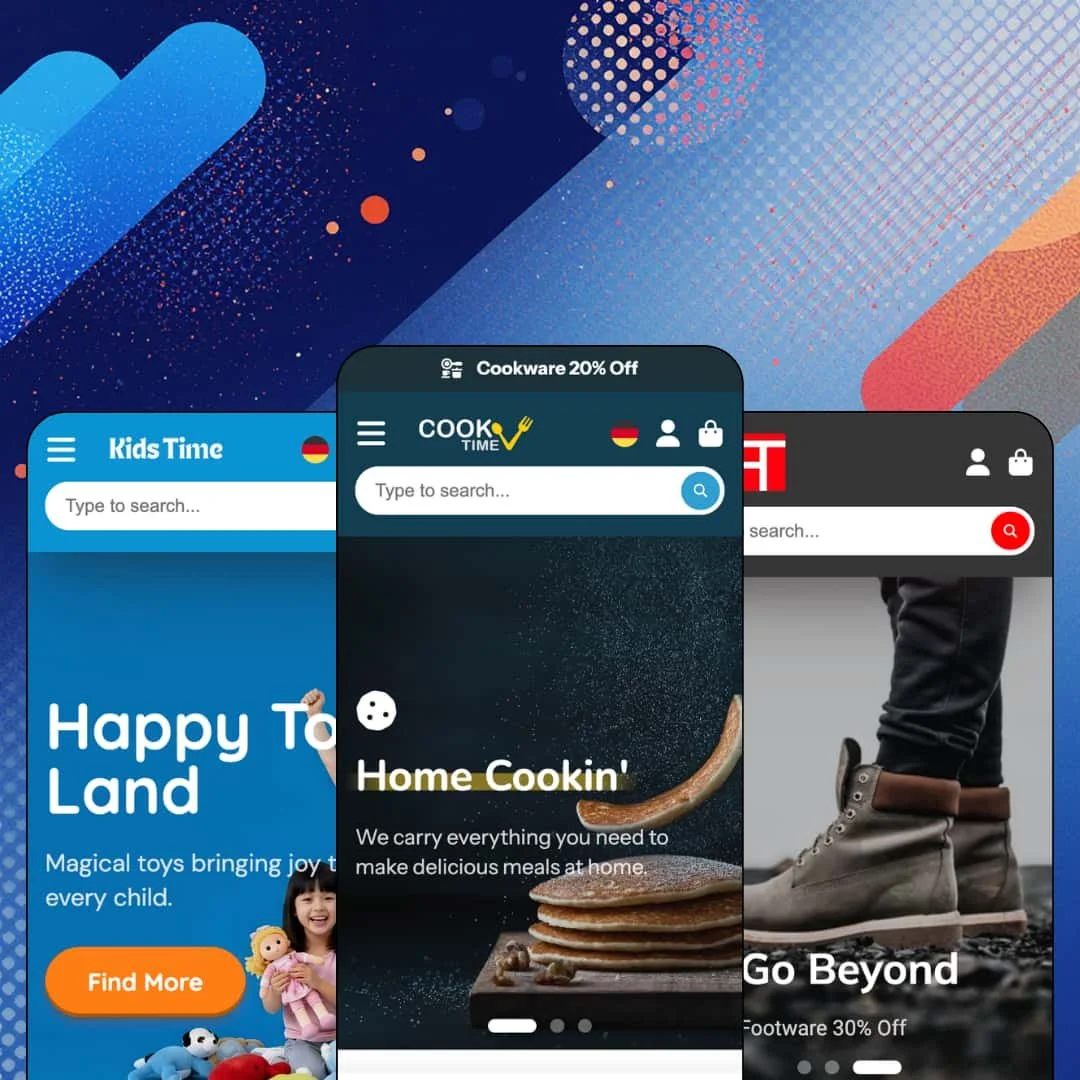
Most Shopify themes treat the header as a place to put links. ShowTime treats it as the store: a Departments button opens a ten-category panel with thumbnails, a Sale tab lists products with prices before you've clicked anything, and your own browsing history sits in the navigation bar. Mile High Themes sells that navigation-first idea for $330 across three presets, Housewares, Fashion, and a 2026-built Toys preset, on an Online Store 2.0 architecture that's been shipping updates since 2017. Whether you need a storefront that starts selling from the menu bar is the question this review tries to answer.
The navigation is a merchandising surface, not a link list
ShowTime's header runs four distinct menu types at once: a Departments panel with a product thumbnail and sub-list for each of ten categories plus an in-menu promo tile, a column-style mega menu with up to seven text columns and two image promos, product-tile menus (On Sale, Hot Deals, Top Picks) that list eight items with prices, and a Browsing History tab that fills with whatever the shopper viewed last. That's more navigation depth than I've seen staged in any single theme demo. It matters because a large catalog lives or dies on whether shoppers can find the third level without a search box. For drop-shippers and multi-category housewares stores running 500+ SKUs across a dozen departments, this header replaces most of what a navigation app would do.
Cross-selling is built in and it works from the product page to the cart
If you run a 50–200 SKU store where accessories and add-ons drive margin, here's what you get without an app: a Frequently Bought Together block on every product page with a combined Add to cart, staged with three companion toys in KidsTime and two tableware items in the Housewares demo. The same cross-sell logic appears in the cart drawer and the add-to-cart notification according to the changelog, and the upsell limit on product pages was removed in 2023. It's one mechanism, deployed in three places.
Promotion tooling that runs the whole page
Need a sale to feel like a sale? The Housewares product page opens with a promo banner reading "Get an Extra $25 Off, Use Code: GET25" above the breadcrumbs, the homepage runs a countdown block on an 80% Off deal, five promo tiles sit under the hero, and product cards carry a unit stock counter (12, 7, 6) next to the price. Add promo popups and trust badges from the feature list and you have a coordinated promotion kit. For flash-drop merchants and restock-driven stores in the mid-market tier, this is the urgency layer working out of the box.
Collection filtering with facet counts and swatches
The Cookware collection page shows what the filter layer can do: an In Stock Only toggle with a live count (22 of 29), a price range slider, a Brand facet listing six vendors with product counts beside each, a Color facet rendered as swatches, a Material facet, and nine sort orders including Most Relevant and Best Selling. Filters collapse into a drawer on smaller screens. This is the difference between a collection page and a catalog. For multi-brand electronics or homeware retailers with 300+ SKUs and buyers who shop by brand first, that Brand facet with counts is the feature that keeps them on the page.
The default voice is discount, all the time
Every demo is on sale. The Housewares announcement bar runs three rotating offers, the Fashion hero is three offers in a row, and the Toys preset still finds room for a 16% savings line. That's lazy. It means a merchant selling considered-purchase products, fine jewelry, designer furniture, luxury skincare, will spend the first day stripping percentage signs out of hero captions, promo tiles, and menu promos before the store reads like their brand. The sections can carry a quiet store, but the demos never show you one.
Social proof is rendered, not collected
Product cards and the Housewares product page show a review count ("7 reviews") next to the star icon. What the theme gives you is the number and the stars. Collecting, moderating, and displaying actual reviews is app work, which the feature list quietly confirms by not listing reviews at all. For single-brand DTC stores with repeat buyers, where the review block is the conversion argument, the theme hands you a placeholder and a decision to make.
Online Store 2.0 at a 2026 price
ShowTime is an OS 2.0 theme, with JSON templates, section groups added in 2023, and blocks that nest about two levels deep. Dawn, Shopify's free default, ships the same generation. What $330 buys over Dawn is the navigation system, the promo kit, the cross-sell logic, and nine years of changelog, and that's a real list. What it doesn't buy is the Theme Blocks nesting depth or the AI block generation that Shopify's newer architecture supports, which matters if you're an agency planning builds you'll still be maintaining in 2028.
What it takes to launch
Expect a two-to-three-day pass covering navigation re-staging (several demo menu columns link nowhere), hero and promo-tile copy, rich-text placeholder blocks, product tab content, social link cleanup, product handle and title rewrites from supplier-style imports, and a sold-out sweep across featured grids before launch.
-
What works in this preset
You land on a housewares store that wants you shopping within one scroll. Below the hero, a tabbed Featured Collection switches between New Arrivals, On Sale, and Staff Picks without leaving the page, and each card carries either an Add button or an Options button depending on whether the product has variants. That's quick buy done with a little judgement. Single-variant items go straight to cart; multi-variant items open a picker instead of failing silently.
I spent most of my time on the Blue Glazed Ceramic Salad Plate page, because it shows how far this theme pushes the product template toward a landing page. The size picker renders each option as a thumbnail with its own price underneath, so the 7-inch at $39 and the 9-inch at $29 sit side by side, and a "View all options as a list" link opens the full variant table for anyone who'd rather scan than click. Below the buy button there's a pickup block with a street address and a "usually ready in 24 hours" line, two trust rows, and a tab set where one tab is an inline question form with email and message fields. It's a lot. For a cookware merchant it's the right kind of a lot.
The lower homepage reads like a content site. There's a video block with a "This week's video" label, a six-post blog grid with category tags on each card, and a twelve-tile #CookTime gallery staged to look like a social feed. None of it is required, but it shows the section library can carry a recipe-driven brand as well as a discount-driven one.
Where it stumbles
The demo positions itself for large stores, and then the Cookware collection opens with a sold-out soup pot. Six of the first twelve tiles on that page are sold out, which is a staging choice, but it undercuts the "everything in stock, wholesale pricing for everyone" message the homepage trust row is pushing.
-
What works in this preset
Runway opens on a three-slide hero where every slide is an offer: breathable tanks, summer sale up to 50%, footwear 30% off. Below it, three promo tiles (25% Off, $30 & Under, The Outlet) and a newsletter strip with a 20% member perk. Nothing here is subtle. For a fast-fashion merchant that's the point.
The Shop the Look section is a twelve-tile lookbook grid, and I sat up when I saw how much editorial weight it carries on a page that's otherwise pure promotion. It sits between a Featured Categories row with six collection tiles and a New Era full-width banner, and it gives the preset a fashion-magazine rhythm that the Housewares demo never tries for.
Staff Picks cards show the vendor name above the price (Captain, Bestwear, CottonPlus) and a Quick View trigger on hover, which matters for multi-brand apparel stores where the brand is half the sell. Further down, a Visit Us section lists a Toronto address, opening hours for weekdays, Saturday, and Sunday, and a Get directions link that opens Google Maps. For a boutique with a physical shop, that section alone saves a custom page.
Where it stumbles
The Classic Solid Hoodie ships with six colours and five sizes, thirty variants rendered as swatches and size buttons, and there's no size chart anywhere on the page. Size chart is a theme-wide feature; the fashion preset just doesn't stage it, which is an odd choice for the one demo where sizing is the whole conversion problem.
-
What works in this preset
KidsTime is the newest preset, built in 2026, and it shows. The hero pairs separate desktop and mobile image assets so the composition holds on a phone, the collection tiles use rounded, illustrated covers, and there's a Fairy Brands logo row with six tiles linking into brand collections. The whole page is airier than the other two demos, with more whitespace and fewer price callouts.
The Gentle Giant product page adds a "You save $13 (16%)" line under the sale price, which is a small thing until you're selling to parents comparing toy prices. A four-up trust row (free delivery, secure payment, hassle-free returns, customer service) sits below the description, and further down there's a gallery popup section called Epic Heroes with six clickable tiles and a Dino Play Time video hero with a poster frame. The product template is doing homepage work here.
I noticed the footer language selector lists English, Italian, Russian, Romanian, and German, with a country selector covering eight regions above it. That's the theme's pre-translated interface strings in action, and it's the only preset that stages them.
Where it stumbles
Not a single product in this demo has a variant. No sizes, no colours, no age ranges. A toy store without age-band navigation (0–2, 3–5, 6+) is missing the first filter any parent reaches for, and the preset doesn't stage one anywhere, not in the Catalog menu, not in the collection tiles, not on the product page.
The header is the theme's real product
Read all three presets and one decision holds across them: ShowTime believes the storefront starts in the navigation bar, not below the hero. Housewares stages it with department thumbnails, Fashion with seven-column text menus, Toys with product-tile menus and browsing history. The sections below the header are competent. The header is the argument.
A retail layer for the shop counter
Pickup blocks with addresses and ready times, a store-hours section with map directions, and phone and email blocks in the navigation area (added in 2023) run through the theme as a set. Together they make ShowTime unusually ready for a merchant who sells online and across a counter, which isn't a segment the Theme Store description even mentions.
Nine years of maintenance you can read
The changelog runs from January 2017 to June 2026 without a gap longer than a few months, and the latest release swapped the theme's own colour swatch system for Shopify's native category-metafield swatches. That's the kind of update that signals a developer tracking the platform rather than patching around it.
Listed verticals without a preset
The Theme Store files ShowTime under Jewelry & Accessories and Food & Drink. None of the three demos stages either one. A jeweler or a food brand buying on the listing will be rebuilding a housewares, fashion, or toy store rather than adapting a peer.
A navigation system this hungry needs a catalog to feed it
Department thumbnails, product-tile menus, in-menu promos, and browsing history all need inventory and imagery to look like the demo. Under about 30 SKUs the Departments panel goes half-empty and the Sale tab repeats the homepage. The theme's best feature is also its steepest content requirement.
One homepage skeleton, three coats of paint
Hero, promo tiles, featured collections, collection list, editorial banner, blog, newsletter. All three presets run the same sequence in nearly the same order, and the differences are colour, type, and how loud the offers are. Merchants who want a layout that breaks the template will be building it themselves.
★ 7.2/10
Rating
-
Four menu architectures, native cross-sell in three places, a full promo kit, and facet filtering with counts. Reviews and size guides need merchant or app work.
7
-
Quick buy, tabbed collections, and the variant-table popup are clear for shoppers; the sheer count of menu types and section options means the editor takes a few sessions to learn.
7
-
The Toys preset pairs dedicated mobile hero assets with desktop ones, filters collapse into a drawer, and the off-canvas menu handles three navigation levels with a back-button pattern.
8
-
Product grids lazy-load images and the newest preset runs WebP throughout, but the Housewares homepage stacks a countdown, tabbed collections, video, and a twelve-image gallery on one page.
7
-
Colour, type, and section options are broad, and the 2026 preset proves the same library can read airy. The homepage sequence itself barely changes between presets.
7
Frequently Asked Questions
-
Cards with variants show an Options button instead of Add; it opens the variant picker in place rather than sending the shopper to the product page. Single-variant products add directly.
-
The Housewares demo runs ten departments, each with a thumbnail and a sub-list of up to eight links, plus a promo tile at the end of the panel. That's three levels including the department itself.
-
The Fashion demo's hoodie has thirty variants across colour and size, rendered as swatches and buttons with out-of-stock states crossed through. High-variant product support was added in early 2025, and Combined Listings support followed that August.
-
Yes. The Housewares product page shows the pickup location's street address, a "usually ready in 24 hours" line, and a View store information link below the buy button.
-
A "View all options as a list" link opens a table of every variant with its price, which is useful when the swatch grid gets crowded or when shoppers want to compare prices across sizes in one view.
-
The Toys preset stages five in its footer switcher: English, Italian, Russian, Romanian, and German. Translating product data is still a Shopify Markets task.
-
Yes, added in January 2023 together with low-stock alerts and a banner block, so the drawer can nudge shoppers toward a threshold without a separate app.
This review is based on hands-on testing of the publicly available preset demos of the ShowTime Shopify theme as of August 2026. Theme features, preset availability, and performance can change with subsequent updates from the theme developer.