
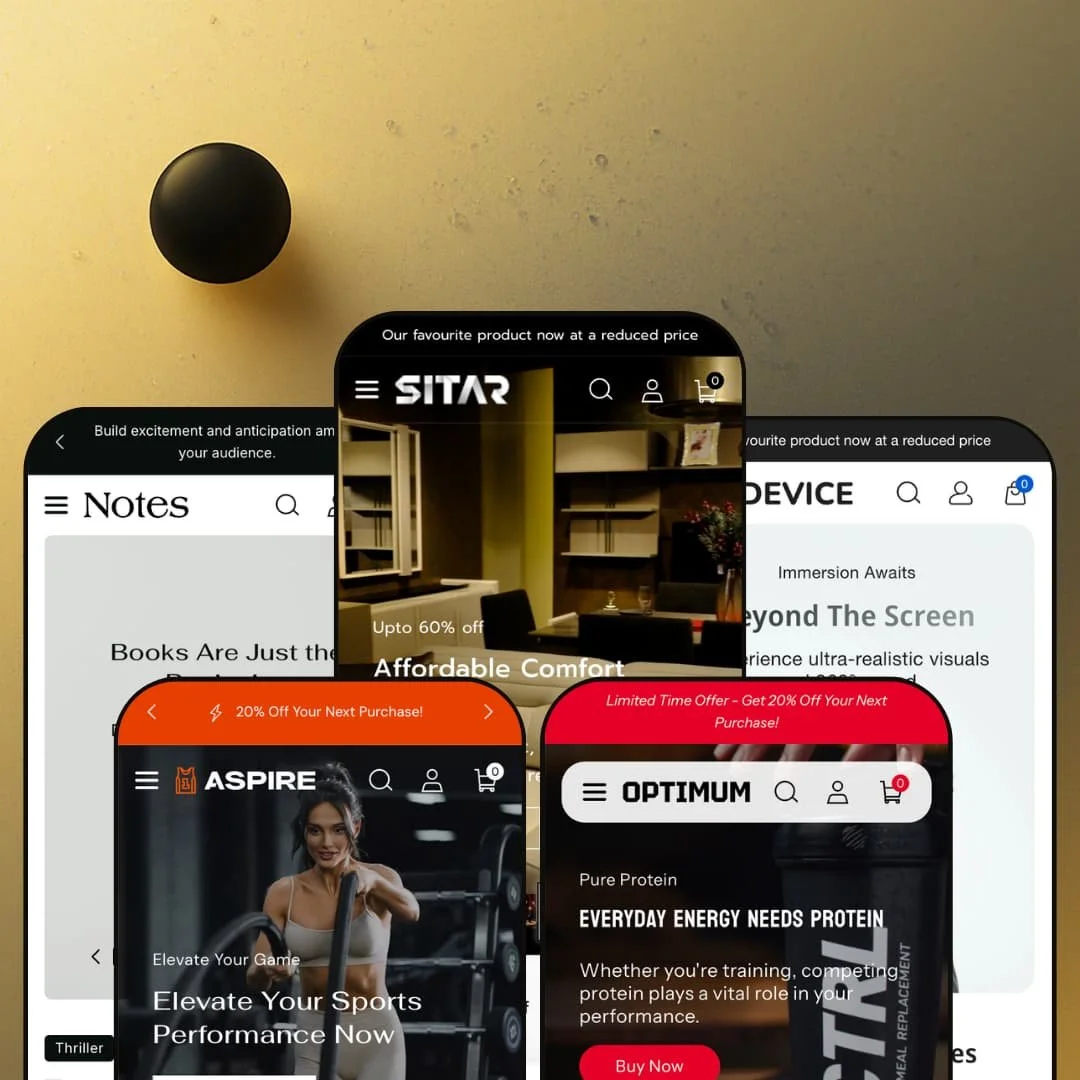
Most Shopify themes commit to one look and one kind of store. Sitar takes the opposite bet, shipping five working presets (furniture, activewear, books, supplements, and electronics) on a single Online Store 2.0 codebase. The question that follows you through every demo is whether that range comes at the cost of depth. After I clicked through all five, the answer turned out to be more interesting than a flat yes or no.
The slide-out cart is built to keep a sale moving
Add anything and a drawer slides in carrying three things at once: a free-shipping progress bar, an order-notes field, and a "You might like" cross-sell row. It moves fast. Nothing bounces the shopper to a separate cart page where momentum tends to die, and for lower-AOV catalogs where carts get built on impulse, like activewear or single-serve supplements under fifty dollars, keeping the next nudge inside the drawer is exactly the right place to put it.
For products that need explaining, the detail page does the work
Start with a merchant selling something a shopper studies before buying, a piece of furniture or a pair of headphones, and Sitar's product page earns attention. The Wooden Chair demo lays out dimensions, material, load capacity, and adjustable seat heights as clean tabbed specs, with a zoomable multi-image gallery and color swatches beside them. Considered-purchase categories live and die on that detail. Browse-and-bounce stores will never need it; spec-driven ones will lean on it hard.
The mega menu scales with the catalog
Across presets the header dropdown runs multi-column, mixes category links with featured collections, and in the electronics demo links individual products from inside the menu itself. A wide catalog stays one click deep. For a merchant carrying a few hundred SKUs spread across several sub-categories, whether a multi-brand operator or a single store with a sprawling range, that navigation depth is what keeps a big catalog from turning into a maze the moment a visitor lands.
Five real presets, one license
Sitar ships five presets across five genuinely different verticals, and each one is a complete store rather than a recolor of the last. Furniture gets a video hero and spec tables. Books get author-led cards. For an operator running more than one storefront, or a single merchant still deciding which direction to commit to, that is five real starting points from one $160 license instead of the single look most themes hand you.
Social proof runs through apps, not the theme
There is no native review, rating, or wishlist display anywhere in the feature set. The hooks are there. Several of Sitar's own demo verticals are the ones that need that layer most, and a supplement or electronics shop, where buyers scan ratings before a considered purchase, will be installing a review app like Judge.me or Loox plus a separate wishlist tool on day one. The trust layer is a real capability the theme leaves to a separate bill and a separate setup.
The conversion toolkit is built for discount selling
Every preset leads with the same urgency furniture: a countdown bar, sale badges, a free-shipping threshold, promo strips. It is effective. It is also a posture, and out of the box the theme assumes you are always running a sale, so a brand selling at full price on heritage or craft will spend real effort pulling those cues back out before the storefront stops shouting about deals. For luxury or premium-positioned sellers of considered goods, that default works against the story you are trying to tell.
Online Store 2.0, not the newest block architecture
Sitar is built on Online Store 2.0, the mainstream standard, not the newer Theme Blocks generation. In practice that means section-level editing with limited block nesting rather than the deep nested-block and AI-assisted building the latest themes allow. For most merchants this will never come up. For agencies and in-house teams building heavily customized, multi-brand layouts that run well past the preset defaults, it is a ceiling worth knowing about before you commit to it.
What it takes to launch
Plan a full copy and imagery pass across hero captions, menu structure, and blog entries for whichever preset you choose, plus inventory and pricing setup, spec-tab and metafield population for the product detail blocks, and a check of your default market and currency ahead of launch. Re-theming a chosen preset toward a different vertical pushes the work higher.
-
What works in this preset
The furniture demo opens with a video-backed slideshow and a small hotspot strip that pins products like the folding chair and the Avalon recliner directly onto lifestyle shots. It is a confident first screen. For a category where people shop by room and by feel, letting a visitor jump straight from an inspirational image to the exact product sitting in it removes the usual detour back to a collection page to go hunting for it.
Where Sitar earns its keep is in how it stages a furniture catalog. Collection tiles fan out by room (kids, dining, bedroom, balcony), color choices render as swatches on the cards, and the grid mixes quick-add with full product links. It reads like a showroom. For a buyer browsing by space rather than by SKU, that organization quietly does the work of a salesperson pointing you toward the right corner of the floor.
Where it stumbles
That opening screen is also the preset's risk. The video hero, the hotspot strip, and the countdown bar stack into a busy first impression, and furniture shoppers often want to browse calmly before they fall for a sofa. The components are strong on their own; the staging asks a lot of the visitor before they have scrolled a single screen.
-
What works in this preset
Aspire reskins the same bones for sport. The conversion instinct sharpens. Product cards carry discount badges, a second image swaps in on hover, and quick-add lets a shopper pick a size without ever leaving the grid, which is exactly the fast browse-to-bag path an impulse-led activewear catalog under fifty dollars wants from its homepage.
The mega menu splits cleanly into men's, women's, specialty apparel, and an others column, which keeps a sprawling size-and-category range from overwhelming the header. A language toggle sits beside the country selector. I noticed it surfaced in the header rather than buried in the footer, and for a brand selling across borders that visibility is a small but real convenience for the shopper deciding whether they are in the right store.
-
What works in this preset
Notes is the quietest of the five. It suits the vertical. Product cards lead with the author name above the title, the prices drop to single digits, and the covers carry the layout, so the whole grid reads like a bookshop instead of a generic storefront pushing inventory.
The literature mega menu organizes by genre rather than by department, and the editorial blog block gets real estate near the foot of the page. That fits a bookshop. For a store that lives or dies on browsing and word-of-mouth rather than hard-sell strips, leaning into content over urgency is the right instinct for the category.
Where it stumbles
For a serious bookseller, the discovery layer reads a little light. Beyond the author label, the preset stages a fairly standard grid, and a deep catalog of titles would want format or series cues that a merchant has to build in themselves. The character is right. The depth for a large list is work you bring to it, not work the preset hands you finished.
-
What works in this preset
Optimum is where the mega menu flexes hardest. The supplement demo packs the dropdown with category columns and then adds a row of promoted collections beneath them: whey, lifestyle protein, creatine, performance boosters. A shopper who already knows what they want gets there in one move, and a shopper who does not gets a guided map of the whole range laid out in front of them before they have to commit to a click.
Pricing sits in a tight band and the Offers block puts the discounted SKUs front and center. It is a sensible fit. That matches how supplement buyers actually shop, with repeat purchases, bundle hunting, and a strong pull toward a visible deal, and the phone number parked in the header adds a reassurance cue that suits a category where people ask questions before they put anything in their body.
-
What works in this preset
Device pushes navigation the furthest. Its mega menu does not just list categories, it links straight to individual products from inside the dropdown, and a separate Gadget In Demand block promotes named hero items, so an electronics catalog that fans out into speakers, earphones, headphones, and smart displays stays one click from the header no matter how wide it grows.
The product grid leans on hover image-swaps and discount badges, and the audio-heavy catalog gives that second-image trick a job, since a headphone genuinely looks different from another angle. The bones do not change. The free-shipping progress bar and slide-out cart carry over from the other presets exactly as they were.
Where it stumbles
The odd thing is what the homepage does not stage. Electronics buyers decide on specs, yet the front page sells by browsing and badges rather than putting comparison or spec cues up high, even though the product pages clearly support that detail. The capability is sitting right there. Pull the spec content forward onto the homepage and the preset would match the way its own shoppers actually make up their minds.
One section library that genuinely speaks five languages
The real achievement is not the preset count, it is that the same underlying sections restyle into a furniture showroom, a bookshop, a supplement store, an electronics catalog, and an activewear brand without any of them reading as a recolor of the others. Read all five back to back and the range holds up. That adaptability of one codebase is the thing a committed single-vertical theme cannot give you.
A complete merchandising kit for the money
Taken as a whole, the conversion and discovery toolkit arrives assembled: cart drawer, predictive search, deep navigation, cross-sell, trust badges, urgency, product video, and tabbed detail, all wired together rather than sold as separate add-ons. For the price band, that breadth is the headline. Few of the individual pieces are unusual on their own, but having all of them coherent inside one theme is what saves the hours you would otherwise spend bolting them on.
The skeleton shows through
Across all five presets the same structural rhythm repeats: hero, urgency bar, mega menu, product grid, blog, newsletter. It is a dependable spine, and it is also a recognizable one. A brand chasing a truly distinctive layout will keep bumping into the template underneath, because the presets vary the content far more than they vary the bones holding it up.
A busy default that needs paring back
The baseline presentation runs visually dense. Promo strips, badges, hover swaps, and multiple bars pile up quickly across the presets, and several demos ask a visitor to absorb a great deal at once before the first scroll has even happened. A merchant who wants a calm, white-space-led canvas can reach it, but the work there is subtraction rather than addition.
★ 8.2/10
Rating
-
Broad, pre-assembled toolkit spanning cart drawer, predictive search, deep navigation, urgency, and rich product pages; reviews and wishlist sit outside the theme and need apps.
9
-
Five ready presets give a fast start and the Online Store 2.0 editor is familiar, so most launch work is content rather than construction.
8
-
Responsive grids, a slide-out cart, and a stacked mobile menu carry the layout cleanly onto small screens.
8
-
Image lazy-loading and a restrained core help, though media-heavy heroes and dense promo sections add weight to the busier presets.
7
-
A strong shared section library and five distinct presets give real room to move; block nesting stops short of the newest Theme Blocks generation.
9
Frequently Asked Questions
-
Pick the preset whose vertical sits closest to yours: furniture maps to Sitar, audio and gadgets to Device, and so on. Because all five draw on one shared section library, a section staged in one preset can be rebuilt in another, so your starting choice is not a cage.
-
Yes, the theme includes UI strings in English, French, Italian, German, and Spanish for its own buttons and labels. Translating your actual products and pages is handled in Shopify's language settings, not by the theme itself.
-
The theme renders the selector in the header and footer; the conversion itself is Shopify Markets. Worth noting that the electronics demo defaults to Indian rupees, so confirm your default market before you go live.
-
Yes. Those structured dimension, material, and care blocks run on the theme's product tabs, and you populate them per product, often through metafields, as part of setup.
-
Both are in the feature set. Pickup ties to the locations you configure in Shopify, so it reflects your real fulfillment rather than a fixed demo state.
-
It is on version 2.0.6 from April 2026, with documentation published by the developer. That is a recent update for a theme that first launched back in 2024.
This review is based on hands-on testing of the publicly available preset demos of the Sitar Shopify theme as of June 7 2026. Theme features, preset availability, and performance can change with subsequent updates from the theme developer.