
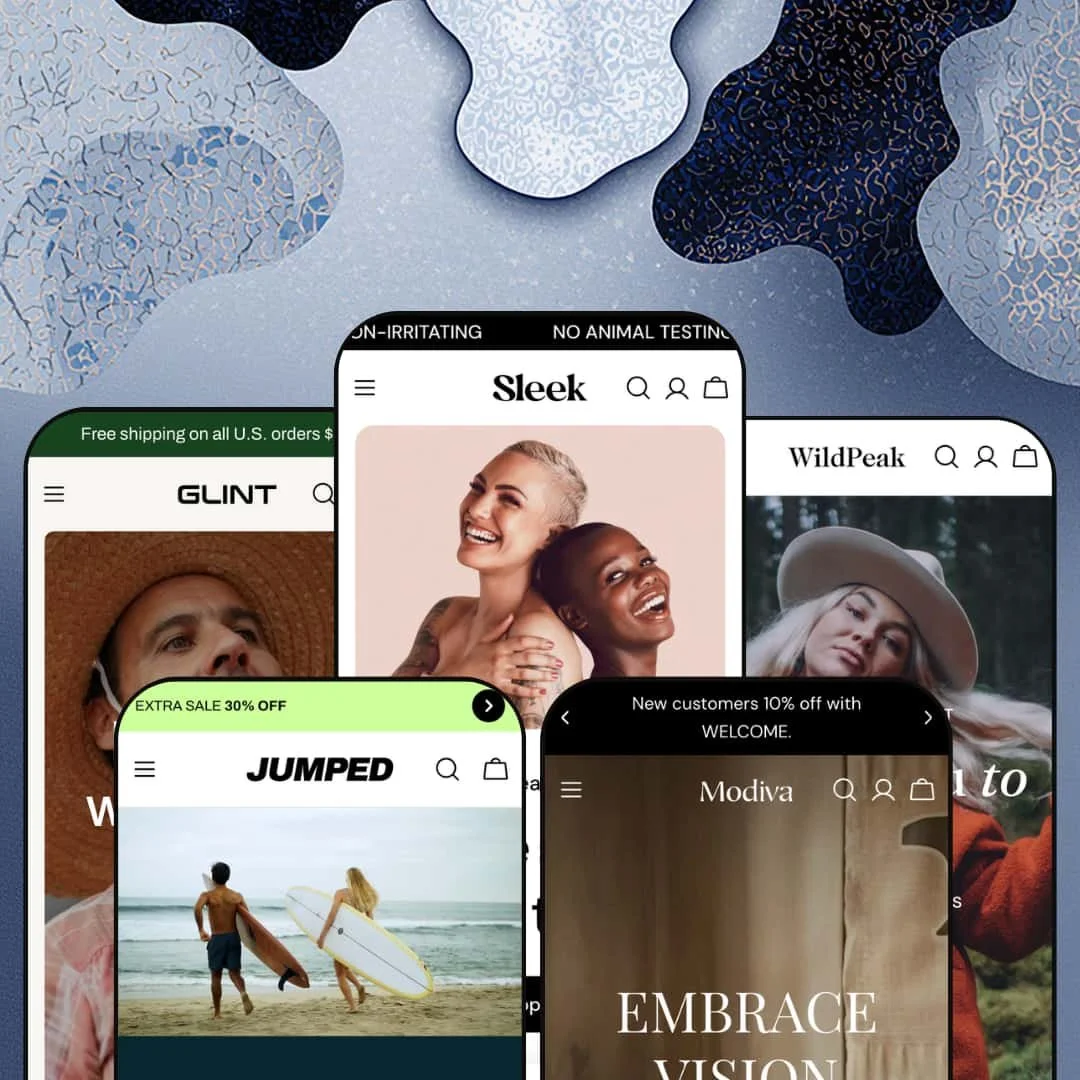
Most premium Shopify themes pick one industry and pour everything into it. Sleek does the opposite. It ships five fully-staged presets (beauty, outdoor apparel, surf-sport, furniture, and accessories) that all draw from a single shared section library, built on Online Store 2.0. For a $350 theme from FoxEcom, that breadth is the entire pitch, and whether it holds up comes down to how the same bones behave under five very different catalogs.
One section library, five believable verticals
A single content-section library re-skins convincingly across very different products, carrying beauty serums in one preset and $1,000 dining tables in another without looking ported. For an agency or multi-brand operator launching several stores on one license, across catalogs from small boutiques to broad multi-category ranges, one purchase covers a lot of ground.
The product page keeps selling below the buy button
The product template behaves like a landing page: collapsible spec tabs, a full size-chart modal with a real measurement table, a low-stock counter, and an "ask a question" form sit above image-with-text story blocks and icon-column material claims. For apparel with fit anxiety, or any mid-to-high-ticket product that needs explaining before it sells, objections get handled in place.
Deep colorways are handled without a mess
Seven color swatches against four sizes, a gallery that swaps to the chosen color, and combined listing tying separate single-color products onto one page. Swatch pickers appear on collection cards too. For apparel or footwear carrying one style in many shades, or accessories lines built on colorways, that means less variant clutter and quicker browsing.
The mega menu does merchandising, not just navigation
The header dropdown isn't just a link list. In every preset it embeds a "Trend This Week" rail of product cards with prices and swatches, plus promo image tiles, right inside the mega menu. For large, multi-category catalogs whose shoppers browse more than they search, that pushes product in front of people before they commit to a collection click.
It's maximalist by default, and restraint costs you
Every preset homepage stacks fifteen-plus sections, several near-identical product carousels, and multiple promo bands before the footer. If you want a calm, fast, few-section storefront, you'll spend your first day deleting rather than building. That tax lands hardest on minimalist brands and small catalogs under roughly thirty SKUs.
No native way to compare high-spec products side by side
The theme gives you tabs and story sections but no comparison-table section. A shopper weighing three dining tables on dimensions and materials has to open each page and hold the differences in their head. For furniture, electronics, or appliance merchants whose customers decide by comparing numbers, that surfacing has to come from a custom section or a separate install before launch.
Pre-translated UI ships for five EU languages only
Built-in interface strings arrive in English, French, Italian, German, and Spanish. The demo's country selector lists markets like Japan, South Korea, Poland, and the Nordics whose languages the theme UI doesn't ship translated, leaving buttons and form text in English until a merchant supplies their own. For brands selling into East Asian or Nordic markets as a core channel, that's translation work to budget.
What it takes to launch
Expect a multi-day pass to rewrite copy across the long, section-dense homepages, populate the product metafields several sections read from, re-stage the mega menu and collection structure per catalog, and replace demonstration products, brand references, and placeholder contact details before going live.
-
What works in this preset
The skincare "bundle" section is the most interesting thing on the page. It stacks three products, each with its own size picker (50ml, 100ml, 150ml), under one "Add all to cart" button so a full routine becomes a single checkout. For a beauty brand selling regimens rather than one-off SKUs, that turns a layout into a basket-builder. Smart default.
I scrolled into a feature-tab block where four skin-concern tabs ("Safe for Sensitive Skin," "Organic Skincare," and so on) swap their supporting copy and a video panel as you click between them. It reads like a small landing page sitting inside the homepage. Beauty shoppers who buy on reassurance get somewhere to be reassured before they reach a product page.
Lower down, a masonry showcase mixes product cards with autoplaying video tiles and editorial stills. The grid stays irregular on purpose, which suits a brand that wants to look styled rather than catalogued.
-
What works in this preset
You land on a three-slide hero, and right beneath it sits a product wall with All / jackets / pants / accessories filter tabs that re-sort the grid in place. For a clothing catalog with clear categories, that puts the whole range one tap away. It's a strong above-the-fold move.
Scroll to the lookbook and a "shop this look" slider pairs styled photography with the individual products in each outfit, every one carrying its own picker, so an inspired shopper can add the jacket and the pants without hunting through separate collections. That outfit-to-cart path is exactly what apparel merchants with coordinated ranges want surfaced, and it comes wired into the demo rather than bolted on later.
Where it stumbles
The flash-sale band ("Buy 3 items and save 15%") leans on a discount mechanic the section can display but not enforce; the actual cart math is something a merchant sets up separately through Shopify discounts. Staged as-is, it advertises a promotion the storefront won't honour on its own until that logic is wired up.
-
What works in this preset
A muted video hero does the talking here, with almost no overlaid text competing for attention. Below it, a collapsible "unique features" block expands three product claims (waterproof, organic cotton, ocean-safe) into short paragraphs as you open each one. For a performance or outdoor brand whose buyers care about materials and construction, that accordion answers questions without burying the page in copy.
The "best sellers" spotlight gives one product a full-width stage: four gallery images, a couple of spec bullets, and an inline option picker. It's the closest the theme comes to a hero-product moment. Surf-sport drops tend to live or die on that single hero product, so having a section built for it matters.
-
What works in this preset
The before/after image slider is the section that earns its place here. Drag the handle and a bare room fills with furniture, which is a genuinely useful demonstration for pieces where context does the selling. A furniture or decor merchant gets a "see it in your space" device without commissioning a configurator.
What I noticed across Modiva's grids is that the Type metafield is actually populated (Dining Table, Sofa, Lantern, Bar Chair), so the "our picks" filter tabs sort by real attributes instead of placeholder labels. For a home catalog where shoppers browse by object type rather than by collection, that's the difference between a filter that works on day one and one you still have to build.
-
What works in this preset
Glint wears an "accessories" label in the preset switcher, yet the demo actually merchandises workwear, tools, and bags under a gardening-brand concept. That mismatch turns out to be informative: it shows the same section library handling a mixed catalog of apparel and hard goods. A garden-trowel card sits happily beside a linen-shirt feature block.
Look closer and it runs the same before/after slider Modiva uses, here showing a styling change rather than a furnished room. That's a useful reminder that the section bends to whatever a merchant points it at, which is a recurring trait worth keeping in mind when you plan a build.
Where it stumbles
For a merchant who genuinely sells only small accessories (jewelry, leather goods, watches), the layout's instinct is still to show full looks and lifestyle spreads. A tight catalog of rings or belts can end up rattling around inside sections designed for outfits and rooms, which means more trimming and rethinking than a small-goods brand might expect.
Five verticals from one license
The clearest reason to buy Sleek has little to do with any single feature: it's the breadth. One $350 purchase yields five production-credible storefronts spanning beauty, apparel, sport, home, and accessories, each staged well enough to launch from. For an agency billing per build, a multi-brand operator, or a founder still deciding what a store should become, that economics is the headline.
It commits to a point of view
Sleek isn't a neutral canvas, and that's a strength if your instincts match its own. Across all five presets the same conversion philosophy repeats: bundle the basket, show the look, manufacture a little urgency, stack the social proof. A merchant who shares that high-intent, merchandising-heavy worldview gets a theme that already agrees with them, rather than a blank slate to opinionate from scratch.
One layout DNA under five skins
The flip side of a shared library is that the five presets are more alike than their industries suggest. Slideshow, product rail, collection tiles, lookbook, press row, testimonials, Instagram: the running order barely changes from beauty to furniture. If you picked Sleek expecting a beauty-native architecture rather than a general lifestyle layout wearing a beauty skin, that sameness shows once you've worked through a second preset.
Its center of gravity is lifestyle apparel
For all the vertical labels, the section library thinks like an apparel brand. Lookbooks, "shop this look," outfit bundles, and styled multi-column spreads are where it's strongest, and those map cleanly onto clothing and accessories. Beauty, furniture, and food merchants can absolutely use it, but they inherit tools shaped for outfits and spend setup time adapting fashion-first sections to non-fashion goods.
★ 8.0/10
Rating
-
A deep, genuinely cross-vertical section library plus a content-rich product template, bundle sections, a before/after slider, lookbooks, and a merchandising mega menu.
9
-
The Online Store 2.0 editor makes every section movable, but the sheer section count and metafield dependencies leave a lot to configure before a store feels finished.
7
-
A slide-out menu with nested category accordions, dedicated mobile crops for the before/after slider, and product rails that collapse into swipeable carousels.
8
-
Lazy-loaded imagery and webp assets keep things reasonable, though the long, carousel-heavy homepages give the browser plenty to do.
7
-
Five presets, deep swatch and colorway support, several gallery and product-layout styles, and a library that demonstrably reskins across industries.
9
Frequently Asked Questions
-
The Theme Store files it under beauty, and the Sleek preset is beauty, but the section library is happiest with lifestyle and apparel brands that sell through styling and storytelling. Home, food, and beauty stores are well supported too; they just lean on a fashion-shaped toolkit.
-
One theme. You install Sleek and switch presets inside the editor, and every preset can reach the same full section library regardless of which industry it was styled for.
-
No. The product pages wire in Loox for reviews, so the star widgets you see are a third-party app rather than a native Sleek feature. The curated quote and testimonial blocks, though, are theme sections you control directly.
-
Not at all. It's a theme-wide section any preset can use; Modiva shows a furnished room while Glint uses it for a styling change. Point it at whatever transformation your product makes.
-
Partly, and only on the right plan. The quantity-pricing and combined-listing features are flagged for Shopify Plus, so quantity-break pricing depends on being on Plus rather than on the theme alone.
-
Modiva, without question. It's the one preset staged with furniture-appropriate type metafields, room-based "get the look" sliders, and a before/after that fills an empty room, so you begin closest to a home catalog and adapt the least.
This review is based on hands-on testing of the publicly available preset demos of the Sleek Shopify theme as of June 6 2026. Theme features, preset availability, and performance can change with subsequent updates from the theme developer.