
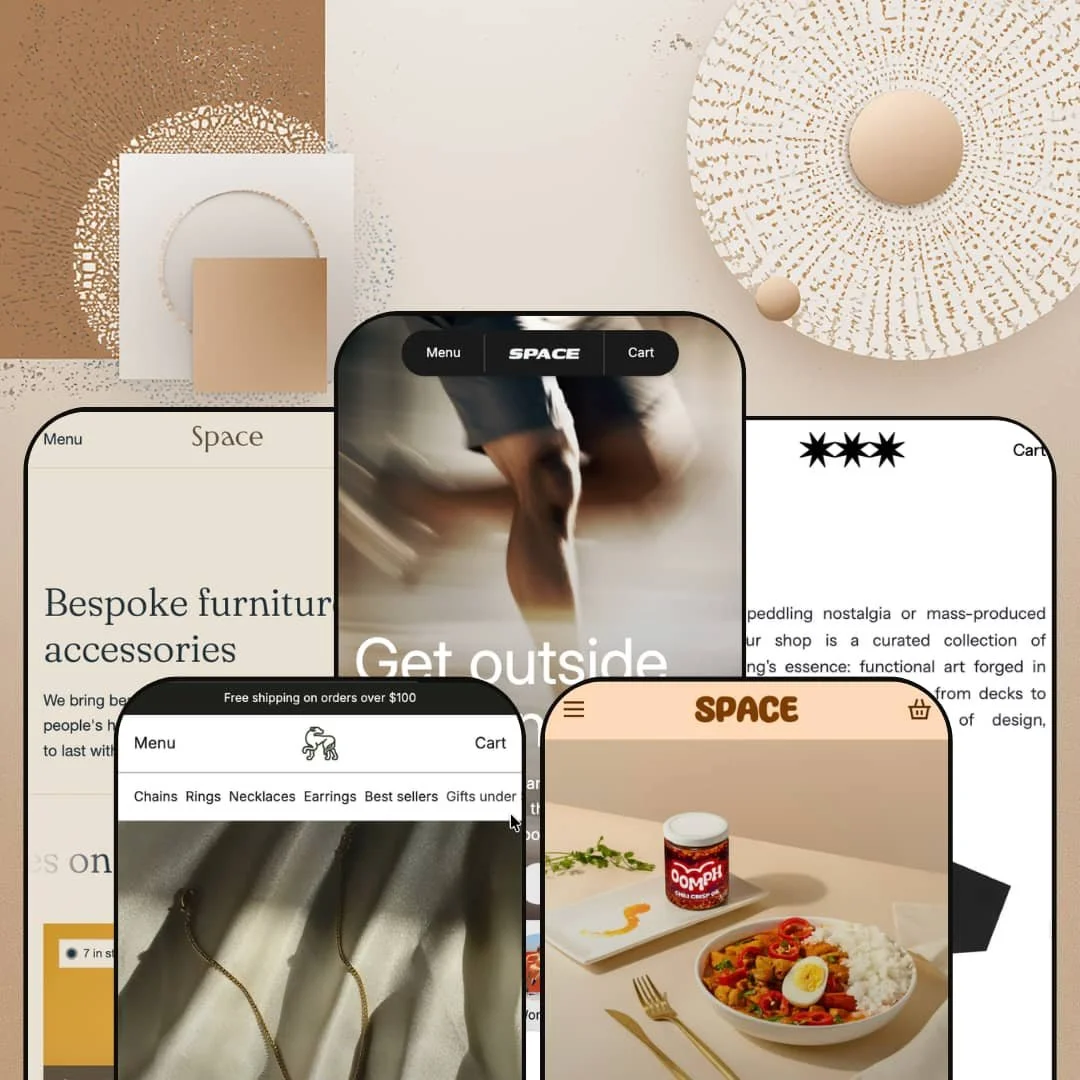
Most premium Shopify themes pick one industry and build everything around it. Space refuses to choose, shipping five presets that run from running shoes to handmade furniture to chili oil. Built on Online Store 2.0 architecture, it leans on a shared library of conversion sections that show up, restyled, across every demo. The real question for a $320 theme is whether that range costs it depth in any single vertical.
A slide-out cart built to lift order value
The cart is where Space stops looking like a pretty theme and starts acting like a conversion tool. Open it on any preset and you get a free-shipping progress bar, a one-click shipping-protection add-on, in-cart product suggestions, an order-note field, and a "share your cart" link that hands a shopper's selection to a friend by URL. It's a lot working in concert. For mid-market DTC stores chasing a higher average order value from impulse-leaning, cross-shopping buyers, that run of nudges sits exactly where the decision gets made.
Media sections that earn the "visual impact" billing
Space sells itself on visual impact, and the section library mostly backs the claim. It shows the brand, not just the catalog. Across the demos I found video product cards that autoplay clips in the grid, an image-hotspot module tagging a single photo with multiple shoppable points, full-bleed scrolling marquees, and an optional store-wide audio toggle. For visually-driven categories like apparel, food, and design objects, where the product photographs well and the buyer shops with their eyes, these sections turn a homepage into something closer to a campaign.
Five real verticals from one purchase
One license gets you five presets, and they aren't five coats of paint on the same store. Range you can reuse. Swift is built for athletic performance, Shimmer for jewelry retail, Silk for high-ticket furniture, Spice for single-product food, and Saga for editorial streetwear, each with demo content and section choices tuned to its category, so a merchant who runs more than one brand or expects to pivot positioning can redeploy the theme rather than learn a new one from scratch.
Enough built-in selling tools to skip a few apps
Stores tired of stacking conversion apps will find a lot already in the box. That's the pitch, and it mostly holds. The theme ships countdown timers, cross-sell and recently-viewed sections, quick view, and promo banners as native sections with no install required. For a lean operator who'd rather not pay for and manage half a dozen plugins, folding those everyday merchandising pieces into the theme keeps both the page and the monthly app bill lighter, which matters most for early-stage, budget-conscious single-brand stores.
Built for curated catalogs, not warehouses
Every demo here sells a tight, story-led assortment, and that isn't an accident. The section library and visual language are tuned for brand narrative, process videos, lookbooks, editorial intros, rather than dense filter-first browsing, and although filtering and sorting are included, the layout never really shows them carrying a thousand-SKU load. It's a boutique system, not a warehouse one. For high-volume operations with 500-plus SKUs across many categories, the storytelling-first design is a poor match for how those shoppers actually want to browse.
The demos lean on apps the theme doesn't include
Brickspace pitches Space partly on replacing apps to save money, so it's worth knowing where that promise stops. Two of the most revenue-relevant surfaces in the demos aren't native: the subscription selling on Spice runs through a subscription app like Shopify Subscriptions or Recharge, and the star ratings on Shimmer and Silk come from a reviews app such as Judge.me or Loox. Space for them, not the engine. For subscription-driven brands and repeat-purchase categories counting on recurring revenue, that ongoing app cost belongs in the math before the $320 reads like the whole bill.
Urgency cues that don't fit every price tag
The same conversion mechanics run on every preset, and they don't always suit the goods. Silk asks shoppers to spend $2,700 on a lounge chair and $6,200 on a cabinet under the very same free-shipping progress bar and low-stock prompts that push $13 chili oil over on Spice. A $6,200 cabinet doesn't need a countdown. For luxury and high-ticket considered purchases, where restraint itself signals quality, those borrowed-from-DTC urgency tics can quietly undercut the premium feel a brand is paying to project.
What it takes to launch
Plan a multi-day pass to swap demo copy, imagery, and per-preset brand naming for whichever preset you adopt, populate the product metafields several merchandising sections expect, wire up any subscription or reviews apps, and configure your markets and currency so the storefront stops defaulting to the demo's settings.
-
What works in this preset
Scroll past the hero on the Swift running demo and you hit a comparison block, five rows deep, stacking the brand against an unnamed competitor on air-cushion design, weight transfer, and a 60-day test run. It earns its place. For a running-shoe buyer who cross-shops on specs before committing, that at-a-glance contrast does more persuasion than another paragraph of body copy ever would.
I clicked into the main navigation and the mega menu opened into featured product tiles, actual shoes with images and prices rather than plain text links, alongside collection shortcuts for Trail and Road. That's header work done with ambition. A store running a split catalog of men's and women's lines can surface hero products straight from the nav, which shortens the path from landing to product page for shoppers who arrive without a fixed destination.
-
What works in this preset
The jewelry demo does something the other presets mostly skip. It builds a bridge to the shop floor. A "Shop in Person" block lists four storefronts across Montreal, Toronto, Vancouver, and Halifax, each linking to its own location page, which for a brand running both a website and a physical counter is exactly the trust cue a hesitant first-time buyer looks for.
Product cards carry merchandising flags like Best Seller, Staff Pick, and Save 20 percent, and the demo pairs them with a Bundles row showing a Gold Essentials set at $550 down from $650. The badge system is theme-level and reads cleanly. Stores that lean on curation and editor's-picks to steer undecided shoppers through a mid-size catalog get a ready-made vocabulary for pushing attention toward the pieces they most want to move.
-
What works in this preset
Silk dresses itself as a high-end furniture studio, with a Vu Cabinet listed at $6,200, and it backs the positioning with two quiet conversion details. Product cards show live stock counts like "4 in stock," and a press-logo marquee scrolls mastheads under the fold. I noticed the stock counter doing double duty here. On considered, low-frequency purchases like furniture, a small "only a few left" signal nudges without shouting, and the press strip lends a young brand borrowed credibility it can't manufacture on its own.
The home demo also runs the widest set of trust sections of any preset. There's an FAQ accordion, a four-quote testimonial row with named roles, and another comparison block, this time "Custom furniture" versus "Big box store." It's a lot of reassurance stacked in sequence. For a store asking shoppers to spend four figures on a single item sight unseen, that layered proof is doing exactly what high-ticket selling demands.
-
What works in this preset
Here the catalog shrinks to almost nothing, and the design leans all the way into it. It reads like a label, not an ad. An ingredients section breaks the chili crisp into its parts, dried chili peppers, cold-pressed olive oil, and a secret spice blend, each with its own icon, which for a food brand selling on provenance answers the first question a wary buyer asks before reaching for the cart.
Where it stumbles
The catalog is the constraint, not the theme. With only a chili oil, a crisp, and a duo to show, Spice leaves the navigation and filtering muscle the other presets flex sitting idle, so the moment a food brand expands past a handful of SKUs this particular staging stops fitting and you're rebuilding the header and collection setup from one of the busier presets.
-
What works in this preset
Saga goes the other direction entirely, dressing the theme down into something that reads like a zine. The homepage opens on a block of attitude-heavy copy about skateboarding's essence, then drops straight into a dense product grid of tees, $2.99 stickers, and totes, with a Lookbook sitting up in the main nav. I scrolled it expecting clutter and found restraint instead. For a streetwear or counterculture label whose customers buy into a story before a product, this stripped-back editorial staging fits the audience better than any amount of conversion chrome would.
The section library is the actual product
Look across all five demos and the same building blocks keep reappearing in different clothes: the comparison table, the slide-out cart, the media sections, the trust rows. One kit, five faces. Buying Space isn't buying a single look, it's buying a set of sections you restyle per brand, and that reusability only becomes obvious once you've sat with every preset instead of just one.
It has a consistent point of view about selling
Whatever the vertical, the theme keeps making the same argument: surface comparisons, cut add-to-cart friction, and stack reassurance near the buy button. That coherence means a merchant inherits a defensible conversion logic, not just a mood board. You're getting a sales philosophy with a UI attached.
Breadth invites bloat
Because every preset hands over a full conversion stack, the path of least resistance is switching on more than a focused store needs. The busiest demos, Swift and Silk, show how quickly a homepage fills with sections competing for the same attention. Restraint is on you, not the theme. Leaving tools off takes more discipline than turning them on.
One aesthetic register, many price points
The bold, high-contrast styling that flatters $3 stickers and $35 tees also has to carry four-figure furniture, and the visual volume doesn't always dial down when the product calls for quiet. A theme this confident in its own loudness asks the merchant to do the toning. Not every brand will want to fight it.
★ 8.0/10
Rating
-
Deep built-in conversion and merchandising library, cart drawer, comparison sections, countdowns, cross-sell, lookbooks, covers most needs without apps, though subscriptions and reviews still route to third parties.
9
-
Five fully built presets give a strong head start, but the volume of sections and the metafield-backed blocks mean a real learning curve before a clean launch.
7
-
Slide-out cart, back-button mega menu stacking, and sticky elements carry the desktop merchandising onto small screens without obvious compromise.
8
-
The media-forward presets run video, marquees, and image-heavy heroes; lazy-loading helps, but the visually busiest demos ask the most of the page.
7
-
The shared section library restyles convincingly across five very different verticals, which is the theme's single strongest argument.
9
Frequently Asked Questions
-
A theme purchase covers a single store. You start from one preset and can pull sections from the others into that same store, but a second store needs its own license.
-
Spice is the closest fit, built around one or two hero products, an ingredients breakdown, and a subscription option rather than a broad catalog.
-
Silk's demo runs an English/French switcher, and the theme ships EU translation strings (EN, FR, IT, DE, ES); translating your own product and page content is a separate setup step.
-
Yes. Shimmer's demo includes a store-locations section, with each address linking out to its own location page.
-
The presets using video heroes and store audio, Swift and Spice, carry more weight than the leaner ones like Saga, so expect to optimize media if you adopt a busy preset.
-
Saga's demo uses a lookbook page in its navigation; it's a theme section you can enable on any of the presets, not a Saga-only feature.
This review is based on hands-on testing of the publicly available preset demos of the Space Shopify theme as of May 31 2026. Theme features, preset availability, and performance can change with subsequent updates from the theme developer.