
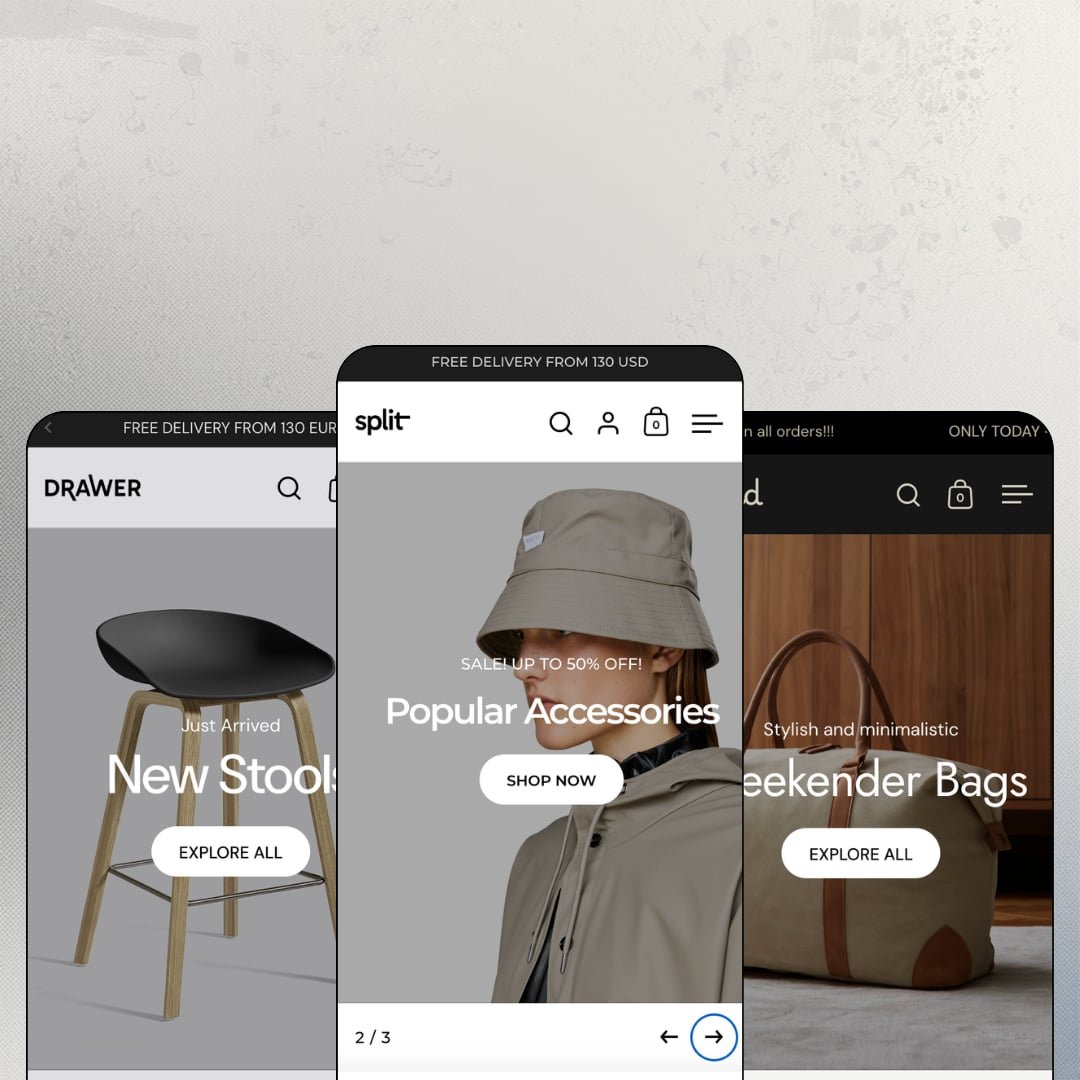
Most Shopify homepages stack full-width banners and hope momentum carries the shopper down the page. Split, an Online Store 2.0 theme that Krown Themes has maintained since June 2017, cuts every screen in half instead: image on one side, message on the other, all the way down. At $280 it sells one layout idea with unusual stubbornness, and its three demos test that idea against rainwear, Scandinavian furniture, and travel bags. The real question is whether a nine-year-old design concept still earns its keep in 2026.
The homepage sells the product directly
A featured-product section drops a complete buy box onto the homepage: sliding image gallery, variant picker, quantity stepper, add to cart. On the rainwear demo that's the Bagpack in grey, white, or ash, purchasable without ever opening its product page, which turns the strongest slot on the site into a working point of sale rather than another banner. No click-through required. Single-hero-product brands and impulse-buy catalogs under 30 SKUs get the most value from this section.
A promo layer you configure, not install
How much sale machinery should a theme carry before you reach for apps? Split's answer spans in-menu promo cards with imagery, countdown banners, and a popup engine the three demos stage three different ways: newsletter capture, a full-image sale teaser, and a single-product "HOT" spotlight. That's three campaign tools, zero installs. It hangs together as one coordinated kit because every piece can point at the same promotion, and drop-model streetwear brands and seasonal-sale apparel stores will use most of it in their first month.
3D models with an AR launcher, inside the standard gallery
Product galleries accept 3D models next to photos. The furniture demo's About a Chair carries a "View in your space" entry as a gallery slide, so a shopper on a phone can project the chair into their actual room before committing to a $220 purchase, with no extra app in the chain. Furniture and interior brands selling considered purchases at mid-market prices should treat this as a shortlisting reason.
Local pickup gets real estate in the buy box
Pickup availability renders as its own block under add-to-cart: location name, "usually ready in 24 hours," and a store-information link. It costs nothing beyond Shopify's location data. That placement is a quiet detail until you actually run a counter, at which point surfacing it at the exact moment of purchase decision is what converts a web order into same-day foot traffic. Single-location boutiques and food-and-drink brands offering counter pickup are the obvious fit.
Social proof is set dressing
Star ratings print on nearly every product card in the rainwear demo, and the bags demo's product pages carry a band titled "Reviews." Look closer: the band holds four hand-typed testimonials, and the stars render from rating metafields that something else has to write, which means the entire trust layer visible in these demos depends on a review app you haven't bought yet. The stars are set dressing until then. Repeat-buyer skincare and impulse-led fashion stores that convert on review volume should budget for that app on day one.
Every panel is a photography bill
The paired-panel grammar hands half the viewport to a single image, band after band. The demos work because they borrow campaign photography from three established brands, and a store dropping supplier shots on white into those same slots will read as half-empty rather than editorial. That's the cost hiding behind the price. Bootstrapped single-brand stores with evergreen catalogs and no recurring shoot budget should audit their asset folder before their wallet.
Online Store 2.0 pricing as the next generation settles in
Split runs on the Online Store 2.0 generation, and Dawn, Shopify's free default, ships that same architecture at $0. That gap won't shrink. What $280 buys is the split-screen identity, the promo kit, and nine years of refinement on top, not the deeper block nesting and editor conveniences of Shopify's newest theme generation, and buyers comparing options in this price range should price that in. Agency teams standardizing client builds and merchants in considered-purchase verticals planning multi-year storefronts will feel this soonest.
What it takes to launch
Expect a multi-day pass across demo copy, navigation and category-tile link targets, size-chart content, translation review in the five bundled languages, and review-app or rating-metafield wiring before the storefront reads as finished.
-
What works in this preset
Scrolling this demo feels like flipping through a campaign booklet rather than a store. I scrolled through three stacked paired panels before hitting a product: a "Jackets & Liners" collection tease, a 50%-off accessories push, and a lookbook invitation, each one giving half the viewport to a single photograph and the other half to a headline. It's a confident rhythm. The pacing only works because every panel gets exactly one message, which forces the merchant into an editorial discipline most store builders never impose on themselves.
Product cards here earn their keep. Hover-ready second images, star readouts, badge stacking that distinguishes "New," "On Sale," "Sold Out," and "Pre Order" states, and direct add-to-cart buttons all live on the card itself. The Bagpack product page continues that density with a six-slide gallery on a thumbnail rail, grey/white/ash swatches, breadcrumbs, and a vendor link back to the brand's catalog.
The Men collection page hides the demo's best surprise below the grid. An image-hotspot section titled "High RAINS standards" pins tappable bullets onto a lifestyle photo, some linking straight to products with prices, one opening a Vimeo clip, and the collection header carries a previous/next pager that walks shoppers sideways into "Jackets & Liners" and "RAINS Edit" without a trip through the menu.
Where it stumbles
The staging is wall-to-wall discount. Announcement bar, an in-menu FINAL SALE promo card, a countdown panel, and sale badges all shout at once, which reads against the "visual brands with a story to tell" pitch this theme leads with. A full-price brand evaluating this demo has to mentally subtract a lot of noise to see the calmer store underneath.
-
What works in this preset
Furniture buyers browse by product name, and this demo's navigation knows it. The Trending column of the menu lists six products directly, About A Lounge Chair down to Picnic Basket, while Furniture unfolds into five sub-collections and a photographic promo card rides along in the same dropdown. Three levels deep, product-aware, and merchandised. That's a menu doing sales work instead of just wayfinding, and it's the strongest single argument this preset makes for catalogs organized around recognizable hero pieces.
I clicked into the editorial spacing expecting filler and found intent. A typographic interlude sets "A fresh take on the quotidian objects" as its own full section with an inline collection link, and a sustainability block pairs three images with a single paragraph of brand copy. The demo breathes between product rows.
The footer works as a contact surface, not an afterthought. A full business block with street address, email, and phone sits beside collection links, and language and country pickers run as two separate selectors. Up top, the announcement bar rotates two messages with previous/next arrows instead of forcing one line to do everything.
Where it stumbles
"Last Items" urges shoppers to "Hurry up and grab it till it lasts!" directly above $1,200 lounge chairs. Flash-sale urgency grafted onto considered furniture purchases is a staging choice that undercuts the premium calm the rest of this demo builds so carefully.
-
What works in this preset
This is the newest of the three demos, and it stages the theme at its leanest. A bags catalog of roughly twenty products gets a single-level Categories dropdown, a kicker-labeled category rail ("Spacious," "The ultimate," "Practical & handy"), and nothing else in its way. Short menu, short path. For a small-catalog operator wondering how much of this theme's editorial machinery is mandatory, Nomad answers: almost none of it, and the storefront still holds together visually.
Sale math renders as computed percentage badges on the cards, -13%, -23%, -30%, rather than crossed-out prices alone, and a Summer Sale countdown panel is staged beside a full-bleed product photo as its own homepage band. The same badge system displays as "Save $30.00" flags over on the furniture demo, so the discount presentation is a formatting decision, not a fixed style.
Where it stumbles
Nomad shows the transactional floor, and this kept bugging me: promo, product rows, countdown, newsletter, done. Merchants drawn in by the narrative pacing this theme is marketed on should judge that register on the other two demos, because this one dials the storytelling to zero and simply proves the sections run lean.
One idea, held for nine years
Every band on all three demos descends from the same paired-panel grammar: heroes, countdowns, editorial interludes, and category tiles all inherit it. That discipline manufactures brand coherence automatically, because nothing a merchant adds can break the visual system. Version 5.0.2 shipped in April 2026, so the 2017 concept is still being actively maintained rather than coasting.
The sale voice is a dial, not a default
Reading the trio side by side reveals a register that throttles cleanly: near-silent premium calm on the furniture demo, mid-volume fashion promotion on the rainwear demo, full discount-forward retail on the bags demo. The same sections carry all three tones. Merchants aren't fighting a baked-in personality; they're choosing a volume level.
Three skins, one skeleton
Strip the photography and the three homepages run nearly the same band order: paired heroes, product rows, featured module, countdown, newsletter. Differentiation across the preset family comes almost entirely from imagery and copy rather than composition, so merchants expecting three genuinely different store architectures are actually buying one architecture with three photo sets.
Prose and photos carry all the product data
Across every demo, product information lives in hand-written description text and images; nothing on any page reads from a structured data layer. Spec-driven categories like electronics or hard goods inherit permanent manual content work, and comparison-minded shoppers get storytelling where they might want tables.
Rating
★ 7.4/10
-
Homepage buy modules, a built-in promo kit, 3D/AR galleries, and pickup surfacing cover a lot of ground at $280 before any app spend.
7
-
The section grammar repeats predictably, so building one paired panel teaches you all of them; promo pieces are individual sections and toggles rather than tangled global settings.
7
-
Paired panels stack into a clean single column, navigation moves to a slide-out drawer, and a sticky cart trigger keeps checkout one tap away.
8
-
Pages run lean, with restrained section counts, disciplined image sizing, and little third-party baggage in the demos.
8
-
Strong identity, narrow range: everything is a panel, and full-width density or asymmetric layouts sit outside the design language.
7
Frequently Asked Questions
-
Yes. Promo banners, countdowns, and popups are separate sections and toggles you simply don't add, and the furniture demo already runs a noticeably quieter register than the bags demo.
-
Three levels, and dropdowns accept direct product links plus an image promo card, so the menu can merchandise hero products instead of only listing categories.
-
The theme's own interface strings ship in English, French, Italian, German, and Spanish, with right-to-left support included; translating your product content remains separate work.
-
Product cards in the demos display Pre Order and Sold Out states as badges, and the feature set includes a stock counter for scarcity messaging on product pages.
-
The rainwear demo's slide-out cart carries an order-notes field and a discount-code entry with an apply button, so codes get redeemed before checkout rather than at it.
-
It launched in June 2017, making it one of the longer-running paid themes around, and version 5.0.2 arrived in April 2026, so updates are current.
This review is based on hands-on testing of the publicly available preset demos of the Split Shopify theme as of August 2026. Theme features, preset availability, and performance can change with subsequent updates from the theme developer.