
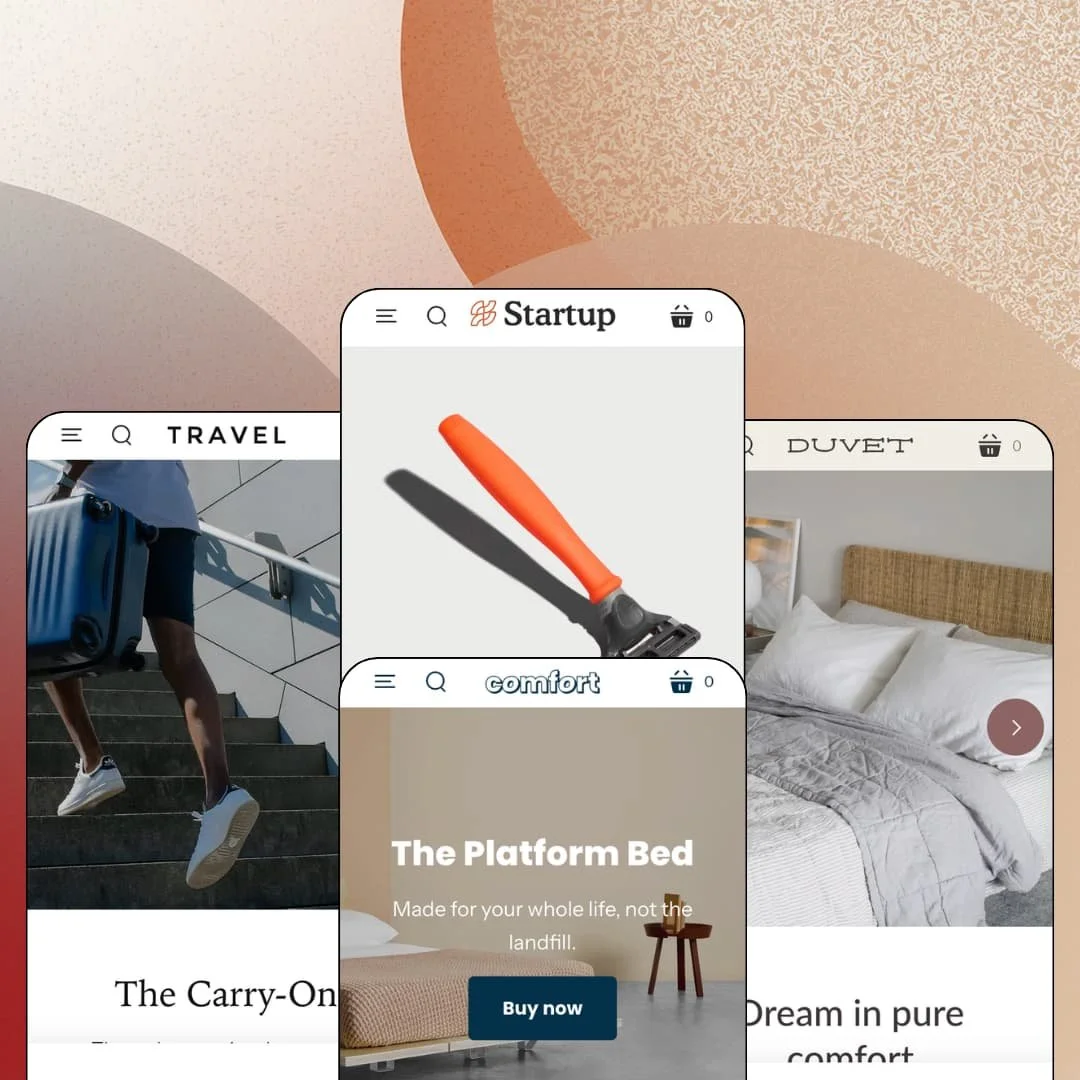
Most Shopify themes are built to hold a catalog. Startup is built to hold one product and make it look inevitable, which is why each of its four demos (a razor, a carry-on, a duvet set, a bed frame) opens on a single hero item instead of a grid. Pixel Union sells it for $100 with four presets on the Online Store 2.0 architecture, and that price lands below the usual budget band, so the question isn't whether it does everything but whether it does the one job it picks. I spent time in all four demos to find out where that focus pays off and where it boxes merchants in.
A homepage that sells a product, not a grid
Startup's featured-product section stages a full buy box on the homepage: gallery with thumbnails, live variant selectors, quantity field, add-to-cart, and tabbed content beneath it, so the bed demo offers Queen or King with a white or black leg colour and four tabs (Details, Materials, Components, Dimensions) without the visitor ever opening a product page. A video can sit in that gallery too. For a merchant, that collapses the funnel to one scroll: the pitch, the proof and the purchase live on the same URL, which is what separates a landing page from a store. For single-hero-product brands under 30 SKUs selling a considered purchase (a bed, a suitcase, a premium razor), this section is the reason to pick Startup over a catalog-first theme.
The reassurance sections are native
How much of a small brand's homepage is really just reassurance? In Startup's demos, most of it, and the theme ships the pieces as sections rather than app hooks: a testimonials block with quote, name and optional image, a press-quote row, a collapsible FAQ section that works on the homepage as well as on its own page, and a logo list for "as seen in" rows. No install needed. That matters at $100, because it leaves the budget for a reviews engine instead of a page builder, and it means the non-star half of social proof is live the day the theme is. For founder-led beauty or home-goods brands in the mid-market tier with a handful of real customer quotes, that's a launch week saved.
Three header layouts from one setting
Launch-stage brands change their navigation more than anything else on the site, and Startup's header setting covers the whole arc: a drawer-only layout that hides the menu behind a button, an inline centred row beside the logo, and a full navigation bar below it. The demos use all three. Switching costs nothing but a dropdown change in the editor, the two-tier dropdown menus and the mobile drawer with its back-button stacking stay the same underneath, and the search form repositions itself to match. For a single-brand store starting at five products and planning for 50–100 SKUs on an evergreen catalog, that's the gap between re-theming at month six and flipping a setting.
Colour bands without custom code
Every section in Startup carries a style switch, default, accent or contrast, that flips background and text colours as one unit, and the demos use it to alternate white, tinted and dark bands down the homepage so the eye gets a reset between the hero, the value-prop columns and the product grid. It's one dropdown per section. That means a dark band behind a quote or a tinted band behind a newsletter form is a setting, not a CSS job, and the palette stays coherent because every band draws from the same three colour sets. For solo founders running a single-brand store with no designer on call and a catalog under 30 SKUs, it's the setting that keeps the site looking finished through its first dozen edits.
The stars are on loan from a dead app
Every product page in the demos shows a star badge under the title and a "Customer Reviews" block further down, and both come from the Shopify Product Reviews app, which Shopify retired in 2024; the theme simply keeps the hooks in place. The stars are on loan from a dead app. That means Startup's star layer is presentation with no engine behind it, so the reviews a grooming or skincare brand actually collects will need a third-party app and its own integration work before the badge under the title shows anything real. For repeat-buyer consumables brands with 10–50 SKUs, where review volume is the sales argument, budget for that from day one.
The cart is a page, and it doesn't count
In all four demos the cart lives on its own page with an empty-state line and a Continue shopping link, and the Theme Store's cart feature list stops at cart notes, in-store pickup and quick buy. None of the demos stage a drawer. The razor demo's announcement bar promises free shipping on orders over $50, yet nothing in the cart tracks progress toward that line, no cross-sell row follows the add, and the add-to-cart button answers with an inline confirmation message that leaves the shopper to find the cart icon on their own. This kept bugging me, because a threshold promise with no counter is a promise the theme can't help the shopper keep. For beauty or grooming brands selling sub-$30 consumables on a free-shipping threshold, that's the conversion mechanic you'll be shopping an app for.
The product page stops at the description
Gallery, variant form, pickup block, description, two info links. That's the full product page in the demos, and the weekender bag page in the Travel demo is exactly that plus a four-card recommendations row. Nothing pins the buy button while the reader scrolls a tall thumbnail gallery and a long description, there's no size-guide or shipping accordion in the buy box (the tabbed content only appears in the homepage buy module in the demos), and the page's persuasive load shifts almost entirely to the homepage. For luxury-tier furniture or bedding brands where the product page is where a $950 purchase gets decided, that's thin.
What it takes to launch
Expect a copy and imagery pass across hero bands, value-prop columns, FAQ entries and testimonial blocks, plus a catalog restructuring pass to fold colourway products into variants and strip demo-store disclaimers out of product descriptions, roughly one to two days.
-
What works in this preset
Landing on this demo feels like reading a pitch deck that happens to sell a razor. The hero is a contrast-style promotion band with the product shot on one side and a two-line promise plus a single BUY NOW on the other, and the entire homepage stacks only seven content sections beneath it before the footer. That's restraint, not thinness.
The text-columns-with-images section carries the brand argument in three icon-led cards (Eco-Conscious, Whole Ingredients, Community), each with its own Learn More link, and an image-with-text block further down introduces the two founders by name with a wave emoji sitting in the copy. It reads like a founder letter. For a direct-to-consumer grooming brand, that's the register you want above the product grid.
Three colour options, Carrot, Onyx and Pine, sit under the razor's $12 price as a button group rather than a dropdown, and below the add-to-cart button the theme renders a store-pickup availability block and two plain info links (full ingredient list, email us). The description stays short. Nothing competes with the buy button, which is the whole point of a page like this.
Where it stumbles
Five products, one menu button. On desktop this demo keeps the entire navigation behind a hamburger drawer, so the Shave and Face & Body collections only appear after a click and a tier-two slide-in; for a catalog this small, one of the theme's inline header layouts would have shown the full range at a glance. It's a staging choice the other presets don't make.
-
What works in this preset
The header here runs navigation below the logo, a row of four links (Luggage, Bags, Accessories, Sale) with two-tier dropdowns that list individual luggage lines (Rime, Nørresundby, Soro) rather than generic categories. I clicked through every one. Each resolves to a real collection with products behind it.
A luggage brand lives or dies on its sale page. This demo knows it. An "Extra 20% off sale" image-with-text overlay band sits mid-page with a SHOP CLEARANCE button, a four-logo press row runs in an accent-coloured band above it, and the blog section previews two dated posts so the Journal link in the footer isn't a dead end. The homepage carries ten sections, the most of the four demos.
On the Luggage collection the theme stages its filter sidebar with Product type, Colour and Size groups as checkbox lists, nine sort orders in the dropdown, and 36 products in the grid. Cards show title and price only. That keeps the grid quiet, though it also means colour variety has to be read from product names rather than seen on the card.
Where it stumbles
"Rime Ash Cabin, Rime Ash Check-In, Rime Ash Medium, Rime Ash Small." That's one suitcase line in one colour staged as four separate products, and the pattern repeats for Coral and Navy until a single product family fills twelve grid slots. Since the theme's product form handles multi-option variants, this catalog structure is a demo decision, and it's the wrong one for a luggage store where shoppers compare sizes within a colour.
-
What works in this preset
This is the softest-looking of the four demos, and the slideshow does most of the work: two full-height slides ("Elevate your space", "Dream in pure comfort"), each with its own collection button, muted linen photography, no text overload. Below it the featured-collection section runs in rows of three. The rhythm is image, grid, argument, grid.
A "Why linen?" image-with-text block carries a bulleted argument (breathes cool in summer, two to three times the strength of cotton) marked with a flower glyph, and a separate band lists three press quotes in italics as a pull-quote row before the newsletter section closes with a 15% first-order hook. It's all on-brand for bedding. Nothing here is a surprise, and for a linen brand that's a compliment.
Twin, Queen, King, then eight colours. The Duvet Set product page uses dropdown selectors for both options and a thumbnail gallery with eight images, and the theme's pickup block appears beneath the form just as it does in the other demos, so a bedding brand with a showroom can route local buyers without an app. The description lists what's in the box.
Where it stumbles
The same duvet shows up three times. The "Our linen sheets" grid stages The Duvet Set as olive, clay and marine, each a separate product at the same $225 starting price, even though the product page proves the theme handles colour as a variant with eight options; the robe grid repeats the trick with three identical "The Robe" cards at $75. For a bedding brand with a few dozen SKUs, that doubles the catalog admin and scatters reviews across duplicates.
-
What works in this preset
One bed, one page, one decision. The header runs a centred inline menu with three links (The Bed, Journal, About), the hero is a full-width photo at its original height with a one-line manifesto ("Made for your whole life, not the landfill") and a Buy now button, and the whole storefront exists to walk a visitor from that line to the buy box without a detour. I sat up at how little the page asks of you.
Below the hero, a text-columns section argues assembly (no tools) and sustainability, then a FAQ section lists three collapsible questions (box spring, materials, mattress slide) right on the homepage rather than on a separate page, and a full-width video section runs before the footer. For furniture, that FAQ placement is smart. Objections get answered before the cart, not after.
"Tweet, Share, Pin it, Fancy." The footer's share block still carries those four buttons under a HELP US SPREAD THE WORD heading, alongside a navigate column, an info column and the country selector, which shows the theme's footer running three content columns plus a utility row even on a one-product store. It's modest. A single-product brand doesn't need more, though the Fancy button dates the block.
One grammar, four brands
Read all four demos in a row and the same page skeleton shows through: hero band, value-prop columns, a featured product or collection, social proof, FAQ or story block, footer. That could read as a weakness. Here it's the product, because the skeleton is a launch formula that holds whether the hero is a $12 razor or a $950 bed, and the demos borrow imagery from real brands (LOJEL, Flax Sleep, Floyd) to prove it survives real photography.
A hundred dollars of sections, not architecture
Startup sits on the same Online Store 2.0 base as Dawn, which is free, so the price isn't buying a newer generation. What it buys is a homepage library tuned for a landing-page store: slideshow, promotion band, icon columns, logo row, full-width video, buy module, FAQ, testimonials, press quotes. Dawn makes you assemble that argument from generic blocks. Startup has already made it.
Prose where data should be
Across the demos, every tab, FAQ entry, testimonial, press quote and dimensions list is typed rich text; nothing reads from metafields, so a merchant maintaining specs for even 20 products will be editing section copy by hand rather than filling fields. That's fine at five SKUs. It gets old at fifty.
The discovery layer is the merchant's problem
The theme's pitch is small catalogs, and the demos are built that way: two-tier menus, cards with title and price, product lines spread across dropdowns. The mega menu is a theme-wide feature, but no demo stages it, so merchants who cross 100 SKUs will be configuring discovery on their own with no preset to copy from. For the audience Startup names, that's acceptable. Past it, it's the ceiling.
Rating
★ 7.0/10
-
Homepage buy module, pickup block and native reassurance sections cover the single-product brief; the cart and the product page carry little beyond the basics.
6
-
Few sections, few settings, one style switch per section; a first-time merchant could rebuild any of the four demos in an afternoon.
8
-
The drawer menu stacks tiers with a back button, heroes carry separate mobile height settings, and the buy module reflows to one column; a tall gallery plus a long description is a long thumb-scroll without a pinned button.
7
-
Homepages run six to ten sections with still imagery and at most one video band; there's little script weight beyond the product form and the retired reviews badge.
8
-
Three header positions and per-section colour bands give range, but the page skeleton is the same across all four demos and the product page has one layout.
6
Frequently Asked Questions
-
Yes. The Comfort demo's navigation is The Bed, Journal and About, and the homepage buy module handles the purchase, so the collection template never needs to appear.
-
A pickup availability block renders under the add-to-cart button in every demo, pulling from the store's Shopify locations, so a showroom or shop-counter brand can surface it without an app.
-
Yes; the Travel demo prints the vendor (VIBORG) under the product title, a toggle worth having for stores that carry a second label alongside their own.
-
Version 13.2.0 shipped in April 2026 and added Shopify's customer account web component, so the theme is tracking current platform changes rather than coasting on its 2017 launch.
-
Two tiers: a top-level link and a dropdown or drawer slide-in beneath it, which in the Travel demo is enough to list every luggage line by name.
-
Both sit on the Theme Store feature list alongside promo banners, but none of the four demos stage them, so expect to enable and style them yourself.
This review is based on hands-on testing of the publicly available preset demos of the Startup Shopify theme as of August 2026. Theme features, preset availability, and performance can change with subsequent updates from the theme developer.