
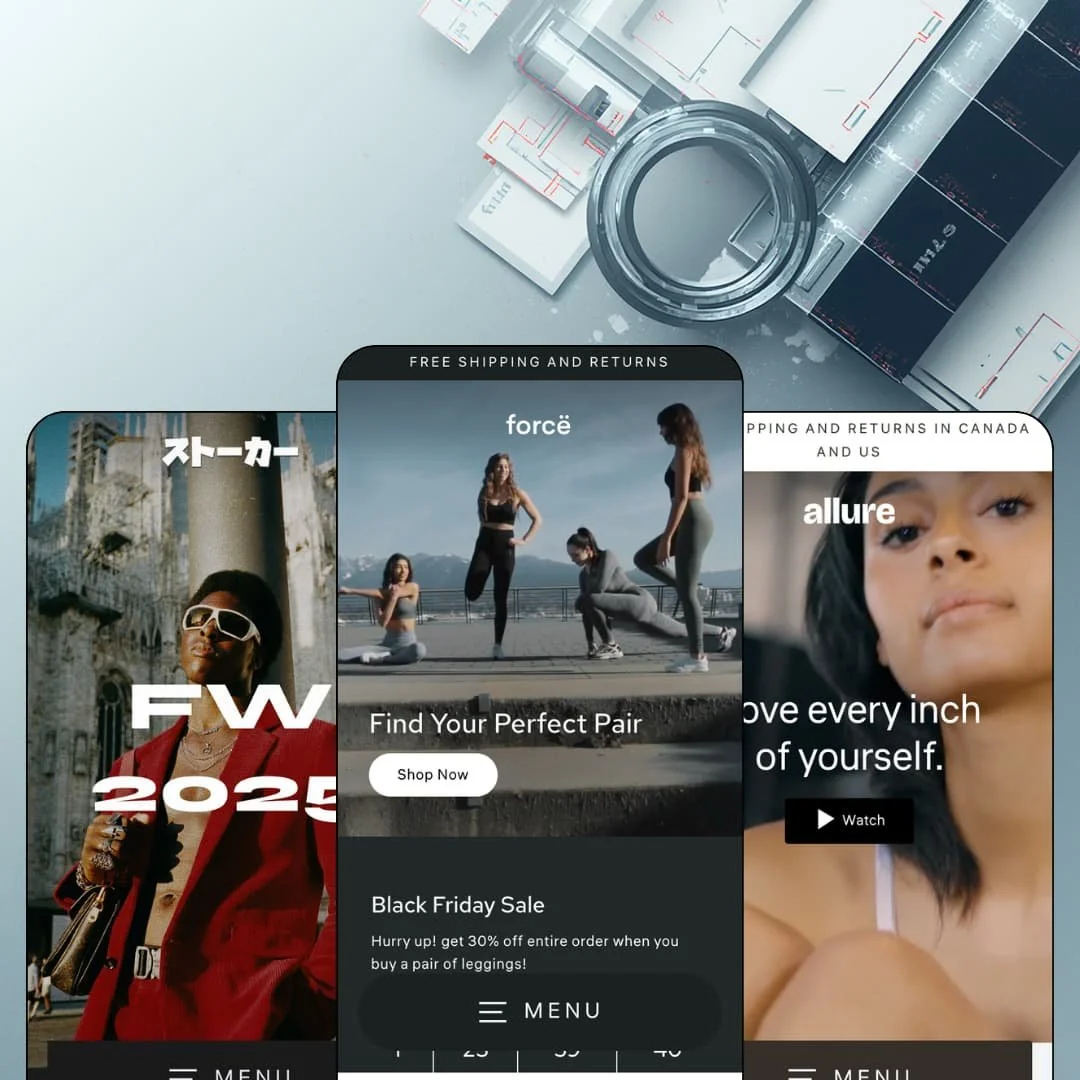
Most mobile-first pitches on the Theme Store boil down to a responsive stylesheet and a marketing slide. Streamline, the Online Store 2.0 theme Archetype Themes has maintained since 2019, inverts that: the phone layout is the design, desktop is the adaptation, and buy triggers are deliberately parked within thumb reach. At $420 it now sits at the very top of the Theme Store price range, so the real question is whether a thumb-first architecture justifies flagship money in 2026. I spent time in all three preset demos, Streamline, Satin, and Fern, to find out.
A checkout path built for thumbs
Sticky add-to-cart, a slide-out cart, sticky cart access, quick buy, and quick view ship together as one coordinated buying path, keeping every step from product card to checkout handoff inside the bottom third of a phone screen. Fewer taps, less scrolling, less abandonment. For merchants whose traffic skews toward mobile impulse buyers and whose catalogs sit in the 11 to 100 SKU band, this is the core argument for the theme.
Product pages that answer objections before support does
The buy box carries tiered inventory messaging that shifts between in-stock, low-stock with a unit count, and incoming-inventory states, and the description area folds into collapsible tabs so sizing and shipping answers sit one tap from the price. It's dense without being cluttered. Fit-sensitive apparel and intimates sellers whose buyers make considered purchases get their pre-sale objections handled on the page instead of in an inbox.
Do you still need an app for urgency?
With Streamline, less than you'd think. Countdown timers, promo popups, a live stock counter, trust badges, and an age verifier ship natively as one coordinated conversion bundle rather than five separate installs. Merchants running flash-drop sales patterns, and food-and-drink sellers in age-gated categories, can stage a full promotional push from the theme editor alone.
Cards that sell with photography
Instant Product Preview cycles through a product's featured images on hover, and image rollover swaps to a second shot, so a browsing session surfaces three or four angles per product without a single page load. That compounds across a grid. Photography-led fashion and lingerie brands at luxury and mid-market price points, where the second image often closes the sale, get unusual mileage from their existing shoots.
Navigation stays one level deep
I went looking for a mega menu. There is none. The header menu expands as stacked link lists with a back-chevron pattern, the same accordion grammar at every viewport, and the feature list confirms nothing richer exists, which means no room for featured products, promo tiles, or image columns inside the navigation itself. For catalogs past 100 SKUs across many categories, and for cross-shop-heavy buyers who navigate by menu rather than search, that ceiling arrives quickly.
The footer is a single band, not a directory
All three demos close on the identical arrangement: a newsletter field, a country selector, social icons, one link list, and payment marks. Three demos, one skinny footer. That's the tell. Nothing in the demos or the feature list points to a multi-column build-out with image blocks or brand columns, so multi-brand operations and wholesale-enabled merchants who need trade, policy, and catalog links organized at the page bottom will find no real estate for them.
Flagship pricing on a previous-generation architecture
The $420 asked here buys an Online Store 2.0 codebase, the same architectural generation Shopify ships free with Dawn, without the nested theme-block flexibility of the newest generation. Streamline's premium therefore has to be earned entirely by its section library, promo tooling, and mobile discipline. That's a high bar. That case is arguable for mobile-majority stores, but budget-conscious first-time sellers and single-brand shops comparing against the free baseline should weigh what the mobile-first layer alone is worth to them.
What it takes to launch
Expect a multi-day pass across hero and campaign copy, collapsible-tab content, seasonal promotion re-staging, footer link wiring, and translation review before any of the three presets is launch-ready.
-
What works in this preset
Landing on this demo feels like opening a fitness brand's app rather than a website. A full-bleed workout video runs beneath the headline "Find Your Perfect Pair," and the first real tap target is a single Shop Now button sized for a phone screen, not a wall of navigation. It sets the tone fast. Everything below keeps that rhythm.
The collection rows do quiet merchandising work of their own: each carousel carries its own selling line, so the Leggings row leads with "Sculpted fit with 4-way stretch" and the Tops row with a fabric promise before a single product is tapped. That's copy discipline. It turns a plain product carousel into a small pitch, and it gives merchants a ready-made slot for benefit language on every category they feature.
The brand layer is staged with restraint. A "Shop the look" block pairs a lifestyle yoga photo with a tappable product card, an "Our story" teaser hands off to the About page in two sentences, and lookbook content lives as blog entries rather than orphaned galleries. For a single-brand shop, that's a complete narrative arc on one scroll.
Where it stumbles
The staging undercuts its own price positioning. Leggings sit at $115 to $165, yet the page opens on a Black Friday countdown promising 30% off, stacks a mid-page banner offering 20% plus an extra 50% on sale styles, and closes on a Clearance row, which reads more outlet than flagship for a label asking premium activewear money. A store copying this arrangement wholesale would train shoppers to wait for codes.
-
What works in this preset
"Love every inch of yourself," the hero film opens, and the only call to action is a Watch button that hands off to a full campaign video. That's a confident choice. Satin stages an intimates brand that sells belief before product, and the demo trusts a self-love film to carry the first screen where other presets would push a discount.
Product cards here carry the most editorial machinery of the three demos. Best Seller and Top Rated badges sit on the lead products, every card shows a vendor line that links through to an auto-built MARY YOUNG vendor collection, and short video clips are mixed directly into card galleries alongside stills. For a boutique carrying labels rather than a house brand, that vendor plumbing is genuinely useful.
I clicked through to the Carter Bra page and found the size guidance done properly. The chart maps cup ranges from AA-A through D-DDD against measurements in both centimeters and inches, with plain-language instructions on where to hold the tape. Fit anxiety is the conversion killer in this category, and the demo treats it as a first-class problem rather than a footnote buried in a policy page.
-
What works in this preset
A vintage store's whole business is scarcity, and Fern stages it like a drop. The hero is a six-image streetwear collage instead of a single banner, a marquee ticker loops "STALKER X KANSAI" across the viewport, and I scrolled through a limited-edition rail of one-of-one Japanese pieces running from a $35 kids tee to $420 silk shirts. Nothing here feels like a template default. It feels like a hyped release page.
Trust staging is heavier than in the other two demos, and for secondhand goods that's the right call. A testimonials row runs five customer quotes back to back, and a value-prop band underneath stacks sustainable materials, a 90-day return promise, and shipping reassurance right before the newsletter capture. Used clothing at $270 to $420 needs exactly that kind of cushioning.
The homepage mixes formats aggressively. A rich-text drop announcement introduces the season, a full-width video carries the winter collection, and a kids-tee carousel with a Save $10 badge shows the sale treatment without letting discounts dominate. It's the busiest of the three demos, yet the dark palette keeps it coherent.
Where it stumbles
One-of-one inventory exposes a gap in the toolkit. When a vintage piece sells it simply vanishes, and neither the demo nor the theme's feature list offers a restock-notification or waitlist mechanic to capture demand for the next drop, which is the single most valuable signal a scarcity-driven seller can collect. Fern nails the theater of the drop but not the follow-up.
One buying grammar, three wardrobes
Activewear, intimates, and vintage streetwear are staged with genuinely different personalities, yet all three presets run on the same spine of media hero, merchandised carousel, shop-the-look, promotion block, and newsletter close. Switching aesthetics never means relearning the machinery. That consistency is what makes the preset family feel like one product rather than three skins.
The section library isn't homepage-bound
Reading the demos side by side, the most telling pattern is what happens below the buy box: product templates carry countdowns, tickers, videos, and promo splits that the homepages themselves run. Streamline treats the product page as a landing page. Merchants who drive paid traffic straight to products get a full persuasion surface without a page-builder app.
Seven years of visible maintenance
A 2019 launch date could easily mean a theme coasting on past glory, but version 7.2.0 landed in March 2026 and the release notes trail shows the codebase absorbing new platform capabilities rather than freezing. Longevity here is an asset, not a warning. Buyers get a battle-tested product with an active pulse.
Desktop rides in the passenger seat
The thumb-first commitment shapes every surface, and on wide screens the stacked, app-like layout trades information density for reach. Stores whose analytics show desktop-heavy sessions, whether B2B buyers or older demographics, will feel the compromise on every page.
The listing names verticals the presets don't dress
Jewelry and accessories and food and drink are flagged as target industries on the Theme Store page, yet every preset in the family is apparel-adjacent. Merchants in those named verticals start from a re-skin project, not a ready-made design, and should budget staging time accordingly.
Photography is the price of entry
Video heroes, image collages, campaign films, and lookbooks anchor every preset, so the design assumes a campaign-grade media library exists before day one. Sellers without professional shoots will watch the layouts deflate.
Rating
★ 8.0/10
-
Countdowns, popups, stock counters, age gating, and a full quick-buy path ship in the box; single-level navigation and the slim footer set the ceiling.
8
-
One shared section grammar across all presets keeps the learning curve short, though the volume of campaign copy to replace raises the on-ramp.
8
-
The thumb-reach buy path, back-chevron stacked menu, and phone-sized tap targets show a theme designed on a handset first.
9
-
Pages run lean, with restrained section counts, sized-down responsive imagery, and lightweight code in keeping with the theme's speed positioning.
8
-
Three convincingly distinct aesthetics come from one library, but the navigation and footer patterns stay fixed no matter the preset.
7
Frequently Asked Questions
-
The theme ships its storefront strings in English, French, Italian, German, and Spanish, so EU-facing stores skip the manual translation of buttons and labels. Product content is a separate job.
-
Yes, Combined Listings appears on the feature list as a Shopify Plus capability, relevant for merchants who merge color variants into a single listing.
-
The demos embed an ask-a-question contact form, protected by hCaptcha, right below the description tabs, so pre-sale questions never require hunting for a contact page.
-
Version 7.2.0 shipped on March 20, 2026, roughly seven years after the theme's original launch, and the version history shows steady releases in between.
-
In-store pickup is a listed cart feature, which makes the theme workable for retail-plus-online hybrids that fulfill over the counter.
-
A before/after image slider is part of the merchandising set, useful for beauty-adjacent products, restorations, or any item whose result is the pitch.
This review is based on hands-on testing of the publicly available preset demos of the Streamline Shopify theme as of August 2026. Theme features, preset availability, and performance can change with subsequent updates from the theme developer.