
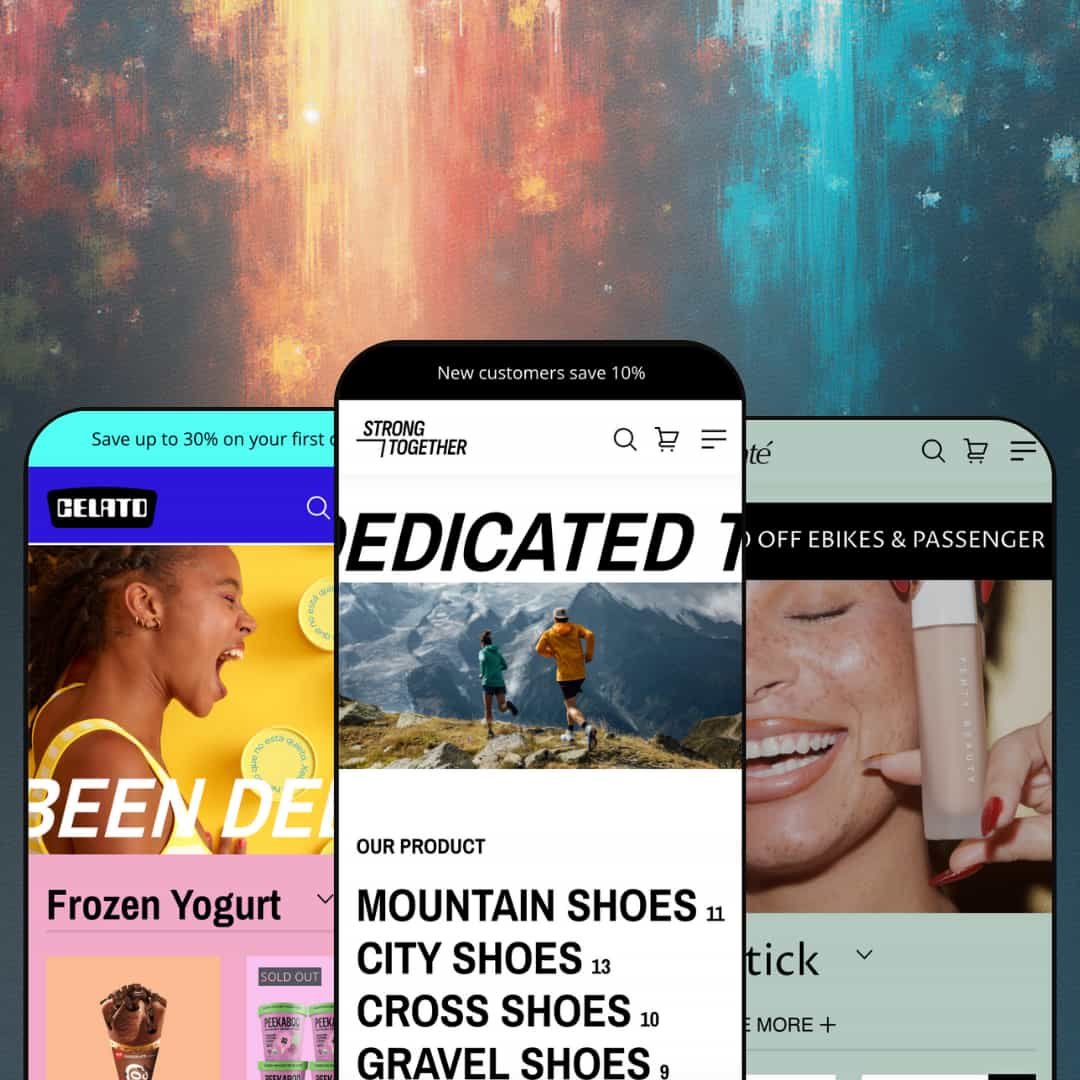
One theme sells trail shoes, pint ice cream, and lipstick, and none of the three demos looks like it borrowed its homepage from the others. That's Strong, a three-preset Online Store 2.0 theme from BoostifyThemes: Strong stages a footwear catalog, Bend stages an ice-cream parlour, Velvet stages a beauty counter, and each preset ships four alternate homepage layouts on top. At a hundred dollars, the question isn't whether you get enough store, it's whether the store you get is built for selling or built for demoing. I spent time in all three demos, their product pages, and a collection page to find out.
Variant-level quick add on product cards
Product cards in the Strong demo carry a Quick add button that expands to a size strip, 35 through 42, plus colour swatches, so a shopper adds a 39 in Black without opening the product page. That's a click saved on every repeat purchase. For footwear and apparel stores with 50 to 200 SKUs and a repeat-buyer base who already know their size, it shortens the path from grid to cart to two taps, and it works the same on the collection page and the homepage rows.
Homepage buy modules with live pricing
Why send a shopper to a product page for a one-SKU decision? Bend's Banana Ice Cream banner puts a "$145 - Add to cart" button directly on the homepage, and the theme's banner-product and featured-product sections do the same for any product you assign to them. It turns a hero into a checkout entry point. For beauty or food brands under 30 SKUs selling on impulse, one hero product per landing page is most of the funnel, and Strong stages that without an app.
Twelve homepage starting points from one purchase
Dawn hands you one homepage and a section library; Strong hands you three presets and a Layouts menu with four alternate homepages inside each, twelve compositions in total, every one a live preview you can click through before choosing. Different hero patterns, different section orders. For a first-time seller on a budget who'd rather edit a finished page than compose one from blocks, that's the difference between a launch week and a launch month, and it's the single strongest argument for the price.
Mega menu plus pre-filled search as a navigation pair
The Shop menu on the Strong demo opens three link columns, By Collection, By Category, By Type, with a highlighted Shop All panel on the left; open the search icon and the overlay already lists five popular searches, one per collection. No typing required. Multi-category retailers with 100 or more SKUs, say a sports store running road, gym, and trail lines side by side, get category discovery from the header alone, and the search prefill doubles as a merchandising slot for whatever needs pushing this week.
The default voice is a discount megaphone
Three rotating announcement messages, all discounts. Flash-sale percentage badges on most cards in all three grids, a "20% off your first order" newsletter, a "$500 off" ticker, a "Save up to 30%" bar: every preset ships with urgency turned to full. That's lazy. For luxury-tier jewelry or considered-purchase beauty brands whose shoppers compare for a week before buying, the launch job starts with switching all of it off and finding a quieter register that none of the demos ever shows.
Social proof is presentation, not mechanism
Testimonials on every homepage are typed-in quotes attributed to a Product Designer, a Team Leader, and an Assistant, each paired with a product card. Not one star renders. The developer's documentation points merchants to "Installing Shopify's Product Reviews app", an app Shopify retired in 2024, so a review layer means choosing a third-party app and wiring it into the product template yourself. For repeat-buyer categories like beauty and food where ratings carry the purchase, budget the app before you budget the theme.
The bundle block adds, it doesn't discount
The "Add bundle to cart" section stages three products under a single button, and on Bend that's an $8.80 cookie, an $8.97 chocolate, and a $10.45 mochi. I went looking for a bundle price. There isn't one; each line carries its own price, so the section is a multi-add convenience with no discount logic, no visible per-slot variant choice, and no savings line to justify the word bundle. Gift-set and CPG merchants selling three-for-two packs or starter kits will need a bundle app or Shopify's native bundle products to make the maths match the headline.
Documentation trails the product
The Strong docs, last updated May 2026, still describe the presets as Default, Color, and Bright, names that don't exist on the Theme Store listing, where they're Strong, Bend, and Velvet. The same page warns that clicking Try theme installs the default homepage regardless of the preset chosen, and that merchants who want another preset's homepage should contact the team. Section docs cover 18 sections and stop. For agencies onboarding a client or a budget-tier solo merchant who reads before asking, support tickets end up standing in for reference material.
What it takes to launch
Expect a multi-day pass: replacing the placeholder brand copy that runs through hero, FAQ, About, testimonial, and product-description slots on all three demos, restaging price and compare-at data across the catalog, re-pointing mega-menu and footer links, and cleaning up UI strings and the market selector before launch.
-
What works in this preset
Browsing Mountain Shoes feels like a real shoe shop rather than a demo grid. Eleven products sit under a filter rail that shows availability, category, a price cap of $315, sizes 35 through 42, and six colours, each option with a live count beside it, and nine sort orders wait in the dropdown next to that. Breadcrumbs run Home, Collections, Mountain Shoes. Cards flip between colourways on hover swatches, and I clicked through a Beige-to-Gray swap on the UltraSole Speed without leaving the grid.
A size guide that opens to a how-to-measure diagram is a small thing. Strong's product page puts the link right beside the size picker, and on the ActiveCore 3000 the modal shows two foot-measuring illustrations plus a 14-day returns line before you've chosen a size. Under the buy button, a checkmark row promises in-store trial, free shipping, and instalment support, then three tabs cover description, care, and shipping. Further down, a Key Feature strip pairs four icons with a full-width product photo, and a dated event list gives the page a magazine tail.
Three testimonials each sit beside a live product card, quick add included, so the quote sells and the card closes. That's the section I sat up at. Below it, a six-question collapsible FAQ and a five-post news grid with dates round out a homepage that behaves like a content site with a shop attached, and the numbered icon-box strip near the top (range, quality, advice, assembly, shipping) sets the tone before any product appears.
Where it stumbles
Sizes run 35 to 42 with no US or UK conversion anywhere, and the size guide illustrates how to measure a foot without saying what the measurement maps to. For a footwear vertical that sells across borders, that's the one table the demo needed and didn't stage.
-
What works in this preset
Ice cream is an impulse category, and Bend's homepage behaves like one. A hero hands off to a tabbed product row, Frozen Yogurt, Milkshakes, Popsicles, where each card carries an Add to cart button, a flash-sale percentage badge where a compare-at price exists, and a Sold out label in place of the button where stock is gone. Twenty-odd cards later you hit the collections. Four tiles report their item counts (11, 13, 14, 7), so the catalog reads as bigger than the grid above suggests.
"Disher Sizes" is not a phrase I expected inside a size-guide modal. Bend's Chocolate Ice Cream page opens a 17-row scoop table, disher number, colour, millilitres, fluid ounces, and cup equivalents, which tells you the size guide is a page-driven rich-text slot rather than an apparel-only table. That flexibility matters more than the table itself. Any vertical with a spec sheet can drop one in without touching code.
The Shop mega menu adds an image tile beside its three link columns, a slot the other demos leave empty. Below the fold, a five-post news list runs as a dated editorial column next to a Chill Vibes newsletter block with its own photography, and a numbered icon-box section carries the About pitch. The lower half reads editorial rather than catalog.
Where it stumbles
Every ice cream on the demo is a single-variant product: no pint versus quart, no pack of four, no flavour axis. The scoop table in the size guide is the only place quantity appears, and it's informational. The Shipping tab talks about customs checks, not dry ice, which for a frozen-goods vertical is the one reassurance the buy box needed.
-
What works in this preset
Velvet is the loudest of the three, and the volume is typographic. A marquee ticker scrolls a promo line under the hero, and a second marquee, Shop by category, introduces a six-tile collection list where each tile swaps to a hover image and carries its count: Body Care 18, Facial Cream 15, Lipstick 11, Masks 15, Serum 7, Oil Cleansers 4. Nothing else in the family moves like that. Between the two tickers sits a three-tab product row and a collection grid, so the page alternates motion and merchandise all the way down.
Two banner-product sections bracket the homepage. The first stages Pink Lipstick with a $49 price and a Shop Now button over a full-bleed photo; the second stages Lip & Cheek Blush Tint with Brown and Bronze shade swatches rendered inside the banner, so a shopper picks a shade before the product page loads. The tabbed row in between runs Lipstick, Serum, and Body Care with SKUs from $20.99 to $49.
Reaching the blush tint's product page, I noticed it carries a product-recommendations slot and an icon-box row that the Strong and Bend product pages also run, plus the same Red and Pink swatch picker and size-guide link beside the quantity stepper. A collapsible FAQ closes the page. The product template belongs to the theme, not the preset, which is the point. Whatever you learn on one demo transfers.
Where it stumbles
Beauty buyers look for ingredients and usage before they look for care instructions. Velvet's demo stages the same three tabs as the shoe store, Description, Product Cares, Shipping & Returns, so ingredient lists and how-to-apply steps are something a skincare merchant builds from the theme's tab and usage-information blocks rather than something the preset hands over.
One section grammar, three convincing verticals
Read across the demos and the same library, marquee, icon box, banner product, collection list, collapsible content, produces a shoe shop, a parlour, and a beauty counter that each look designed for their category. Nothing looks ported. That's the trait worth buying: the sections are vertical-agnostic in a way the demos prove rather than claim.
Complete stores, not homepage mockups
Each demo runs a populated collection page, filled product templates, a five-post blog, an About page, a contact page, and a FAQ, with item counts on every collection tile. For the price, I'd have settled for a homepage and a product page. Strong stages the whole store three times over.
One product-page skeleton for every vertical
The template that suits a shoe (gallery, size guide, trust row, three tabs, key-feature icons) is the same template on a pint of ice cream and a lipstick, block for block. The blocks are configurable, but the demos never show a second arrangement, so a merchant learns what the theme can do on a product page from exactly one layout.
Listed for jewelry, staged for none
The Theme Store tags Strong for Jewelry & Accessories and Food & Drink. Food gets Bend. Jewelry gets nothing: no preset, no ring-size guide, no engraving field, and no demo product with a metal or carat axis. Jewelry merchants are buying on faith.
A short track record so far
Seven Theme Store reviews since the April 2025 launch, all positive, and the listed release is version 1.0.5 from July 2026, described as improvements and bug fixes. Reviewers single out support response times. That's a good sign and a small sample.
Rating
★ 7.0/10
-
Card-level quick add, homepage buy modules, a mega menu with image tile, and a page-driven size guide cover the conversion basics; reviews and priced bundles need apps.
7
-
Twelve pre-built homepages and one consistent product template flatten the learning curve; generic developer docs add friction back.
7
-
Every preset uses a slide-out menu with back-button stacking, a cart drawer, and card quick-add that works with a thumb; the long homepages mean a lot of scrolling past promo blocks.
7
-
Homepages lean on lazy-loaded imagery and SVG icon assets, but Bend and Strong stack twenty-plus product cards and a five-post blog on a single page, which is weight the merchant chooses.
7
-
Three presets that don't look related, marquee and banner-product sections that reshape a page, and four alternate homepages per preset; the constraint is a single demoed product-page arrangement.
7
Frequently Asked Questions
-
Strong is the footwear store at boostify-strong.myshopify.com, Bend is the "Celato" ice-cream store at boostify-strong-celato.myshopify.com, and Velvet is the "Enchante" beauty store at boostify-strong-enchante.myshopify.com. The store names don't match the preset names, so bookmark the URLs.
-
No. It runs Online Store 2.0 with JSON templates and a two-level section-and-block structure; there's no Theme Blocks nesting and no AI block generation in the editor.
-
The listing names EN, FR, IT, DE, and ES UI strings, and the demos toggle between English and French in the header. Product titles and descriptions still go through Shopify's own translation tools.
-
An earlier snapshot of the listing showed Strong at $320 with six reviews; it now sits at $100 with seven. Nothing in the feature list changed between the two.
-
It's on the feature list, but none of the three demos stages one on a product page or card, so expect to switch it on in the product template settings and test the low-stock threshold yourself.
-
A slide-out drawer with a "Login to check out faster" prompt in the empty state and cart notes on the feature list. There's no free-shipping progress bar on the feature list or in any demo.
-
The listing says yes. The demos stage a "Get advance at our store" trust line under the buy button rather than Shopify's location-based pickup availability, so you'll be enabling and testing that block with your own locations.
This review is based on hands-on testing of the publicly available preset demos of the Strong Shopify theme as of September 2026. Theme features, preset availability, and performance can change with subsequent updates from the theme developer.