
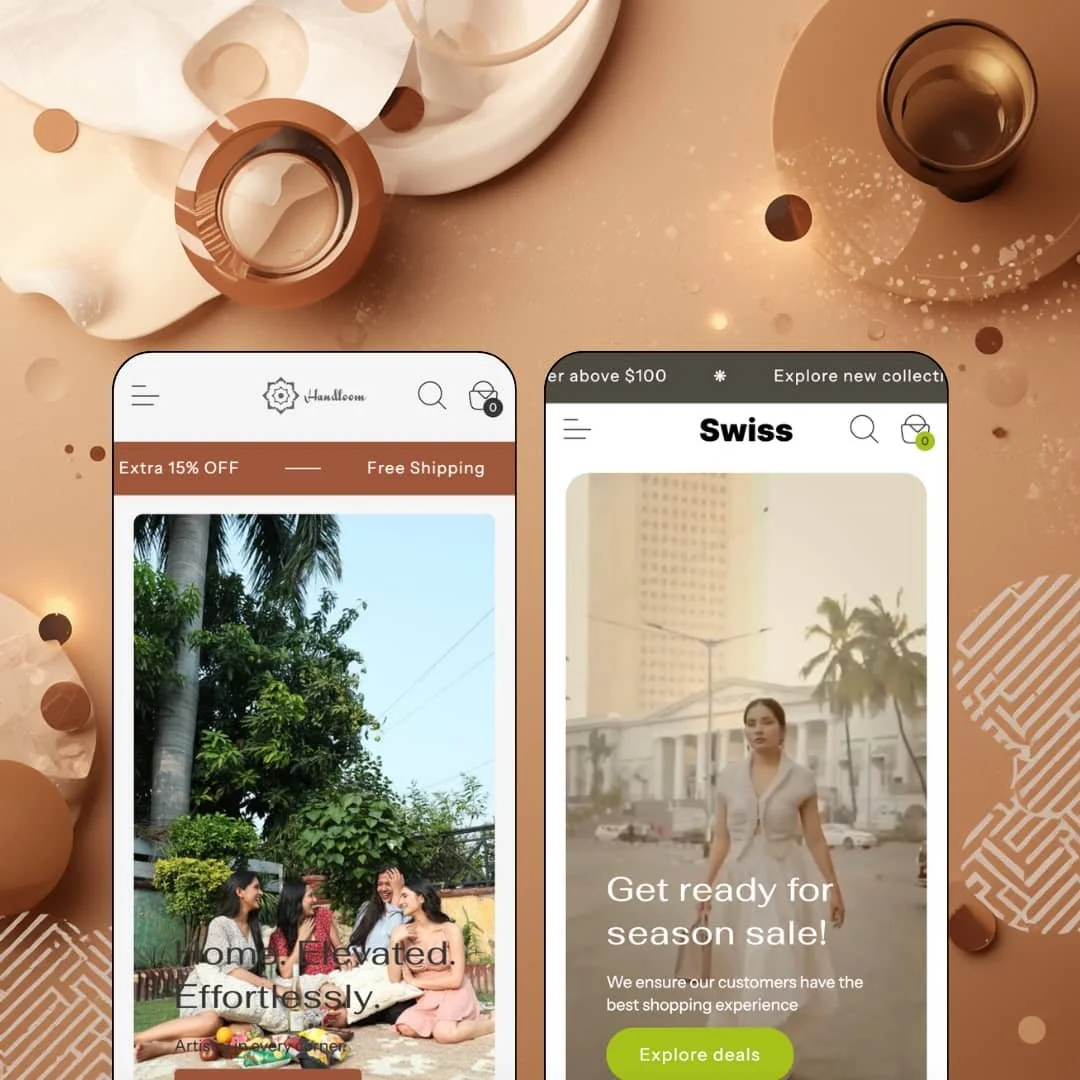
You're paying $280 for two demo stores that sell handloom rugs and smocked dresses, while the Theme Store listing files the theme under jewelry and food. That mismatch is the first thing to understand about Swiss, an Online Store 2.0 theme from Berlin-based Slash Themes that launched in January 2025 and describes itself as versatile rather than vertical. The versatility claim rests on a promo-heavy section library and a mega menu built for deep category trees, not on any single signature mechanic. Whether that's enough depends on how much merchandising you want the theme to do for you, and how much you're willing to build yourself.
Mega menu that doubles as a promo surface
The mega menu holds three or four link columns, an image tile with two editable promo lines, and an optional category quick list with its own View more link. The Handloom demo uses it to expose a Category/Technique/Material taxonomy; the fashion demo uses it to push a season deal alongside a product-level link column. That's real merchandising depth in a header. For a home-goods or apparel merchant with 50 to 200 SKUs spread across three or more browsing dimensions, this menu replaces the "Shop all and filter" fallback with guided entry points.
A buy box built for considered purchases
Stock counter, custom-note field, size-chart trigger, trust-badge row, sticky add-to-cart. The pieces sit in a fixed order under the product title, and the accordions for care, instructions, and shipping follow directly below, so the whole column works as one unit rather than as scattered blocks. Each element is small on its own, but together they answer the questions a shopper asks before committing to a $100 dress or a €2,000 wall hanging. Mid-market apparel and home-textile brands whose buyers compare, hesitate, and return to the page will get the most out of this arrangement.
Homepage product module with a working gallery
Can a homepage sell without sending anyone to a product page? Swiss says yes with a featured-product section that renders a four-image gallery with modal zoom, the variant picker, a quantity stepper, and the add-to-cart button, all inline. It's the full buy box lifted onto the homepage. Brands with under 30 SKUs and one hero product, or subscription-style stores that funnel everyone toward the same first order, can turn this into the primary conversion path.
A promo kit that covers the whole page
Swiss ships a rotating announcement bar with multiple messages, marquee ticker sections for mid-page and footer placement, a countdown section, in-menu promo straplines, and promo popups. The fashion demo runs three ticker strips on one homepage. All of it is native, none of it needs an app, and the pieces are visually consistent because the same divider glyph and type treatment carry across them. Flash-drop and seasonal-sale operators in the budget-to-mid-market range will find the urgency layer ready on day one.
Social proof is a row of icons
There are no review stars, no testimonial section with attribution, and no rating aggregate anywhere in either demo. What Swiss offers instead is a four-tile "Why people love us" row with icons for soft material, secure payment, easy returns, and happy customers, plus a "500+ Happy customers" badge above the product title. The badges are promises, not proof. For a considered-purchase vertical like home textiles or a repeat-buyer fashion brand, the review layer will have to come from an app, and the theme provides no native slot that makes it look integrated.
Free shipping in three tickers, zero progress in the cart
Both demos advertise free shipping in the announcement bar and again in ticker strips. Open the cart drawer and you find a recommended-products carousel labelled "Trending this month" and an Add note link, but no threshold bar telling the shopper how far they are from unlocking the offer. The listed feature set doesn't include one either. I kept expecting it and it never showed. Merchants who rely on threshold-based free shipping to lift average order value, especially in mid-market apparel or gift-driven home goods, lose the one cart mechanic that does that job.
Fourteen months without a release
Version 2.0.0 landed on June 18, 2025, and it was a file restructure plus two collection-page fixes. Nothing since. That's a long gap for a theme launched in 2025 competing in a store where the platform has moved toward Theme Blocks, and it makes the "premium features" line in the listing feel more like a snapshot than a roadmap. Agencies building for multiple clients, or single-brand merchants planning a three-year run on one theme, should weigh that cadence before buying.
What it takes to launch
Expect a multi-day pass across placeholder section copy, contact-strip details, duplicate product listings, countdown targets, and market-selector configuration before either preset is launch-ready, plus a variant restructure if you inherit the demo's split-colorway catalog.
-
What works in this preset
Rug shoppers think in three dimensions at once, and this demo's navigation respects that. The Rugs menu splits into Shop By Category, Shop By Technique, and Shop By Material, each carrying four sub-collections, so a visitor can enter through Abstract, through Hand Tufted, or through Jute without hitting a dead end. Twelve entry points from one menu. Beside those columns sits an image tile with two promo straplines, the first offering 15% on a first order and the second reading like a product-care promise, which turns the menu into a small landing page rather than a link list.
I scrolled through a homepage that leans harder on atmosphere than on grids. A product video runs full-width, followed by a "Build your set" block that pairs two room photographs in a side-by-side slider, and then a four-tile promise row for quality, payment, returns, and support. The throw-blanket grid under "People's pick" is the only dense merchandising moment above the countdown, and it holds six products with second-image hover staged on each card. For a home-decor merchant whose photography does the selling, this pacing is the right call.
The product page for the organic cotton throw reads like a care label. Three accordions stack under the buy box for Description, Wash and care, and Shipping, a stock line reports 761 units, and a custom-note field sits above the add-to-cart button. The store is staged in euros with a four-market selector covering Germany, India, the UAE, and the United States, and the language menu offers English, French, Arabic, and Italian, so the international rendering has been thought through rather than left at default.
Where it stumbles
A rug store without a size axis is a rug store with a problem. Every product I opened in this demo carries exactly one variant, and colorways are split into separate listings, so the organic cotton throw exists as six products named Red, Pink, Green, Cyan, Brown, and Black rather than one product with a swatch row. The theme supports color swatches and multi-option pickers, so this is staging, but it means the demo never shows the picker doing the one job rugs need most, which is choosing 160×230 versus 200×300 on a single page.
-
What works in this preset
Two header rows before the logo even appears. The top strip carries three quick links to Cord Set, Dress, and Tunic, a click-to-call phone number, a mailto address, and a trust-badge image, and only then does the main navigation with its Shop mega menu arrive. That utility row is theme work, not platform default, and it gives a fashion merchant a place to park customer-service contact without stealing the main menu's attention. The mega menu below it adds a "Browse by category" quick list with a View more link, which is a different menu block from the one the rugs demo stages.
The tunic product page is where this preset shows its variant handling. Color and Size run as two button groups of five options each, twenty-five combinations in total, and the pricing moves with the colorway so that Purple sits at $78 while Blue lists at $188 and Yellow at $150. A size-chart trigger sits under the picker. Above the title, a three-badge row promises money-back, 500+ customers, and free shipping, and the stock line reports 13 units, which is the right number for a fashion drop that wants to feel scarce.
I went looking for the collection page's filter set and found Size, Color, Availability, and a price range, backed by eight sort orders including Most relevant and two date sorts. The Dress collection lists 15 products with a breadcrumb trail and a vendor line on each card. Nothing exotic, but complete enough that an apparel store with a few hundred SKUs across five sizes and five colors could ship on it without adding a filter app.
Where it stumbles
The catalog grammar changes from product to product. The balloon sleeve midi dress appears as separate Blue, Green, Yellow, and Pink listings, each with its own URL, while the ruffled hemline tunic carries all five colors inside one listing. A shopper who learns one pattern on the tunic page will be confused on the dress page, and a merchant copying this demo's setup will inherit that inconsistency.
Built on a grammar merchants already know
Open the editor on either preset and the section names, the product-page block order, and the filter drawer all behave the way Dawn's do, which is the one comparison worth making here. Swiss is Dawn's skeleton with a merchandising layer bolted on top, and that inheritance means a merchant migrating from Shopify's free theme keeps every habit they've formed. The learning curve is close to zero. What you're paying for is the layer, not the bones.
Localization staged as if someone would use it
Across both demos, the language selector carries four to six languages including Arabic, and the fashion demo renders the full country list with currencies. The theme's job in that stack is the selector rendering, right-to-left support, and the translated interface strings, and all three are visibly in place rather than promised in a feature list. Merchants selling into Gulf markets or across the EU won't be the first to test it.
The listing and the presets describe different stores
The Theme Store files Swiss under Jewelry & Accessories and Food & Drink. Neither demo touches either vertical. A jeweler or a coffee roaster who arrives from that filter will find a rug store and a dress store and have to imagine the translation themselves, which is more imagination than a $280 purchase should require.
Two presets, one homepage
Hero, three collection tiles, product grid, image-with-text, ticker, countdown, shop-the-look, video, icon row, featured products, newsletter. That sequence appears in both demos in nearly the same order, with the photography and the palette doing all the differentiating. The preset choice is a skin choice, and a merchant wanting a different page rhythm will rebuild it section by section.
Prose where data should be
Rugs have dimensions, pile heights, and materials. Garments have fabric weights and measurements. Swiss handles all of it through free-text accordions and a size-chart link, with no metafield-driven spec table or comparison block in either demo. For catalogs where shoppers filter on attributes rather than browse by mood, that absence shapes every product page.
Rating
★ 7.0/10
-
Mega menu, promo kit, homepage buy module, and stock counters are all native; no review integration slot and no cart progress bar hold it back.
7
-
Section vocabulary and block order match Shopify's free-theme conventions, so there's almost no relearning; the split-colorway demo catalog is the only trap.
8
-
Sticky add-to-cart, drawer cart, and a stacked mobile menu with the same three-column depth; the two-row header on the fashion demo eats vertical space on small screens.
7
-
Both homepages lazy-load images and keep section counts moderate, but three video sections and repeated ticker strips add weight the rug demo in particular doesn't need.
7
-
Color, type, and section order are all editable, yet the two demos prove the homepage rhythm barely changes between presets.
6
Frequently Asked Questions
-
No. Product details live in accordions and a size-chart link, and neither demo stages a metafield table.
-
Yes. The fashion demo's Shop menu lists individual products by name in its Dress, Co-ord set, and Best seller columns, each linking straight to a product page.
-
Line items, a "Trending this month" recommended-products carousel, an Add note link, and the checkout button. There's no shipping-threshold bar and no discount-code field in the drawer.
-
Both demos offer Arabic in the language selector, and the feature list names right-to-left support explicitly, so the theme carries the CSS for it.
-
The fashion demo's tunic runs five colors against five sizes as button groups, with per-color pricing, so multi-option pickers with price variance are handled natively.
-
Version 2.0.0 on June 18, 2025. Nothing has shipped since, as of this review.
-
The feature list names a FAQ page, and both demos link to one from the footer and header, so the template is included rather than something you'd build from a rich-text page.
This review is based on hands-on testing of the publicly available preset demos of the Swiss Shopify theme as of August 2026. Theme features, preset availability, and performance can change with subsequent updates from the theme developer.