
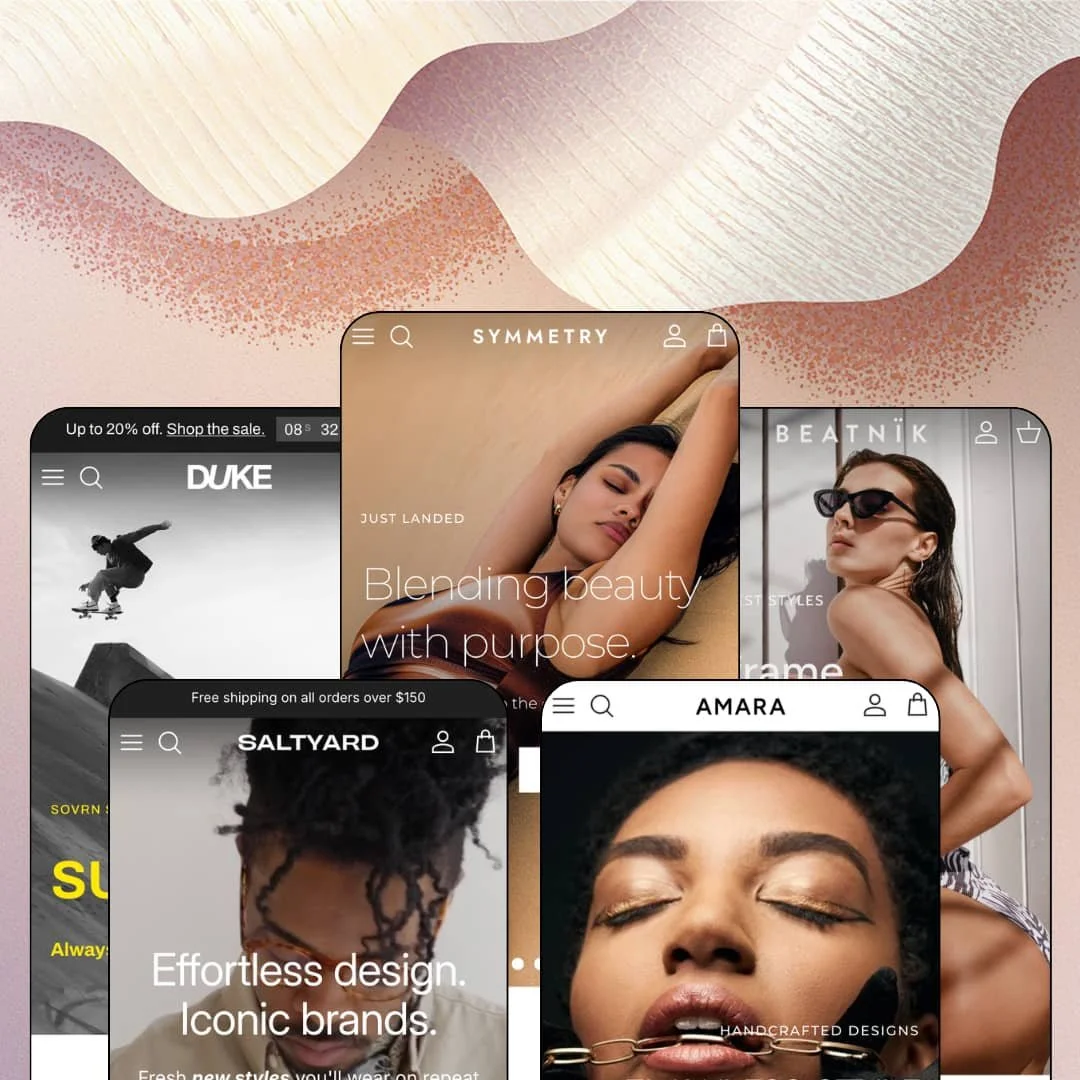
Roughly 70,000 live stores run on a theme most shoppers will never consciously notice. Symmetry, Clean Canvas' long-running flagship, is built to disappear behind whatever brand gets poured into it, and its five preset demos stretch from bra-sized swimwear retail to fine jewelry. It's an Online Store 2.0 build, first released in December 2016 and still on an active update cycle as of this review. At $420, quiet versatility has to earn serious money, and the demos give plenty of evidence to judge it by.
Product cards that sell before the click
The card system is a complete micro-storefront. Swatches swap the card image per colorway, size runs render as tappable chips, quick buy sits one hover away, and inline stock counts such as "8 in stock" add pressure without a single app install. Badges flex between percentage discounts, absolute amounts, and custom labels like "Polarized" or "Recycled." For apparel and accessories stores in the 50 to 500 SKU range with impulse-leaning buyers, that density turns collection pages into the primary selling surface.
Who actually answers the "will it fit" question?
Symmetry does, with two mechanisms working together. A configurable fit scale draws a Runs small to Runs large indicator directly in the buy box, and the size guide opens as a modal with genuine conversion tables, from bra-size measurement grids to UK, US, and EU ring sizing with a centimeter and inch toggle. Fit doubt drives returns, and returns eat margin. Boutique fashion and jewelry sellers handling sized goods and considered purchases get a returns-reduction layer without touching custom code.
Native pre-order and inventory states
Pre-order runs end to end without an app. Cards carry a pre-order badge, the buy box swaps to a Pre-order button with a per-variant backorder line naming the exact variant that will ship later, and a countdown block can sit above the whole arrangement for dated releases. Selling tomorrow's stock becomes a setting, not a project. Drop-model brands and seasonal sellers who pre-sell inventory before it lands, from swim capsules to deck runs, can operate that entire cycle out of the box.
A promo kit with a clock in it
Urgency tooling is native and layered. The announcement bar rotates multiple messages with an embedded countdown, standalone countdown sections attach to sale campaigns, promo popups and in-menu promos are wired into the theme, and promo tiles slot between homepage sections. It all runs from theme settings. Discount-led and restock-driven merchants in fashion verticals cycling weekly campaigns get a full campaign surface without stacking marketing apps on top.
The review layer isn't part of the purchase
Star ratings sit on nearly every card across the demos, and product pages show full review sections with histograms and a write-a-review link. Check the official feature list, though, and reviews appear nowhere on it. The sparkle isn't in the box. Jewelry and beauty brands selling considered purchases where ratings gate the decision need to budget a review app and its integration on top of the $420 license.
Filters mirror your raw data, for better or worse
The filter drawer is powerful and completely literal. On the swim demo's 68-product collection, the color filter lists more than sixty separate entries because every option value in the catalog gets its own line, and the size filter mixes letter sizing, numeric sizing, and bra-size grids in one list. I went looking for any grouping control and found none. Multi-brand retailers and marketplaces aggregating 100-plus SKUs from several suppliers will need disciplined option hygiene before the filtering delivers clean discovery.
An Online Store 2.0 build at a 2026 flagship price
Symmetry remains on the Online Store 2.0 generation, without the nested Theme Blocks architecture of Shopify's newest wave. Dawn, Shopify's free default on that same generation, ships the identical platform foundation for nothing; what $420 buys here is the section library, the conversion tooling, and nine years of refinement layered on top. That trade can absolutely be worth it. Single-brand stores planning multi-year builds and larger operations with 500-plus SKUs who want the newest editor architecture should read the version notes before checkout.
What it takes to launch
Expect a multi-day pass across promo surfaces before launch: countdowns, announcement rotations, and banner ribbons need re-staging, shipping-threshold messaging appears in several sections that must be aligned, fit-scale and size-chart content wants metafield-level population, and five demos' worth of testimonials, press rows, and gallery imagery must be replaced with your own assets.
-
What works in this preset
Browsing this demo feels like walking into a genuine multi-brand swim retailer rather than a template wearing stock photos. The header search drawer opens onto popular-category chips carrying live product counts, brand names run as prefixes on product titles, and a dedicated BRANDS menu splits the catalog by designer. That's retail logic, not decoration. For a store aggregating several labels, the navigation does the aggregating visibly.
Colorway overload is this catalog's daily reality, and the cards handle it without falling apart. A single bralette carries fourteen printed colorways; the card shows a swatch row and folds the rest into a "+ 11 more" counter instead of drowning the grid. I clicked through a dozen of these and the grid stayed readable the whole time.
The buy box goes deep for a category where fit anxiety decides sales. Under the add-to-cart button sits a reassurance icon row, and below that an accordion stack covering the description, shipping windows, returns deadlines, and a note that tops and bottoms sell separately. Nothing about it is flashy. It reads like a page assembled by someone who has answered swimwear support emails for years and got tired of typing the same replies.
-
What works in this preset
A store-hours block with a tappable Google Maps directions link sits just above the footer, flanked by info tiles for gift cards, student discounts, and the nearest branch. It's a small thing. But it quietly reframes the whole demo as a shop with a door, which matches how plenty of independent menswear actually operates between a physical rail and a webstore.
The editorial layer earns its space. Sustainability value tiles, expandable icon rows on fabric sourcing, a magazine blog, and a testimonial slider whose quotes link straight to the products being praised all stack into a homepage that argues for the brand while it sells. Merchants with strong material stories get generous surfaces to tell them on.
-
What works in this preset
Eyewear is tough to sell flat on a grid. This demo leans on pinned hotspot callouts over lifestyle photography, with labels like "Shown on Kaka Caramel" linking straight from a model's face to the product page, so the distance between inspiration and checkout shrinks to a single tap. I kept tapping the pins just to see where they led. For an accessories catalog with strong photography and a compact range, that's the right conversion move.
The header carries a live language selector beside the country picker, and the announcement rotation includes an order-cutoff message for next-day delivery. Small operational signals, all configurable. Lens options merchandise as named swatches, so "Charcoal lenses" and "Amber lenses" read as deliberate product decisions rather than anonymous variant slots.
-
What works in this preset
What does a skate brand actually need from a homepage? Mostly attitude, and this demo commits: a scrolling SHOP OWSLA X SOVRN ribbon loops across the page, a filmed team edit gets its own section with full credits, and the collab lands a dedicated collection of its own. The content grammar sits closer to a crew's zine than a storefront, and that is precisely why it works for this vertical.
The cards run quieter here, and the contrast is instructive. No quick-buy triggers are staged on the deck grid, badges switch to absolute values like "$5.00 off", and inline lines like "3 in stock" carry the urgency on their own. Same card system, different temperature. It's a useful preview of how far the card settings bend.
Where it stumbles
The Decks carousel undercuts its own energy. Six of the twenty boards in the featured slider sit at "Sold out", several in a row, which reads less like drop scarcity and more like a rail nobody restocked. A skate audience built on flash drops and restock hype registers that instantly.
-
What works in this preset
Fine jewelry gets its own retail grammar here instead of a re-skinned fashion layout. I spent the longest stretch of this review inside the Wedding Shop branch, which carries engagement, wedding, eternity, and bridal-party collections, while the staged price band runs from a £33 pendant to a £1,064 diamond ring without either end looking out of place. Materials do the variant work: cards and buy boxes speak in Silver, 9ct Yellow Gold, and 18ct plating rather than generic option labels.
The trust build is physical. A three-city showroom grid covers London, Montreal, and Los Angeles, a VIP club banner pitches in-store perks, and a tagged #MyAmara customer gallery runs beneath the product page. For considered purchases at four-figure price points, that offline-anchored reassurance is doing real conversion work.
One grammar, five convincing temperatures
Read the five demos back to back and the same section vocabulary keeps reappearing, yet swim retail, essentials menswear, eyewear, skate, and fine jewelry each land with a genuinely distinct register. The listing's one-theme-for-any-store pitch survives contact with its own demos. Merchants unsure of their final direction, or agencies serving mixed clients, get real headroom from a single license.
A storefront that remembers physical retail
Across the preset family, opening-hours sections with directions, multi-city showroom grids, click-and-collect messaging, and delivery-cutoff announcements keep showing up. The theme treats the website as one half of a retail operation rather than the whole business. Brands running counters, showrooms, or stockist networks inherit surfaces the demos themselves actively use.
The default temperature is promotional
Four of the five demos idle with countdowns in the announcement bar, sale ribbons, and discount badges as their resting state. None of it is mandatory. But a quiet, full-price brand starts by dismantling urgency furniture before building its own voice, and the presets give that work no head start.
Storytelling carries loads that data could share
Nothing in the feature set or the staged pages offers spec tables or a product-comparison view; testimonials, press rows, value tiles, and galleries are all populated by hand, piece by piece. Catalogs whose selling points live in attributes rather than adjectives will feel that ceiling. The theme persuades beautifully and tabulates barely at all.
A listed vertical with no preset behind it
The Theme Store files Symmetry under Food & Drink alongside its fashion and jewelry industries, yet none of the five presets stages a food or drink catalog. Buyers in that vertical are asked to do the translation in their heads. It's an odd gap for a preset family this broad.
Rating
★ 8.0/10
-
Card-level quick buy, native pre-order states, fit tooling, and a layered promo kit cover the conversion path; reviews and comparison data remain app territory.
9
-
Five polished presets shortcut the design work, but the breadth of badge, promo, and card settings means a real configuration pass before launch.
7
-
Slide-out cart with free-shipping progress messaging, sticky cart support, and accordion-style mobile navigation keep small screens transactional.
8
-
The demo homepages run image-dense with looping ribbons and multi-slide heroes; lazy-loading is in place, and restrained section counts will matter on merchant builds.
7
-
Five verticals from one section vocabulary, with badge formats, card density, and promo surfaces all bending per preset.
9
Frequently Asked Questions
-
Yes. The demos stage multi-column dropdowns mixing link lists with image panels and short promo text blocks, and in-menu promos are a listed feature.
-
Comfortably. Product pages carry vendor bylines that link to vendor collections, and collection filters include a brand facet with per-brand product counts.
-
A slide-out drawer with a free-shipping progress line, a configurable promo message slot, cart notes, and a sticky cart option, so the final step keeps selling.
-
The Theme Store files it for catalogs of 11 to 100-plus products, and the swim demo comfortably runs a 68-product collection with numbered pagination and sub-collection quick links.
-
Yes. Right-to-left support ships in the theme, along with translated interface strings for English, French, Italian, German, and Spanish.
-
Version 8.3.2 shipped in July 2026, and the preset family recently gained Amara as its newest jewelry demo.
This review is based on hands-on testing of the publicly available preset demos of the Symmetry Shopify theme as of August 2026. Theme features, preset availability, and performance can change with subsequent updates from the theme developer.