
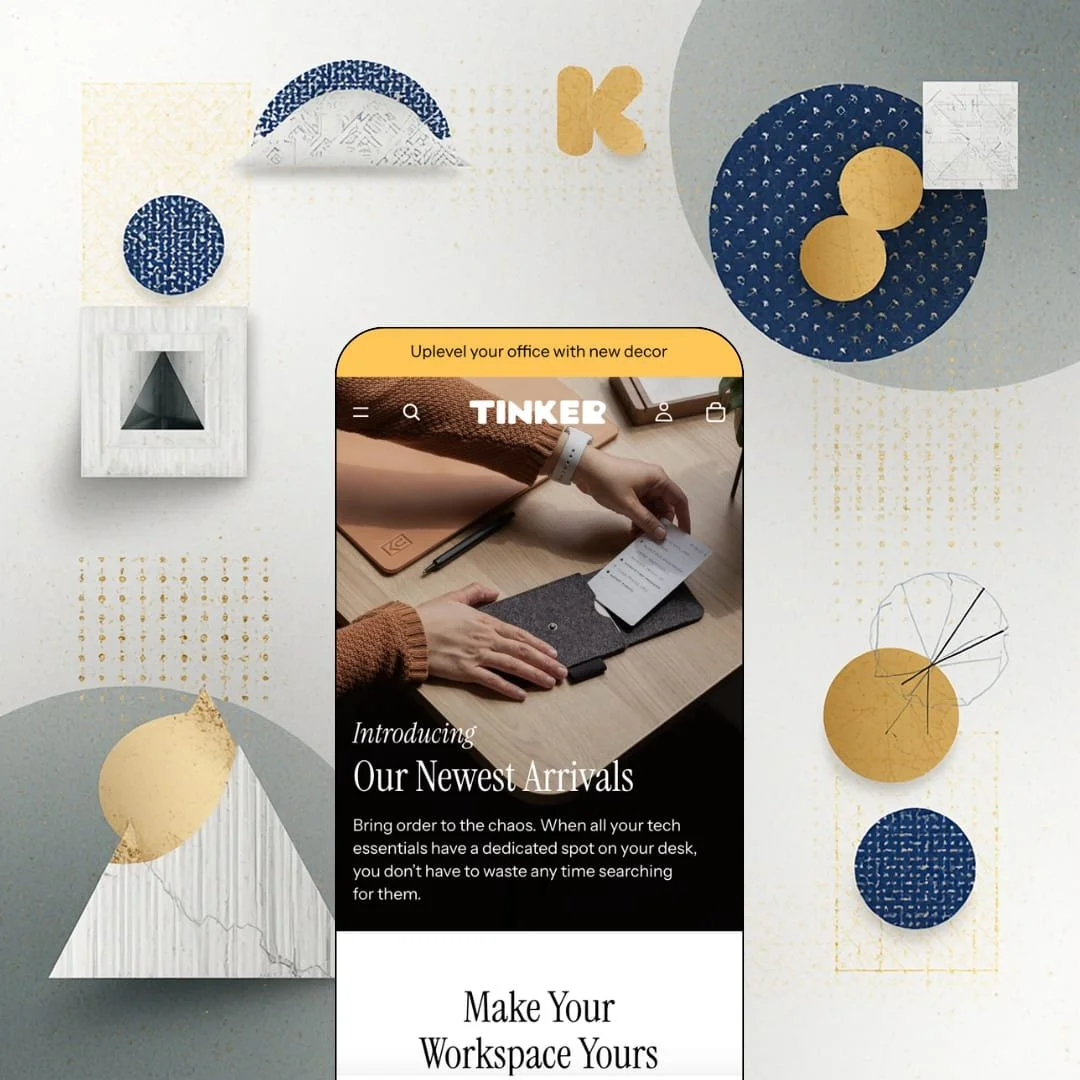
Free themes usually arrive stripped down; this one arrives with the newest architecture Shopify has. Tinker is a Shopify-built free theme from the Horizon collection, which means Theme Blocks: nested blocks, AI block generation, a mobile-first build, all at $0. The demo stages desk organizers, productivity cards and chargers for a maker brand with roughly 70 products in its largest collection, and that staging tells you exactly which merchant this was drawn for. Whether the merchants who've already installed it agree is a different story, and that story currently sits at 36% positive.
A product page that treats dimensions as data, not prose
Under the buy box, each product renders a compact spec strip, Width, Height, Length and Made in as label-value pairs drawn from product metafields, followed by Features, Details and Shipping & Returns as collapsible blocks. That's structured product data on a free theme. For makers of desk goods, furniture or hardware with 30 to 200 SKUs and buyers who measure before they order, the strip answers the fit question before the description does, and it does so without a spec-table app in the mix.
Long product pages, short path to the button
What happens when a product page runs 26 gallery images and a video block before the recommendations row? On Tinker, a sticky cart bar pins a thumbnail, the title, the price and an Add to cart button to the top of the viewport the moment the main button scrolls out of view. I sat up when I saw it. The Starter Kit page stages exactly that kind of long, image-heavy scroll, and single-brand stores selling considered-purchase items with storytelling galleries get the conversion safety net without a sticky add-to-cart app.
Horizon-era blocks at a free price
Merchants who'd otherwise default to Dawn are the ones who should look hardest here. Dawn sits on Online Store 2.0 with blocks nested about two levels deep; Tinker ships Theme Blocks with nesting up to eight levels, AI block generation compatibility and a mobile-first build, and the difference shows in the bento collection cards and video blocks the demo leans on. Same price. For first-time sellers and small single-brand shops under 100 SKUs who'll customize in the editor rather than in code, that's the more future-facing free starting point.
Inventory states handled by the theme
Pre-order, a stock counter and in-store pickup all ship as native theme features, alongside product badges the merchant can style. None of it needs an app. Together they let a product page say "ships in three weeks", "only 4 left" or "pick up today" without three separate installs competing for the same slot under the buy button. That matters most for small-batch makers and restock-driven brands whose catalog moves between made-to-order and in-stock several times a year.
A track record merchants are actively disputing
Thirty-one of 86 Theme Store reviews are negative and only 36% are positive, which for a Shopify-built theme sixteen months into its life is a weak signal. The complaints are specific. Recent merchants report the mobile gallery skipping several images per swipe, the selected variant image replacing the featured image with no setting to change that, blog blocks with no pagination, and second-level menu items collapsing before the cursor reaches them. Version 4.1.5 landed on August 31 2026 with bug fixes, so some of this may already be closed, but merchants with image-heavy catalogs and multi-image products who sell primarily on mobile should read the pattern in full before committing.
Desk goods are the only vertical it has been dressed for
The Theme Store files Tinker under jewelry and accessories and food and drink, yet every pixel of the demo is office hardware on neutral backgrounds. The card grammar, the spec strip, the muted palette and the craftsmanship framing are tuned for objects photographed on a desk. A jewelry brand needs zoom-first galleries and a food brand needs ingredient and nutrition blocks, both of which the theme supports, but neither gets a staged reference here, so those merchants are designing from a blank sheet. Considered-purchase makers in home, office and hardware get the full picture. Everyone else starts from the palette alone.
The cart is a doorway, not a salesroom
Tinker's marketing toolkit stops at promo banners, badges, in-menu promos and a stock counter: no countdown timer, no free-shipping progress bar in the cart drawer, no discount or newsletter popup. For a theme pitched around a high-converting buyer experience, the cart is where the pitch goes quiet. It's a doorway, not a salesroom. Impulse-buy brands and stores that run flash drops or free-shipping thresholds as their main lever will feel that gap from the first campaign they run on launch weekend.
What it takes to launch
Expect a copy pass across product descriptions to replace demo-store disclaimers and the shared boilerplate in the Details and Shipping blocks, a catalog restructure if colorway families are to become variants, a menu relabel, and metafield population for the spec strip. One to two days for a catalog under 100 products.
-
What works in this preset
Scrolling the homepage feels like flipping through a catalog for a single, well-photographed brand. A full-bleed hero carries an italic "Introducing" kicker over "Our Newest Arrivals", then a video block titled "Make Your Workspace Yours" takes the next screen, then an image-and-text split for productivity essentials, then a Shop by Collection row of four bento-style tiles. Nothing shouts. The section count stays short enough that the newsletter block, with its own image, sits just above the footer before you've lost patience, which for a free theme is a restraint I didn't expect.
The header runs a linked announcement bar, four top-level collection links plus a "More" overflow item, search, account and a slide-out cart, and the demo carries both a dark and a light version of the logo so the header can swap when it sits over a transparent hero. I clicked into the cart drawer expecting a bare panel. It's bare, but deliberately so: an empty state, a log-in prompt, a Continue shopping link back to the full catalog. Sticky header is a theme setting and the demo keeps it on.
Seventy-four items in one collection is a real test for a free theme's discovery tools, and the Organizers page passes it. The filter column offers Availability, a Price range with the highest price stated, and a Color facet with five options, next to nine sort orders and a column-grid toggle. Product cards carry quick-add that offers a direct Add for single-option items and a Choose path where an option must be picked. Pagination runs four pages. I scrolled through all of it without the grid ever breaking rhythm.
Where it stumbles
Colorways are staged as separate products rather than variants, and it shows. The MagSafe Phone Stand exists as four listings (black walnut, black maple, white walnut, white maple), the Laptop Stand as four more, the Zigzag Tray as four again, so the 74-item count is inflated by duplicates and the color swatches the theme supports on product pages never get a chance to appear. For a theme whose Theme Store pitch leads with product discovery, a demo that makes a shopper compare four near-identical cards to find a finish is the wrong showcase. Combined listings would tidy this, but that's a Shopify Plus feature, and the demo doesn't stage it either.
Tinker is a Shopify-built catalog theme that spends its newest-generation architecture on quietness: neutral surfaces, short section stacks and product data rendered as labels rather than paragraphs.
The trade-off is that restraint puts the whole burden of personality on the merchant's photography and copy, because the demo's charm comes from one brand's images rather than from anything the theme adds on top.
It's the free theme for merchants whose products already look finished, and a Horizon-generation on-ramp for anyone who plans to grow into the editor rather than out of it.
★ 6.8/10
Rating
-
Metafield spec strip, native pre-order, stock counter and pickup, quick add on cards. Merchant-reported variant-image behavior and missing blog pagination pull it down.
7
-
Theme Blocks with short section stacks are easy to rearrange in the editor. Merchants coming from older themes face a block-nesting learning curve.
7
-
Mobile-first build with a sticky cart bar and column-grid toggle. Merchant reports of gallery swipes skipping multiple images keep this below the architecture's promise.
6
-
The homepage runs lean: restrained section count, lazy-loaded images, and a video block that shows a poster frame before it plays. Few third-party scripts in the demo.
7
-
Nested blocks and bento cards give real layout range. The palette and typography defaults pull everything toward the same quiet desk-goods look.
7
Frequently Asked Questions
-
Yes. It runs on Theme Blocks, so blocks nest inside blocks up to eight levels deep and the editor can generate blocks with AI, which is a different working model from Online Store 2.0 themes where nesting stops at about two levels.
-
From product metafields. Fill them in the admin and the theme renders each as a label-value pair under the description; leave them empty and the row doesn't clutter the page.
-
The demo carries both a dark and a light logo version, which is the setup the theme uses to switch header styling between a transparent state over the hero and a solid state once you scroll.
-
Each card carries a quick-add action. Single-option products get a direct Add; products with options route through a Choose step so the shopper picks before anything lands in the cart.
-
Theme strings come pre-translated in English, French, Italian, German and Spanish. Product data is still yours to translate through Shopify Markets.
-
Version 4.1.5 shipped on August 31 2026, roughly sixteen months after the May 2025 launch, with a bug-fix and performance focus.
-
No. The demo runs a flat four-item navigation with a "More" overflow; the mega menu with in-menu promos is a theme feature you'd configure yourself once you have enough categories to justify it.
This review is based on hands-on testing of the publicly available preset demos of the Tinker Shopify theme as of September 14 2026. Theme features, preset availability, and performance can change with subsequent updates from the theme developer.