
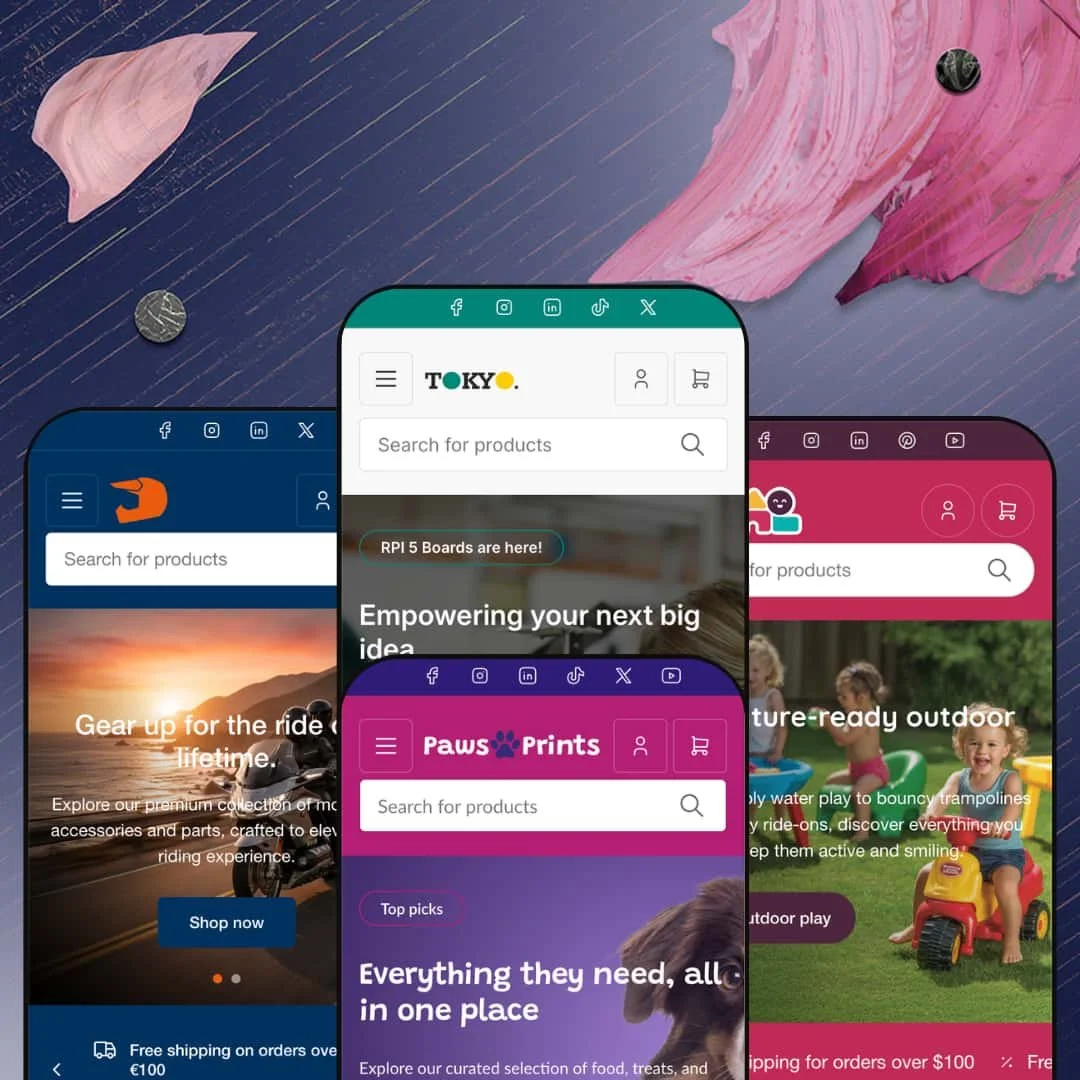
Most Shopify themes are built to sell the photograph. Tokyo is built to sell the part number. I clicked through four live demos spanning electronics, motorcycle gear, pet supplies, and toys, and the same retail machine runs under all of them: an Online Store 2.0 build from Truly Fine Pixels, priced at $320 and sitting at version 4.2.0 as of January 2026. If your customers arrive knowing the brand, the spec, or the SKU they want, this one was made with you in mind.
Brand merchandising is built into the page templates
Tokyo ships brand directories as page templates in two flavors, an A-to-Z index and a logo grid, and pairs them with vendor links on product cards and brand marks on product pages. Two templates, zero apps. For a store that resells other companies' products, brand is a primary browse path, and this theme treats it that way from the first day. Multi-brand retailers and distributors carrying a few hundred SKUs across electronics, parts, or gear will feel the difference within a week of launch.
Wholesale access controls live in the theme layer
Hybrid retail-wholesale operations get first-class treatment here. Price visibility can be gated behind customer login at the individual product level or across an entire collection, and bulk-order forms sit alongside the gates for trade-quantity purchasing. No app handles the gating. For a parts supplier or consumables business running a consumer storefront and trade accounts from one catalog, that template-level control removes an entire integration project from the launch plan.
Collection pages built for the long tail
Collection pages can be read three ways: a visual grid, full rows, or compact rows that compress a category into something close to a distributor's order list. A compare toggle sits directly on the grid, and the filter rail accepts manual price ranges alongside its checkbox facets. Density is a feature here. For catalogs past 500 SKUs serving considered-purchase buyers who shortlist before committing, this is the difference between browsing a store and working one.
A header that keeps up with deep taxonomies
How deep does your category tree actually go? Tokyo's navigation nests three levels in the demos, Components down to Power down to Batteries, and the feature set includes in-menu promos so the panels can sell while they sort. Dawn, Shopify's free baseline, stops at flat dropdowns; the gap between the two headers is the gap between a shop and a department store. Hardware, hobby, and parts retailers running seasonal promotion calendars across wide catalogs get navigation that won't bottom out.
The design register is warehouse, not boutique
Every one of the four demos leads with information: SKU lines under titles, vendor chips on cards, stock labels, badge stacks. It sells efficiently. It doesn't flirt. This kept bugging me as I pictured other store types inside it, because a luxury-tier, single-brand storyteller in beauty or fashion would spend weeks stripping the utility cues out and still be fighting a layout language that assumes products win on data rather than desire.
The B2B story ends where the theme does
Tokyo's wholesale features are presentation: gated prices, bulk-order forms, a B2B page sitting in a demo menu. Order logic is a different animal. Quantity-break pricing, net payment terms, and company account structures belong to Shopify's platform tier rather than to any theme, so a wholesale-first distributor with negotiated pricing across major accounts should read Tokyo as the storefront for a B2B operation, not as the operation itself.
Small stores inherit big-store overhead
Brand indexes, multi-level menus, filter rails, comparison controls: the architecture assumes there's a catalog worth navigating, and at $320 that machinery is exactly what the money buys. An under-30-SKU, single-brand shop switches most of it off. What remains after the switch-off, a clean grid and a simple header, is a thin return on a premium price for a store whose whole inventory fits on one screen.
What it takes to launch
Expect a one-to-two-day pass covering demo copy cleanup across the storefronts, metafield population to power the spec-based filters, brand-index assembly, and mega menu re-staging around your own category tree.
-
What works in this preset
Land on the electronics demo and the header already tells you what kind of store this is. A second row carries an "All categories" browser and a search bar with its own vendor dropdown, so a customer hunting a NaviBoard sensor can scope the search before typing a single character. That is distributor behavior, not boutique behavior. The demo wears it comfortably.
Volt. Model. Brand. The filter rail on the Boards collection speaks in spec, with live counts beside every facet value and subcollection chips above the grid splitting boards into beginner, educational, performance, and specialty buckets. For component shoppers, filtering by voltage or memory capacity is the actual buying decision, and the demo's product data is populated deeply enough that the facets read as real tooling rather than decoration.
Product pages keep information in front: an SKU line above the title, the brand's logo beneath it as a clickable mark, and accordion tabs splitting description, shipping terms, and warranty into separate reads. Variant selection runs two axes at once, color buttons plus length options on the demo cable, with a quantity stepper beside the cart button. I spent time hunting for a buried detail and kept finding the same answer: nothing sits more than one interaction away.
Where it stumbles
A "B2B" link sits in the demo's main navigation, but the store around it is staged pure hobbyist: workshops, starter kits, a €9.90 charging cable up front. A trade buyer landing here sees a maker shop. The tension is the demo's staging, not the theme's capability, yet it leaves the preset's most commercially interesting angle, supplying parts at volume, as a page link rather than a storefront posture.
-
What works in this preset
TOR250. That's a SKU, printed directly on a helmet's product card next to the brand link, before the product page is even open. Cards also carry per-colorway thumbnails that link straight to the matching variant, so a rider comparing the same lid in black, blue, and bronze never has to leave the grid. For gear shoppers who cross-reference model codes against manufacturer sites, that little SKU line does real work.
The mega menu works three angles at once: shop by type, shop by style, shop by brand, all in one panel, with promotional banner tiles for accessories and clothing dropped in beside the link columns. I went looking for a dead end and didn't find one. Every browsing logic a gear buyer might bring, helmet type, riding style, or brand loyalty, gets its own column, which turns the menu into a merchandising surface instead of plain wayfinding.
Under the hero, a rotating trust bar stacks the reassurances a safety-product buyer wants to see early: CE certification, thirty-day returns, a free-shipping threshold, a rider count. The clearance link wears a "Flash sale" badge inside the navigation itself. Confidence-building is front-loaded here, which matters in protective gear, where hesitation kills carts long before checkout does.
-
What works in this preset
Why would a pet shop hide an entire collection behind a login? Because groomers and kennels buy shampoo and catnip by the case, and this demo gates the whole catnip collection at members-only pricing while the rest of the store shops like ordinary retail. The split is invisible to a regular customer. For a supplies retailer with professional clientele on the side, it's the demo's smartest single staging decision.
Menus here mix levels freely. The grooming dropdown lists five individual products by name, the food category fans out into dry, wet, grain-free, and puppy-formula subcollections, and the brand area offers both a directory page and an A-to-Z listing. That flexibility fits pet retail, where one shopper navigates by animal, another by product category, and a third by whatever brand the vet recommended.
Nobody reorders from a store that obscures its inventory truth. The demo stages bulk ordering on a pet bed, a pre-order cushion, and limited-stock and out-of-stock states all within reach of the menu, treating availability as sales information rather than an error condition. Consumables retail lives on exactly this clarity.
-
What works in this preset
A toy store's most honest navigation axis isn't category, it's age, and this preset commits to that: 0–2, 3–5, 6–8, and 9–10 collections each carry a product count and a short developmental blurb right in the browsing tiles. Parents shop by birthday, not by taxonomy. The age layer sits beside ten product-type categories, each holding three subcollections, so both shopping mindsets get served simultaneously.
A Black Friday landing page ships inside the demo's main menu, next to a "Sale" link wearing a "Hot!" badge, while a free-shipping ticker scrolls across the top of the page like a storefront window decal. The seasonal posture is unmistakable. Toy retail spikes hard in the fourth quarter, and this preset is staged as if it already knows that.
The demo menu doubles as a feature index: complementary-product pairing, bulk ordering, login-gated pricing, and blind-box categories are all staged for direct inspection. Collectibles deserve a mention. Blind boxes and mini figures exist as a real category structure here, which matters for toy merchants riding the collectible wave, where drop-style scarcity and repeat purchasing drive the economics.
Where it stumbles
In this preset demo, every path to product runs through taxonomy or age. Occasion-led merchandising, the gifts-under-€25 or birthday-bundle style of staging that gift-driven retail leans on, is left entirely for the merchant to build, even though the section library provides the parts to build it with. That's a staging choice rather than a capability gap, but it means the demo undersells the vertical's biggest buying trigger: someone shopping for someone else's kid.
One engine, four believable verticals
Read in sequence, the demos make a quiet argument: the same architecture dresses as a component distributor, a safety-gear shop, a consumables retailer, and a seasonal gift store without any of the four feeling like a costume. That range is far easier to claim than to show. Tokyo shows it by repetition rather than by claim.
Retrieval-first retailing as a personality
Every preset assumes the shopper arrives with intent: search, taxonomy, brand, spec. None of them is built around scroll-and-be-inspired discovery, and that consistency reads as character rather than accident. Stores whose revenue comes from repeat buyers who know exactly what ran out last month will compound value from this posture over years, not weeks.
A developer that ships
Version 4.2.0 landed in January 2026 carrying twenty-two changes in what the release notes call a minor update, and the Theme Store record stands at 100% positive across five reviews, several praising support responsiveness directly. Five reviews is a thin sample. It is also an unblemished one, and the update cadence suggests a theme being actively grown rather than kept on life support.
Four wardrobes, one body
The presets differentiate by vertical content more than by skeleton: header logic, card anatomy, and page rhythm repeat across all four demos, with palette and imagery doing the differentiating work. Merchants choosing Tokyo for design variety are really choosing one design direction styled four ways. That's honest value at this price, but it's worth knowing which of the two things you're buying.
It runs on data discipline
The theme's center of gravity, spec facets, brand paths, comparison-ready grids, presumes rigorous product data behind it: metafields filled, tags consistent, vendors assigned. A merchant with a messy catalog doesn't get a worse-looking store; they get an engine idling. This is less a launch task than a permanent operating posture, and a store where nobody owns product data will never see what it paid for.
★ 7.8/10
Rating
-
Price gating, bulk ordering, brand templates, spec filtering, and on-grid comparison all live inside the theme itself. Very few boxes left unticked for catalog retail.
9
-
Online Store 2.0 sections keep day-to-day editing visual, but the headline features want metafields, customer tags, and menu architecture configured before they show their value.
7
-
The mobile menu uses a slide-out pattern with expandable levels, and sticky-header plus back-to-top options keep long catalog pages navigable on small screens.
8
-
Homepages stay disciplined about section count and product grids defer offscreen image loading; the navigation markup is heavy, which is the price of all that menu depth.
8
-
Wide latitude inside the utility-retail register, with four presets and a large section library. Push it toward editorial or luxury staging and the grain starts resisting.
7
Frequently Asked Questions
-
Three of the four demos run dedicated Stores pages, and the feature set covers in-store pickup, with one electronics demo product staged specifically to show multiple pickup locations.
-
Theme interface strings come pre-translated in English, French, Italian, German, and Spanish. Translating your product content itself is handled on Shopify's side, not by the theme.
-
Yes. Pre-order is part of the feature set, and every demo stages a pre-order product so the treatment can be inspected before purchase.
-
The electronics demo includes a product staged with a 3D model, so media support extends past flat images and video.
-
A stock counter covers scarcity display, cards carry availability labels, and the demos stage limited-stock and out-of-stock products so both states can be checked directly.
-
Combined listing support is on the official feature list, flagged for Shopify Plus, which suits merchants consolidating variant-heavy product families into a single listing.
This review is based on hands-on testing of the publicly available preset demos of the Tokyo Shopify theme as of June 2026. Theme features, preset availability, and performance can change with subsequent updates from the theme developer.