
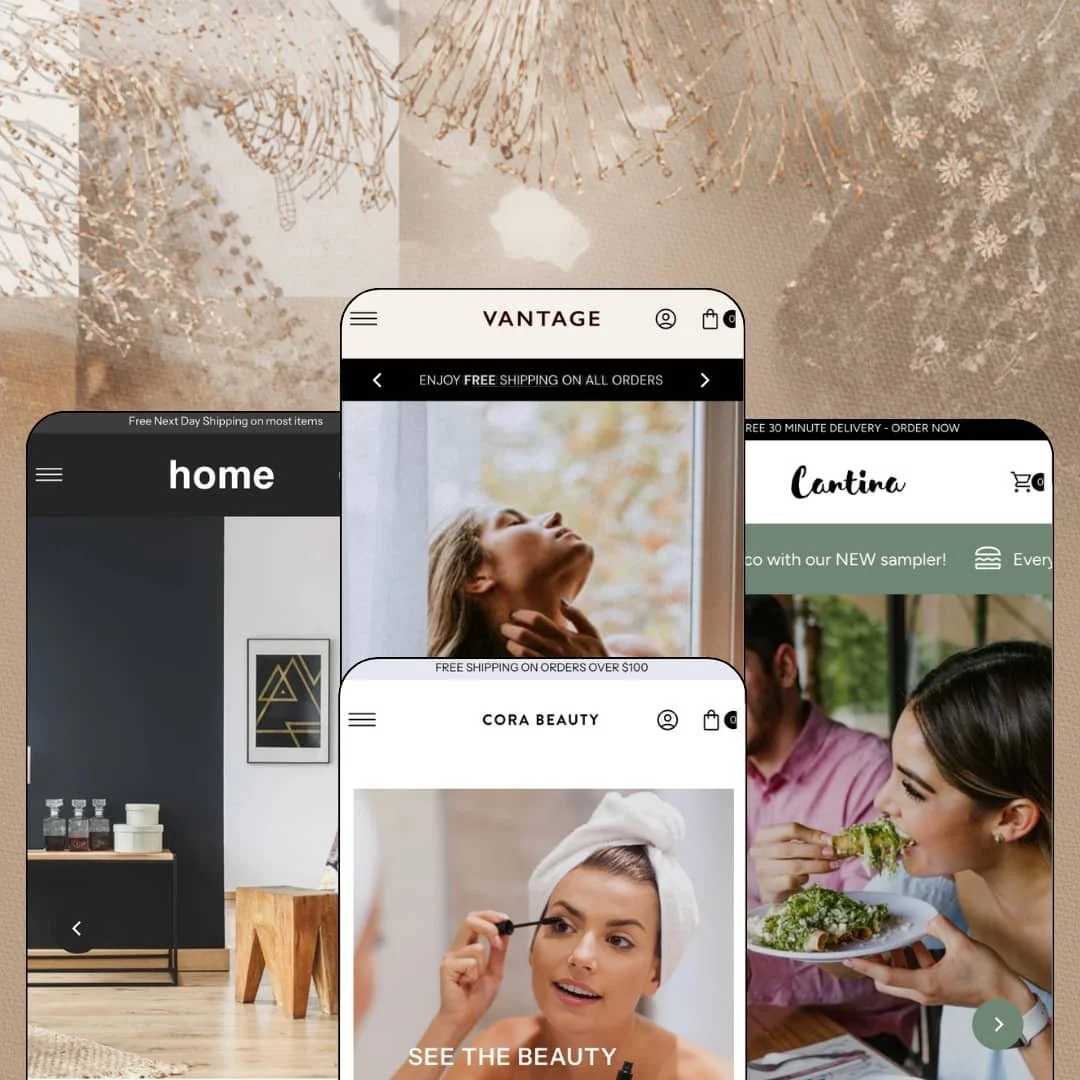
A beauty counter, a lingerie drop, a furniture showroom and a taco joint all run on the same code here, and none of them looks like it's borrowing the others' clothes. Four presets ship with one purchase, each staged for a different vertical, each pulling from the same section library of promo banners, tickers, hotspots and countdowns. That breadth is the pitch, and the question for anyone shopping at this price is whether the underlying build keeps up with what the demos promise. It's an Online Store 2.0 theme, launched in 2017 and still receiving releases, with version 12.3.0 landing in July 2026.
Navigation that reaches product level
The mega menu accepts headed columns, product-level links, in-menu promo links and tag-filtered collection deep links, all in the same panel system. That matters because a shopper who knows the item shouldn't have to pass through two collection pages to reach it. It's fast. For a multi-category catalog of 150 to 500 SKUs in beauty, home or hardware, where considered-purchase buyers arrive with a specific product in mind, this menu depth replaces a large chunk of the navigation-app work a merchant would otherwise bolt on later.
Variant choice on the card
Sizes, colourways, portions and dimensions all render as chips on the product card, and the chip set adapts to whatever option axis the product carries. Fewer taps. A shopper browsing a grid of 24 items picks the size once and moves on, which shortens the path for restock-driven apparel brands and for impulse-buy categories like snacks or accessories where the product page is a detour nobody wanted.
The buy box as a trust stack
Ask yourself what a nervous first-time buyer wants to see before tapping Add To Cart. This theme answers with a coordinated buy-box kit: icon badges under the price, a data-list Product Details tab with live stock count, a sticky add-to-cart bar that follows the scroll, a Secure Online Shopping payment row, and share icons. Each piece is small. Together they turn the product page into a page that argues for the purchase, which suits mid-market DTC brands selling $40 to $400 items to buyers who compare before committing.
Built for the shop with a door
For a single-location retailer or restaurant with 20 to 100 SKUs and a physical counter, the theme ships store-hours and address blocks with a maps-directions link, in-store pickup support, an age verifier for alcohol or tobacco lines, and a customizable contact form. That's a local-commerce layer, not an afterthought. It's all in the box. A neighbourhood bakery or a bike shop could launch the whole storefront on the sections already there.
Social proof is furniture, not evidence
Every demo runs testimonial cards and a press-logo row, and every one of them is hand-typed text. The quotes are stage props. There's no review engine, no star aggregation and no rating schema, so a beauty or supplement brand that lives on verified reviews with 500 or more SKUs and repeat buyers will install Judge.me or a comparable app on day one and then spend time matching the app's output to the theme's typography.
Prose where data belongs
The Product Details tab prints the basics well. Tables, not paragraphs, is what's missing: everything beyond variant, SKU, weight and brand is a rich-text description. Furniture merchants need dimensions, materials and lead times as structured rows; food merchants need ingredients and allergens as a table; neither gets a metafield-driven spec section in the demos, even though the feature list names ingredient and nutritional information as capabilities. That's a lot of hand-typing for a considered-purchase catalog of 100 or more items.
Nine years of updates, one generation of architecture
The July 2026 release added colour palettes and reworked how colours flow through sections, which is real maintenance. It's still Online Store 2.0. That means the two-level block nesting ceiling, no AI-assisted block generation, and no Theme Blocks editor model, while Dawn, Shopify's free baseline on the same generation, receives the platform's newest components first at no cost. For an agency building for a client who expects three or more years on the theme without a rebuild, the age of the foundation is a fair question to put to the developer before purchase.
What it takes to launch
Expect a multi-day pass covering copy across four demo voices, market and currency configuration, hours and contact data, mega menu re-staging per vertical, and consolidating sibling products into proper variants before the card chips earn their place.
-
What works in this preset
You land on a cosmetics store called Cora and the header is already doing the heavy lifting before you scroll. The Makeup menu opens a five-column mega menu with headed groups (Face, Eyes, Lips, Cheeks) and eight sub-links under Face alone. The New menu does something different: instead of categories it stages promo links such as New Lip Gloss and New Concealer, which is the theme's in-menu promo capability put to work as a launch calendar. It's dense. For a beauty catalog that runs 200 shades across five product families, this is the navigation you'd actually need.
I scrolled through the homepage twice because the section mix changes rhythm more than I expected. Hero slides give way to promo tiles, then three testimonial cards, then a product grid, then a press-logo row, then a video block titled Chosen For You, then editorial teasers, then a scrolling ticker repeating Cruelty Free, Planet Friendly, Ethically Sourced. Nothing repeats back to back. The ticker is a small thing, but it's the kind of section a values-led skincare brand would otherwise install a marquee app for.
The product page carries the demo's best idea. I clicked into the Matte Base Concealer and found a twelve-image thumbnail gallery down the left, a colour picker labelled by shade code, and a Product Details tab that prints variant, SKU, weight, product type and brand as a clean data list. Two icon badges sit under the price reading Cruelty free and Sustainably sourced. Language and currency selectors ride in both header and footer, with five interface languages staged in this demo.
-
What works in this preset
Monza sells lingerie and swim, and it opens loud. The announcement bar rotates three messages (free shipping, a 50 percent sale, a new drop), the hero runs two slides, and directly beneath sits a full-width countdown block headed Annual Sale Now On with a Shop Now button. The countdown component is present and wired; a merchant sets the date and it runs. For a drop-model brand that lives on scheduled launches, that homepage stack is already 80 percent of a campaign page.
What kept me on this demo was the product card. Every brief in the Final Reductions grid shows XS, S, M and L as tappable chips right on the card, so a shopper can pick a size before ever opening the product page. Save 10% and Save 50% badges render in the corner without crowding the image. The grid itself is tight, four across, and the mix of bodysuits at $450 next to briefs at $120 shows the card handles both price bands without the layout wobbling.
Below the grid the preset keeps selling. A four-tile collection row (Bras, Bodysuit, Nightwear, Swim), a trust ticker cycling International Shipping and Free Returns, three stacked promo banners, a Restocked spotlight with its own Buy Now button, four short testimonials, and an As Seen In press row. Then the footer adds a Featured Items product list next to the newsletter form, which is a footer block I rarely see used. It reads like a merchandiser built it, not a designer.
Where it stumbles
The catalog staging works against the preset's own drop-model positioning. Padded Underwired Swimsuit appears twice as two separate products, High-Waisted Briefs appears three times, and Blue and Cranberry Leavers Lace Bodysuit are listed as siblings rather than colourways of one product. That doubles the grid without adding choice. A lingerie merchant with 40 styles in four colours each would need to consolidate those into variants before the size chips on the cards start doing real work.
-
What works in this preset
Dark backgrounds, warm wood photography, and a navigation built for browsing rather than hunting. The New menu opens a four-column panel where the Tables column lists actual products (Dunn Dining Table, Rume Dining Table, Sierra Table) instead of sub-collections, and the secondary nav row exposes filtered links such as Seating > Couches and Accessories > Rugs that drop straight into a pre-filtered collection view. Nothing dead-ends. I went looking for one and didn't find it. For a furniture catalog of 100 to 300 pieces where shoppers arrive knowing they want a chandelier, that's the difference between two clicks and five.
Halfway down the homepage there's a Shop The Look image with an attached product list: Rolan Chair at £880, Wyn Cubed Accent Table at £800, plus an Outdoor Seating collection link. It's the theme's image-hotspot section staged as a room scene. A $25 Reward Offer block and a Featured Item spotlight reading This Brass Pineapple Drink Set Is Selling Fast sit either side of it, so the page alternates between inspiration and nudge.
I liked how the furniture cards handle option axes. The Rein Mirror shows Gold and Bronze chips, the Teddy Rug shows 8' x 10' and 9' x 12', and the Torch Planter shows Small, Medium and Large, all on the card face. A four-item trust row (Free Delivery, 98% Happy Customers, Visit Us, Planet Friendly) closes the page above a four-column footer, and a newsletter popup fires on first visit.
-
What works in this preset
Would a Shopify theme make sense for a taco restaurant in Orlando? Roma argues yes, and the top of the page is where the argument lands. A marquee ticker alternates Savor The Taste Of Mexico With Our New Sampler and Every Monday Kids Eat Free, a bright bar above it reads Free 30 Minute Delivery, and the hero pairs Our Place Or Yours with a Taco Tuesday slide. It's noisy in the right way.
The menu section is smarter than it looks. Appetizers, Entrees and Sides are three chips that link into the Menu collection pre-filtered by tag, so one collection serves the whole card. Dishes render as product cards with For One and To Share as selectable portion chips, and Nachos shows From $8.75 because the portion axis changes the price. A Gear grid further down sells the Cantina mug, hat and tee with a Sold Out label and a Save 16% badge, which is the same card component doing merch duty.
I didn't expect a hospitality demo to stage the theme's local-retail layer this fully. An Our Hours block lists opening times, a Find Us block prints the street address with a Get Directions link that opens a maps route, and the footer social row adds Snapchat and TikTok icons alongside the usual three. For a single-location hospitality business with 30 to 60 menu items and a small merch line, those three blocks cover what a separate contact page usually has to.
Where it stumbles
A restaurant sells modifiers, and Roma stages none. Calamares gets a portion axis and nothing else: no spice level, no side swap, no add-guac, no pickup time. The theme lists in-store pickup among its features, but the demo stages the menu items without any pickup or delivery-slot choice, so a merchant would be adding line-item properties or an ordering app to make dine-in versus take-out meaningful at the cart.
One grammar, four verticals, no gaps
Read all four demos and the same page grammar surfaces every time: hero slides, promo tiles, a product grid, a testimonial row, a press strip, a four-column footer. Cosmetics, lingerie, furniture and a restaurant each bend it without breaking it. No preset gets a section the others can't use, which means a merchant can start on Roma's layout with Portofino's palette and lose nothing.
Promo sections as a first-class citizen
The Theme Store tagline promises easy promotional sections, and the demos deliver: rotating announcements, marquee tickers, countdown blocks, reward-offer panels, restock spotlights and sale badges are all native and staged in context. A merchant who runs a calendar of launches and markdowns gets the tooling without a page-builder app.
Still alive at nine
A 2017 theme could easily be coasting. Instead the July 2026 release reworked colour handling across sections, and the demos carry current Shopify components such as the localization selectors and the new customer-account entry point. That cadence is worth more than any single feature to a merchant planning a multi-year run.
The default voice shouts
Every preset opens with an offer, a countdown, or a ticker. That's the theme's native register, and a luxury or heritage brand selling £3,000 daybeds or fine lingerie at $450 will spend its first editing session turning things off rather than on. Quiet is possible here, but it's a configuration you build toward, not the starting point.
Listed industries don't match the presets
The Theme Store files this theme under Jewelry and Accessories and Food and Drink. There's no jewelry preset, and the only food preset is a restaurant, not a packaged-goods or grocery store. A jewelry merchant gets Vantage's beauty skeleton to repurpose; a coffee roaster gets a taco menu. Both work, but neither is the head start the listing implies.
Discovery caps at the menu
Filtering and sorting exist, but the demos lean on the mega menu and tag-linked collections for discovery rather than faceted sidebars with counts. For catalogs above a few hundred SKUs, the menu becomes the catalog map, and that scales only as far as a merchant is willing to hand-curate it.
Rating
★ 7.0/10
-
Deep mega menu, card-level variant chips, countdown and promo blocks, store-hours and pickup layer all native; no review engine or spec-table system.
7
-
Every preset is built from the same section grammar, so learning one homepage teaches all four; the number of promo toggles takes a session to tame.
8
-
Slide-out menu with accordion depth, sticky add-to-cart bar, and cards that keep variant chips tappable; long homepages get very tall on a phone.
7
-
Image lazy-loading and a lean header keep first paint quick; the demos stack video, tickers and countdowns, which merchants should prune.
7
-
Light, dark, bright and grain-textured presets from one palette system; the shared skeleton limits how far a layout can drift from the demo rhythm.
6
Frequently Asked Questions
-
Yes. Portofino ships as a dark preset with light text on charcoal backgrounds, and the July 2026 colour-palette update means switching between light and dark schemes happens in the editor.
-
Roma stages dishes as products with a portion option (For One, To Share) and splits the menu by tag into Appetizers, Entrees and Sides. Modifiers like spice level or side swaps need line-item properties or an app.
-
The theme ships English, French, Italian, German and Spanish strings for buttons, labels and form text. Product content and any additional languages are handled through Shopify Markets, not the theme.
-
Yes, theme-wide. Monza stages it as a full-width block under the hero; a merchant sets the end date and the component runs live on the storefront.
-
An age verifier is part of the theme. Roma's demo advertises 30 tequilas but doesn't stage the gate, so it's a toggle to enable rather than something you'll see in the preview.
-
The Theme Store files it for catalogs of 11 to 100-plus products. The menu system and filtering will stretch to several hundred SKUs; beyond that the hand-curated navigation becomes the bottleneck.
This review is based on hands-on testing of the publicly available preset demos of the Vantage Shopify theme as of August 2026. Theme features, preset availability, and performance can change with subsequent updates from the theme developer.