
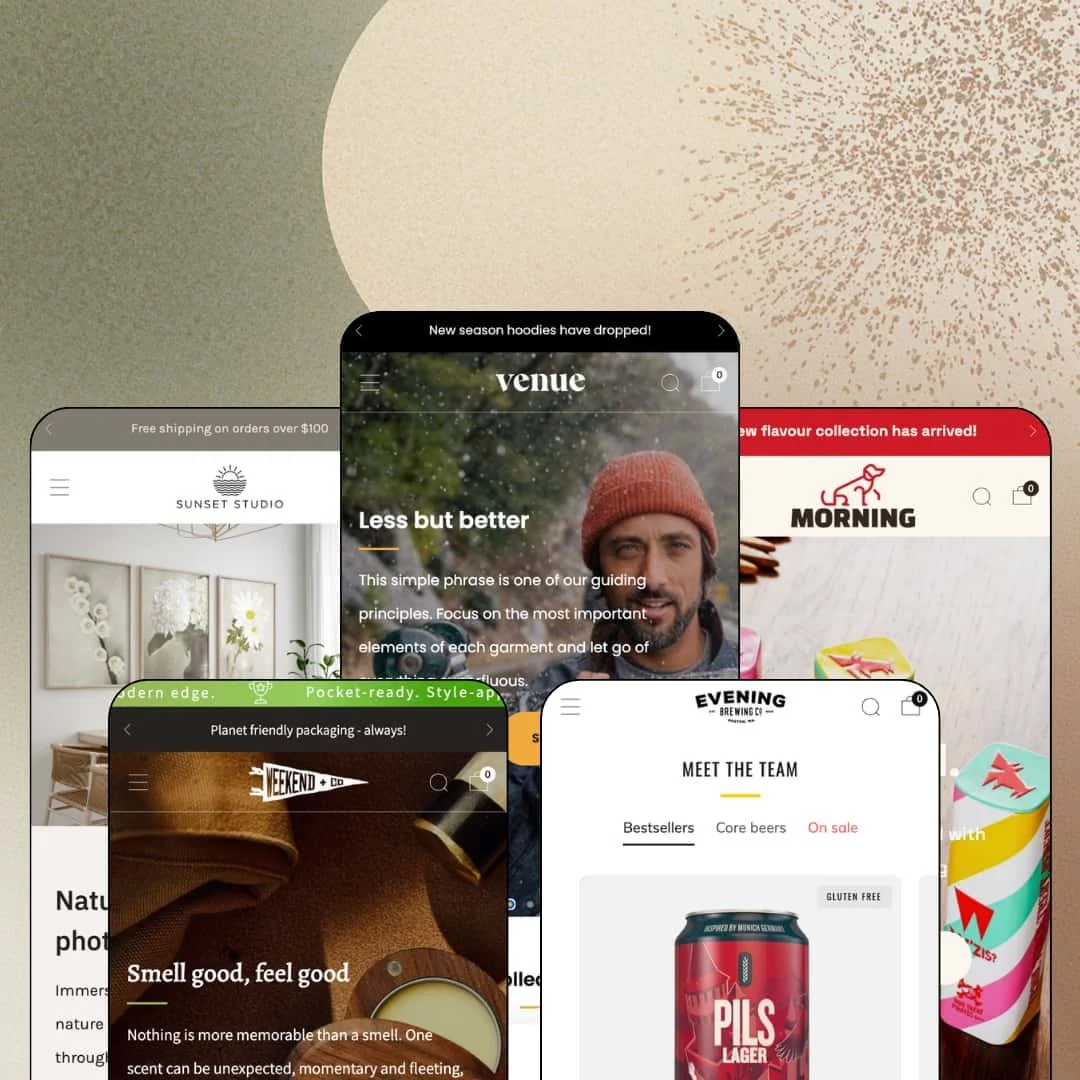
Most Shopify themes that launched in 2017 are coasting on their install base by now. Venue, the $380 five-preset theme from Safe As Milk, spent June 2026 swapping one of those presets out wholesale for a brand-new demo instead. Turnover like that in year nine says something about how this Online Store 2.0 theme is maintained, and it framed the question I carried into testing: does nearly a decade of iteration add up to a store worth building on today? I spent time in all five preset demos to find out.
A conversion kit that arrives already assembled
Countdown timers, stock counters, promo popups, promo tiles, trust badges, quick buy, and pre-order all ship in the box as one coordinated urgency-and-reassurance unit. On the apparel demo, a per-product countdown runs directly above a Pre-order button, so scarcity messaging and availability handling share a single glance in the buying area. That pairing takes zero custom work. For drop-model streetwear labels and flash-sale beauty brands selling to impulse-buy audiences, this is the launch toolkit already wired in on day one.
Mega menus that merchandise instead of just navigating
The menu columns accept far more than link lists: image promo tiles, blog-post cards, and direct product-level links all slot in beside standard collection columns. On the clothing demo, individual tees and hats sit in the dropdown as clickable entries with an On sale image tile beside them, turning the navigation itself into a campaign surface that changes with the season. That's shelf space, not just wayfinding. For merchants with 50 to 300 SKUs running seasonal campaign calendars, the header becomes a promotional slot you already own.
How much can a product page carry before you need a page builder?
That was my running question, and Venue's answer is: quite a lot. The product template stacks accordion sets, a Shop with confidence trust row with payment icons, and full storytelling sections with testimonials and video below the buy box, so a paid-traffic landing experience can live on the product page itself. No separate landing-page tooling required. For single-brand DTC stores under 100 SKUs selling considered purchases, that consolidates the funnel onto the page that actually converts.
Nine years in, still shipping like a young theme
Version 18.2.2 landed in June 2026 and didn't just patch bugs: it retired the Health & Beauty preset entirely and replaced it with the new Pets demo. Whole-preset turnover at this age signals a developer still investing in the product rather than milking a back catalog, which matters when a theme purchase needs to survive several years of platform change. The update log backs it up. For agencies standardizing client builds across food, pet, apparel, and art verticals, that maintenance record de-risks putting one theme underneath many stores.
The theme has a promotional accent it never quite drops
Rotating announcement bars, countdown blocks, scrolling tickers, and popup offers appear across four of the five demos, and every one of them is a toggle you can switch off. What remains after you do is still a section library whose strongest pieces are built for noise. If your brand whispers, Venue shouts. A restrained build is achievable, but luxury jewelry houses and considered-purchase ateliers with sub-30-SKU catalogs will spend their setup time deselecting features rather than discovering them.
Spec-driven catalogs get storytelling tools, not data tools
The merchandising features top out at product tabs, size charts, and usage information. Nothing in the section library or across five demos renders a comparison table or a metafield-driven spec matrix, so a catalog that sells on numbers rather than narrative has no native home for those numbers. That gap is real at $380. Electronics and furniture sellers with 200-plus-SKU, multi-attribute catalogs will end up hand-building tables in rich text or reaching for an app to present specifications properly.
An Online Store 2.0 ceiling in a Theme Blocks world
Venue's editor follows the OS 2.0 pattern of sections with roughly two levels of block nesting, while the newest Theme Blocks generation allows nesting up to eight levels deep. Day to day, few merchants will notice. The limit surfaces when layouts need heavy restructuring inside a single section, which is exactly where agencies delivering bespoke client builds and campaign-heavy merchants who rebuild pages every season start fighting the editor instead of using it.
What it takes to launch
Expect a one-to-two-day pass covering copy and imagery replacement across hero slots, testimonial and press sections, FAQ accordions, and location blocks, plus mega-menu re-staging with your own collection imagery and promo tiles.
-
What works in this preset
Browsing this demo feels like shopping a mid-size apparel brand that has already decided what you should look at next. A tabbed collection section rotates between Dark Collection, Tees & Knits, and On sale within one component, and the product cards inside it swap to a second image on hover while stacking badge pairs like Pre-order and New season without breaking the card layout. It stays dense but readable.
I sat up at one detail on the Portsmith Fleece product page: the full size chart, inches and centimeters included, renders directly inside the buying area instead of hiding behind a modal link. A Goes well with row pulls three related products in right below. That placement earns money.
The homepage closes with a dual store-locator section listing two locations with opening hours, phone numbers, and map imagery. For an apparel brand running physical retail alongside the web store, that section replaces a page build the merchant would otherwise owe themselves.
-
What works in this preset
An age gate loads before a single beer renders. The verifier fires as a full overlay with configurable Enter and Leave actions, which matters to anyone selling alcohol or other age-restricted goods because it ships inside the theme rather than as one more app install. No extra tooling needed.
Shopping by taste works here, not just by category. The mega menu carries dedicated Flavor profile and Beer strength columns, chocolate through citrus on one axis and 5% and under through 7% and above on the other, so a returning customer who knows what they like never touches the category tree.
A full featured-product module sits mid-homepage with a live variant picker for size and color, a quantity stepper, and a working add-to-cart, so a hero SKU sells without a page visit. Further down, the Specials on tap trio presents three non-purchasable brews with ABV callouts. One section sells, the other tells.
-
What works in this preset
This is the preset Safe As Milk shipped brand new in June 2026, and the fresh build shows. The homepage runs a before/after image slider you drag to compare two packshots, an icon ticker looping claims like Happy Dogs and Fresh Flavours, and a six-logo press strip, all sequenced around a countdown block that carries its own call-to-action button. It reads like a launch page, in a good way.
I went looking for the point where the product template runs out of room, and on the treat-tin page I never found it. Three separate accordion groups (Triple guarantee, Good to know, Shipping & Delivery) sit under the description, and further down a dedicated FAQ section splits into Nutrition, Feeding, and Product columns. That's a lot of answered objections.
The Inspired by Bertie block tells a founder-dog origin story, and the testimonial trio swaps generic source labels for attributions like Whippet Owner and Border Collie Owner. Small field, big credibility shift for a pet brand.
-
What works in this preset
Before the hero even arrives, a scrolling text ticker loops taglines like Heritage craft. Modern edge. across the top of the page. It sets a tone in half a second.
Gift shoppers get navigation built around budgets. The Gift Guide menu column splits the catalog into $10 to $30, $30 to $80, and $80 to $100 bands, and the featured playing-cards module below sells its Black, Green, Red, and Ivory decks through photographic color swatches rather than plain text chips.
The entire store runs on roughly a dozen products. It never feels thin, which is its own argument: the section library fills a homepage convincingly even when the catalog can't.
-
What works in this preset
Print buyers think in wall layouts, and this demo navigates that way. The Photo arrangement menu column sorts the catalog into Single, Two, Three, Four, Six, and Nine photo collections, matching how a customer actually plans a gallery wall rather than how a warehouse shelves inventory.
Scale is the other story here. I clicked through a sale collection holding 117 products and a country selector running past forty entries, and the same theme that just carried a twelve-product gift shop handled the volume without changing character. From-pricing covers the multi-size print variants cleanly.
Where it stumbles
Print sizes sell through variant dropdowns and a size-guide page, and nothing in the preset shows a print at scale in a room. For wall-art merchants whose buyers hesitate between a 12x16 and a 24x36, that judgment call lands entirely on the merchant's own lifestyle photography.
Built for stores with a front door
Every preset stages physical-world commerce in some form: location blocks with opening hours on the clothing demo, a brewery taproom with directions links, a workshop presented beside the retail counter on the gifts demo. Read together, the pattern is unmistakable. Venue treats click-and-mortar retail as a first-class use case, and merchants splitting revenue between a counter and a checkout page will feel that in how little they have to bolt on.
Real inventory, real partners, honest demos
Two of the five demos run on actual merchandise from named outside brands, with the pet treats sourced from W'ZIS and the art prints from Lisa Russo Fine Art. That choice quietly proves something a staged demo can't: the sections hold up when filled with real product data, real photography ratios, and real catalog quirks instead of idealized placeholders.
Navigation shaped by shopping logic
Across the family, menus keep modeling how buyers decide rather than how inventory is filed: taste and strength axes for beer, price bands for gifts, wall arrangements for prints. That consistency reads as a house philosophy rather than a one-off demo trick, and it hands merchants a ready template for organizing their own catalogs around purchase decisions.
Five demos, one homepage rhythm
Read back to back, every preset descends in nearly the same order: announcement rotation, story-tile hero, featured products, countdown, social proof, community block, newsletter close. The differentiation between verticals comes from imagery and palette, not from page composition. A merchant who wants a Venue store that doesn't feel like other Venue stores will be reordering and cutting sections, not just reskinning them.
The persuasion engine assumes you have proof to feed it
Venue's selling style leans on supplied evidence at every turn: testimonial trios, press-logo strips, founder narratives, owner-attributed quotes, location credentials. An established brand slots its material straight in. A pre-launch store with no press, no reviews, and no physical footprint loses much of what makes these demos convincing and ships noticeably quieter pages until that proof exists.
★ 8.0/10
Rating
-
Countdowns, pre-order, quick buy, stock counters, and age gating all ship native; a spec-table or comparison section is the one notable absence from the 30-plus section library.
8
-
Everything the demos do is section-and-toggle work with no code involved, but pages this dense mean a long list of settings to walk through before launch.
8
-
The mobile menu drills into nested collection levels with view-all shortcuts at each step; the trade-off is that dense homepage stacks become long scrolls on a phone.
8
-
Imagery lazy-loads throughout and pages stay lean relative to their section counts, though ticker loops and multiple video sections on some demos add weight a stripped-down build could skip.
8
-
One section library convincingly produces a brewery, a pet brand, a gift shop, an apparel label, and a print gallery, spanning roughly a dozen SKUs to three figures.
8
Frequently Asked Questions
-
Yes. Pre-order states appear on product cards and switch the buy-button label automatically on product pages, with several products staged that way across the demos.
-
Yes: an age-verification overlay fires on the brewery demo before the homepage becomes browsable, with configurable Enter and Leave actions.
-
No. Bundles on the pet demo are staged as ordinary products and collections, so dynamic pick-your-own bundling still requires an app.
-
The theme's interface strings ship in English, French, Italian, German, and Spanish; translating your product content remains separate work through Shopify's own tools.
-
In-store pickup display is on the feature list, so click-and-collect merchants can surface availability without extra tooling.
-
Yes, flagged as a Shopify Plus feature, which matters for brands that split colorways into separate listings and want them merged on one product page.
-
Both ends work in practice: one demo sells about twelve products while another runs past a hundred prints, with infinite scroll and swatch filters aimed at the larger end.
This review is based on hands-on testing of the publicly available preset demos of the Venue Shopify theme as of August 2026. Theme features, preset availability, and performance can change with subsequent updates from the theme developer.