
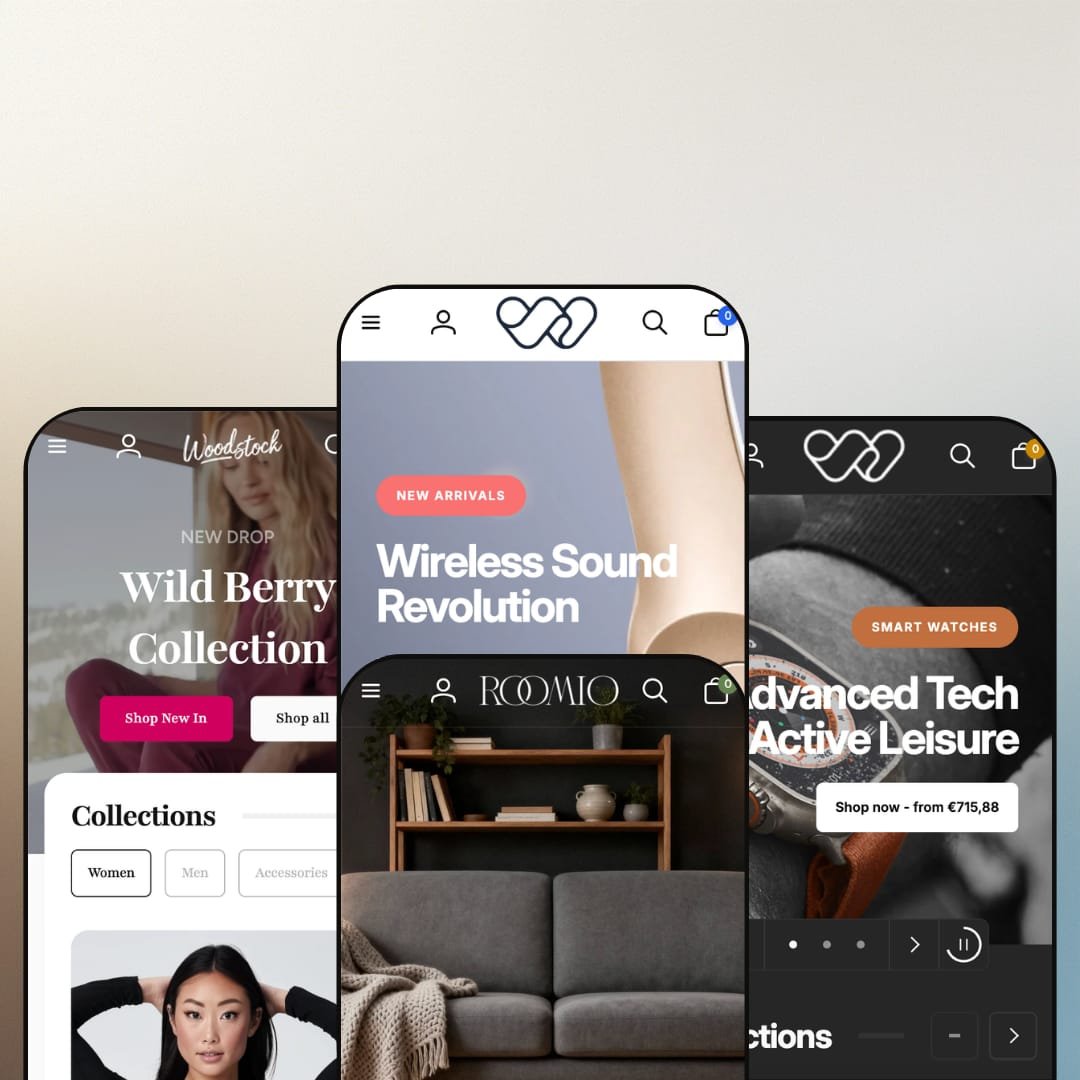
Most Shopify themes pick a lane: fashion, electronics, or furniture, and commit to it. Woodstock takes the opposite bet, shipping four preset demos that span consumer electronics, luxury watches, activewear, and home furniture from a single license. Built on Online Store 2.0, it leans on a sprawling section library to make one codebase pass for four very different kinds of store. The question that follows you through the demos is whether that range comes at the cost of depth.
Four storefronts in one license
Woodstock ships four preset demos that read as four different companies: a tech department store, a dark watch boutique, an activewear label, and a Scandinavian furniture brand. That breadth carries real commercial value for an agency building client sites across categories, or for a multi-brand operator who would otherwise license a separate theme per vertical and re-learn each one. The range is the product. One purchase covers four credible starting points under a single admin.
A built-in visual-merchandising kit
Dawn hands you a clean canvas and a short list of sections; Woodstock hands you image hotspots, shoppable lookbooks, a before/after image slider, and product-tagged video reels out of the box. These are theme-wide sections, available whichever preset you start from. For an editorial-led brand that sells on lifestyle imagery, whether fashion or furniture, where the photo does the persuading, they remove a stack of custom build work before the first campaign. You bring the photography; the sections are already here.
The cart drawer pulls its weight
Open the cart on any preset and it arrives loaded: a free-shipping threshold, a gift-wrap upsell, recommended products, an order-note field, and an in-drawer shipping estimate. Each piece is a small nudge toward a larger basket, gathered onto the one surface a shopper meets just before they pay. For impulse-friendly catalogs (accessories, gifting, or mid-AOV apparel where add-ons are easy yeses), that drawer does conversion work most of the page never sees. I clicked through every drawer. The contents never thinned out.
Variants you can see
Pick a color on a product page and the gallery regroups to that color's photos rather than leaving you to guess from a single hero shot, a behavior the March 2026 update made native. Swatch pickers, hover-to-second-image on cards, and that variant-aware gallery work together so a color decision is always shown, never described. For catalogs where buyers shop with their eyes, such as apparel in multiple colorways or furniture in several finishes, it is the difference between a confident add-to-cart and an abandoned tab. Show, don't tell.
A maximalist default that resists restraint
Woodstock's instinct is to add: badges, marquees, promo tiles, layered mega menus, sale flags, section after section. That suits a merchant who wants a busy, feature-forward storefront, but it pulls against single-product DTC brands and quiet-luxury labels, whose whole appeal is white space and the things left out. Paring the theme back to something spare means switching off and deleting a great deal, which is more work than starting from a plain theme and building up. If restraint is your brand, look elsewhere.
Online Store 2.0, not the newest block architecture
At $270 in 2026, Woodstock sits on the Online Store 2.0 generation: sections and standard app blocks, but not the deeper nested-block model, or the AI-assisted block generation, of the newest Horizon-era themes. In practice you still get flexible section-based editing, so this is a ceiling rather than a wall. Teams running large catalogs with in-house developers who customize aggressively will notice the generation gap first. It's current, but a step behind the frontier.
Broad section library, light on vertical-specific tools
The section toolkit is wide, but it stays general. The same "Add to compare" and one shared size-chart model serve every vertical rather than tools shaped to a single category: a furniture seller with large-format SKUs who wants dimensioned spec tables, or an electronics merchant with spec-heavy catalogs who wants true side-by-side comparison, will be building those with metafields and custom section work on top of what ships. The breadth runs horizontally across categories more than it runs deep into any one of them. Range, not specialization.
What it takes to launch
Plan a full content pass before launch: replace placeholder copy throughout, swap the stand-in product imagery for licensed originals, redo brand naming across whichever preset you choose, and populate the metafields behind swatches, size charts, and the compare tool. The maximalist demos give you a lot to strip back as well as a lot to fill in.
-
What works in this preset
The Woodstock preset is the everything store. It commits hard. A mega menu stacks promotional tiles, nested category columns, and a three-city customer-support block with real addresses and phone lines, and below it sit a hero slideshow and a "Power Your Life" mosaic of category cards covering phones, audio, laptops, and wearables. For a broad electronics catalog with dozens of subcategories, the layout gives every department a home on the homepage. I went looking for the catalog and mostly got sold to first.
The electronics framing extends into the support layer: a long FAQ accordion answers warranty, returns, and shipping questions in a buyer's own words, and trust rows reinforce guarantees near the fold. This is the kind of content an electronics shopper actually checks before a high-consideration purchase. It reads like a real store, not a placeholder.
Watch and phone cards carry star ratings in this demo, which look integrated but come from a review app rather than the theme. Worth knowing if social proof is central to your launch.
Where it stumbles
The same density that suits a giant catalog turns against a small one. Staged this heavily, the homepage competes with itself: hero, mosaic, reels, testimonials, and blog all ask for attention in the first few screens, and a focused ten-product catalog would look thin trying to fill the frame. This is a staging mismatch rather than a missing capability, since every section here is optional and theme-wide.
-
What works in this preset
Switch to Obsidian and the mood drops to a true dark palette, not a light theme with the lights off. The shift is more than a color swap. Against black, a background-video section and image hotspots frame high-ticket watches that the demo stages into five-figure territory, and the restraint reads like a boutique rather than a bargain bin. For a focused, high-consideration catalog such as luxury watches or any single-category premium line, the darker canvas does flattering work.
A store-hours block and an embedded map give the page a bricks-and-mortar dimension, useful for a boutique that also sells in person or wants to signal a physical presence. The mega menu narrows to a clean watch taxonomy here.
I noticed the same lookbook and hotspot sections that power the other presets doing quieter, more deliberate work here, each one pointed at fewer and far pricier products. The toolkit is identical; the editing is calmer.
-
What works in this preset
Vita is where the fashion toolkit finally gets a workout. This is the stress test. Tabbed collection grids sort the catalog by Women, Men, and Accessories; a "Shop the Look" hotspot turns an editorial photo into shoppable points; and product pages carry color-and-size pickers, a size-chart modal, and an "Add to compare" control. For an apparel label with seasonal drops and cross-category shoppers spanning tops, leggings, outerwear, and footwear, the merchandising surfaces match how people actually browse.
A "Shop by Color" slider leans into trend-led buying, sorting the range by shade for shoppers who start from a palette rather than a product. A press-logo row supplies the social proof, drawing on the theme's dedicated press section.
The product page itself is well-organized: variant-grouped images, tabbed Description, Details, Size and Fit, Care, and Delivery panels, plus trust badges under the buy button. It's the most complete product template of the four demos.
Where it stumbles
All that merchandising stacks up. By the time you reach a buy-ready grid you have scrolled past a hero, a tabbed grid, a lookbook, a color slider, a recommendation splash, and a press row, and on a phone that is a long way down before the first add-to-cart appears. I kept scrolling, waiting to be allowed to shop. The fix is editorial discipline on the merchant's side rather than a theme limit, but the default arrangement front-loads mood over conversion.
-
What works in this preset
Roomio is the newest preset, and it shows. It is the most cohesive of the four. A video-slideshow hero opens onto room-sorted product tabs for Chairs, Sofas, Lamps, and Accessories, a "Shop the Room" lookbook with quick-view, and a calm brand-story section built around video. For a furniture or home-decor brand selling considered, higher-ticket pieces such as sofas, lighting, and statement chairs, the pacing finally feels intentional rather than crammed.
The content model here is genuinely good: the FAQ answers materials, delivery lead times, and care in specific, on-brand language, and a linked care guide extends it. For high-ticket furniture, that pre-purchase reassurance matters.
Most usefully, Roomio is proof the theme can be quiet. The same engine that builds the busy electronics store also builds this restrained, editorial furniture brand, which tells you the density elsewhere is a choice, not a constraint.
The range is real, not cosmetic
Read all four demos back to back and the engine genuinely becomes four different stores, each reaching its own design language: a department-store grid, a dark boutique, an editorial fitness label, a warm furniture showroom. The differences run deeper than swapped products and palettes; the compositions themselves diverge. Few themes attempt this spread, and fewer make each end convincing.
One system under every skin
Beneath the four aesthetics, the same spine repeats: one cart drawer, one mega-menu architecture, one hotspot-and-lookbook system, one product template. A merchant learns the theme once and can redeploy it across very different catalogs without relearning it. That consistency is a quiet operational asset for anyone running more than one store.
The trajectory points toward refinement
The newest preset is also the most disciplined, which suggests the developer is learning to edit, not just to add. If that direction holds, the theme's weakest tendency, its habit of overcrowding, is the one most likely to improve. That is a reassuring signal for a multi-year purchase.
Capable, but it brings no point of view
The theme equips you for almost anything and argues for nothing. The presets that land hardest, Roomio and Obsidian, succeed as much on restraint and photography the merchant must supply as on the theme itself; hand the same layout ordinary imagery and it reads ordinary. You are buying range and a blank check for taste, and the taste has to come from you.
The four verticals are specific ones
Woodstock's breadth covers electronics, watches, activewear, and furniture well, but the listing also courts jewelry, beauty, and food merchants who will not find a preset tuned to them. They start from the nearest neighbor and adapt, which is workable but undercuts the one-purchase-fits-my-category promise for anyone just outside the four.
★ 7.8/10
Rating
-
A wide, genuinely useful section library spanning merchandising, conversion, and discovery, plus a complete cart drawer and a strong product template.
9
-
Standard Online Store 2.0 editing, but the maximalist demos are heavy to strip back and the configuration surface is large.
7
-
Responsive with a clear mobile menu, though the editorial-dense pages make for long scrolls to a buy action on phones.
7
-
Video heroes, reels, and many sections make the defaults weighty; it lightens considerably once trimmed to what a store actually needs.
7
-
Four distinct preset starting points, a broad section set, and dedicated swatch and color tooling give wide creative range.
9
Frequently Asked Questions
-
No. The ratings in the demos come from a Shopify-compatible review app; the theme provides the placement and styling, and you add the review app yourself.
-
It is a genuine dark palette with its own contrast and treatment, not a light design with the colors flipped, so it holds up as a deliberate look rather than a quick toggle.
-
A store runs on one preset as its base. You can borrow individual sections between looks, but you choose a single starting design and customize from there.
-
Woodstock suits broad, multi-category catalogs that need every department on the homepage; Obsidian suits focused, higher-ticket or single-category lines that benefit from a darker, calmer canvas.
-
They are a native theme section that tags products onto video; you supply the video files, which are served from your own store.
-
The developer maintains a documentation center for the theme and handles questions through a support desk, with setup and customization guidance available there
This review is based on hands-on testing of the publicly available preset demos of the Woodstock Shopify theme as of June 2026. Theme features, preset availability, and performance can change with subsequent updates from the theme developer.