
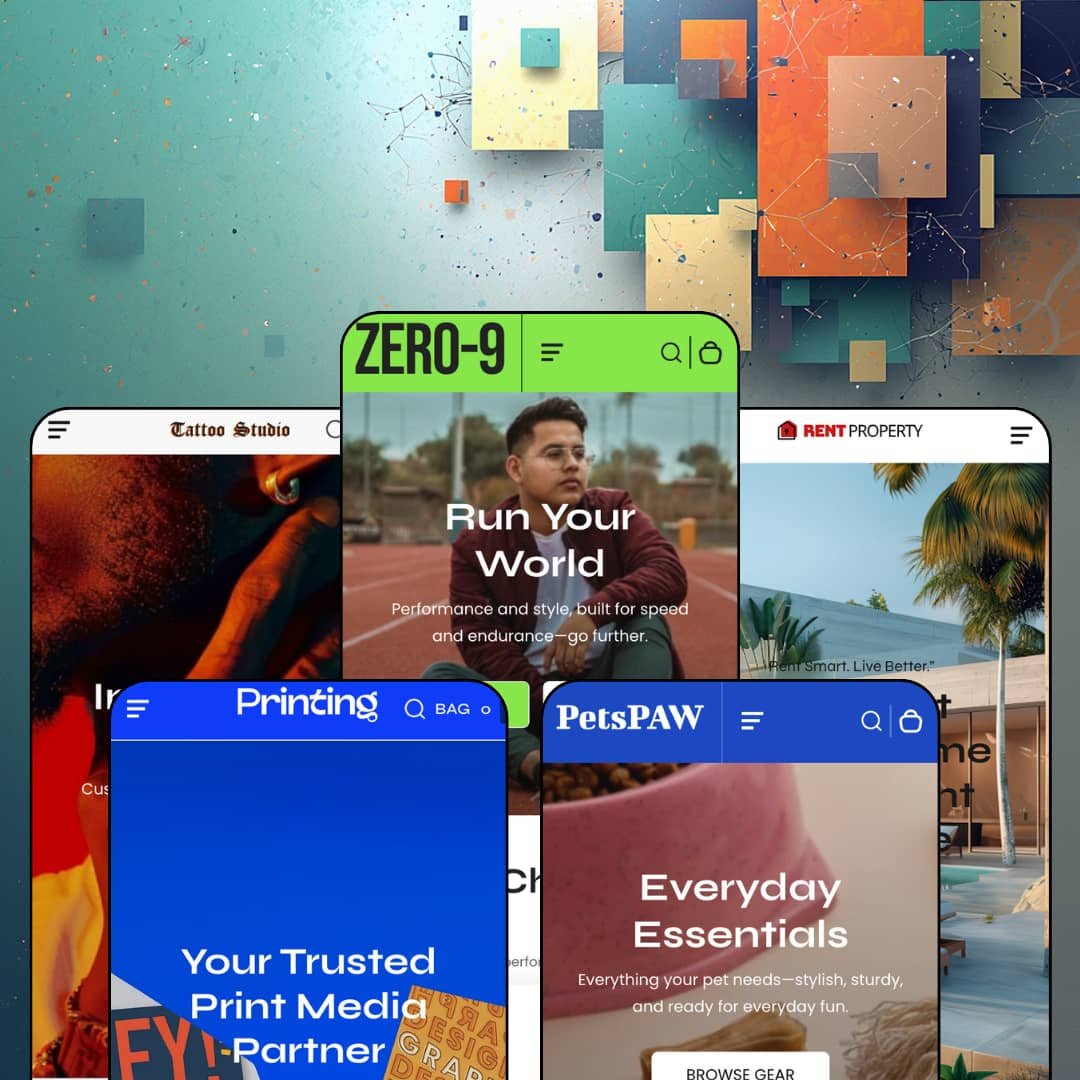
Most five-preset themes stretch one storefront across five color palettes. Zero stretches across five markets that have nothing to do with each other: performance shoes, pet toys, a print shop, a tattoo studio, and rental property. Omelatte FZ-LLC built it on Online Store 2.0 architecture and prices it at $320, squarely in premium territory. Whether the stretch holds is the real question here, because two of those five demos aren't primarily selling products at all.
Homepage buy modules close the sale in place
The featured-product section renders a complete purchase form directly on the homepage: color swatches, shoe-size buttons, a quantity stepper, and a live subtotal line, staged with a two-axis variant set on the flagship and a color-chip version on Wag. That's the whole trip. A shopper can land, configure, and add to bag without ever opening a product page, which compresses the funnel in a way most of this theme's other sections only gesture at. For hero-product DTC brands and impulse-buy catalogs under 50 SKUs, this section carries the heaviest conversion weight in the library.
Can a menu close a sale?
Zero's mega menu thinks so. The flagship's Women and Men columns each lead with three named featured products, Black Gold Pro and Marathon Track Running among them, sitting beside conventional Shoe Type category links, so the dropdown promotes specific items before a shopper reaches any grid. Navigation becomes shelf space. Footwear and apparel merchants running 50 to 200 SKUs with cross-shop-heavy browsers get a merchandising surface out of a structure competitors usually leave as plain links.
A lead-gen form where the hero usually sits
The service form section puts an inquiry flow at the top of the page: name, a service dropdown, phone, email, and a 200-character message field. The Printing demo stages it with print-service options while Property reconfigures the same section with rental and lease choices, which confirms the dropdown is merchant-editable rather than hardcoded. The homepage becomes an intake desk. Print shops, studios, and other service-adjacent merchants running custom-quote work for considered-purchase buyers get a native capture tool that product themes rarely carry.
Card-level spec rows turn products into listings
Property cards render an icon row under each price: bedrooms, bathrooms, and square footage, visible at grid level before any click. Specs surface where browsing happens. Structured attributes on the card change how comparison works, because a shopper can shortlist from the grid instead of opening tabs to check basics one listing at a time. Spec-forward inventories in the 11 to 100 listing range, from property through furniture and equipment, are the audience this treatment actually serves.
Service verticals without service machinery
Three of five presets sell things you book rather than ship: tattoo sessions, print runs, property leases. The theme's entire answer to that is the inquiry form. There is no scheduling surface, no deposit flow, and no quote-to-order path anywhere in the feature set, so the transaction these verticals actually run on happens off-theme, in email threads or outside tools, after the form fires. The cart can sell a tattoo design. It can't book one. Tattoo studios and print-service shops with appointment-driven, considered-purchase business models should price in that gap before buying the preset that matches their sign.
The proof layer is presentation, not collection
Testimonial sliders on the homepages and the tattoo product page are hand-typed content blocks, and the brand-logo rows are uploaded graphics. Nothing collects. The theme ships no review engine and no rating aggregation, so every quote a merchant displays is one they wrote into the editor themselves, with all the credibility limits that implies once shoppers notice. Pet and footwear merchants in impulse-buy categories chasing repeat buyers will need a review app before this layer verifies anything.
Online Store 2.0 architecture at a 2026 premium price
At $320, Zero sells the same architectural generation that Shopify's free Dawn establishes as the baseline, with the two-level block nesting that generation allows and nothing deeper. The price buys the library, not newer plumbing. Zero's library genuinely outbuilds Dawn's, so the comparison isn't fatal, but it frames what the money purchases. Single-brand merchants running 100 to 500 SKU catalogs who expect deep block composition from a premium purchase should check that ceiling first.
Limited track record
Zero launched March 24, 2025, and carries two Theme Store reviews as of this writing, both positive, one crediting fast support responses. Two data points aren't a pattern. Seventeen months in, there's no volume of merchant feedback yet to surface how the theme behaves under real catalogs, real traffic, or real support load. Single-brand operators building an evergreen store on a multi-year theme commitment are taking that uncertainty on themselves.
What it takes to launch
Expect a multi-day pass covering cross-preset copy cleanup where marketing lines from one vertical resurface in another, inventory and availability re-staging, metafield population for the card-level attribute rows, and a brand-naming sweep across the demo content.
-
What works in this preset
Landing on the Zero-9 demo feels like walking into a stadium shop mid-promotion. Six hero slides rotate. The announcement bar cycles four messages, a Cyber Monday banner anchors the mid-page, and most product cards in the featured grids carry a struck-through price beside the sale figure, so the storefront argues for urgency before a shopper has picked a category. A countdown block and promo tiles further down keep that pressure running to the footer.
Tabbed merchandising does a lot of quiet work on this homepage. One tabbed block switches between Basketball, Badminton, and Running collections in place; a second block further down runs Wrestling, Soccer, and Running, so a single scroll surfaces six slices of the catalog without a click into collection pages. Between them, a scrolling product ticker loops sale items with prices and View Detail links, which turns even the transitions into shelf space.
I sat up at the search overlay, because it behaves like a small landing page. Before a shopper types a character, it offers Popular Links for four sport categories, a Quick Links column, and a featured slot promoting indoor shoes. Search-first visitors get merchandised on arrival instead of staring at an empty input field.
-
What works in this preset
"🧸 New Toys Just Dropped" scrolls past before you see a single product, and that emoji-led announcement bar sets the register for the whole preset. Wag trades the flagship's stadium tone for rounded cards, pastel banners, and a three-slide hero, which shows the same theme carrying a soft consumer brand as comfortably as a performance one. The tone shift is styling work, not new sections.
I scrolled through the catalog page, and the browsing layer is more complete than the small demo suggests. Sub-collection pills sit above the grid, a filter drawer opens with its own embedded search field, and the sort menu offers nine orderings over a 27-product catalog. That's real wayfinding. Small pet stores won't need it on day one, but it's the part of this preset that scales past the demo's size.
Where it stumbles
Every product in this demo is staged as backordered or sold out. A storefront pitched on quick view and fast add-to-bag argues against itself when nothing can actually be bagged, and shoppers evaluating the buying flow through this preset hit dead buttons at every card. For a conversion-focused theme, that staging choice undercuts the sales pitch the preset exists to make.
-
What works in this preset
Which theme demo teaches you prepress? This one does. The homepage FAQ block answers file-format questions with press-ready specifics, from accepted formats through 300 dpi CMYK export down to a rich-black ink recipe, and that concreteness makes the section read like a working service page rather than filler. Print shops get a usable content template, not just a layout.
Trust framing arrives early and in structure. An icon row states four service claims under the hero, the collection grid prints product counts directly on its tiles, and a testimonial slider rotates three customer quotes with names attached. It's a lead-capture homepage wearing a storefront's clothes.
Where it stumbles
The catalog staging reads against the vertical, and this kept bugging me. Most collections here hold two products at flat single prices, while actual print buyers think in run sizes and paper stocks; the demo stages none of that variant depth on its items. A print shop adopting this preset inherits the landing-page framing but has to build the vertical's pricing logic into its own product setup from nothing.
-
What works in this preset
I spent time on the Red Dragon product page, and it's structured like a consultation, not a listing. Three tabs cover design and sizing, ink safety, and aftercare; a second accordion pair below the buy box handles booking deposits and touch-up terms; a four-item icon list states vegan inks and sterile setup; two policy tiles with icons summarize refunds and shipping. That is a lot of load-bearing structure for a studio that would otherwise scatter this across pages.
The services grid reads like a studio menu. Nine style tiles run from Line Work through Japanese, each with a one-line descriptor, and the block doubles as navigation into style-specific collections. Studios organize their portfolios exactly this way, so the section maps onto how the vertical already presents itself.
-
What works in this preset
You can shop the tour footage here. Each of the two video blocks carries three listing cards beside the player, complete with price and View Detail links, so a property tour clip converts directly into browsable units. It's the most commerce-forward video treatment in the preset family.
Typology badges keep the grid legible. Cards wear labels reading Rental House, Apartment, Shop, or Commercial above the title, and a collection list sorts the inventory into rental categories from budget through luxury. For inventory where category outranks brand, that labeling does the sorting a logo wall can't.
Where it stumbles
A property vertical with no map is a strange thing. There's no location section, no neighborhood browsing, no geographic filter anywhere in the demo; listings exist purely as product cards, and a renter who thinks in districts first has no way to browse that way. It's the one vertical-specific tool this preset visibly needed and doesn't stage.
Re-skins with different skeletons
The five demos change structure, not just palette. The sports flagship runs a long promotional stack, the two service presets rebuild the homepage around intake and portfolio blocks, and the pet demo sits between them with a softer retail grammar built from the same parts. Reading all five side by side is the only way to see how far one section library bends, and it bends further than the shoe-first sales pitch implies.
Sections that change jobs between presets
The before/after slider styles sneaker colorways in one demo and dramatizes a pet-wellness transformation in another; video blocks run as brand film in one preset and as shoppable inventory reels in another. Range here shows up as role changes rather than section count, which matters for merchants planning to repurpose blocks outside their preset's staged intent.
The listing and the demos describe different themes
The Theme Store files Zero under Jewelry & Accessories and Food & Drink, the sales copy pitches shoes, and the presets stage pets, printing, tattoos, and property. Buyers arriving from either listed industry find no matching preset; buyers in three of the five staged verticals find no matching industry tag. Even the page's own meta description counts two ready-made designs where the listing displays five.
A discount voice runs through the whole family
Cyber Monday banners appear in two demos, percent-off announcement messages run in all five, and struck-through pricing covers most of the flagship grid. The promotional register is a family trait, not one preset's styling choice, so full-price and premium-positioned brands face a rewrite of the selling grammar across every surface they adopt.
Rating
★ 7.2/10
-
Homepage buy modules, an intake form section, and card-level attribute rows give the library genuine conversion tools; the service verticals it courts get no booking mechanics.
7
-
Five staged starting points cover unusually different businesses, but the copy and inventory state of the demos means real cleanup before any of them ships.
7
-
The tattoo and property demos stage dedicated mobile hero assets rather than cropped desktop art, and the slide-out menu keeps deep catalogs reachable.
8
-
Card imagery loads lazily and stays light, though the flagship homepage stacks a very long run of sections with looping ticker content that shoppers scroll past twice.
7
-
The same sections credibly build a promo-heavy shoe store, a soft pet brand, and lead-gen service pages; that spread is the theme's best argument for itself.
7
Frequently Asked Questions
-
Five: Zero, Wag, Printing, Tattoo, and Property. The Theme Store page's meta description still says two ready-made designs, but the listing itself displays all five.
-
Interface strings come in English, French, Italian, German, and Spanish, and the flagship demo stages the language selector live in the footer next to a country picker.
-
Both appear on the official feature list, alongside a quick order list, stock counter, and slide-out cart in the cart-and-checkout group.
-
The Zero flagship. Its single homepage runs a slideshow, tabbed collections, a countdown, a before/after slider, brand logos, video, a product ticker, and blog cards in one scroll.
-
Omelatte FZ-LLC, based in Ras Al Khaimah, UAE. Version 2.1.2 shipped January 22, 2026, citing header stability, product form behavior, and variant set handling.
-
Yes, it's listed under marketing features next to promo popups and countdown timers, which is relevant for tattoo shops and any merchant carrying age-restricted merch.
-
Shopify classifies Zero for catalogs of 11 to 100-plus products, and the demos stage between roughly a dozen and thirty items each.
This review is based on hands-on testing of the publicly available preset demos of the Zero Shopify theme as of August 2026. Theme features, preset availability, and performance can change with subsequent updates from the theme developer.