
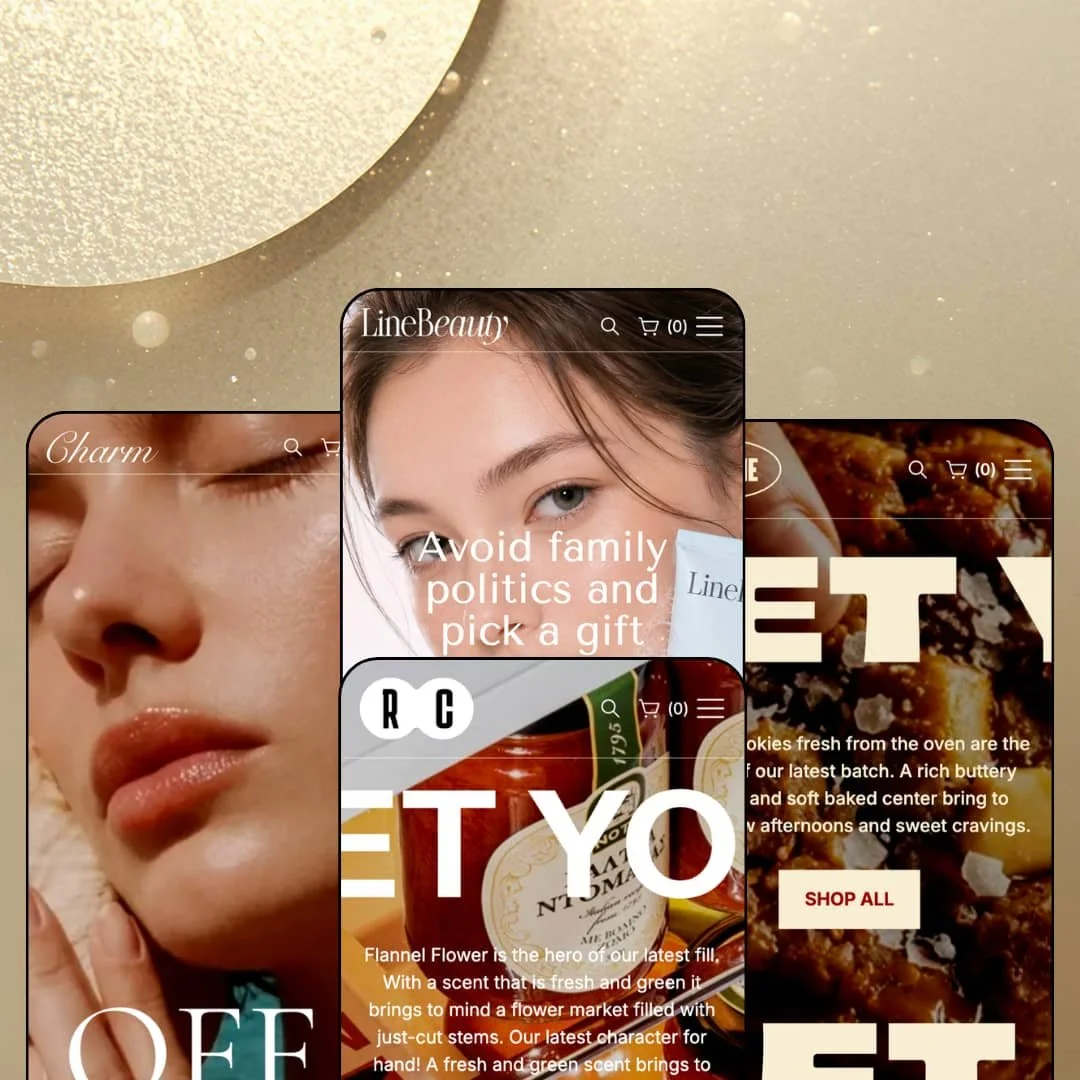
Most beauty-positioned Shopify themes ship one skincare demo and call it a day. Line ships a face-wash store, a jewelry store, a nut-butter store and a cookie store from one $260 purchase, which tells you the "beauty" label is more a mood than a boundary. If you sell small, photogenic consumables and want a quiet, minimalist frame around them, that's the question these four presets are built to answer. The theme runs on Online Store 2.0 with JSON templates, and its section library grew by a dozen sections in the July 2026 version 2.0.0 release.
Three product-page information layouts, switchable per template
Every preset stages the same three product templates: a fixed carousel with the buy box pinned while the gallery scrolls, a standard carousel, and a stacked layout for long image sets. Merchants get that choice per template. It matters because a serum with three angles and a gift set with twelve photos shouldn't be forced through the same gallery, and Line lets a single store run both without a second theme install. For skincare or supplement brands under 100 SKUs with a considered-purchase buyer, that's the layout decision that shapes conversion.
An ingredient spotlight section built for label-readers
What does a face wash actually contain? Line answers with a dedicated product-page section that lists each ingredient as a heading, an image and a one-line description; the Pure Dew demo stages four of them, Lillypilly Extract through Eucalyptus Oil, in a tabbed row. It's the theme's clearest nod to its beauty pitch. Clean-beauty brands with a small evergreen catalog and a repeat-buyer audience who read INCI lists get a merchandising surface for the thing they sell on, without bolting on a page builder.
A metafield-driven comparison table on the product page
The product page can render a side-by-side table of three products with rows for price, material, release year, assembly and height, each row pulled from product metafields, and a Quick view button at the bottom of every column. Same five rows on every preset. That turns a single product page into a mini decision page, which is exactly where a shopper choosing between a 30ml and a 50ml, or between two serums, tends to stall. For jewelry or gadget-adjacent merchants with 50 to 200 SKUs and multi-attribute variants, this section does comparison work inside the theme itself.
Testimonials that carry a product card
The Testimonial section pairs each quote with an avatar, a name, a role line and a full product card with price, arranged as a carousel. A review becomes a buy button. Instead of social proof living in one block and merchandising in another, the theme wires them together so the product the customer is praising sits inside the same tile, one click from the cart. Gift-led and impulse-buy categories, bakeries, candles, small-batch food with catalogs under 30 SKUs, get the most out of that pairing.
Two reviews in eleven months
Line launched in October 2025 and had two Theme Store reviews when I checked, both positive. That's a thin track record. It means very few merchants have run this theme through a holiday season, a flash sale or an app-heavy setup and come back to say how it held up, and the two who did wrote about support rather than performance. Single-brand DTC merchants planning a multi-year store on a subscription or restock-driven model should weigh that before committing.
Four presets on the box, three homepage layouts in practice
Cookie and Snacks share the same section order top to bottom: hero, three category tiles, featured grid, best-seller spotlight, countdown, two image banners, About block, promo banner, blog grid, trust row. Only the palette and the photography change. That's lazy. A merchant paying $260 for a four-preset theme is really buying three compositions and a recolor, and a food merchant comparing the two demos will notice within a minute of scrolling. Bakeries and snack brands with under 30 SKUs still get a good preset; they just don't get two.
Quiet is the only register
Across all four presets the typography weight, section spacing and card style stay identical; even Snacks, staged in all caps with loud copy, sits in the same measured rhythm as the beauty preset. There's no display-face or editorial layout staged anywhere. The Theme Store calls it minimalist, and it is, but minimalism here is a ceiling as much as a style. Drop-model streetwear, kids' stores and flash-sale brands whose identity depends on visual noise will find the theme keeps turning the volume back down.
What it takes to launch
Expect a multi-day copy pass across hero captions, testimonial and press blocks, blog entries and footer link targets, plus metafield population for the comparison-table and ingredient sections and a re-check of the staged language and country selectors before launch.
-
What works in this preset
The homepage opens with a gift pitch rather than a product shot. A full-bleed hero, a headline about avoiding family politics, one button, then a second banner for macadamia body care underneath it, and only after that do product cards appear. It's a slow reveal. Cards carry size chips right on the tile, so a shopper picks 40x40 or 120x120 without leaving the grid.
Shop-by-collection runs as a horizontal tab row: Cleansing, Exfoliation, Moisturizing & Hydration, Treatment & Correcting, Sun Protection, Specialized Skincare, each tab swapping the product set beneath it. I noticed the tabs mirror how a skincare routine is actually structured, which makes the section feel merchandised rather than decorative. Six tabs, one section, no page reload.
Three language options sit in the header. English, Vietnamese and Simplified Chinese are staged in both the top bar and the search overlay, and the search overlay itself opens with six "Popular searches" chips pointing at named collections. That chip row is the kind of small touch that shortens a return visitor's path. The footer below carries a logo, a street-address line, four link columns, a social row, a country selector and payment icons in one block.
-
What works in this preset
Jewelry needs motion, and Charm knows it. Two autoplaying video blocks sit mid-page, each paired with a headline and a shop-all button, and they break up what would otherwise be a long run of static tiles. Video is a section option here, not a hack.
The "Our collection" section stages five category labels, Rings, Earring, Necklace, Brooch, Bracelet, each with its own paragraph and a View Product button, arranged as a scrollable showcase rather than a grid. It reads like a lookbook index. I spent time clicking through those five, and each one lands on a real product page with a jewelry-material axis and a size axis, so the variant picker gets a proper two-dimensional test.
Scroll far enough and the page turns editorial. A four-quote testimonial row with avatars, a press-logo strip, then a four-post blog grid with dates and read-article links. For a jewelry brand that sells on story, that bottom third does the trust work.
Where it stumbles
The Charm demo is staged as a luxury brand and then opens with a 90%-off-everything hero. Lab diamonds, 18k gold, milestone-jewelry copy, and the first thing a visitor sees is a clearance banner. That's a staging choice, not a theme limit, but it reads against the preset's own positioning, and a merchant will want to swap that hero before showing the store to anyone.
-
What works in this preset
A hazelnut, a headline in all caps, and three category tiles. Energy Chip, Butter and Sauce sit directly under the hero with Shop Now buttons, and the whole top of the page is done in three scrolls. Fast, loud, appetite-first.
This one I sat up for. The best-seller spotlight stages one product with a three-icon benefit row, four weight chips from 250G to 550G, a price and an Add to cart button, all on the homepage, so a repeat buyer never has to open a product page. Below it, a countdown section with a background image counts down a "Sweet Art Collection" sale with a Discover now button.
Promo banners do a lot here. "BUY 1 BOX GET 3 PACK, ONLY $90.00" sits as its own section between the About block and the image grid, and the footer trust row repeats Recyclable, Fast & Free Shipping and Natural as icon columns. For a snack brand that runs on bundle deals, those blocks are the merchandising surface.
-
What works in this preset
Cookie is the newest preset, added in the 2.0.0 release, and it's the warmest of the four. Cream and brown palette, rounded product photography, prices staged as ranges like $14.00 to $54.00 with TRIO, SIXER, DOZEN and PARTY BOX chips on every card. The pack-size logic is baked into the cards.
The product page adds a Caring tab beside Description and Shipping & Return, with storage instructions, and runs a text marquee ("FRESH, BUTTERY, SOFT, CRISPY") as a full-width strip beneath the trust icons. It's a bakery-menu rhythm. A three-icon row for Freshly Baked Daily, Fast & Free Shipping and Quality Ingredients sits right under the buy box, so the reassurance lands before the shopper scrolls.
Blog content is cookie-specific rather than generic: holiday gift boxes, cookies and milk, a red velvet launch, decorating ideas. Small thing, but it makes the demo feel like a store you could copy rather than a template you have to gut.
Switching presets later is a restyle, not a rebuild
Read all four demos and the same skeleton appears every time: a three-level mega menu, a back-stacking mobile menu with the logo repeated on each panel, a search overlay with suggestion chips, the same product-page template trio, the same footer composition. That consistency means a merchant who launches on Line and later wants Cookie's warmth keeps their navigation, product templates and footer intact. The presets are skins over one system, and for once that's the reassuring reading.
The homepage is treated as a checkout surface
Every preset puts at least one direct add-to-cart path on the homepage, whether through a product spotlight, a promo banner or a countdown with a call to action. The theme's merchandising philosophy is that the shopper shouldn't need to reach a product page to buy. For small-catalog consumables that's the right instinct, and it shows up consistently rather than in one showcase preset.
The library is still growing
Twelve new sections and a new preset arrived nine months after launch, including bundles, flash sale, infographic, table content and two countdown variants. That's an active developer, not a set-and-forget theme. Buyers get a section library that's broader in September 2026 than it was on launch day, and the changelog suggests more is coming.
The beauty label undersells the actual range
The Theme Store pitches Line as a beauty theme, yet three of the four presets sell food and jewelry. A skincare merchant gets one preset built for them and three references to adapt; a snack merchant gets two presets and a name that doesn't fit. Neither audience is being spoken to directly, and that positioning gap shows up in how the Theme Store's own "more themes for beauty" row surrounds it.
Trust content depends on static blocks
Testimonials, press logos and client-feedback panels are all theme sections across every preset, with no review-app integration hooks staged anywhere in the four demos. A merchant running Judge.me or a similar app will have to decide where the theme's own testimonial sections and the app widget coexist on the product page. It's workable, but the theme doesn't show you how.
★ 7.6/10
Rating
-
Comparison table, ingredient spotlight, homepage add-to-cart and three product templates cover consumables well; nothing here for apparel or configurator-style catalogs.
8
-
Section library is broad and the demos map each section to a named page, but metafield-driven sections need population before they render anything useful.
7
-
The mobile menu uses a back-button stacking pattern with the logo on every panel, and sticky cart is a theme option; video sections carry poster images for phones.
8
-
Homepages run lean: WebP assets throughout, lazy-loaded imagery, and video only where a preset actually calls for it.
8
-
Four palettes and a dozen new sections give range within minimalism; stepping outside that register isn't something the theme is set up for.
7
Frequently Asked Questions
-
Yes. The best-seller spotlight section stages a product with variant chips, price and an Add to cart button, and both food presets run it as the fourth section on the page.
-
The product page lists pickup availability by location with a "usually ready in 24 hours" line and a "check availability at other stores" modal; the beauty demo stages three locations.
-
Three levels. The demos run a top-level item, a second-level group and a third-level page list in both the desktop mega menu and the mobile menu.
-
The theme ships English, French, Italian, German and Spanish interface strings. The demos stage English, Vietnamese and Simplified Chinese switchers to show the selector working.
-
Yes, and there's more than one: a countdown with background image, a countdown with text, and a dedicated flash-sale section were all added in the 2.0.0 release.
-
A slide-out drawer with an empty state, a continue-shopping button and a "log in to check out faster" prompt. A sticky cart option is also listed for mobile.
-
It does. The Snacks demo triggers a size-guide modal from the buy box with a chart image, and the jewelry preset places the same guide as a tab beside Description and Shipping.
This review is based on hands-on testing of the publicly available preset demos of the Line Shopify theme as of September 25 2026. Theme features, preset availability, and performance can change with subsequent updates from the theme developer.