
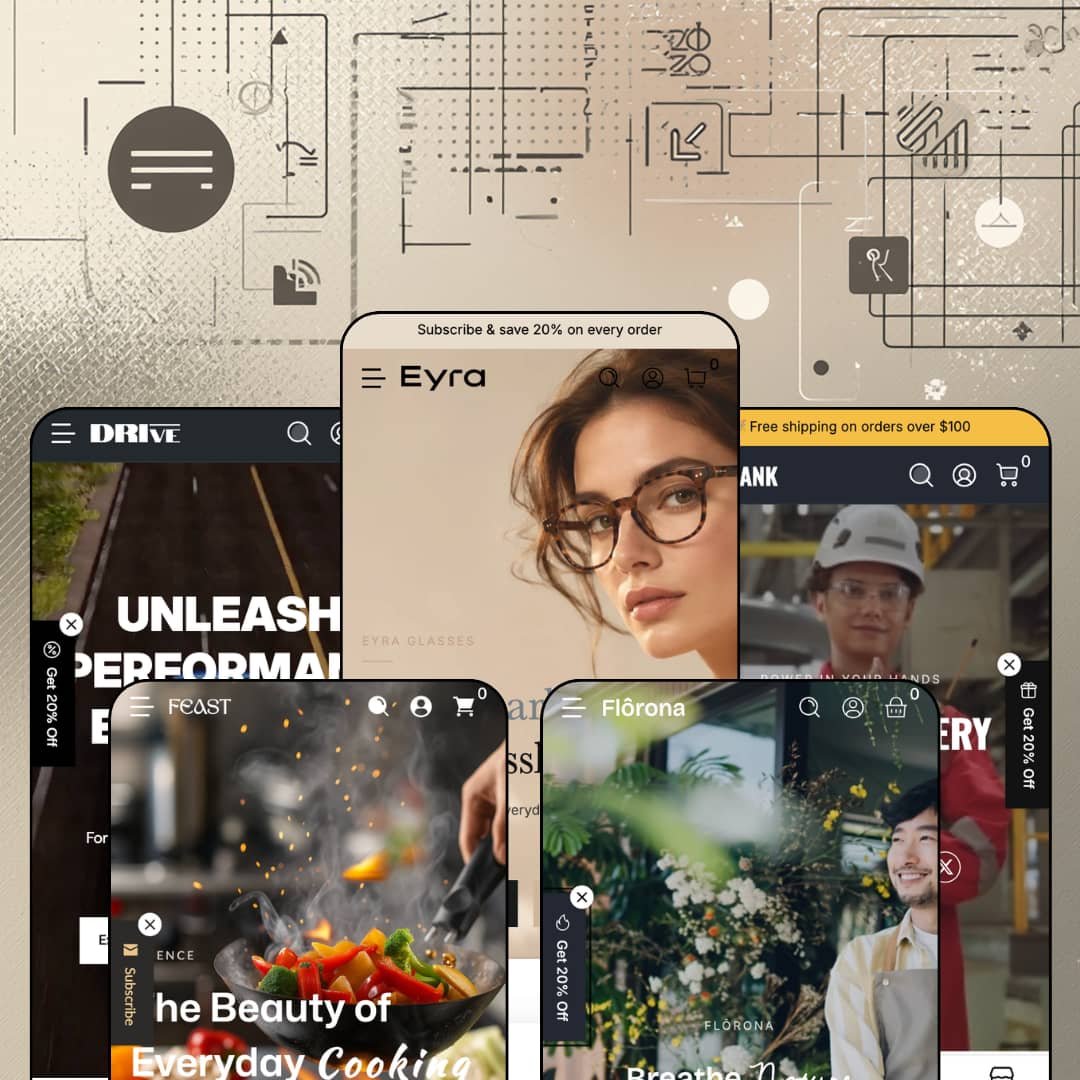
You're selling drills, alloy wheels, or a 10.5-inch frying pan, and your buyer wants a spec sheet before they want a story. That's the shopper Webvista Studio built Krank for: a $320 Online Store 2.0 theme with five presets (Krank, Drive, Florona, Feast, Eyra) that treats every product page as a data sheet with a compare table underneath it. The catch is that the same industrial grammar runs under the plant shop and the eyewear boutique, and whether that reads as consistency or as a costume depends on what you sell. I spent time in all five demos to find out where the data-first approach earns its keep and where it strains.
A mega menu that behaves like a catalog index
Krank's dropdown accepts image columns, multi-level text columns, promo tiles, and product tiles in one menu. Florona's Shop menu runs Types, Styles, and Spaces columns beside two image promos (Grow at Home, Styled by Nature), and Feast's Collections menu closes with two image tiles for Kitchen Deals and New Kitchen Essentials, the second wearing a New label. Menus are merchandising here. For multi-category hardware or home distributors with 200 to 2,000 SKUs and repeat trade buyers, that means the navigation can carry attribute paths and promotions without a mega-menu app or a custom section.
What if the product page were a spec sheet first?
That's the question Krank's product template answers. It carries a metafield-driven Product Specifications table, a Compare Products table that lines up sibling items with their own swatch, price, and Quick View cells above spec rows, and a Documents block with download rows for a user manual, spec sheet, and safety guide. On the impact wrench I opened, the compare table put three wrenches side by side at 1.5, 1.8, and 2.0 kg with their drive sizes and power sources. Buyers decide on that row. For electronics, tools, or appliance merchants with 50 to 500 SKUs and considered-purchase customers, this replaces a comparison-app install plus the integration work of feeding it.
Guided search for buyers who know the part, not the name
Buyers who arrive with a part number or a category in mind get a search that meets them halfway. The header search on the tool demo is scoped by a Product Type dropdown with sixteen entries, Popular Searches chips (seven on Feast) sit under the field before you type a character, and version 1.2.0 added a dropdown filter banner that walks a shopper through guided selections to the right category. Search stops being a blank box. For auto-parts or hardware stores with 500+ SKUs and restock-driven repeat buyers, that shortens the path from intent to collection without an app.
Inventory states without an app
Stock counters, back-in-stock capture, and pre-order all ship inside the theme. Drive's Matte Black wheel reads Only 3 left on its card and Feast's Velvet Press reads Only 9 left, the product template carries a Notify Me When Available form that captures an email against the selected variant, and Pre-order badges sit on Drive's Ceramic Pro caliper and Eyra's Ridge Titanium frames. None of it needs a subscription. For drop-model or restock-driven brands with 30 to 200 SKUs, that's the urgency and recovery toolkit in one install.
The rating line is display, not data
Every product page in all five demos prints the same 4.5 rating and the same review count beneath the title, from the impact wrench to the frying pan, and every homepage runs a hand-typed testimonial carousel with names and portraits. Those reviews don't exist. Nothing in the theme collects, moderates, or renders customer reviews, so a merchant installs a review app (Judge.me, Loox, or Yotpo) and hides the theme's own rating block on day one. For considered-purchase categories with mid-market pricing, where the star row does the persuading, that's an extra install before the product page is honest.
Discount is the default register
Countdowns run three times on the tool homepage (a sale slide, the bundle, a Limited-Time Power Deals tile), Drive stacks an Up to 30% Off timer below the fold, a Get 20% Off popup fires on all five demos, and Sale! badges sit on roughly half the cards in every grid. Loud is the setting out of the box. Eyra positions itself as premium eyewear and Florona as calm living, and both ship with the same promo furniture. For luxury-tier or considered-purchase brands with evergreen sales patterns, stripping the urgency layer is the first configuration job, not an option.
A data layer you have to feed
Spec tables, compare tables, and the parts finder are only as complete as the metafields and collections behind them. A compare table on a product without populated attributes shows headers and blanks, the Documents block shows three download rows that each need a file, and the finder's dropdowns route to collections you've built by hand. The theme supplies the frames, not the data. For 500+ SKU distributors migrating from a supplier feed, or multi-brand retailers without a product-information source, budget the mapping work before the merchandising promise pays out.
Online Store 2.0 under a 2026 price tag
Krank runs on the Online Store 2.0 generation: JSON templates, sections everywhere, blocks nested a couple of levels deep. Dawn, Shopify's free baseline, sits on the same generation, so the $320 buys the section library and the data layer rather than a newer architecture with deeper block nesting or AI block generation. That's a fair trade for many stores. For agencies or holding-company operators standardising on the Theme Blocks generation across multiple brands, it's a reason to look elsewhere.
What it takes to launch
Expect two to three days: a copy pass across announcement bars, store-locator entries, product-page support blocks, and hero slogans that carry over between presets; metafield population for spec and compare tables; bundle, countdown, and popup reconfiguration; and a product-handle cleanup where demo items borrow third-party brand names.
-
What works in this preset
Voltage. Drill type. Use case. Features. Kits and add-ons. Open the Categories menu on the tool demo and the Power Drill entry fans out into those five attribute columns, each category carrying a small thumbnail beside its name and a Best Seller / Pro Choice promo pair tucked underneath, so a contractor who thinks in 18V and SDS finds the path before the product name matters. Ratchet Wrenches does the same with drive size and usage type. Power Grinders adds four promo tiles labelled On Sale and Popular. It's a menu that thinks like a parts counter.
The Limited-Time Bundle section sits mid-page with three pre-ticked products, each showing a discount price beside its regular price and a quantity stepper, a running total, and one Add All to Cart button under a countdown. I clicked through the bundle's Cordless Buffer Polisher and found the variant string (Red Black / AC-powered) carried into the bundle line itself, which tells you the section picks specific variants rather than parent products. That's the difference between a bundle and a link list.
Retail buyers get looked after too. A Find a Store drawer opens from the header with five California locations, each with a one-line description, a Navigate link that opens Google Maps directions, a phone number, and opening hours, while the header itself runs a 24/7 Service phone line beside the logo. A four-icon trust row (Free Shipping, Easy Returns, Secure Payment, Quality Guarantee) sits directly under the hero. For a tool brand with counter staff, this is the front door.
Where it stumbles
Trade buyers order by the case, and the demo stages nothing for them. Every tool I opened shows single-unit pricing only; the volume-pricing display that arrived in version 1.2.0 isn't deployed on any product here, so a merchant selling to contractors will switch it on and populate quantity breaks themselves before the pro positioning holds up.
-
What works in this preset
Wheels have sizes, tires have codes, and Drive knows it. The bundle on this homepage lists a SportMax UHP tire as 255/30ZR20 / 92 / Y and a Bronze Sport wheel as 18x8, so the variant strings read like a fitment sheet rather than a colour swatch, and the tire cards in the grid show diameter thumbnails (205, 215, 285, 315) as their swatch set. Automotive variants are numbers. This preset stages them that way.
The Vehicle Parts Finder banner sits below the category tiles with Select Make, Select Model, and Select Generation dropdowns over a dark parts photograph, then a Search button. It's a guided path to a collection, not a fitment database, but it gives a parts shop the front-page interaction its buyers expect. Below it, a Rim Restoration block runs three counters (1500+ rims restored, 1200+ clients, 5-day turnaround) beside a before/after slider you drag across a wheel.
The Products menu here drops into four columns (wheels, tires, calipers, car care), and each column lists ten product tiles with prices and either an Add to Cart or Choose Options button inside the dropdown itself. Single-variant calipers add to cart from the menu without a product-page visit. For repeat buyers who already know the part, that's a real shortcut.
Where it stumbles
Drive sells services it can't book. Schedule Service, Book Restoration, and Book a Service all route to the contact page, and the restoration section that shows counters and a slider has no slot picker, quote form, or deposit product behind it. A shop that also wrenches will need an app or a workaround before that half of the homepage does anything.
-
What works in this preset
Quieter, greener, and slower on purpose. The homepage opens on a soft hero, moves through a four-icon trust row, and then stops on a Featured Product block for a Fiddle Leaf Fig with Height variants (2 ft / 4 ft), three tag chips (Statement, Violin, Bright), and an Estimated Delivery line reading Sep 30 to Oct 04 directly under Add to Cart. For live plants, a delivery window on the buy box is the most useful line on the page. Nothing else here shouts.
With. Without. That's the whole pitch of the image-compare slider near the foot of the page, which drags between a bare room and the same room dressed with greenery. Above it, a four-tile editorial grid (Bring Nature Home, Beautiful Details, Everyday Serenity, Slow Living) mixes headline sizes and copy lengths so the wall reads like a magazine spread rather than a card grid. I noticed the social feed section closes each post with a shoppable product card, Peace Lily and Aloe Vera among them, which turns the gallery into a second product row.
Where it stumbles
A plant shop sells care information as much as plants, and Florona's demo stages none. Product cards carry three adjective chips and a height picker, nothing about light, watering, or pet safety. The spec table that carries stove-top compatibility on Feast isn't deployed on the plants; a merchant would populate it with light and water needs themselves before the preset reads as a nursery rather than a décor shop.
-
What works in this preset
Cookware needs a stove-top answer, and Feast's product page gives one. The Luna Pan's Product Specifications table lists compatible stove-top types (ceramic, sealed plate, induction, halogen, gas) alongside material and certification rows, and the buy box stacks three collapsibles for Shipping, Returns, and Size & Dimensions beneath a "Hurry up! Only 4 left" line. That's a lot of decision support for a $199 pan. It reads like a good retail hang tag.
Two marquee rows bracket the page, the top one cycling shipping, returns, and weekly-drops promises in a single line. Between them the Kitchen Favorites block splits into three tabs (Everyday Cookware, Coffee & Appliances, Tableware & Dining) with eight cards each, a fourteen-tile category strip runs the full catalog from frying pans to table textiles, and the Journal cards carry tag chips under their titles. The demo's country selector also runs real currencies across nearly thirty regions, which is a Shopify Markets setup rather than a theme feature, but it does show how the header's selector renders when it's populated.
Where it stumbles
Tableware is a gifting category, and the demo ignores that. Gift wrapping sits on the feature list, yet the Luna Pan buy box stages no wrap option and no gift-message field; a merchant selling registries or housewarming sets would turn those on and write the copy before launch.
-
What works in this preset
+1.00, +1.50, +2.00, +2.50, +3.00. The Linden and Serena reading glasses expose magnification as the variant axis, each strength with its own swatch image on the card, while frames like Ridge Titanium run four colourway swatches instead. Cards wear custom badge labels (Staff Pick, Kids Favorite, Travel Ready, Limited Edition) rather than the generic Sale, and the Designed for Every Look block splits into Men, Women, and Kids tabs with nine to ten cards apiece. It's the most carefully photographed demo of the five.
An eight-question FAQ sits on the homepage in two groups, Shopping & Orders and Product & Care, with full answers about frame materials, cleaning, and warranty terms. Since version 1.2.0 the FAQ and collapsible sections emit FAQ structured data, so those answers are search-visible as well as readable. A press strip above it pairs three editor logos with short quotes, and a five-item testimonial carousel follows with portraits.
Where it stumbles
Optical frames without a prescription step. Eyra sells optical glasses and blue-light frames, yet the buy box is colour plus Add to Cart: no lens-type choice, no prescription upload, no pupillary-distance field. That step is the whole business for an optical retailer and lives in an app, not in the theme. The size-chart capability on the feature list also goes unstaged here, so lens width, bridge, and temple measurements are a merchant-side add before frames sell online.
Everything ships everywhere
Read all five demos back to back and the presets reveal themselves as skins over one merchandising engine: the bundle section, the shoppable social feed, the press strip with quotes, the store drawer, and the tabbed product rows appear in every one, in the same positions, with the same controls. A merchant who buys Feast and pivots to hardware next year loses nothing. That portability is worth more than any single preset's styling.
Built for shops with a counter
Every demo carries the Find a Store drawer with directions and hours, the tool and auto demos run a service phone in the header, and in-store pickup and a customisable contact form are on the feature list. Krank assumes some of your customers will walk in. For hybrid retailers, that assumption is baked into the header rather than bolted on with a locator app.
A release cadence that adds rather than patches
Version 1.1.0 landed in October 2025, and by June 2026 the log shows an image magnifier and thumbnail options, the Feast preset with image-text tabs, a dedicated quick-view template with nine extra interface languages and trackpad swipe, then the Eyra preset, volume-pricing display, the dropdown filter banner, and FAQ structured data. Two presets and several sections in eight months. That's a developer still building, not maintaining.
Five skins, one skeleton
Hero, trust row, category tiles, tabbed product rows, bundle with countdown, testimonials, press logos, social feed, blog: that's the homepage order on all five demos. Colour, type, and photography change; the sequence doesn't. Rebranding a preset takes an afternoon. Making a store feel unlike the other four takes real section surgery.
Vertical claims outrun the tooling
Each preset promises a vertical through imagery and copy, and in three of the five the transaction that vertical turns on (a service booking, a lens prescription, a care guide) sits outside the section library. The theme is excellent at describing a product and thin at handling the thing a specialist shop actually does with it. Buy it for the catalog. Plan the specialist step separately.
Industrial vocabulary under lifestyle skins
The product template's default blocks talk like a hardware store: Documents and downloads, Warranty, Technical Assistance, Replacement Parts, "Stock adequate! Ready to ship." A plant or eyewear brand inherits that voice and rewrites or hides it. The lifestyle presets are wearing the tool preset's clothes. It shows most on the product page, exactly where a boutique wants to sound least like a distributor.
★ 7.4/10
Rating
-
Compare tables, spec tables, bundles, back-in-stock, pre-order, and a store drawer ship natively; the review layer and any vertical-specific transaction still need apps.
8
-
Sections are plentiful and consistent across presets, but the spec, compare, and finder features only pay off after metafield and collection setup that the demos don't show.
7
-
Drawer navigation with submenu drilling, a sticky cart, and a dedicated quick-view template keep the dense catalog usable on a phone; release notes since 1.1.3 focus on slider and drawer responsiveness.
8
-
Homepages carry twelve to fifteen sections with lazy-loaded imagery and embedded video blocks; the tool and auto demos are heavy by design, the eyewear demo noticeably leaner.
7
-
Five distinct visual registers from one section library, with badge, subheading, and accent-line controls added in 1.2.0; the shared homepage skeleton limits how far a brand can stray from the pattern.
7
Frequently Asked Questions
-
Yes. The product template includes a Compare Products section that pulls sibling products into columns with swatches, price, a Quick View cell, and spec rows drawn from metafields; version 1.1.3 cleaned up its column borders.
-
It shows a discount price per slot and a running total, then sends the items to the cart with a "Discounts will be applied at checkout" note, so the actual price break relies on a Shopify discount you've configured rather than theme-side math.
-
The listing names EU translations (EN, FR, IT, DE, ES), and version 1.1.3 added nine more theme-string languages including Greek, Hungarian, Romanian, and Slovenian; product content itself still comes from your own Markets translations.
-
Since 1.2.0 the theme renders volume pricing on product pages and in quick view, drawing on Shopify's quantity price rules; none of the demos stage it, so expect to configure and test it yourself.
-
Version 1.1.1 added a magnifier with a zoom-in mode and adjustable thumbnail sizes on the product page, and 1.1.3 lists further gallery and zoom refinements.
-
A list. The Find a Store drawer holds location blocks with address, phone, hours, and a Navigate link that opens Google Maps directions; there's no embedded map or distance sorting, so shoppers scan rather than search.
-
A slide-out drawer that drills into submenus level by level, with social icons at the base; the 1.2.0 release fixed icon layering inside those submenus, which suggests the pattern is actively maintained.
This review is based on hands-on testing of the publicly available preset demos of the Krank Shopify theme as of September 25, 2026. Theme features, preset availability, and performance can change with subsequent updates from the theme developer.