
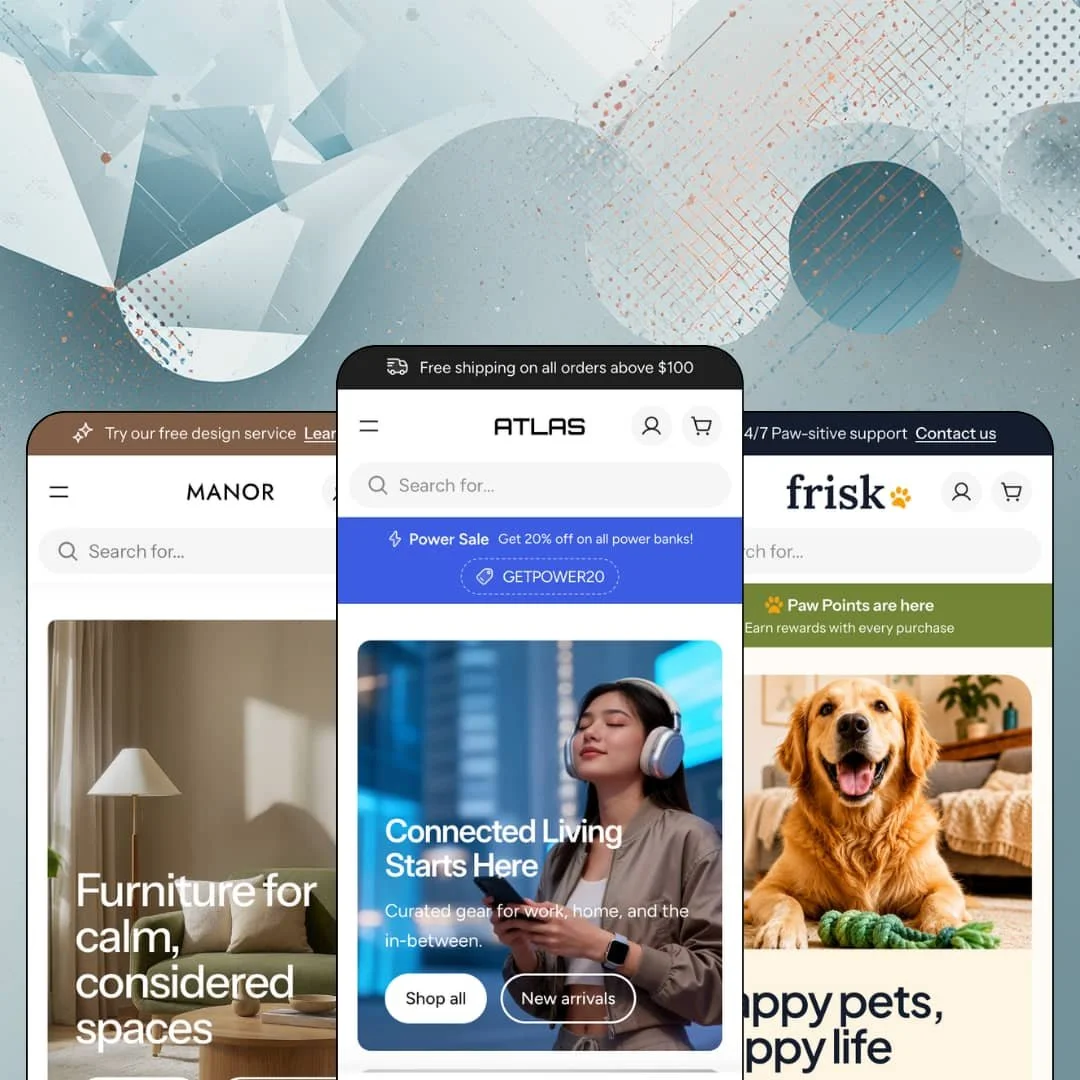
Most product cards tell you a price and stop. Atlas cards add the brand line, a badge, and a count of how many units are left. That appetite for retail detail runs through all three presets of this $280 theme from Alloy Themes, launched in February 2026 on the Theme Blocks architecture, the newest generation of Shopify theming. Three demos, covering electronics, furniture, and pet supply, make the case that one section library can sell very different things.
Spec-driven product pages without an app
Atlas treats product data as a first-class layout element. On the ChargePro Power Bank, a summary row surfaces capacity, max output, and simultaneous-device count above the fold, and an eight-row specification table sits beside the description covering ports, safety systems, and design. Specs stop being paragraphs. For electronics and appliance merchants with 30–150 SKUs selling considered-purchase hardware to spec-reading buyers, this is the difference between a page that answers questions and a page that generates support tickets.
How much selling can a menu do?
How much selling can a navigation menu do before it stops being navigation? Atlas pushes the question hard: the electronics demo hangs a "-20% OFF" tag on the Power menu item, marks Audio with "New releases," and fills the panel's right edge with product and collection tiles labeled Bestsellers and Editor's pick across seven column groups. The menu becomes a merchandising surface where campaigns start one hover earlier than the homepage. Multi-category retailers with 100+ SKUs and cross-shop-heavy buyers get promotional real estate in the single most-visited element of the store.
A homepage bundle section that handles variants
The bundle section is the most technically ambitious thing on these homepages. Manor's "The Living Room Edit" lists a sofa, a pendant light, and a vase as numbered steps, gives each line item its own option pickers, Upholstery and Leg Style included, and closes with a single add-the-edit-to-cart button. Every item stays configurable. For furniture and home merchants with mid-market pricing and room-based cross-selling, this section replaces what would otherwise be a bundle-app install plus integration work, at least for the presentation half of the job.
A card-level urgency kit that speaks in gradations
Product cards carry an inventory voice with actual nuance. The pet demo shows the range: "In stock" for healthy inventory, "Low stock (2 units)" as supply thins, and "Only 1 left in stock" at the edge, alongside merchant-defined badge labels like "Vet approved" and "Staff pick" next to the standard sale and new markers. Scarcity gets specific. Restock-driven consumables stores serving impulse-buy and repeat-buyer traffic can run urgency honestly, from the actual inventory numbers, instead of pasting a generic "selling fast" sticker on everything.
Spec tables that can't look at each other
I went looking for a product comparison view and found a blog category instead. Nothing in the feature list or any of the three demos stages two products side by side, and the electronics demo's own Journal menu quietly routes "Product Comparisons" to editorial articles, which is where that job apparently lives. That's a strange gap in a theme this proud of structured product data. Electronics and appliance merchants with 50–200 SKUs and considered-purchase buyers who cross-shop three models before committing will be writing comparison blog posts or leaving the work to the customer's browser tabs.
The persuasion vocabulary defaults to discounts
Atlas's reflexes are promotional, and the reflexes show even where they don't fit. Every preset greets first-time visitors with a percentage-off newsletter popup, including the furniture demo, which offers 10% off while displaying sofas at $3,999 and $4,199, a pairing that undercuts the calm, considered brand the preset otherwise builds. The instinct is always a deal. Luxury-tier single-brand merchants selling on story and price integrity can dial the temperature down in settings, but they'll be working against the theme's natural voice rather than with it.
The polish is rented from the assets
Dawn, Shopify's free baseline, launches respectably on a logo and product photography. Atlas's default homepage grammar assumes far more: two press quotes from named publications, three to five portrait-backed testimonials, a lifestyle video, a stat row, and enough campaign imagery to feed heroes, split promos, and a scrolling ticker. Without those assets, the presets deflate fast. First-time sellers and solo founders with under-30-SKU catalogs and no media library should look at these demos as a shopping list of content debt, not a preview of week one.
What it takes to launch
Expect a one-to-two-day pass covering per-product metafield population for the specification tables, mega menu re-staging with real link targets, badge labels and popup offers, and the standard replacement of demo copy and imagery across homepage, About, and FAQ surfaces.
-
What works in this preset
I opened the search overlay before touching anything else, and it was already selling. Before a single keystroke, it serves trending-search chips like "powerbank" and "smartwatch" plus a populated product grid with badges and buy buttons. Search here isn't a box. It's a storefront that happens to have an input field at the top, which matters for gadget shoppers who arrive knowing roughly what they want but not which model.
The service layer around the buy button is unusually complete for a demo. The ChargePro Power Bank page shows pickup availability with a named store, an address, and a ready-in-24-hours note, followed by a "Need help with choosing the right product?" link to an expert contact. A sticky buy bar keeps the price and both option pickers in view while you read, so the decision never scrolls out of reach.
Promotion gets staged with actual mechanics rather than decoration. A popup announces a power-bank sale and hands over a GETPOWER20 code with one-tap copy, and further down the page two press quotes from named publications anchor the trust story. It reads like a store mid-campaign. That's a more honest preview of daily retail life than the usual serene demo homepage, and it shows the theme's promotional plumbing working end to end.
Where it stumbles
For a preset selling smartwatches at $499 and $949, the product pages walk into a considered purchase with no product-level proof. The demo stages testimonials and a 4.9 rating at store level, but individual products carry specs and nothing else, and since ratings and reviews are app territory on Shopify, that's an install and integration job the electronics merchant should budget for on day one. High-ticket, cross-shopping buyers expect a number under the title. Here they get silence.
-
What works in this preset
Hover the interior photograph in the lower half of the homepage and three price tags surface on the scene: the Kent Sofa, the Gracelyn Vase, and a marble coffee table, each clickable. This is the image-hotspot section doing real commerce work instead of decorating. For a furniture store, one styled room that sells its own contents is worth more than a dozen isolated product shots.
The same page sequence that shouts in the electronics demo speaks quietly here. The value row now reads Furniture Delivery, Material Guidance, and Styling Support, the scrolling ticker says CALM LIVING and QUIET OBJECTS, and the product page closes with three editorial columns about proportion and materials. Nothing was swapped out. Everything was re-tuned, which tells you how much temperature control the settings actually give you.
I clicked into the Kent Sofa expecting generic furniture copy and found a properly filled data sheet. The specification table lists 94.5-inch width, 25-inch seat depth, an iron and solid ash frame, and the fabric blend, while the summary row above the description surfaces seating capacity and construction at a glance. Furniture buyers measure before they buy. This staging respects that.
-
What works in this preset
A pet store lives or dies by how fast a dog person and a reptile person both find their aisle. Frisk answers with an Explore menu split into By Pet, By Life Stage, By Concern, and By Activity, then repeats the idea on the homepage as a row of illustrated avatar circles for Puppies, Kittens, Adults, and Seniors. Six species get their own paths. The information architecture does the categorization work a supplement-and-kibble catalog genuinely needs.
The promotional surfaces switch dialects here, and the switch is instructive. Instead of a discount code, the popup announces "Paw Points are here" with a rewards pitch, while the announcement bar rotates two messages, one for 24/7 support and one for the free-shipping threshold at $49. Same tooling, loyalty vocabulary. Merchants running points programs through an app get matching front-of-house messaging without custom work.
Social proof gets its most elaborate staging of the three demos. Five testimonials pair an owner avatar with a photo of the actual pet, and a brand-story split follows with counters for pet parents served and brands stocked. It's warm without being sloppy. The section-by-section craft suggests the preset was built by someone who has actually browsed a pet superstore rather than skimmed one.
Where it stumbles
The copy writes a check the positioning may not cash. Frisk talks like a superstore, claiming 500+ trusted brands and "way more aisles," yet Shopify's own listing tags Atlas for catalogs in the 11–100+ range, and the demo itself runs on a handful of collections. This kept bugging me as I browsed. Pet retailers with genuinely deep catalogs, thousands of SKUs across restock-driven consumables, should stress-test collection filtering with their real product count before taking the superstore framing at face value.
One grammar, three temperatures
Read the three homepages back to back and something subtle emerges: the identical sequence produces a loud tech retailer, a hushed furniture showroom, and a friendly pet superstore purely through labels, palettes, imagery, and copy register. Even the value-proposition row transforms from Bulk Discounts to Material Guidance to Paw Points without changing shape. That's evidence of deep styling control, and it's only visible when you stop reading presets individually and start reading them as one system wearing three outfits.
A young theme moving at a fast cadence
Atlas launched in February 2026 and reached version 1.3.0 by early July, an update that added the entire Frisk preset plus new customization for the announcement bar, header, product cards, and color system. Five months, three presets. The Theme Store record is correspondingly short, five reviews so far and all of them positive, which is worth knowing without over-reading in either direction. What the changelog does establish is a developer actively widening the theme rather than maintaining it.
Presets are palettes, not layouts
Hero, value row, tabbed bestsellers, category tiles, split promos, press and testimonials, video, bundle, blog, newsletter. That sequence repeats in that order on all three homepages, so the presets differentiate through styling while sharing one compositional spine. Merchants who want a structurally distinctive storefront, rather than a beautifully re-skinned instance of a common pattern, will be rearranging sections themselves instead of inheriting a different arrangement from their preset choice.
A multibrand retailer's worldview
Across the whole family, Atlas assumes you're a curated shop selling other people's products. Every product card leads with a vendor line, the electronics menu offers All Brands and Featured Brands paths, and the proof sections lean on stocked-brand counters. Single-brand DTC operators will find the defaults answering a question their customers never ask, namely whose product this is, and will need to strip the vendor layer out of cards, menus, and story sections to sound like themselves.
★ 8.6/10
Rating
-
Specification tables, variant-aware bundles, promo popups, in-menu promotion, and graduated stock messaging all ship built in; the missing side-by-side comparison view is the one visible gap.
9
-
Presets arrive staged down to the popup offers, so the path from install to plausible store is short. The catch is data entry: product pages only match the demo after per-product metafield work.
8
-
The mobile menu stacks labeled submenu panels instead of piling up accordions, and the sticky buy bar keeps price and option pickers one thumb away on long product pages.
9
-
Cards and menu panels render lean and imagery loads lazily. The default homepages are media-hungry, though, so merchants stacking video, popups, and full section runs should preview before publishing.
8
-
One section set is convincingly styled into three different retail temperatures, and version 1.3.0 widened header, product-card, and color customization further.
9
Frequently Asked Questions
-
Atlas suits multibrand gadget retail with heavy promotion, Manor suits considered home and furniture selling with editorial calm, and Frisk suits high-variety pet or consumables retail organized by audience segments. Pick by selling temperament, not by industry label.
-
No. The demo tables draw on per-product data the merchant supplies, so budget catalog time for entering dimensions, capacities, or materials before your product pages resemble the demos.
-
Atlas belongs to the newest theme generation, the one built for Shopify's current editor with deeply nestable blocks. Practically, you get finer-grained control inside sections than older Online Store 2.0 themes allow, and you're on the architecture Shopify is actively developing toward.
-
It launched February 5, 2026, and hit version 1.3.0 on July 6, 2026, which introduced the Frisk preset. It's an actively developed first-year theme rather than a long-proven one.
-
Not from the theme alone. Atlas stages store-level testimonials, but per-product ratings and reviews come from a review app on Shopify, so plan that install if your vertical expects them.
-
The theme's interface strings come pre-translated for English, French, Italian, German, and Spanish, and right-to-left layouts are supported. Your product content still needs translating through Shopify's own localization tools.
-
Yes, the feature list includes combined listings support, though note that combined listings themselves are a Shopify Plus capability, so the theme-side support only matters on that plan.
This review is based on hands-on testing of the publicly available preset demos of the Atlas Shopify theme as of August 2026. Theme features, preset availability, and performance can change with subsequent updates from the theme developer.